Adobe’s AI experiments let you walk around in photos and interview your
Adobe showcased four AI sneaks at Max, including Project Sight Span for 3D photo navigation and Project Screen Test for interactive character auditions.
By Dillip Chowdary • Nov 14, 2026 • Source: The Verge

Adobe unveiled four generative artificial intelligence prototypes at its annual Max conference, presenting experimental tools designed to reshape digital imaging, character animation, and audio design. Detailed in The Verge's report, these technological previews introduce interactive systems that turn static pictures into explorable environments, direct digital actors through spoken interviews, and replicate retouching edits across multiple subjects.
This analysis breaks down the four sneak previews showcased by the company: Project Screen Test, Project Sight Span, Project Sound Bender, and Project Rinse Repeat. The report is written for digital artists, animators, video editors, and photo retouchers evaluating how emerging machine learning prototypes could soon influence professional creative workflows across standard desktop suites.
01Audition environments for conversational video characters
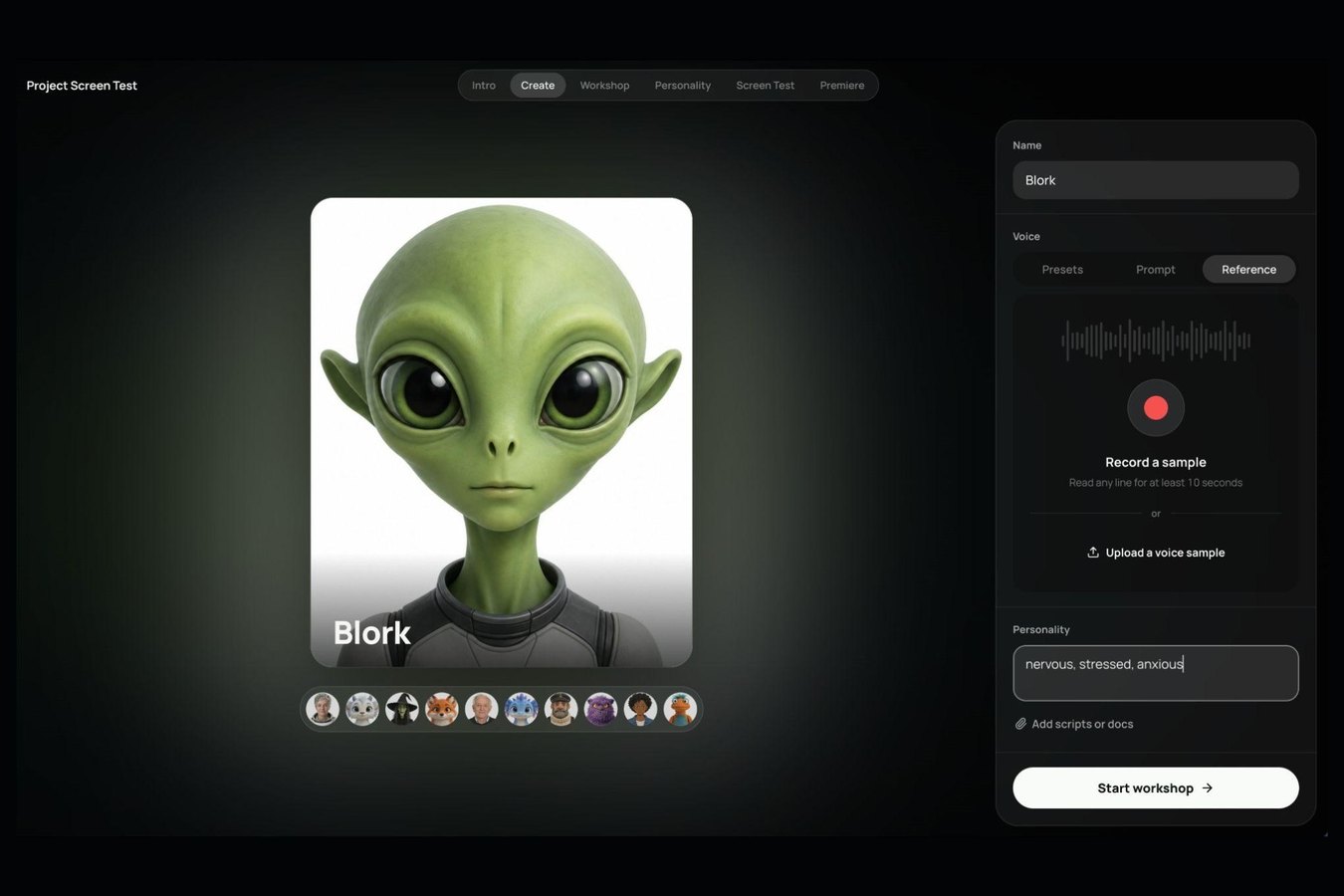
Project Screen Test establishes an interactive audition space where animators direct synthetic personalities through conversation rather than text prompts alone. Operators assign foundational attributes such as an anxious, shy, or awkward disposition, and select a vocal profile via presets, descriptive text, or uploaded audio samples. These starting parameters anchor the persona before deeper direction begins.
Creators next converse with the persona across a video-call interface to outline backstory details, emotional temperament, goals, flaws, and movement quirks. A dedicated personality tab allows operators to manually adjust any behavioral traits generated during the conversation. Once the character is configured, the system generates animated screen test clips based on custom environmental prompts.
The system currently functions as a standalone research experiment without scheduled integration into commercial video applications. By emphasizing conversational iteration, the tool aims to overcome the generic quality typical of automated video generation. Traditional animation requires deliberate intention for every facial movement, and this prototype attempts to bring similar consistency to synthetic cast members.
02Navigable three-dimensional spaces from flat photographs
Project Sight Span turns flat two-dimensional images into navigable three-dimensional environments, allowing operators to reposition the virtual camera. The underlying model synthesizes out-of-frame backgrounds and peripheral scenery that blend naturally into the original composition. Although navigation displays temporary low-resolution geometry, full visual sharpness returns once the user confirms a chosen angle.
The processing pipeline works across standard photos, paintings, and illustrations while preserving source artistic styles. Distinctive elements such as facial features and decorative tattoos remain recognizable even after dramatic camera shifts. This allows visual artists to alter the perspective of a scene well beyond standard frame cropping.
The resulting perspective changes push photographic manipulation into full scene reconstruction. Digital artists gain the flexibility to reposition viewing angles long after a photo session concludes. Adobe showcased the spatial conversion technology during its live technical sneak presentations at the Max event.
Advertisement
Tech Pulse Daily
Get tomorrow's pulse first
Join engineers who read Tech Pulse before stand-up. Free, weekday mornings.
03Four-corner canvas for synchronized sound effects
Project Sound Bender introduces an interactive audio generation tool that lets editors manipulate sound effects like moving a cursor across a color wheel. Users import a video clip and submit a descriptive text prompt such as bubbling sci-fi cauldron noises. The system synthesizes matching audio assets and automatically aligns them to the video timeline.
The interface centers on a square sound canvas where each corner hosts a distinct generative variation. For liquid cauldron prompts, the four corners generate dense gurgling, rumbling boiling rocks, pitched bloops, and crackling electric fire. Operators drag the cursor across the canvas in real time to emphasize specific audio elements.
Sound designers can customize each corner with alternative prompt variations to refine audio textures. This interactive canvas removes the need to browse external libraries or manually assemble overlapping audio clips. The system combines automated synchronization with manual steering to accelerate post-production sound workflows.
04Automated edit replication with native Photoshop tools
Project Rinse Repeat automates the transfer of manual retouching edits across multiple subjects in a single image. When an editor smooths skin blemishes on one person, the tool adapts those exact adjustments to others in a group portrait. The system adjusts for individual facial variations while keeping visual corrections uniform.
The software also streamlines commercial marketing graphics by propagating realistic product shadows across multiple items. Adding a shadow to one object allows the tool to generate matching lighting on adjacent products of different sizes and shapes. This eliminates repetitive masking and placement tasks across catalog layouts.
Because the tool is built around Photoshop, every transferred edit renders through native application functions. Retouchers retain complete non-destructive control to fine-tune layer masks, opacity, and brushstrokes. This design ensures automated edits remain fully customizable rather than baking irreversible changes into the base image.
05Experimental preview pipelines and creative control
The sneak previews shown at Adobe Max represent technical demonstrations rather than guaranteed commercial features for Creative Cloud or Firefly. However, generative artificial intelligence now forms a cornerstone of Adobe's corporate roadmap, making eventual commercial deployment likely for successful prototypes. These initiatives aim to make complex post-production tasks more accessible and interactive for working creators.
Senior principal Adobe research scientist Gautham Mysore stated that simplifying these interactions focuses on granting experienced artists more precise control over generative outputs. Mysore highlighted Sound Bender's audio canvas and Sight Span's spatial camera adjustments as systems that let professionals apply personal judgment directly. The company considers bridging creative intent with direct mechanical control a central research objective.
If these experimental tools prove practical, generative systems could gradually replace traditional stock libraries and manual editing routines. The prototypes illustrate how machine learning tools are transitioning from passive text-prompt generators into responsive creative instruments. Working artists may soon direct automated systems through tactile interfaces that preserve professional nuance.
Adobe’s AI experiments let you walk around FAQ
What is Adobe Project Screen Test?
Project Screen Test is an experimental tool that lets creators develop AI video characters by talking to them in an audition-like environment. Users establish personality traits, voice profiles, and backstories before generating animated screen test clips in custom scenarios.
How does Project Sight Span reframe flat images?
Project Sight Span turns two-dimensional photos, paintings, and illustrations into navigable 3D spaces with synthesized out-of-frame backgrounds. The interface displays low-resolution geometry during repositioning but restores full resolution once an angle is selected.
What does Project Sound Bender do with video audio?
Project Sound Bender generates AI sound effects from text prompts and syncs them directly to an uploaded video clip. Editors adjust the audio mix in real time using a four-corner canvas that blends distinct generative sound variations.
Can Project Rinse Repeat edits be modified in Photoshop?
Yes, Project Rinse Repeat is built around Photoshop and recreates replicated adjustments using native application tools. Every copied edit remains fully customizable as an individual, editable adjustment rather than a flattened image layer.
Sources

Author
Dillip Chowdary
Writes Tech Bytes coverage of AI, engineering, and the tools that actually ship. Editor of Tech Pulse Daily.
Related on Tech Bytes
Advertisement