An app for running multiple Claude accounts at once
Claude Sessions Pro launched for Mac, Windows, and Linux to run multiple Claude Desktop accounts simultaneously with a $15 lifetime license for two computers.
By Dillip Chowdary • Nov 06, 2026 • Source: doubleclaude.com
DoubleClaude launched Claude Sessions Pro, a desktop utility for Mac, Windows, and Linux that runs multiple Anthropic Claude Desktop accounts simultaneously without logging out. Detailed in doubleclaude.com's report, each profile functions independently with its own credentials, chats, projects, pins, settings, and connectors. Priced at a $15 one-time lifetime license for two computers, the utility offers add-on seats and a 14-day refund policy.
This report examines the architecture, setup process, operating system compatibility, and developer toolchain integration of Claude Sessions Pro. Built for software engineers, consultants, and teams managing distinct Anthropic subscriptions, the release resolves session collisions across macOS 14 Sonoma, Windows 10 and 11, and Linux by isolating application data, rate limits, and command-line environments into dedicated local sandboxes.
An app for running multiple Claude accounts: what actually changed
Anthropic binds the official Claude Desktop client to a single active user session, forcing professionals who maintain multiple accounts to log out repeatedly. Claude Sessions Pro restructures this operating model by creating discrete application instances that run side by side without account collisions. On macOS, each profile functions as a full Mac application featuring a distinct colored letter badge on its Dock icon, a dedicated entry in Command-Tab, Spotlight indexing, and independent windows. On 64-bit Windows and Linux systems, profiles run in dedicated application windows and integrate with system trays.
Beyond visual separation, the application enforces complete isolation across every profile's underlying local storage and settings. Each profile remains signed in to its respective account using either email authentication or Google sign-in without terminating active sessions in adjacent windows. Conversations, project workspaces, pinned sessions, preferences, external connectors, and Model Context Protocol servers remain confined to their designated account environment. Furthermore, the tool manages client upgrades directly by downloading new Claude Desktop releases from Anthropic, validating Anthropic's cryptographic signature prior to installation, and updating all configured profiles while applying separate self-updates.
An app for running multiple Claude accounts: how it works
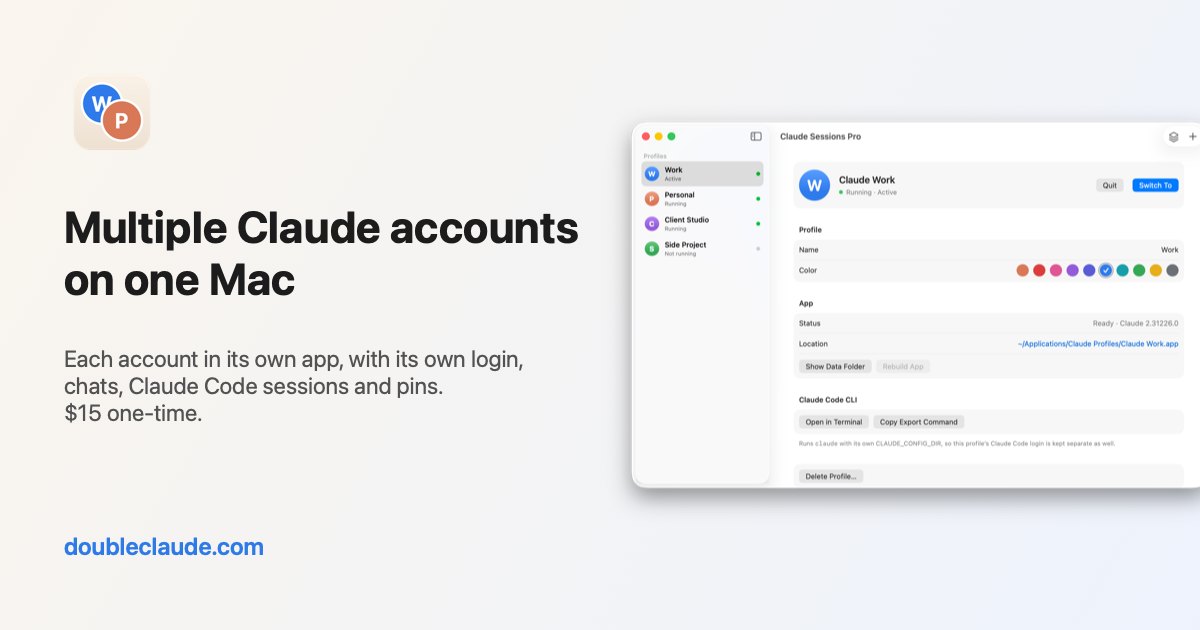
The software configures local environments through a three-step onboarding sequence designed to complete in one minute. After downloading and running the installation package, the setup wizard automatically detects existing Claude Desktop installations on the host system. Users select Move my current Claude into a profile, which transfers existing login states, chat histories, pinned conversations, and configuration settings into an initial profile like Claude Personal. The original desktop installation directory stays completely untouched to serve as an uncorrupted local backup, ensuring that existing configurations and historical records are never lost during setup.
Once the primary profile is established, users click a plus icon to create and label new profiles such as Claude Work, subsequently authenticating with secondary credentials. A menu bar icon on macOS and system tray icon on Windows and Linux displays colored letters showing which account currently occupies foreground focus. Clicking this icon reveals active instances, allows immediate switching between accounts, and offers one-click profile creation. The switcher also monitors usage limits, presenting session and weekly quota consumption along with reset schedules while dispatching warning alerts at 80 percent and 95 percent thresholds before usage runs out.
Advertisement
Tech Pulse Daily
Get tomorrow's pulse first
Join engineers who read Tech Pulse before stand-up. Free, weekday mornings.
An app for running multiple Claude accounts: why it matters
Developers and enterprise consultants historically tackled multi-account management using terminal automation scripts or secondary macOS user accounts, but both approaches introduce significant operational friction. Switching macOS users hides background workspaces, interrupts active jobs, and requires re-entering operating system passwords. Terminal scripts often break when processing Google authentication challenges and cannot maintain persistent Dock icons or Command-Tab integration. Claude Sessions Pro provides simultaneous access to every account without requiring terminal maintenance, preserving native window management, individual Dock representations, and automatic launch-at-login options while preventing authentication session failures during daily operations.
The platform also addresses command-line development through native Claude Code isolation in both desktop interfaces and terminal shells. Claude Code sessions and pinned prompts in the Code tab stay strictly linked to the account that launched them. For command-line operations, the utility provides one-click Terminal launch configured with the profile's dedicated CLAUDE_CONFIG_DIR directory. This environment separation ensures that terminal sessions automatically authenticate under the corresponding account, enabling developers to run corporate projects on enterprise Team plans while executing personal repositories on Pro plans without repeatedly logging out of the command-line interface.
An app for running multiple Claude accounts: who is affected
The software impacts cross-platform desktop users across Mac, Windows, and Linux operating systems. Apple hardware compatibility spans macOS 14 Sonoma or newer versions across both Apple silicon and Intel processors. On Windows, the application requires 64-bit Windows 10 or Windows 11 operating systems across Intel, AMD, and ARM hardware. Linux compatibility encompasses Ubuntu 22.04 LTS or newer and Debian 12 or newer running Claude for Linux across Intel, AMD, and ARM architectures. Freelance developers, agency consultants managing separate client workspaces, and enterprise teams managing proprietary internal code alongside personal projects represent the core user demographic.
Commercial terms are structured as a $15 one-time lifetime license covering up to two computers across Mac, Windows, and Linux. Users who need additional device seats can license three extra computers for an additional $9.99 payment, backed by a 14-day full refund policy. Unregistered installations receive an initial one-hour evaluation window that monitors usage limits across all active profiles. Following the expiration of that initial hour, unactivated installations continue displaying quota statistics for a single account without cost, while fully licensed installations retain comprehensive side-by-side usage metrics and rate alerts for all configured accounts.
An app for running multiple Claude accounts: what to watch
Users should evaluate how the software manages ongoing client maintenance and privacy requirements as Anthropic updates Claude Desktop. Claude Sessions Pro installs incoming updates released by Anthropic after verifying Anthropic's cryptographic signature, subsequently updating all local profile directories. Account usage tracking reads session consumption and weekly boundaries directly from each profile's authenticated session, routing network requests exclusively to Anthropic's Claude infrastructure. Because telemetry queries remain strictly between local profiles and Claude endpoints without routing through third-party intermediary servers, corporate users maintain expected security standards while monitoring token limits across distributed client accounts.
The utility enters a software ecosystem alongside alternative profile tools such as Parall and Multi-Claude, as well as manual login toggling and shell scripts. As Anthropic continues refining Claude Desktop, Model Context Protocol configurations, and Claude Code integrations, maintaining clean separation between project preferences and MCP servers across distinct profiles will remain vital for development workflows. Observers should track whether future desktop updates introduce native multi-profile capabilities directly from Anthropic, and how third-party tools sustain seamless integration with system trays, Dock badges, and command-line shell environments across newer operating system versions.
Developer Action Items
- ☐ Verify the claim on the official Anthropic / Claude / Google page (or HN Claude/Codex/Fable), not from this recap alone.
- ☐ Name the surface that moved — API, policy, model, hardware, or commercial terms — before you Slack the thread.
- ☐ Assign one owner a day to read the primary material and decide: this-sprint, this-quarter, or noise.
- ☐ Do not change production on day-one coverage. Watch the vendor changelog and one independent write-up first.
An app for running multiple Claude accounts FAQ
How much does Claude Sessions Pro cost?
The software costs a one-time payment of $15 for a lifetime license that covers up to two computers, with an option to add three more machines for $9.99. Purchases include a 14-day full refund guarantee.
Which operating systems support Claude Sessions Pro?
The utility supports macOS 14 Sonoma or later on Apple silicon and Intel, 64-bit Windows 10 and 11, and Ubuntu 22.04+ or Debian 12+ running Claude for Linux.
How does Claude Sessions Pro handle multiple Claude Code accounts?
It preserves Claude Code sessions and pins in each profile's Code tab and opens terminal windows configured with each profile's CLAUDE_CONFIG_DIR so the command-line interface authenticates to the proper account.
Can Claude Sessions Pro monitor Claude account rate limits?
Yes, it sits in the macOS menu bar or Windows tray to display session and weekly usage limits side by side, alerting users at 80 percent and 95 percent thresholds.
Sources

Author
Dillip Chowdary
Writes Tech Bytes coverage of AI, engineering, and the tools that actually ship. Editor of Tech Pulse Daily.
Related on Tech Bytes
Advertisement