Apple Creator Studio adds MotionVFX for Final Cut Pro
Apple updated its Creator Studio suite on November 18, 2026, adding MotionVFX to Final Cut Pro and natural language Generate Fill to Pixelmator Pro.
By Dillip Chowdary • Nov 19, 2026 • Source: 9to5Mac
At a glance
- Product
- Apple Creator Studio
- Release date
- November 18, 2026
- Included library
- MotionVFX for Final Cut Pro
- Image feature
- Pixelmator Pro Generate Fill
- Productivity tool
- Intelligent Assistant for iWork
- Pricing model
- Included for subscribers with usage packs
Apple released a wave of software updates across its Apple Creator Studio application suite on November 18, 2026, delivering MotionVFX integration for Final Cut Pro alongside feature expansions for Pixelmator Pro, according to 9to5Mac's report. The rollout follows Apple's hardware showcase last month, where the company introduced the MacBook Pro with PROLED XDR and previewed November enhancements for its professional creative tools.
This report examines the arrival of MotionVFX assets in Final Cut Pro, generative image tools in Pixelmator Pro, and new assistant capabilities inside productivity software. The analysis is aimed at video editors, graphic designers, and studio subscribers managing digital workflows across Apple's professional creative platform.
01Rollout schedule across App Store applications
Apple staged the release of its creative software across multiple phases throughout November rather than delivering every application update on a single launch day. Logic Pro received its update earlier in the month, while the remaining software catalog rolled out across the App Store after an interval of approximately two weeks.
The release of these application packages fulfills software commitments that Apple outlined during the unveiling of the MacBook Pro with PROLED XDR last month. Creators can now download the newest software builds directly through the App Store to update their existing local workstation installations.
This structured rollout brings Apple's primary video and graphic editing applications up to date alongside the digital audio workstation updated earlier in November. Creative teams gain immediate access to the updated toolsets once the App Store client completes the package downloads.
02MotionVFX visual assets inside Final Cut Pro
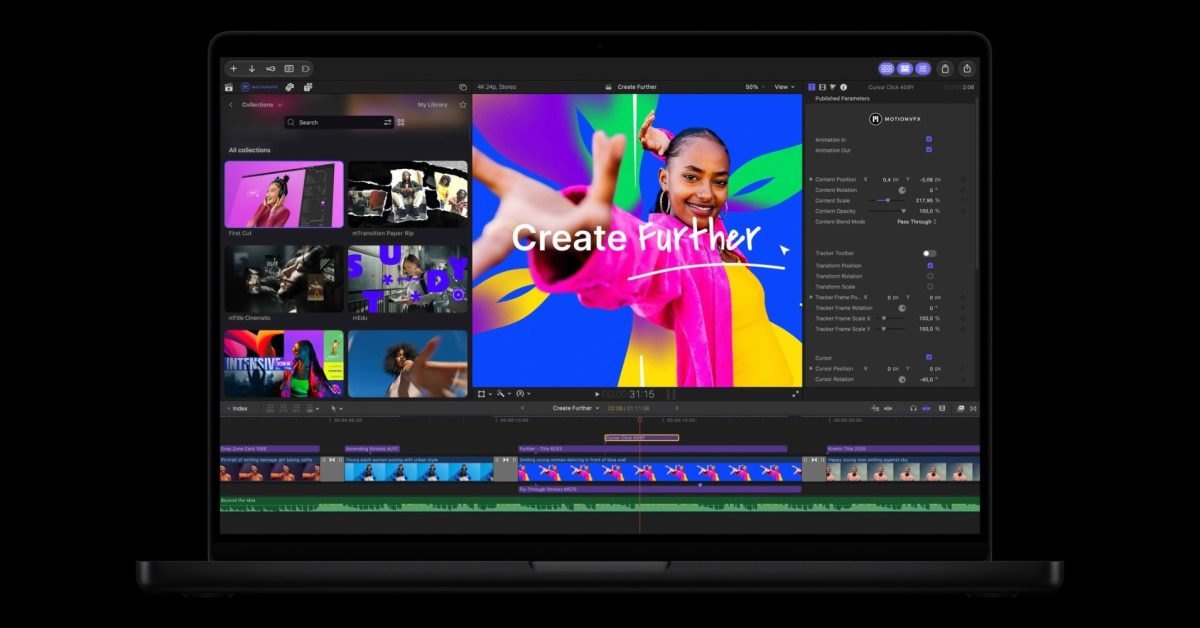
Final Cut Pro now incorporates full access to MotionVFX's extensive library directly within the video editing environment. Video editors can browse and apply professional visual effects, software plug-ins, animated transitions, graphics templates, and motion graphics tools without leaving their active production projects.
The integration of MotionVFX supplies prebuilt motion design assets that streamline post-production workflows for editors assembling complex video sequences. Creative professionals can place preconfigured visual transitions and title cards straight onto their editing project timelines to reduce turnaround times on commercial cuts.
Note: Full access to the MotionVFX collection of visual effects, plug-ins, transitions, templates, and motion graphics tools is included at no additional cost for active Apple Creator Studio subscribers. Users receive the entire asset catalog under their existing membership rather than purchasing separate third-party licenses.
03Natural language image editing with Pixelmator Pro
Advertisement
Tech Pulse Daily
Get tomorrow's pulse first
Join engineers who read Tech Pulse before stand-up. Free, weekday mornings.
Pixelmator Pro adds an image editing capability called Generate Fill that lets creators transform selected areas of an image using natural language. Artists can mark specific sections of a picture and provide descriptive phrases to produce contextual modifications directly inside the canvas.
The update establishes direct interoperability between still image manipulation and video production by letting creators edit images from a Final Cut Pro project using Pixelmator tools. Editors can manipulate graphic layers, retouch artwork, and update video stills without exporting intermediate image files.
This connected editing setup removes workflow barriers between standalone graphic software and active video projects. Creative professionals working across both applications can revise visual assets dynamically, ensuring that title graphics, thumbnail stills, and background elements remain synchronized with active video sequences.
04Intelligent Assistant across Pages Keynote and Numbers
Beyond its dedicated media creation software, Apple rolled out feature updates for its core office productivity applications, specifically Pages, Keynote, and Numbers. Each of these productivity tools now includes an Intelligent Assistant feature designed to support users with automated content generation, presentation formatting, and spreadsheet data handling.
The release wave also encompasses smaller utility updates across Apple's remaining pro utilities catalog. These incremental releases provide maintenance improvements and foundational compatibility across auxiliary programs, keeping Apple's professional software environment fully aligned with modern operating system frameworks.
By enhancing productivity applications alongside video and image editing suites, Apple provides automated assistance for administrative creative tasks. Production teams can draft project proposals, build pitch presentations, and organize production budgets within the broader software environment of connected studio applications.
05Subscription access and intelligence usage packs
The staggered rollout illustrates Apple's evolving monetization model across its digital creator platforms. Earlier in November, Logic Pro introduced artificial intelligence capabilities alongside paid intelligence usage packs, marking the company's first implementation of surcharges for increased access to artificial intelligence processing.
In contrast to usage-based computational charges, the MotionVFX integration remains included at no added cost for Apple Creator Studio subscribers. This hybrid approach blends bundled commercial design tools with metered compute tiers as artificial intelligence tools become standard components of professional production software.
Subsequent software cycles will show whether Apple expands metered compute packs into other creative programs or maintains bundled allowances. Subscribers will need to monitor how feature limits and usage allocations are structured across future updates to the Apple Creator Studio catalog.
Frequently asked questions
What visual effects are added to Final Cut Pro?
Final Cut Pro now includes full access to MotionVFX visual effects, plug-ins, transitions, templates, and motion graphics tools. These assets are available at no additional cost for Apple Creator Studio subscribers.
How does Pixelmator Pro work with Final Cut Pro?
Pixelmator Pro adds a Generate Fill feature that transforms selected image areas using natural language. Creators can also edit images directly from a Final Cut Pro project using Pixelmator tools.
Which productivity applications received updates?
Apple updated Pages, Keynote, and Numbers with an Intelligent Assistant feature, alongside smaller maintenance releases for its other professional utilities.
What are intelligence usage packs in Apple Creator Studio?
First introduced with Logic Pro earlier in November, intelligence usage packs represent Apple's paid add-on model for increased access to artificial intelligence processing.
Sources

Author
Dillip Chowdary
Writes Tech Bytes coverage of AI, engineering, and the tools that actually ship. Editor of Tech Pulse Daily.
Related on Tech Bytes
Advertisement