Apple publishes iPhone Duo support documents covering hinge, Touch ID
Apple published support documents for the new iPhone Duo detailing hinge troubleshooting checks, genuine Touch ID buttons, and a Shift Left Edge case setting.
By Dillip Chowdary • Oct 24, 2026 • Source: 9to5Mac

Apple published a collection of official support documents to coincide with the launch of its dual-screen foldable smartphone, the iPhone Duo, outlining technical guidance and hardware troubleshooting protocols for early adopters. According to 9to5Mac's report, the documentation addresses several mechanical and display behaviors unique to the foldable form factor, including specific hinge failure symptoms, software screen adjustments for official protective cases, and repair parts validation for Touch ID hardware.
This breakdown examines the specific guidance released across Apple's technical documentation, highlighting device setup procedures, display shifting configurations, and hardware warnings for owners and technicians. Whether you are unboxing an iPhone Duo, troubleshooting physical enclosure and hinge movement problems, or outfitting the hardware with protective accessories, these initial support articles detail how the operating system and mechanical parts are designed to function together in daily use.
Apple publishes iPhone Duo support documents: what actually changed
Apple’s new support documentation introduces formal diagnostic categories for the physical folding mechanism and specific software settings designed for external protection. The released pages include dedicated guides for setting up the iPhone Duo Case, managing genuine Touch ID buttons, and resolving complex hardware issues where screens stay black or fail to respond. Rather than treating the device as a standard flat handset, the documentation codifies explicit procedures for physical folding problems, computer-based passcode resets on a Mac or PC, and button troubleshooting across the twin-display housing.
In addition to diagnostic guides, Apple introduced a specific operating system setting called Shift Left Edge to handle physical tolerances when protective cases are installed. The company also published an entry for the iPhone Duo inside the primary iPhone User Guide, alongside dedicated troubleshooting entries covering Multi-Touch screen issues, Bluetooth, and Wi-Fi connectivity. The documentation establishes that the device relies on genuine Touch ID hardware, highlighting repair authenticity rules alongside mechanical guidance for the newly deployed hinge structure.
Apple publishes iPhone Duo support documents: how it works
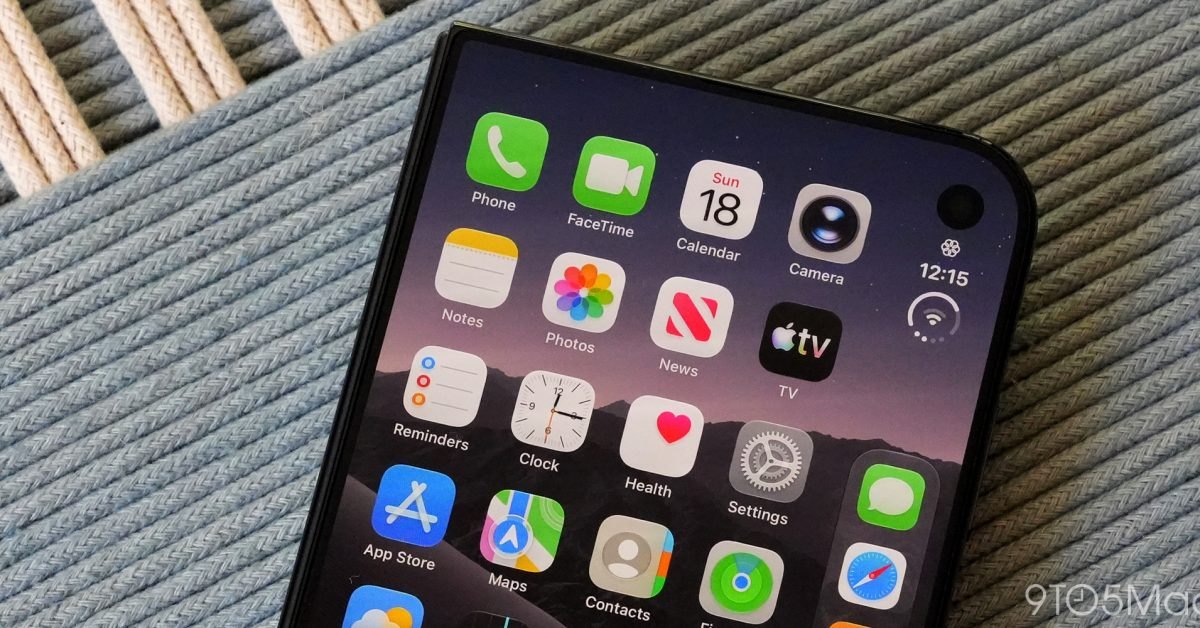
When users snap an official iPhone Duo Case onto the device, the front portion of the protective accessory partially covers the left edge of the outer display. To resolve this, a system notification automatically appears on the iPhone Duo display giving the user an immediate option to adjust the active screen size to fit the case. Users can simply follow the onscreen instructions to scale the viewing area so that interactive touch elements and visual content remain unobstructed by the case frame.
The display accommodation can also be configured manually at any time through the operating system settings menu. To make the adjustment manually, users open Settings, tap Display & Brightness, and turn on the Shift Left Edge toggle switch. Enabling this setting shifts the outer display content inward, ensuring clear visibility despite the front portion of the case overlap. For physical hinge issues, Apple's troubleshooting document advises users to look for five distinct failure states: devices that will not open or close completely, unexpected noise during folding, a loose hinge assembly, a bent or broken hinge mechanism, or general enclosure damage affecting movement.
Advertisement
Tech Pulse Daily
Get tomorrow's pulse first
Join engineers who read Tech Pulse before stand-up. Free, weekday mornings.
Apple publishes iPhone Duo support documents: why it matters now
The publication of these support documents signals Apple's proactive effort to establish clear service benchmarks on day one of a completely new mechanical form factor. Dual-screen and folding mobile devices introduce unique wear points, such as hinge friction and bezel obstruction from protective covers, which do not exist on standard smartphones. By explicitly defining what constitutes an abnormal noise, incomplete closure, or mechanical play in the hinge, Apple provides consumers and technicians with clear criteria for identifying defective units straight out of the box.
Documenting the Shift Left Edge display feature demonstrates how software accommodations are required to solve mechanical design trade-offs on edge-to-edge folding screens. Protective cases often require physical lip coverage to secure the glass, which would otherwise clip the visible active display area without software adjustments. Furthermore, by publishing guidance specifically covering genuine Touch ID buttons, Apple confirms the biometric authentication layout for the iPhone Duo while laying down hardware verification rules for authorized service repairs and parts replacement.
Apple publishes iPhone Duo support documents: who is affected
The newly published technical articles directly affect all new iPhone Duo owners, particularly early purchasers installing protective cases or monitoring the mechanical integrity of their device during initial setup. Users purchasing the official iPhone Duo Case will need to interact with the Shift Left Edge system prompt or navigate to Display & Brightness settings to ensure their outer display content aligns properly with the case's physical borders.
The support pages also affect repair technicians, independent service providers, and device owners experiencing hardware faults or forgotten device credentials. Anyone facing issues where the screens stay black, the phone refuses to power on, or buttons fail to register inputs will need to use the dedicated troubleshooting paths. Additionally, users who forget their passcode are instructed on how to perform a full device restore using a connected Mac or PC, while owners with loose, noisy, or physically bent hinges are directed to official service channels based on the documented hinge failure definitions.
Apple publishes iPhone Duo support documents: what to watch
As broader distribution of the iPhone Duo gets underway, Apple is expected to add more technical documents to its support library to cover additional hardware scenarios and edge cases. Observers will be watching how frequently owners report mechanical hinge difficulties, such as incomplete closures or unusual sounds, and whether the documented hinge failure categories translate into straightforward hardware replacements under warranty or require specialized repair shop visits.
Another key area to monitor is the real-world performance of the Shift Left Edge display mode across third-party accessories and diverse screen layouts. Attention will also focus on the genuine Touch ID button policies, specifically whether third-party component repairs trigger software warnings or disable biometric authentication on the device. Apple's ongoing updates to the iPhone User Guide and troubleshooting databases will clarify long-term durability expectations and servicing procedures for the dual-screen handset.
Developer Action Items
- ☐ Diff the official changelog for Apple before you bump — APIs, defaults, and removed flags only.
- ☐ Install through the vendor's documented channel in staging; keep a one-command rollback and time-box the canary.
- ☐ Grep your repo for old flag names, lockfile pins, and plugin versions that the notes mark as breaking.
- ☐ Prefer the first patch cut over the day-zero tag unless you have a reason to be on the leading edge.
- ☐ If 9to5Mac did not name a region, plan, or SKU, screenshot the official availability line before you promise it to users.
Apple publishes iPhone Duo support documents FAQ
What hinge problems does Apple cover in the iPhone Duo support documents?
Apple covers devices that will not open or close completely, unexpected noise while folding, loose hinges, bent or broken hinges, and enclosure damage affecting hinge operation.
How do you adjust the iPhone Duo outer screen for a protective case?
You can follow the automatic onscreen prompt after attaching the case, or open Settings, select Display & Brightness, and turn on the Shift Left Edge toggle.
What authentication hardware is detailed in the iPhone Duo documentation?
Apple published a specific support document covering genuine Touch ID buttons for the iPhone Duo, alongside guides for troubleshooting button issues.
Can you reset a forgotten passcode on the iPhone Duo?
Yes, Apple outlines instructions to reset an iPhone Duo if you forget your passcode by connecting the device to a Mac or PC.
Sources

Author
Dillip Chowdary
Writes Tech Bytes coverage of AI, engineering, and the tools that actually ship. Editor of Tech Pulse Daily.
Related on Tech Bytes
Advertisement