Apple releases iOS 27.2, here’s what’s new
Apple released iOS 27.2 on October 26, 2026, adding USB-C Apple Pencil support to iPhone Duo, expanding Siri AI to five languages, and refreshing Apple Music.
By Dillip Chowdary • Oct 26, 2026 • Source: 9to5Mac
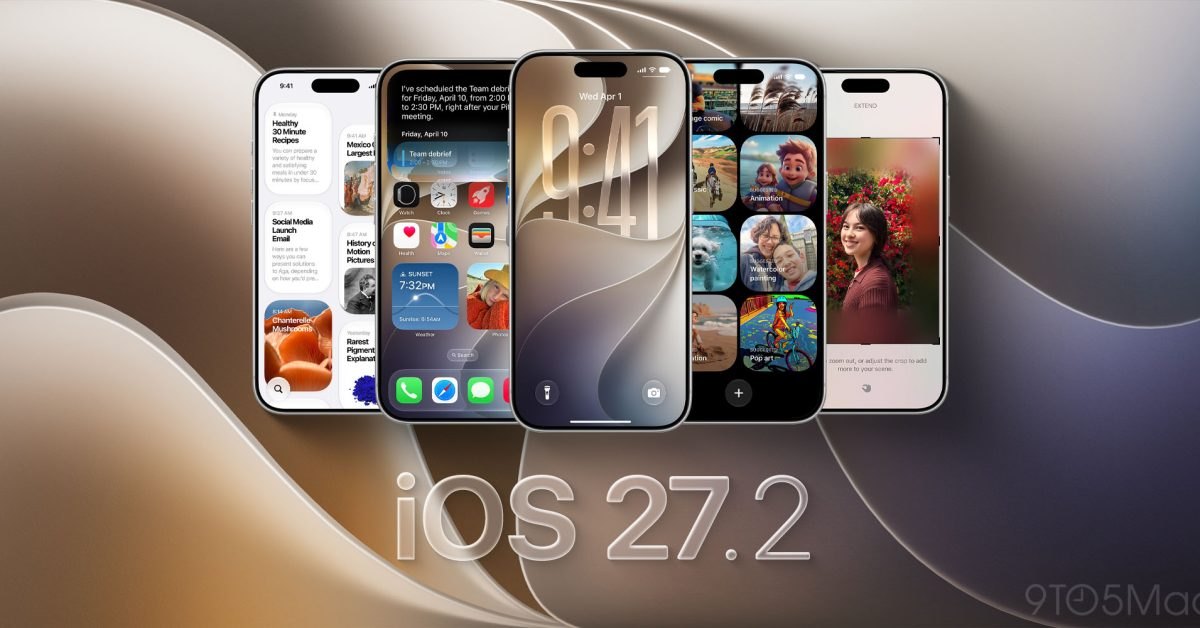
Apple officially released iOS 27.2 for iPhone users on October 26, 2026, delivering expanded intelligence capabilities, interface refreshes, and hardware peripheral compatibility. As detailed in 9to5Mac's report, the point release brings multi-language expansions to Siri AI, visual updates across Apple Music, workflow enhancements across Messages and Podcasts, and peripheral accessory support for Apple Pencil on iPhone Duo. The rollout updates system-level intelligence on modern Apple silicon while delivering refined control toggles across consumer applications and connected home environments.
This technical breakdown examines the operational additions across iOS 27.2, covering system requirements, smart home toggles, interface redesigns, and hardware configurations for iPhone developers, administrators, and daily users. The release focuses on expanding on-device context processing, offering fine-grained privacy exemptions, integrating watermarking validation tools, and delivering scheduled accessory compatibility across designated iPhone lines.
What Apple iOS 27.2, here’s what’s new shipped
The iOS 27.2 release deploys notable capability upgrades to Siri AI for iPhone 16 models, iPhone 15 Pro, and iPhone 15 Pro Max. Siri AI now retains conversational memory across sessions, allowing users to query past discussions such as previously recommended restaurants. Context retrieval draws from an expanded array of inputs, scanning attached photos in Messages, attendee records in Calendar, recorded voicemails, Safari browsing history, and Reading List items. A centralized Excluded Apps setting lets users restrict Siri, system search, and suggestions from indexing selected software, while granular text selection allows copying isolated sections of generated answers.
System applications across iOS 27.2 also gain structural adjustments and external peripheral integration. The update activates Apple Pencil support for iPhone Duo exclusively using the USB-C version of Apple Pencil, fulfilling Apple's original roadmap commitment for later in the calendar year. Group FaceTime gains Dual Capture to stream simultaneous feeds from front and rear cameras, and now supports third-party sign language interpreters and live captioners. Photos introduces SynthID watermarking detection to label generative imagery, while Shared Albums gain caption editing, comment modifications, duplication safeguards, and album expiration notifications.
What changed for builders in Apple iOS 27.2, here’s what’s new
Application builders and interface designers encounter updated contextual hooks and media surface requirements with iOS 27.2. Messages introduces Suggested Actions, presenting contextual shortcuts like calendar scheduling or reminder generation based on conversational syntax, with end-user settings governing suggestion classifications. Apple Music implements a refreshed visual design, replacing the longstanding red tab accent with blue, updating home widgets to black backgrounds, and adopting a monochromatic black-and-white application icon. Podcasts organizes the Home tab into independent New Episodes and Continue Playing sections, while Apple TV implements household profiles on iPhone to isolate watch histories.
| System Component | Prior Implementation (iOS 27.1) | Updated Implementation (iOS 27.2) |
|---|---|---|
| Siri AI Locales | English-only baseline tier | French, Japanese, Korean, Portuguese, Spanish |
| iPhone Duo Input | Standard capacitive touch | USB-C Apple Pencil active digitizer support |
| Generative Photos | Unflagged image metadata | SynthID generative tool watermark detection |
| Apple Music Theme | Red accent tone with red icon | Blue selection accent with black-and-white icon |
Builders interacting with Apple's media layers must account for the separate streaming shelves in Podcasts and user profile segregation in Apple TV. Additionally, the Games application friend hub surfaces context around friend recommendations and exposes recently launched titles directly on player profile sheets.
Advertisement
Tech Pulse Daily
Get tomorrow's pulse first
Join engineers who read Tech Pulse before stand-up. Free, weekday mornings.
How to install or upgrade Apple iOS 27.2, here’s what’s new
Eligible iPhone hardware can download the software update over the air through native system configuration menus. To trigger the installation, open the Settings app on iPhone, select General, and tap Software Update to download and apply iOS 27.2. HomePod owners looking to utilize newly delivered accessory features must ensure both their iPhone and HomePod devices are upgraded to software version 27.2 simultaneously.
# Software update navigation on iPhone
Settings > General > Software Update# Verify paired HomePod version in Home app
Home App > HomePod Settings > Software Update > 27.2Once installed, HomePod devices gain a dedicated Lock Controls setting that prevents accidental top-surface touch inputs from triggering music playback while keeping touch-to-dismiss timers and alarms operational. Smart lock management in the Home app also exposes automated Lock After Closing and Door Left Open notification thresholds.
Gotchas and compatibility in Apple iOS 27.2, here’s what’s new
Hardware support boundaries and regional restrictions create specific limitations across iOS 27.2. Siri AI capabilities remain strictly bounded to iPhone 16 models, iPhone 15 Pro, and iPhone 15 Pro Max, and are completely unavailable to devices located in mainland China or member states of the European Union. Furthermore, while iPhone Duo gains Apple Pencil input, compatibility is strictly limited to the Apple Pencil with USB-C, excluding the Apple Pencil Pro and earlier wireless charging models entirely.
The previously previewed Health application redesign represents another notable omission. While early developer and public beta builds of iOS 27.2 contained an overhauled Health interface, Apple removed the redesign prior to commercial release, stating that the health interface refresh remains scheduled for a separate rollout later in 2026.
What to watch after Apple iOS 27.2, here’s what’s new
Following the iOS 27.2 milestone, attention turns to the delayed Health application overhaul and smart home security integrations. Apple confirmed that the redesigned Health app remains slated for delivery before the end of the year, signaling that another maintenance or point release will arrive to introduce the interface. Administrators should observe how compatible smart locks interact with the newly added Door Left Open alerts and Lock After Closing rules.
Developers should also track how user adoption of Excluded Apps impacts intelligence discovery across third-party software, as users increasingly manage Siri indexing boundaries. With Siri AI now supporting French, Japanese, Korean, Portuguese, and Spanish, testing localized suggestion parsing and Messages Suggested Actions behavior across these non-English regions will be crucial for service providers.
Developer Action Items
- ☐ Diff the official changelog for Apple / iOS 27.2 before you bump — APIs, defaults, and removed flags only.
- ☐ Install through the vendor's documented channel in staging; keep a one-command rollback and time-box the canary.
- ☐ Grep your repo for old flag names, lockfile pins, and plugin versions that the notes mark as breaking.
- ☐ Prefer the first patch cut over the day-zero tag unless you have a reason to be on the leading edge.
- ☐ If 9to5Mac did not name a region, plan, or SKU, screenshot the official availability line before you promise it to users.
Apple iOS 27.2, here’s what’s new FAQ
Which iPhone models support the new Siri AI features in iOS 27.2?
Siri AI features are supported on all iPhone 16 models, iPhone 15 Pro, and iPhone 15 Pro Max.
Which Apple Pencil works with the iPhone Duo on iOS 27.2?
Only the Apple Pencil with USB-C is compatible with iPhone Duo; Apple Pencil Pro and other Pencil versions are not supported.
Where are the expanded Siri AI languages available?
Siri AI adds French, Japanese, Korean, Portuguese, and Spanish, but the Siri AI feature set remains unavailable in the European Union and mainland China.
Sources

Author
Dillip Chowdary
Writes Tech Bytes coverage of AI, engineering, and the tools that actually ship. Editor of Tech Pulse Daily.
Related on Tech Bytes
Advertisement