Apple @ Work: Workbrew 2.0 is an inventory for the development software
Traditional mobile device management servers catalog software distributed via Apple Business Manager, uploaded enterprise packages, and configuration profiles.
By Dillip Chowdary • Nov 21, 2026 • Source: 9to5Mac
At a glance
- Product
- Workbrew 2.0
- Developer
- Workbrew
- Release date
- November 21, 2026
- Pricing
- Free Team plan
- Limits
- No device or user limits
- Certifications
- ISO 27001 certified
Workbrew launched Workbrew 2.0 on November 21, 2026, expanding its Mac fleet inventory platform from Homebrew packages to include npm packages, VS Code extensions, and native macOS applications, as detailed in 9to5Mac's report. The release introduces a native macOS client acquired from the Updatest team alongside an administrative console designed to surface developer-installed software that traditional device management tools miss. The platform also gained ISO 27001 certification and maintains a free tier without user or device caps.
This release targets Mac administrators, IT security teams, and engineering organizations navigating shadow developer tooling. It covers software inventory tracking, self-service approval workflows, and centralized patching across modern engineering environments where non-technical staff frequently install scripting packages.
01Unmonitored developer packages across enterprise Macs
Traditional mobile device management servers catalog software distributed via Apple Business Manager, uploaded enterprise packages, and configuration profiles. Standard developer environments bypass this perimeter because engineers and analysts install dependencies directly inside Terminal sessions. Homebrew alone maintains more than 16,000 packages, sitting alongside millions of npm packages and hundreds of thousands of IDE extensions that finance never procured.
AI-assisted scripting tools have pushed package installations outside traditional engineering groups into marketing, operations, and data analytics teams. These builders frequently install command-line dependencies and editor extensions to execute custom automation scripts. Without direct package monitoring, organizations maintain accurate inventories of corporate applications while remaining blind to the majority of third-party code running on local hardware.
02Workbrew expansion beyond initial Homebrew tracking
Workbrew originally operated as an administrative agent dedicated to monitoring Homebrew installations, detecting unpatched vulnerabilities, and distributing command-line updates across client machines. Version 2.0 integrates npm packages, VS Code extensions, and native macOS software into a unified fleet catalog. The company stated it has patched more than 10 million vulnerabilities for its customers since initial deployment.
| Metric or Feature | Version 1.0 Baseline | Version 2.0 Release |
|---|---|---|
| Cataloged Package Types | Homebrew packages only | Homebrew, npm, VS Code extensions, macOS apps |
| End-User Interface | Terminal-only / Agent | Native Mac app store |
| Security Certification | Standard compliance | ISO 27001 certified |
| Cumulative Patches | Historical baseline | Exceeds 10 million vulnerabilities |
| Team Plan Pricing | Free tier available | Free tier without device or user limits |
Note: Workbrew 2.0 operates alongside existing device management servers rather than replacing them, relying on mobile device management agents to deploy the initial Workbrew background package.
Advertisement
Tech Pulse Daily
Get tomorrow's pulse first
Join engineers who read Tech Pulse before stand-up. Free, weekday mornings.
03Native enterprise app store via Updatest
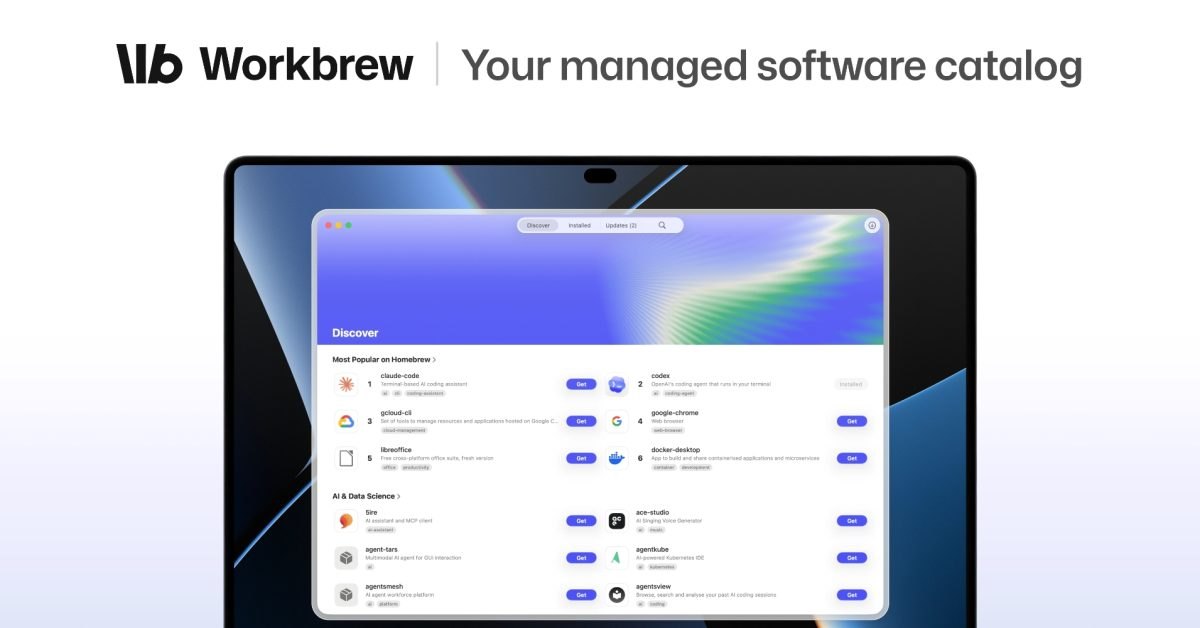
The central addition for non-technical employees is the Workbrew app, a native macOS interface serving as a company-specific software catalog. The client application originates from the Updatest team, which Workbrew acquired specifically for this product cycle. While Updatest continues to operate as an independent consumer application for individuals and families, its core interface now powers enterprise software distribution on every Workbrew tier.
Employees can browse IT-approved software, trigger local installations without Terminal commands, and submit access requests for unlisted tools. Administrative staff review incoming requests inside the centralized Workbrew Console to approve or deny submissions. When administrators reject a request, the platform routes a written justification directly back to the requesting user.
04Fleet coordination next to device management
Workbrew 2.0 functions as a companion monitoring utility rather than a standalone device management server. Organizations deploy the background agent through their existing device management systems to establish visibility into local development dependencies. Chris Merrell, Director of IT, End User Services at Camping World, noted that the platform provides visibility into developer packages while keeping fleet-wide updates effortless.
The architecture specifically isolates runtime environments, development modules, and custom extensions that corporate management profiles do not inspect. Enterprise environments consisting entirely of knowledge workers utilizing standardized business applications do not require this secondary layer. The platform targets mixed fleets where staff across multiple operational departments execute terminal scripts, manage local dependencies, or customize code editors.
05Package rollout and fleet deployment options
Organizations deploy the agent across fleets through their existing device management infrastructure before managing developer software policies. The vendor provides a free Team plan that includes the native client and management console without user or device volume constraints.
- Deploy agent Push the Workbrew agent package to target Mac systems using your existing enterprise device management server.
- Access console Open the Workbrew Console to view discovered Homebrew formulas, npm libraries, and IDE plugins across all active machines.
- Configure catalog Publish sanctioned packages to the native Workbrew app so employees can install approved software without elevated command-line access.
Frequently asked questions
What software types does Workbrew 2.0 monitor?
Workbrew 2.0 inventories Homebrew packages, npm packages, VS Code extensions, and native macOS applications across enterprise Mac fleets.
Does Workbrew 2.0 replace mobile device management systems?
No, Workbrew is not a device management system and relies on existing device management infrastructure to deploy its endpoint agent.
What is the cost of Workbrew 2.0 for small organizations?
Workbrew offers a free Team plan that includes the native Mac client and administrative console with no device or user limits.
Sources

Author
Dillip Chowdary
Writes Tech Bytes coverage of AI, engineering, and the tools that actually ship. Editor of Tech Pulse Daily.
Related on Tech Bytes
Advertisement