Apple’s official DIY repair guides for the iPhone Duo now available
Apple released official DIY repair manuals and safety guides for the iPhone Duo on October 23, 2026, detailing 22 distinct internal hardware components.
By Dillip Chowdary • Oct 24, 2026 • Source: 9to5Mac
Apple published official self-service repair manuals and technical documentation for the iPhone Duo on October 23, 2026, establishing factory servicing procedures on the same day the new dual-screen hardware launched. The release delivers comprehensive technical manuals alongside targeted troubleshooting documentation covering hardware subsystems like the center hinge mechanism, Touch ID controls, and dual-display components. Independent repair shops and individual owners now have access to verified internal schematics, step-by-step disassembly flows, and specialized equipment manuals directly from the manufacturer, as highlighted in 9to5Mac's report.
This breakdown examines the complete documentation package released for the iPhone Duo, outlining the covered internal components, required servicing tools, and safety protocols established by Apple. Device technicians, independent electronics repair specialists, and individual device owners considering do-it-yourself maintenance can evaluate the mechanical scope and procedural requirements necessary to service this unique device safely. The guide provides practical visibility into internal component architectures, helping repairers determine which procedures can be performed locally and which tasks demand dedicated thermal fixtures before disassembly begins.
What shipped in Apple’s official DIY repair guides
The primary repair manual provides explicit disassembly, servicing, and reassembly workflows across twenty-two distinct component modules inside the iPhone Duo. Documented servicing procedures encompass the back glass, camera modules, FaceTime camera, logic board, Taptic Engine, bottom speaker, main microphone, outer display, and protective cover layer. The manual also details internal subassemblies including top speaker, outer front camera, dual battery modules designated as Battery 1 and Battery 2, input/output board, USB-C connector assembly, structural enclosure, primary inner display, inner display assembly, volume buttons, and Touch ID/Camera Control buttons.
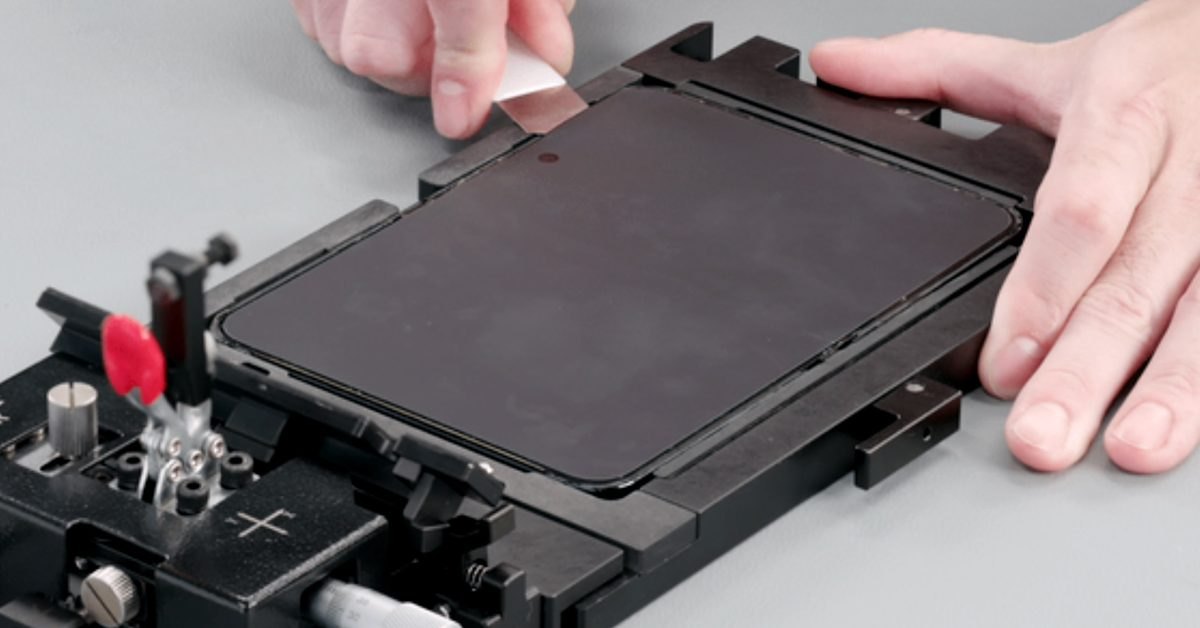
In addition to component teardowns, Apple shipped an operational manual for the Heated Display Removal Fixture, standardizing the thermal separation procedure required to open the device without cracking delicate display panels. The documentation package includes two specialized safety guides addressing high-risk handling scenarios, focusing explicitly on cracked glass mitigation and safe battery removal steps. These safety documents mandate specific personal protection measures, workplace containment steps, and purpose-built non-conductive tooling designed to minimize personal injury and electrical short circuits during complex repairs.
What improved in Apple’s official DIY repair guides
Releasing full repair documentation on device launch day represents a noticeable operational acceleration compared to previous Apple hardware cycles where manuals frequently lagged retail availability by several months. Technicians now receive comprehensive diagnostic tracks addressing common mechanical hinge anomalies, touch responsiveness discrepancies, and display calibration errors before customers encounter field issues. By publishing detailed internal schematics, exact fastener locations, and cable routing pathways immediately, Apple eliminates the speculative teardowns historically required by independent repair shops to map newly engineered mobile form factors.
| Repair Parameter | Initial Support Status | Official Manual Release |
|---|---|---|
| Component repair procedures | 0 step-by-step guides | 22 comprehensive workflows |
| Dedicated safety advisories | Basic device warnings | 2 dedicated safety manuals |
| Hardware diagnostic tracks | Standard setup support | 3 specific diagnostic areas |
| Device internal schematics | Unpublished to public | Full diagrams and tool lists |
| Self Service Store parts | 0 parts in catalog | Pending future availability |
Advertisement
Tech Pulse Daily
Get tomorrow's pulse first
Join engineers who read Tech Pulse before stand-up. Free, weekday mornings.
The newly published materials also formalize clear boundaries between general hardware troubleshooting and invasive mechanical interventions across the chassis. Support documentation published earlier in the day isolated display software glitches and biometric calibration steps, allowing technicians to resolve functional irregularities without opening the physical enclosure. When mechanical intervention becomes mandatory, the standardized documentation pairs every procedure with explicit tool inventories and diagnostic checklists, ensuring that independent technicians operate with the identical procedural rigors utilized across authorized service environments throughout active hardware repairs.
What you gain from Apple’s official DIY repair guides
Independent repairers gain authoritative mechanical schematics that eliminate guesswork when navigating the intricate internal layout of the iPhone Duo. Having verified part numbers, tool requirements, and step-by-step guidance allows technicians to assess repair complexity, estimate labor time accurately, and avoid damaging adjacent components like fragile ribbon cables and thermal spreaders. The guidance provides clear visual maps showing the placement of the dual battery cells and modular input boards, which drastically lowers the probability of catastrophic short circuits during battery maintenance.
Device owners gain total transparency into device serviceability and repair complexity, allowing them to make informed choices before opening their hardware. Apple explicitly recommends that owners read the complete repair manual before picking up tools, advising individuals to proceed only if they feel fully competent executing the exact technical instructions. By outlining mandatory precautions, thermal fixture requirements, and potential hazards, the documentation helps users determine whether they possess the requisite workshop environment or should delegate the job to a professional technician.
How to get Apple’s official DIY repair guides
Technicians and owners can access the complete iPhone Duo documentation catalog directly through the official Apple Support and repair manual web portal at no cost. The manuals are delivered as digital documents that can be viewed in standard web browsers or downloaded locally for bench reference during live service sessions. Repairers should navigate to the designated iPhone Duo manual page to inspect internal diagrams, verify tool part numbers, and review the Heated Display Removal Fixture operating manual before attempting mechanical separation on customer devices.
Before starting any hands-on disassembly, technicians must thoroughly inspect the specialized safety manuals covering broken glass containment and battery extraction. These guides detail the precise personal protective gear, clean workstation requirements, and thermal equipment settings mandatory for personal safety and component integrity. Reviewing the dedicated support documents covering hinge alignment, Touch ID responsiveness, and display troubleshooting first is also essential, as many perceived hardware faults can be evaluated through software diagnostic routines without physical teardown or unsealing delicate screen adhesives.
What to watch after Apple’s official DIY repair guides
The primary limitation of this documentation rollout is that genuine iPhone Duo replacement parts and proprietary repair tools remain unavailable in Apple's Self Service Repair Store. While technicians possess comprehensive disassembly procedures and schematics, they cannot currently purchase genuine display assemblies, replacement batteries, or OEM logic boards from the manufacturer. Industry observers and repair businesses should monitor Apple's official parts store over coming weeks for catalog updates indicating when certified hardware components and rental tool kits become purchasable for independent repairers.
Repair specialists should also track future revisions to the support documentation as Apple gathers field telemetry on real-world hinge durability and dual-screen wear patterns. The initial guides establish baseline procedures for first-generation hardware, but software calibration routines and diagnostic utilities often receive iterative updates following wider retail deployment. Watching how Apple integrates post-repair system configuration software for replaced components will determine how smoothly independent repair shops can perform complete screen and battery swaps in the field over the long term.
Developer Action Items
- ☐ Diff the official changelog for Apple before you bump — APIs, defaults, and removed flags only.
- ☐ Install through the vendor's documented channel in staging; keep a one-command rollback and time-box the canary.
- ☐ Grep your repo for old flag names, lockfile pins, and plugin versions that the notes mark as breaking.
- ☐ Prefer the first patch cut over the day-zero tag unless you have a reason to be on the leading edge.
- ☐ If 9to5Mac did not name a region, plan, or SKU, screenshot the official availability line before you promise it to users.
Apple’s official DIY repair guides FAQ
What components are covered in Apple's iPhone Duo repair manual?
Apple's manual covers 22 individual components including the inner display assembly, outer display, dual batteries, logic board, cameras, and Touch ID buttons.
Are genuine iPhone Duo parts available to order immediately?
Genuine replacement parts and factory repair tools for the iPhone Duo are not yet available through Apple's Self Service Repair Store.
What safety guides did Apple release alongside the repair manual?
Apple published two specialized safety manuals outlining precautions and procedures for handling broken glass and safely replacing internal batteries.
What hardware issues are addressed in the new support documents?
The support documentation covers diagnostic and troubleshooting steps for device hinge problems, Touch ID anomalies, and dual-display issues.
Sources

Author
Dillip Chowdary
Writes Tech Bytes coverage of AI, engineering, and the tools that actually ship. Editor of Tech Pulse Daily.
Related on Tech Bytes
Advertisement