Astropad Workbench 1.3 adds faster streaming, privacy curtain, and more
iPad users also gain custom shortcut mapping, which redirects system keyboard commands—normally intercepted by iPadOS—directly to the host macOS machine.
By Dillip Chowdary • Oct 10, 2026 • Source: 9to5Mac
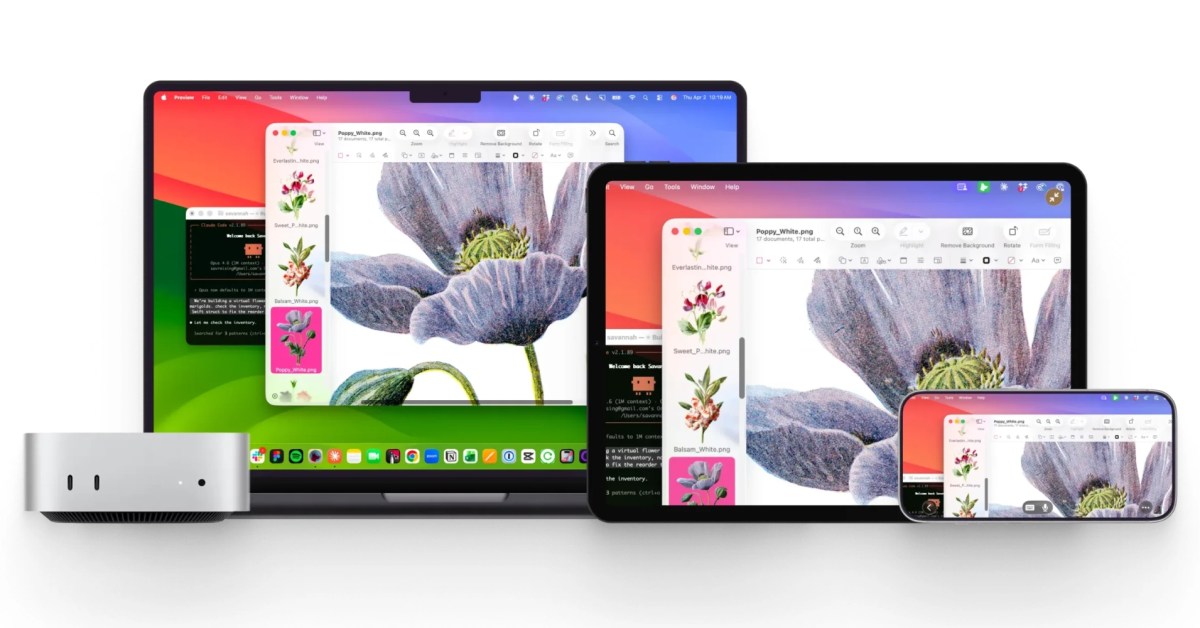
Astropad has officially released Workbench 1.3, marking the largest update to its remote desktop application since its initial debut earlier this year, as reported in 9to5Mac's report. Developed specifically for managing remote access to Macs from an iPhone or iPad, the app has become a key tool for developers monitoring AI agents and operating headless Mac mini setups. The 1.3 release focuses on improving unattended Mac access, boosting streaming performance, and resolving a wide range of reliability issues.
This article details the specific features introduced in version 1.3, performance enhancements for Apple silicon, deployment instructions, and technical compatibility considerations. It is designed for system administrators, Mac developers, and remote workers who rely on iPadOS or iOS devices to control macOS workstations.
What Astropad Workbench 1.3 shipped
Astropad Workbench 1.3 introduces major tools aimed at managing unattended remote machines, headlined by a new privacy curtain feature. When a remote session is active, the privacy curtain conceals the host Mac screen by offering three visual styles, dimming the physical monitor, and disabling local keyboard and mouse input to prevent unauthorized physical access. Additionally, the update integrates a background monitoring utility named Watchdog, which tracks the application status and automatically relaunches Workbench following crashes, dropped connections, or unresponsiveness.
For iPadOS and iOS workflows, version 1.3 adds native picture-in-picture support, enabling users to maintain a live window of their remote Mac while navigating other apps. iPad users also gain custom shortcut mapping, which redirects system keyboard commands—normally intercepted by iPadOS—directly to the host macOS machine. Alongside these major feature additions, the update addresses stability across the stack by delivering 71 distinct bug fixes for keyboard input, clipboard synchronization, and user sign-in workflows.
What changed for builders in Astropad Workbench 1.3
Under the hood, Astropad completely rebuilt the core video streaming architecture specifically for Apple silicon processors. The updated engine delivers lower latency and higher responsiveness by leveraging hardware-level optimizations, while content-aware encoding dynamically alters how text and image buffers are processed. This dynamic adjustment improves text sharpness and increases overall frame refresh rates during heavy interaction.
| Metric / Feature | Workbench Launch (April) | Workbench 1.3 | | Video Streaming Performance | Baseline | 30% faster on Apple silicon | | Text Clarity & Encoding | Standard encoding | Content-aware encoding | | Reliability Fixes | 0 cumulative fixes | 71 bug fixes | | Remote Privacy | Physical display exposed | 3 curtain styles + input block |
These performance improvements build upon previous updates released since the April launch, which introduced external mouse support, smooth zooming, improved sleep state handling, visible macOS cursors, non-English speech-to-text, longer background connection stability, enhanced connection speed, upgraded encryption, and extended clipboard stability.
How to install or upgrade Astropad Workbench 1.3
To upgrade an existing installation of Astropad Workbench on a host Mac, users can trigger the vendor update mechanism directly via the terminal interface or application settings.
workbench updateAdvertisement
Tech Pulse Daily
Get tomorrow's pulse first
Join engineers who read Tech Pulse before stand-up. Free, weekday mornings.
To update the command-line helper package globally across deployment tools, run the package manager installation command:
npm install -g @astropad/workbench-cliTo switch active environment profiles or launch Workbench pinned to a specific remote host configuration from the CLI, execute the following commands:
/model mac-mini-headlessworkbench --connect mac-mini-headlessTo set the default target machine for all subsequent remote connection requests, update the global environment settings:
workbench config set default-target mac-mini-headlessGotchas and compatibility in Astropad Workbench 1.3
While version 1.3 resolves key stability bugs, users managing specialized setups should note specific software compatibility requirements. The update includes explicit compatibility adjustments for third-party utilities such as Wispr Flow and native iPadOS features like Apple Pencil Scribble, ensuring stroke and text input route correctly without conflicting with Mac desktop inputs.
Furthermore, Japanese Kana keyboard users and international teams benefit from revised input handling, though setup requires matching client-side keyboard layouts with host system settings. Administrators deploying the Watchdog daemon must also ensure proper background execution permissions are granted under macOS System Settings to allow automated relaunching after system disconnections.
What to watch after Astropad Workbench 1.3
Following the rollout of version 1.3, Astropad continues to expand its feature footprint for AI workflows and headless hardware management. Prior updates already established key foundational elements such as Command-Space shortcut passthrough from iPad, non-English speech-to-text input, and persistent clipboard syncing, establishing a baseline for future automation features.
Looking ahead, developers and sysadmins should monitor subsequent minor releases for further refinements to Apple silicon hardware encoding and remote display virtualizations. As headless Mac mini clusters become more prevalent in AI agent training and CI/CD pipelines, future Workbench iterations are expected to deepen remote automation hooks and connection diagnostics.
Developer Action Items
- ☐ Diff the official changelog for Apple / macOS / iOS 1.3 before you bump — APIs, defaults, and removed flags only.
- ☐ Install through the vendor's documented channel in staging; keep a one-command rollback and time-box the canary.
- ☐ Grep your repo for old flag names, lockfile pins, and plugin versions that the notes mark as breaking.
- ☐ Prefer the first patch cut over the day-zero tag unless you have a reason to be on the leading edge.
- ☐ If 9to5Mac did not name a region, plan, or SKU, screenshot the official availability line before you promise it to users.
Astropad Workbench 1.3 FAQ
When was Astropad Workbench first launched and what is its main use case?
Workbench first arrived in April as a remote desktop app designed to access a Mac from an iPhone or iPad, with a specific focus on monitoring AI agents and controlling headless Mac mini setups.
How much faster is video streaming in Astropad Workbench 1.3?
Astropad states that video streaming in version 1.3 is 30% faster on Apple silicon due to a rebuilt streaming system and content-aware encoding.
What does the new Watchdog feature do in Workbench 1.3?
Watchdog monitors Workbench in the background and automatically relaunches the application following a crash, disconnection, or failure to respond.
How many bug fixes are included in the 1.3 update?
The Workbench 1.3 release includes 71 bug fixes covering keyboard input, clipboard syncing, user sign-in processes, and other app components.
Sources

Author
Dillip Chowdary
Writes Tech Bytes coverage of AI, engineering, and the tools that actually ship. Editor of Tech Pulse Daily.
Related on Tech Bytes
Advertisement