ChatGPT can transcribe as you speak now with Live Dictation
OpenAI rolled out Live Dictation for ChatGPT across all plans and platforms, transcribing speech in real time while removing the previous ten-minute audio cap.
By Dillip Chowdary • Nov 19, 2026 • Source: The Verge
At a glance
- Product
- ChatGPT Live Dictation
- Developer
- OpenAI
- Availability
- All plans on web, desktop, iOS, Android
- Recording limit
- No limit (10-minute cap removed)
- Release date
- November 19, 2026
- Record mode tier
- Plus, Enterprise, Edu, Business, Pro beta
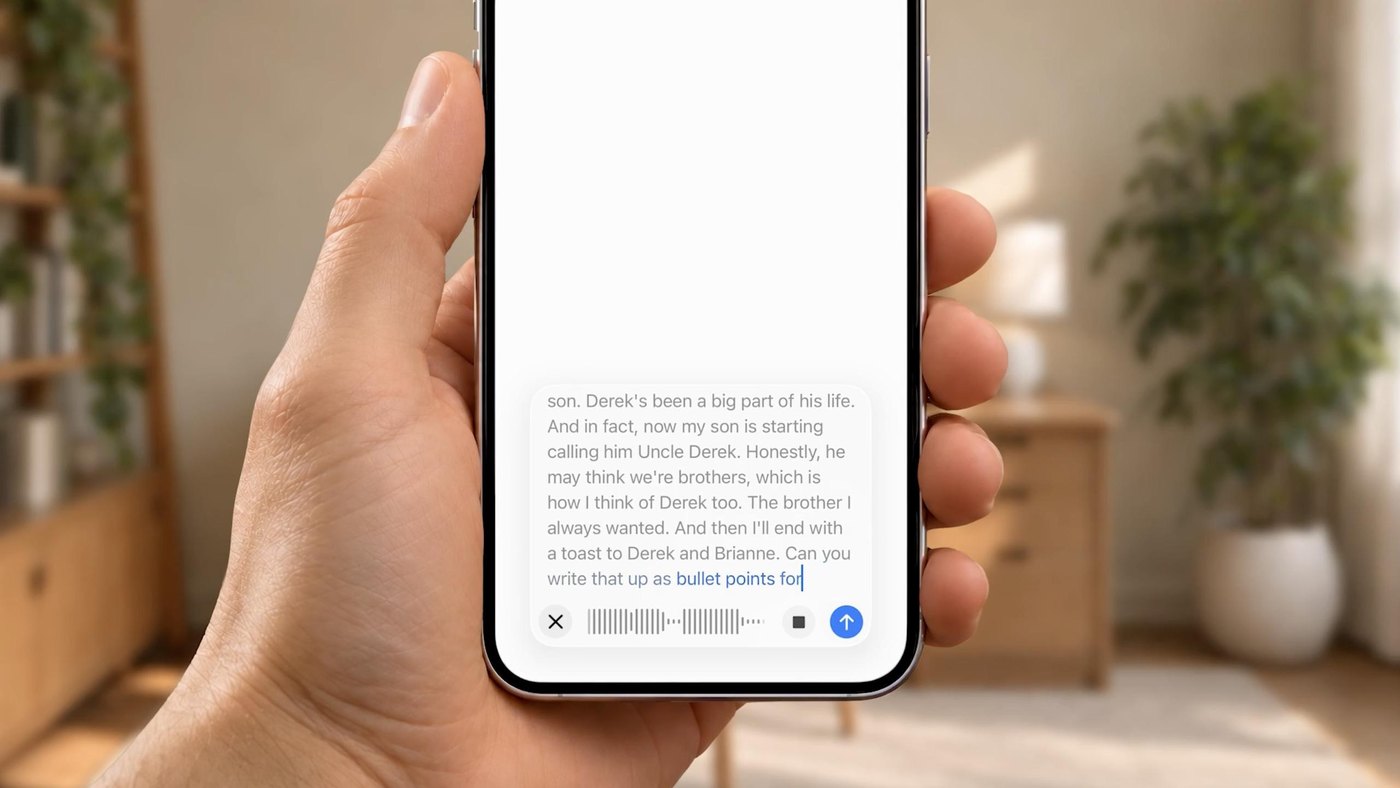
OpenAI launched a Live Dictation capability for ChatGPT that transcribes spoken prompts in real time directly from a user's microphone. Rather than holding recorded audio until speech concludes, the upgraded interface processes vocal input continuously and converts it into text on the fly. Detailed in The Verge's report, the system is deploying worldwide across the web interface, the desktop application, and mobile versions on iOS and Android.
This report details the release schedule, interface modifications, platform support, and subscription requirements associated with OpenAI's audio transcription updates. It is intended for software engineers, workplace users, and general subscribers who rely on spoken prompting to compose text, generate summaries, or issue instructions inside the model's chat interface.
01Real-time transcription across global clients
OpenAI is deploying the live dictation tool across its complete spectrum of user tiers, ensuring that both free accounts and premium members gain immediate access. The unified rollout covers every primary operating environment, including web browsers, dedicated desktop software, and mobile applications for Android and iOS devices. The underlying system processes audio streams instantaneously so users can observe their spoken words translating into written text without system pauses.
The previous system architecture captured the entirety of an audio recording before uploading the file for backend conversion, which created noticeable delays for long prompts. In contrast, the newly released mechanism processes voice input incrementally to populate the prompt field as speech occurs. This low-latency design eliminates the gap between speaking and viewing output, allowing immediate inspection of prompt syntax before submission.
The global distribution strategy ensures uniform availability regardless of regional infrastructure or subscription standing. By delivering the capability simultaneously to desktop and portable devices, the company standardizes microphone interactions across personal computers and smartphones. Users transitioning between devices encounter identical voice processing workflows without needing custom plugins or platform-specific configuration adjustments.
02Audio waveform controls and text editing
The updated input bar incorporates a dynamic audio waveform that responds visually to microphone volume during speech. Tapping or clicking this graphical waveform surfaces the live transcript as the artificial intelligence model generates words in real time. Once dictation ends, the complete transcription settles inside the prompt box, where users can manually edit phrasing, adjust punctuation, or append supplementary instructions before sending.
- Microphone activation Click the microphone button to initiate continuous audio streaming through the primary device microphone.
- Transcript inspection Tap or click the pulsating waveform to reveal the live textual output as words are generated.
- Manual revision Edit the finalized transcription inside the main prompt container to correct phrases or adjust formatting before submission.
The integration of inline editing solves previous usability obstacles where erroneous speech interpretations required complete re-recording. Speakers can now isolate individual mistranslated terms within the prompt box using standard keyboard navigation or mobile cursor controls. This direct interaction maintains the natural pace of dictation while preserving rigorous control over the final input delivered to the underlying language model.
03Removal of the ten-minute recording limit
Advertisement
Tech Pulse Daily
Get tomorrow's pulse first
Join engineers who read Tech Pulse before stand-up. Free, weekday mornings.
Alongside the acceleration of transcription speeds, OpenAI permanently removed the ten-minute restriction that previously capped single voice recordings. Users can now speak uninterrupted without monitoring countdown timers or facing sudden cutoffs during extensive technical explanations. The vendor also confirmed that voice dictation reliability has improved, resulting in fewer dropped utterances and higher fidelity across varying acoustic conditions.
The legacy ten-minute ceiling frequently disrupted longer dictation workflows, compelling users to segment comprehensive briefings or meeting summaries into awkward portions. Lifting this technical restriction enables natural pacing during extended brainstorms, complex code walkthroughs, and verbose project descriptions. Coupled with backend architectural refinements, the service handles sustained audio sessions with reduced risk of memory loss or connection resets.
The increased reliability highlighted by the company targets background acoustic anomalies and inconsistent speech cadences that previously compromised dictation quality. Spoken technical vocabularies, conversational hesitations, and varied speaking speeds are tracked with fewer transcription dropouts. By addressing stability alongside length constraints, the revised interface accommodates sustained operational workflows without requiring third-party audio capture utilities.
04Distinct workspace tiers and dictation modes
OpenAI segments its voice features across distinct product tracks to serve casual prompts, multi-party sessions, and direct oral dialogues. Live Dictation operates natively within the standard prompt box across all ChatGPT tiers, serving as an accessible transcription tool for everyday queries. More specialized recording environments, however, remain gated behind commercial licenses and institutional subscriptions.
| Feature Mode | Target Function | Plan Availability | Status |
|---|---|---|---|
| Live Dictation | Fast prompt transcription | All free and paid plans | General rollout |
| Record Mode | Voice notes and meetings | Plus, Pro, Business, Edu, Enterprise | Beta |
| Conversational Voice | Two-way audio interaction | Standard ChatGPT mobile and desktop | Active |
Subscribers on open accounts can still repurpose the prompt box dictation tool to transcribe external audio clips or summarize audio files into concise bulleted lists. By instructing the model to reorganize dictation text into outlines, free and paid users gain flexible document synthesis without entering dedicated meeting transcription environments. The structural division keeps basic prompt drafting universal while reserving structured collaborative tools for paid enterprise cohorts.
05Meeting transcription and conversational voice tools
The rollout of live prompt dictation builds upon broader voice infrastructure updates initiated by OpenAI earlier this year. The company previously overhauled ChatGPT's two-way conversational voice mode to deliver more fluid conversational exchanges on mobile and desktop platforms. That direct spoken dialogue system operates independently from standard prompt dictation, emphasizing vocal interaction over raw text generation.
Note: The dedicated record mode designed for transcribing long-form meetings and voice notes remains in active beta testing. This specialized tool is limited to subscribers on Plus, Pro, Business, Edu, and Enterprise workspaces rather than free tiers.
In parallel with conversational voice improvements, the specialized record mode introduced last year continues testing inside commercial accounts. While that standalone feature specializes in indexing multi-speaker meetings, standard prompt dictation provides an immediate, unrestricted alternative for individual workers seeking quick text summaries. Together, these complementary tools expand OpenAI's presence across voice-driven software productivity and spoken human-computer interaction.
Frequently asked questions
What is ChatGPT Live Dictation?
It is an audio input feature that transcribes microphone speech in real time as you speak into the prompt box. Users can tap or click the audio waveform to inspect the live transcript and edit the text before submitting it.
Who has access to Live Dictation in ChatGPT?
The feature is rolling out globally to all ChatGPT plans across the web, desktop applications, and iOS and Android mobile apps.
Is there still a time limit on voice dictation in ChatGPT?
No, OpenAI has removed the previous 10-minute recording limit for voice dictation, allowing longer uninterrupted speech while also improving transcription reliability.
How does Live Dictation differ from ChatGPT record mode?
Live Dictation is available to all users for prompt box inputs, while record mode is a separate beta tool for transcribing meetings and voice notes limited to Plus, Pro, Business, Edu, and Enterprise plans.
Sources

Author
Dillip Chowdary
Writes Tech Bytes coverage of AI, engineering, and the tools that actually ship. Editor of Tech Pulse Daily.
Related on Tech Bytes
Advertisement