CleanupBuddy 2.0 expands beyond the keyboard with new display cleaning
Developer Gui Rambo launched CleanupBuddy 2.0 for $2.99, expanding Mac cleaning protection from keyboards to touchscreens with Apple Intelligence.
By Dillip Chowdary • Nov 11, 2026 • Source: 9to5Mac
Developer Gui Rambo released CleanupBuddy 2.0 on November 10, 2026, expanding the Mac maintenance utility beyond keyboard locking to support display cleaning across modern Apple computers. As detailed in 9to5Mac's report, the utility prevents accidental inputs while wiping hardware and now includes display dimming and touch-suppression options. The update accommodates both traditional monitors and newer touchscreen hardware.
This release analysis breaks down the technical additions, privacy controls, hardware compatibility, and Apple Intelligence features introduced in the 2.0 milestone. The tool is designed for Mac laptop and desktop owners seeking an operational pause during physical cleaning without shutting down their machines.
01What CleanupBuddy 2.0 expands beyond the keyboard shipped
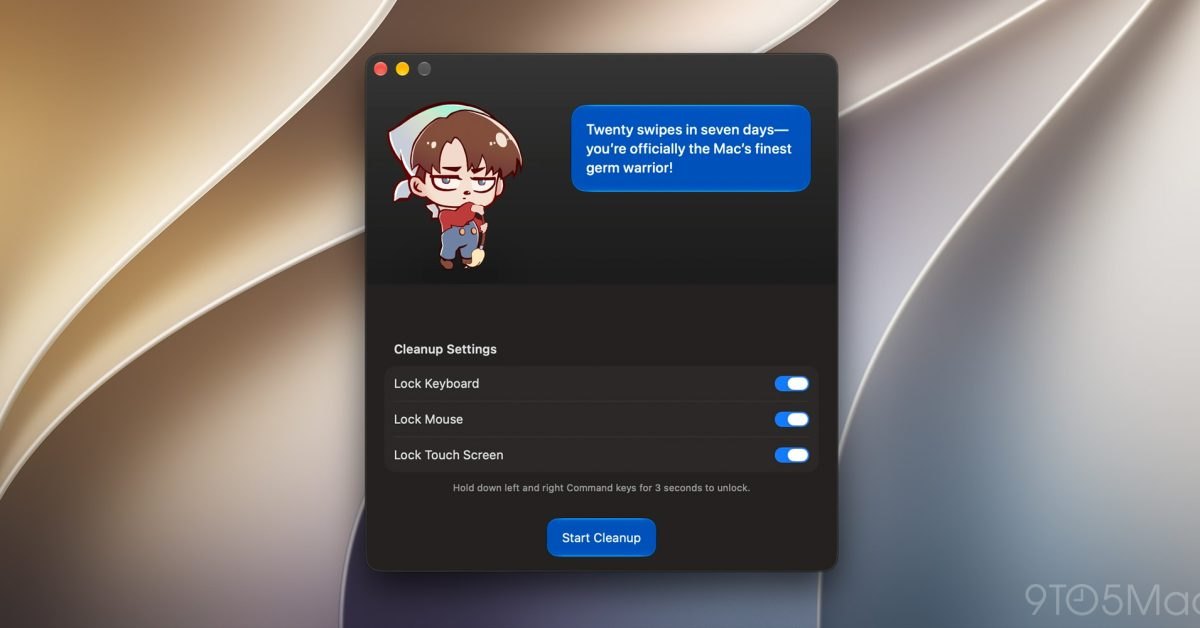
The core utility previously focused on freezing physical keyboard input so owners could wipe down keycaps without typing gibberish or executing unwanted system shortcuts. Version 2.0 broadens that defense perimeter to screen surfaces by adding a dedicated Lock Touch Screen setting. This option ignores unintended touch inputs on the touchscreen MacBook Pro while the glass is being wiped down.
For devices lacking touch hardware, the update introduces a Dim Display setting that darkens the panel to make smudges, fingerprints, and dust visible under ambient room lighting. The release notes emphasize that users on standard Macs still benefit from this darkening mode even if touch protection is inactive. Cleaning sessions continue to feature the animated character that reacts to cleanup activity.
The update also refines the visual interface to enhance operational clarity. Specifically, Rambo improved the contrast and readability of the Start Cleanup button when using the Liquid Glass interface aesthetic. These visual updates ensure users can verify status clearly before engaging the lock state.
02What changed for builders in CleanupBuddy 2.0 expands beyond
Under the hood, version 2.0 shifts its animated companion from static quips to dynamic, on-device Apple Intelligence processing. The character generates context-aware, personalized comments before and after cleaning sessions by analyzing local telemetry. The underlying system evaluates session length, registered key presses, and mouse click counts to produce playful or snarky observations.
| Feature / Metric | CleanupBuddy 1.x | CleanupBuddy 2.0 | | Base price | $2.99 | $2.99 | | Input protection scope | Keyboard input only | Keyboard and touchscreen inputs | | Display assistance | Standard screen brightness | Dim Display mode for smudge inspection | | Personality engine | Scripted character quips | On-device Apple Intelligence generation | | Accessibility safeguard | Standard Sticky Keys behavior | Sticky Keys and Shift shortcut suspended | | Base operating system | macOS 14 or later | macOS 14 or later (macOS 26 for AI) |
Advertisement
Tech Pulse Daily
Get tomorrow's pulse first
Join engineers who read Tech Pulse before stand-up. Free, weekday mornings.
Hardware interaction handling also received crucial edge-case refinements. The software now automatically disables macOS Sticky Keys alongside the five-shift activation shortcut for the duration of a wipe. This prevents repetitive key strikes against modifier keys during wiping from triggering assistive dialogs or locking modifier state in system memory.
03How to install or upgrade CleanupBuddy 2.0 expands beyond the keyboard
CleanupBuddy 2.0 is available for purchase and download at an outright price of $2.99. Users running earlier versions can pull the update directly through standard application distribution channels without recurring subscription charges. Once installed, the app sits in the menu bar ready to engage a cleaning window whenever maintenance is required.
open -a "CleanupBuddy"Engaging a cleanup session locks inputs until the user manually triggers the hardware release mechanism. To exit the locked cleaning state and resume normal input processing, users press and hold both Command keys simultaneously. This dual-key hold requirement prevents cloth passes and random hand pressure from accidentally unlocking the system mid-wipe.
04Gotchas and compatibility in CleanupBuddy 2.0 expands beyond
System compatibility presents a bifurcated requirement profile depending on the features users intend to run. The baseline keyboard locking, display dimming, and touch suppression functions operate on macOS 14 and later versions. However, the personalized character commentary powered by Apple Intelligence requires macOS 26 or later, along with locally downloaded on-device models ready for execution.
Privacy considerations remain strictly localized for users cautious about usage monitoring. Rambo clarified that session statistics are collected exclusively while cleaning mode is active and never persist beyond local storage on the Mac. Users retain granular control in preferences, where they can independently toggle off cleanup tracking metrics and Apple Intelligence features.
05What to watch after CleanupBuddy 2.0 expands beyond the keyboard
The arrival of touch-blocking utilities marks an important adaptation to Apple's evolving Mac hardware lineup. As touchscreen displays appear on MacBook Pro hardware, third-party developers must account for dual-surface input contamination during physical maintenance. CleanupBuddy demonstrates how small system utilities can integrate localized Apple Intelligence without sacrificing data privacy or battery life.
Moving forward, adoption will depend on how reliably on-device models initialize across varied macOS 26 installations. Users should verify that Apple Intelligence model assets are fully downloaded and verified before expecting generated commentary. The utility remains an inexpensive single-purchase solution for maintaining clean hardware without risking erratic input behavior.
CleanupBuddy 2.0 expands beyond the keyboard FAQ
How much does CleanupBuddy 2.0 cost and what macOS versions are supported?
CleanupBuddy 2.0 costs $2.99 and requires macOS 14 or later for basic operations, while personalized Apple Intelligence commentary requires macOS 26 or later with local models ready.
How do users unlock the Mac after a cleaning session?
Users unlock the keyboard and screen by pressing and holding both Command keys simultaneously once cleaning is complete.
What does the new display cleaning feature do on Macs without touchscreens?
On Macs with traditional non-touch screens, the Dim Display option darkens the screen surface to make smudges and dust easier to see during cleaning.
What data does CleanupBuddy collect for its animated character?
CleanupBuddy records time spent cleaning, keystrokes, and mouse clicks locally during active sessions, and users can disable both the metrics and Apple Intelligence integration in settings.
Sources

Author
Dillip Chowdary
Writes Tech Bytes coverage of AI, engineering, and the tools that actually ship. Editor of Tech Pulse Daily.
Related on Tech Bytes
Advertisement