Download all 20 Apple HomeView wallpapers in light and dark mode here
Apple released HomeView 27.2 build 24V514 ahead of its November 13 launch, introducing twenty light and dark wallpapers for its upcoming smart display.
By Dillip Chowdary • Oct 31, 2026 • Source: 9to5Mac
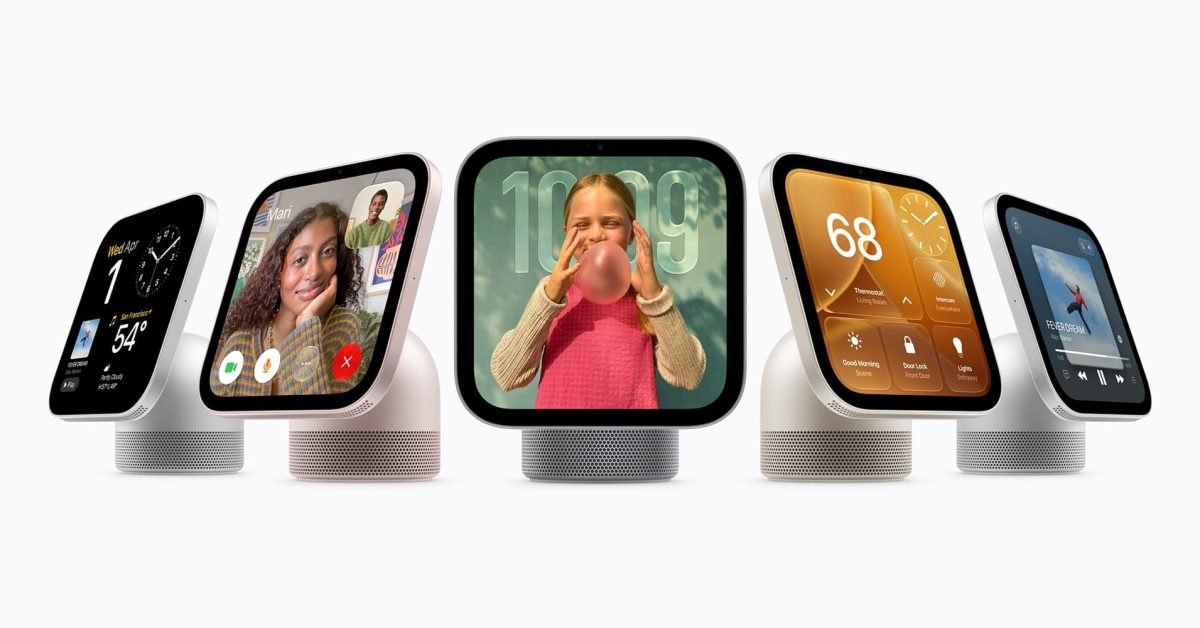
Apple released the HomeView 27.2 system update ahead of the official retail debut of its dedicated smart home hub, revealing the full set of default assets packaged inside the firmware. The rollout delivers build 24V514, which powers the upcoming device scheduled to launch globally on November 13, 2026. Hardware preorders are active ahead of the release date, giving ecosystem watchers an early inspection of the accompanying visual assets uncovered in 9to5Mac's report on the software distribution. The update packages twenty distinct default wallpapers configured for both light and dark display modes across the smart display interface.
This breakdown covers the technical visual assets extracted from the HomeView 27.2 distribution, the system interface behaviors exposed within the operating system build, and the hardware configuration options available for early adopters. It details the asset dimensions, format considerations across Apple hardware, and interface customization panels uncovered within the firmware. Readers planning device deployments across home automation environments or preparing cross-device visual themes will find exact specifications, asset formatting parameters, and operating system build identifiers below.
What Download all 20 Apple HomeView wallpapers shipped
Apple packaged twenty individual default wallpapers directly into the HomeView 27.2 system software update ahead of the hardware debut. Every graphic within the collection includes paired visual presentations, offering dedicated light mode and dark mode variations for varying ambient lighting conditions. The assets were created specifically to suit the display geometry of the smart home hub hardware, using a square 1:1 aspect ratio across all twenty wallpaper files. Because of their square framing, the files can be scaled, cropped, or repositioned using existing display management tools across alternative hardware screens.
Beyond the extracted backdrop files, the system distribution includes visual configurations for the user interface that will welcome owners on launch day. Independent developer Guilherme Rambo identified the dedicated face customization interface built directly into the operating system, showing how users will configure clock styles, widget layouts, and primary backgrounds. The system files also reveal how the light and dark dynamic pairs align with ambient schedule rules, giving the hardware a tailored visual presentation whether mounted on a wall or placed on a desktop stand.
What changed for builders in Download all 20 Apple HomeView wallpapers
Firmware build 24V514 provides developers and interface designers with their first concrete look at Apple's spatial and display metrics for HomeView software. The square 1:1 aspect ratio establishes standard display proportions distinct from the traditional 19.5:9 mobile canvas or 16:10 laptop screens found in other product lines. Interface engineers analyzing the package can review how assets scale across display boundaries and how the dedicated face customization panes organize glanceable information panels. The inclusion of native light and dark alternate states confirms that interface builders must supply dual-state visual treatments for custom clock faces and hub accessory cards.
| Metric | Previous Target (Software 26) | Shipped Target (HomeView 27.2) |
|---|---|---|
| Firmware Build | Unreleased Internal Baseline | Build 24V514 |
| Wallpaper Count | 0 Public Assets | 20 Paired Default Files |
| Visual Modes | Single Legacy Mockup | Dedicated Light and Dark Variations |
| Aspect Ratio | Variable Display Presets | Fixed 1:1 Hub Geometry |
| Hardware Status | Unreleased 2025 Target | Preorder Active, Nov 13 Launch |
The internal framework structure also reflects revisions made during extended internal development cycles. Digital inspection of the image catalogs demonstrates how background elements sit beneath interactive touch components without obscuring glanceable controls. The layout confirms that developer-facing home control panels must account for centralized clock elements alongside corner-anchored accessory controls. Builders optimizing third-party smart home dashboards can structure widget bounds around these verified asset footprints.
How to install or upgrade Download all 20 Apple HomeView wallpapers
System administrators and developers managing Apple ecosystems can download the extracted wallpaper files directly to existing local storage drives or mobile photo libraries. On iPhone, iPad, and Mac platforms, Apple supplies native background management tools inside System Settings and Settings. To apply the 1:1 assets on an iPhone or iPad, users open Settings, choose Wallpaper, select the downloaded image file, and use standard pinch gestures to reposition the square bounds across the vertical screen.
Advertisement
Tech Pulse Daily
Get tomorrow's pulse first
Join engineers who read Tech Pulse before stand-up. Free, weekday mornings.
Developers testing HomeView software environments or deploying terminal commands across automated workstation setups can verify their local tools using standard command-line procedures:
claude updateTo adjust active model parameters within interactive interface sessions, operators can run the standard model configuration commands:
/model claude-fable-5-1For automation jobs requiring pinned tool execution, run the binary with explicit model flags:
claude --model fableTo lock default tool options within deployment profiles, set the preferred model identifier inside your project environment configuration. On Mac hardware, users configure the HomeView wallpapers by opening System Settings, selecting Wallpaper, and dragging the square graphic into the primary preview slot with Fill Screen or Center scaling options enabled.
Gotchas and compatibility in Download all 20 Apple HomeView wallpapers
The primary consideration when deploying HomeView wallpapers on non-hub devices is the native 1:1 aspect ratio. Because standard smartphones use tall rectangular displays and computers use wide widescreen orientations, centering a square 1:1 image results in significant edge cropping unless users configure letterbox margins or custom positioning. Users setting these backdrops on mobile devices must manually zoom and shift the focal elements to prevent top-aligned clock widgets or bottom-dock application bars from occluding central graphic details.
System compatibility for the HomeView 27.2 firmware itself remains restricted to Apple's forthcoming smart display hardware. Although developer Aaron Perris uncovered internal asset references pointing to an older HomeView Software 26 graphic, that legacy software never saw general public release. Devices in production will run HomeView 27.2 build 24V514 out of the box. Users attempting to flash or adapt the raw firmware package to older Apple TV or iPad hardware will encounter boot restrictions and signature checks preventing cross-device installation.
What to watch after Download all 20 Apple HomeView wallpapers
The release of HomeView 27.2 build 24V514 serves as the operational baseline ahead of the official hardware release date on November 13, 2026. Preorders remain active across Apple retail channels while hardware units assemble in distribution channels. The presence of residual HomeView Software 26 graphics indicates Apple postponed the initial hardware schedule from an earlier 2025 launch target to complete operating system polish and finalize the face customization subsystems.
Observers should monitor forthcoming software updates leading into the November 13 arrival for additional clock face templates, interactive home controls, and smart accessory integrations. Further teardowns of the 24V514 build will likely reveal how the device connects with companion Apple TV, HomePod, and iPhone hardware within local network boundaries. As production units reach retail customers, Apple will provide final documentation regarding home control automation shortcuts and display settings across the HomeView platform.
Developer Action Items
- ☐ Diff the official changelog for Apple 27.2 before you bump — APIs, defaults, and removed flags only.
- ☐ Install through the vendor's documented channel in staging; keep a one-command rollback and time-box the canary.
- ☐ Grep your repo for old flag names, lockfile pins, and plugin versions that the notes mark as breaking.
- ☐ Prefer the first patch cut over the day-zero tag unless you have a reason to be on the leading edge.
- ☐ If 9to5Mac did not name a region, plan, or SKU, screenshot the official availability line before you promise it to users.
Download all 20 Apple HomeView wallpapers FAQ
When is the Apple HomeView scheduled to launch?
The Apple HomeView is currently available for preorder and officially launches on November 13, 2026.
What software version did Apple release for HomeView?
Apple rolled out HomeView 27.2 under system build number 24V514.
What are the aspect ratio and display modes for the HomeView wallpapers?
The twenty wallpapers feature a 1:1 square aspect ratio and come in paired light and dark mode variations.
What evidence exists that Apple delayed the HomeView release?
System files inside the update contain a hidden HomeView Software 26 graphic, indicating the product was originally intended to ship last year.
Sources

Author
Dillip Chowdary
Writes Tech Bytes coverage of AI, engineering, and the tools that actually ship. Editor of Tech Pulse Daily.
Related on Tech Bytes
Advertisement