Google Antigravity is now built into Gemini app for macOS
Google built Antigravity into the Gemini app for macOS on October 13, 2026, during the Gemini 4 Argon rollout, and Antigravity access requires AI Ultra.
By Dillip Chowdary • Oct 14, 2026 • Source: 9to5Mac
Google is integrating Antigravity into the Gemini app for macOS as part of the Gemini 4 Argon rollout on October 13, 2026. 9to5Google's report, by Abner Li at 9:15 am PT, describes the update. Antigravity is Google's agent-first development platform. Version 2.0 was introduced at I/O 2026, and it was previously a standalone app for Mac, Windows, Linux, and most recently Googlebook (Android).
This piece covers the macOS integration, the Gemini 4 Argon coding reason, and the AI Pro and AI Ultra split. It is for Mac users who want to code apps, web experiences, and more from one app, and for people coming from standalone Antigravity, Gemini Spark, slash-command Skills, or Connected Apps.
Google Antigravity is now built into Gemini: the announcement
On October 13, 2026, as part of the Gemini 4 Argon rollout, Google is bringing Antigravity directly into the Gemini app on macOS. Antigravity is Google's agent-first development platform. Version 2.0 was introduced at I/O 2026. It was previously a standalone app for Mac, Windows, Linux, and most recently Googlebook (Android). Since May, Google has been updating Antigravity at a rapid pace, with major updates coming on a weekly basis, or even every few days. This macOS integration is the October 13 step in that run of releases.
Gemini 4 Argon's upgraded coding capabilities are cited as the reason for this integration. Users can code apps, web experiences, and more from one app. As of October 13, 2026, the new model requires AI Pro and above in the Gemini app, but Antigravity access requires AI Ultra. Abner Li published the report at 9:15 am PT. Inside the macOS app, a Liquid Glass pill for Antigravity sits in the top-right corner, the same button lets you exit, and it launches the full experience found in the dedicated application.
What actually changed with Google Antigravity is now built into Gemini
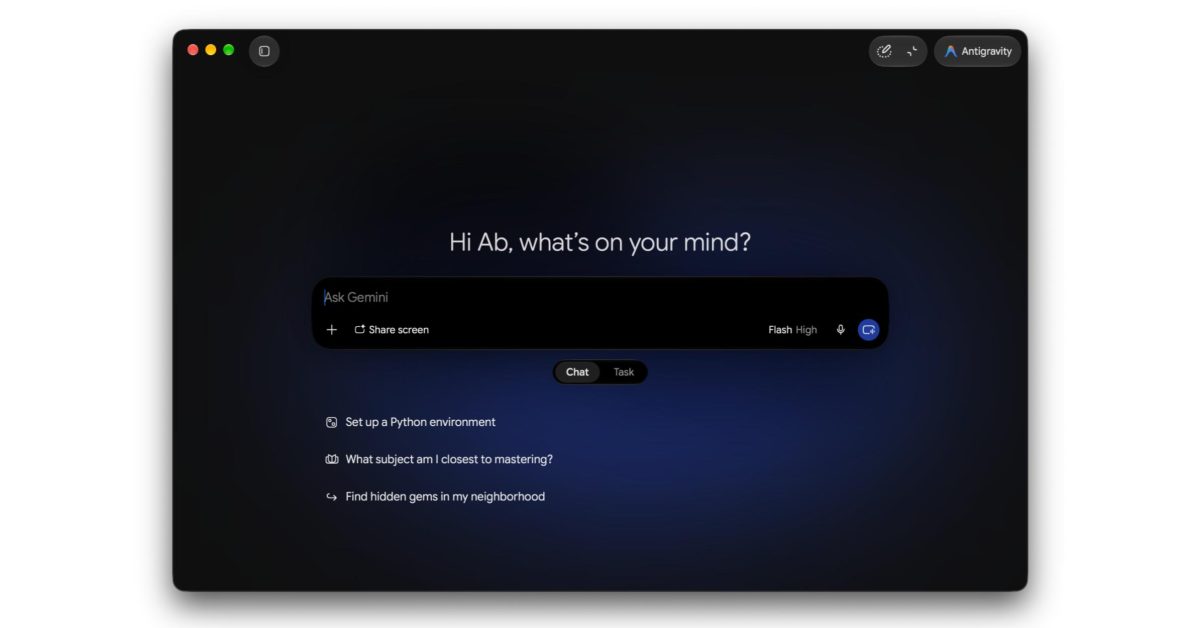
The Gemini app for macOS shows a new Liquid Glass pill for Antigravity in the top-right corner. The same button lets you exit. That control launches the full experience found in the dedicated application. The app also adds a Chat and Task switcher. Task is the new name for Gemini Spark. The switcher appears below the prompt box. These controls arrive with the Gemini 4 Argon rollout on October 13, 2026, in the same macOS Gemini app that now holds Antigravity.
The navigation drawer gets an update in that macOS release. Search is now in the top-right corner of the panel. A new Scheduled view shows both Spark tasks and Scheduled actions. Skills are opened with @ (mention), replacing the / (slash) command. In the side panel, Customize lets you access Skills and Connectors. Connectors is the new name for Connected Apps. Seeing the pill, the drawer, and the switcher means running the latest version of the Gemini app for macOS from the October 13, 2026 update.
Advertisement
Tech Pulse Daily
Get tomorrow's pulse first
Join engineers who read Tech Pulse before stand-up. Free, weekday mornings.
Who should care about Google Antigravity is now built into Gemini
Mac users of the Gemini app who want to code apps, web experiences, and more from one app are the people this integration addresses. Google cites Gemini 4 Argon's upgraded coding capabilities for that. Tier still splits the features. As of October 13, 2026, the new model requires AI Pro and above in the Gemini app. Antigravity access requires AI Ultra, so AI Pro reaches the model and does not include Antigravity. AI Ultra is the subscription that opens the agent-first development platform from inside Gemini on macOS.
People who already use the standalone Antigravity app on Mac, Windows, Linux, or Googlebook (Android), including version 2.0 from I/O 2026, get a macOS Gemini path into the full experience found in that dedicated application. Gemini Spark users will see Task, the new name, on the switcher below the prompt box. The Scheduled view still lists Spark tasks and Scheduled actions. Skills users move from the / (slash) command to @ (mention). Connected Apps users should open Customize in the side panel, where the name is now Connectors.
How to try Google Antigravity is now built into Gemini
Run the latest version of the Gemini app for macOS. The Liquid Glass pill for Antigravity is in the top-right corner, and the same button lets you exit. It launches the full experience found in the dedicated application. Antigravity access requires AI Ultra. The new model behind the upgraded coding capabilities is Gemini 4 Argon, and it requires AI Pro and above in the Gemini app as of October 13, 2026. From that one app, users can code apps, web experiences, and more.
The same latest macOS build carries the other interface changes. Below the prompt box, switch between Chat and Task. Task is the new name for Gemini Spark. The Scheduled view shows both Spark tasks and Scheduled actions. Search sits in the top-right corner of the navigation drawer panel. Use @ (mention) to access Skills. That replaces the / (slash) command. In the side panel, Customize lets you access Skills and Connectors, and Connectors is the new name for Connected Apps in the Gemini app.
What to watch after Google Antigravity is now built into Gemini
Since May, major Antigravity updates have arrived weekly or even every few days, up through version 2.0 at I/O 2026 and this October 13, 2026 placement inside the Gemini app for macOS. The Gemini 4 Argon rollout is the occasion for that placement. The Liquid Glass pill in the top-right corner still opens the full experience found in the dedicated application, and the same button exits. The dedicated app was already standalone software for Mac, Windows, Linux, and most recently Googlebook (Android). The in-app route added here is the macOS Gemini app.
Two gates stay in force for this rollout. Gemini 4 Argon, the new model, requires AI Pro and above in the Gemini app, while Antigravity access requires AI Ultra. Task is the new name for Gemini Spark, yet the Scheduled view still shows Spark tasks and Scheduled actions. Skills use @ (mention) instead of the / (slash) command. Customize, in the side panel, reaches Skills and Connectors, and Connectors is the new name for Connected Apps. The latest Gemini app for macOS shows the pill, the Chat and Task switcher below the prompt box, and Search in the top-right of the navigation drawer.
Developer Action Items
- ☐ Diff the official changelog for Gemini / Google / macOS 2.0 before you bump — APIs, defaults, and removed flags only.
- ☐ Install through the vendor's documented channel in staging; keep a one-command rollback and time-box the canary.
- ☐ Grep your repo for old flag names, lockfile pins, and plugin versions that the notes mark as breaking.
- ☐ Prefer the first patch cut over the day-zero tag unless you have a reason to be on the leading edge.
- ☐ If 9to5Mac did not name a region, plan, or SKU, screenshot the official availability line before you promise it to users.
Google Antigravity is now built into Gemini FAQ
Is Google Antigravity built into the Gemini app for macOS?
Yes. On October 13, 2026, as part of the Gemini 4 Argon rollout, Google is bringing Antigravity into the Gemini app on macOS. A Liquid Glass pill in the top-right corner opens the full experience from the dedicated app, and the same button exits it.
Which subscription do you need for Antigravity in the Gemini app?
Antigravity access requires AI Ultra. The new Gemini 4 Argon model requires AI Pro and above in the Gemini app. AI Pro covers that model and does not include Antigravity.
What is Task in the macOS Gemini app?
Task is the new name for Gemini Spark. The Chat and Task switcher appears below the prompt box. A Scheduled view still shows both Spark tasks and Scheduled actions.
How do you open Skills in the Gemini app for macOS?
@ (mention) is now how you access Skills, replacing the / (slash) command. Customize, in the side panel, also lets you access Skills and Connectors.
What are Connectors in the Gemini app?
Connectors is the new name for Connected Apps. In the side panel, Customize lets you access Skills and Connectors.
Sources

Author
Dillip Chowdary
Writes Tech Bytes coverage of AI, engineering, and the tools that actually ship. Editor of Tech Pulse Daily.
Related on Tech Bytes
Advertisement