Google gives Gemini the ability to use your Mac for you
Google brought computer use to the Gemini macOS desktop app, letting paid subscribers automate native app tasks and web browsing in the background.
By Dillip Chowdary • Nov 19, 2026 • Source: TechCrunch
At a glance
- Product
- Gemini computer use
- Announcement date
- November 19, 2026
- Supported platform
- macOS desktop app
- Subscription tier
- Google AI Plus, Pro, or Ultra
- Initial availability
- United States in English
- Core controls
- Live preview, pause, stop, approve
Google expanded its artificial intelligence portfolio on Thursday by releasing a computer use capability for the Gemini desktop application on macOS. The feature allows the software to navigate native Mac applications, complete multistep digital chores, and browse websites in the background on behalf of the user. According to details shared in TechCrunch's report, this update brings direct operating system actions into the desktop software to automate repetitive workflows.
This report details the underlying mechanics of the desktop tool, its competitive position against existing rival assistants, and the safety measures built into the system. The analysis serves Mac users, software professionals, and administrative workers evaluating automated tooling across local files and web applications. Readers will find concrete operational limits, required subscription tiers, and supported workflow scenarios without marketing hype or promotional embellishment.
01Background app navigation across macOS
Google launched a dedicated computer use capability within its Gemini desktop software designed specifically for macOS computers. The software operates as an autonomous agent capable of executing digital chores across native desktop programs and web browsers without constant manual intervention. System operations proceed quietly in the background while the active user continues unhindered on separate personal projects.
Unlike basic chat assistants that only produce text responses, this tool interacts directly with application user interfaces across the Mac ecosystem. The assistant accepts natural language instructions from the operator and translates those prompts into functional mouse and keyboard commands. This architectural design targets multistep sequences that require retrieving local documents, gathering information from external sites, and modifying active software windows.
Desktop automation bridges the gap between disconnected offline files and online software platforms. The program executes sequences of routine actions by coordinating data between installed desktop tools and background browser sessions. By taking on mechanical tasks across various local utilities, the system aims to streamline long workflows into unified automated routines.
02Desktop agent race and Gemini Tasks
The launch places Google in direct competition with established desktop agentic solutions already deployed by Anthropic, OpenAI, and Meta. Those rival artificial intelligence providers brought autonomous computer navigation features to desktop environments months ahead of this announcement. Google now enters this specialized operating system tier after focusing previously on narrower conversational and browser integrations.
The release closely follows Google's wider rollout earlier this week of Gemini Tasks, an in-app utility designed for routine consumer operations. That feature functions as an agent that assists users when logging into online services, completing digital store purchases, and reserving calendar appointments on the web. These concurrent product updates illustrate an expanding strategy centered on end-to-end task execution rather than simple informational retrieval.
Google also opened access recently to early testers for its revamped CC agent, which was initially announced in September. That specialized agent helps families coordinate logistical schedules, manage shared calendars, sort incoming emails, and track group tasks across chat channels. Together with desktop computer use, these initiatives mark an effort to unify personal scheduling and local system automation under Google's software brand.
03Live chat preview and execution controls
Advertisement
Tech Pulse Daily
Get tomorrow's pulse first
Join engineers who read Tech Pulse before stand-up. Free, weekday mornings.
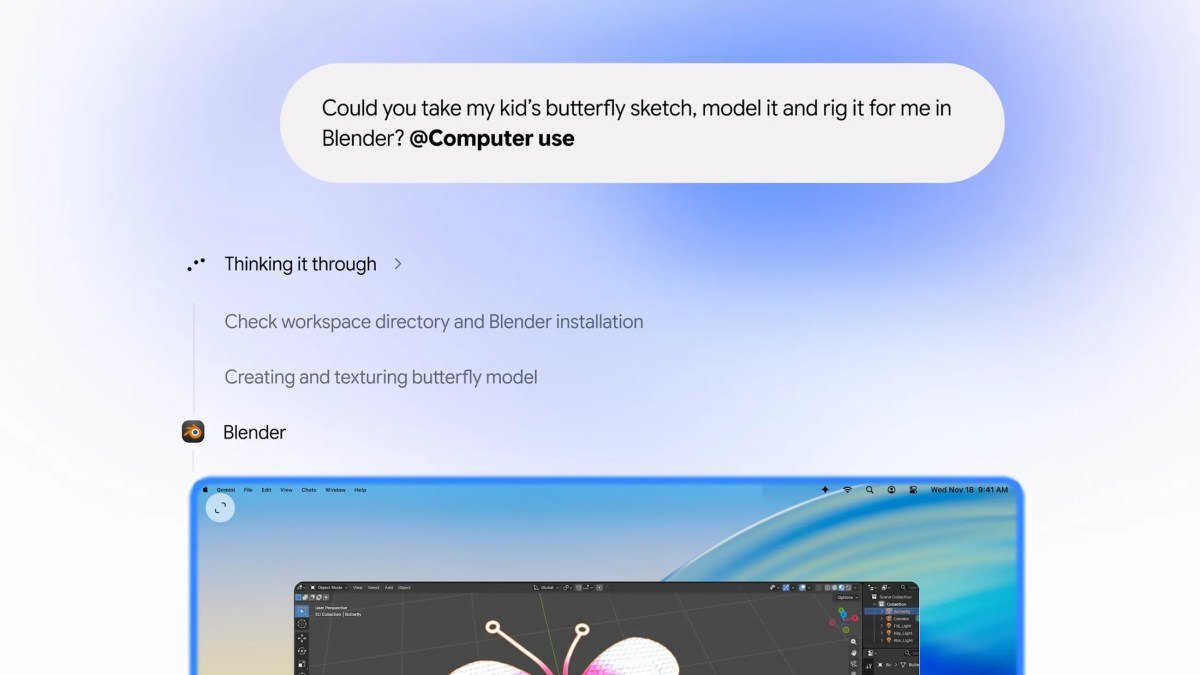
Execution inside the Gemini desktop application relies on a dedicated live preview window integrated directly into the chat stream. When an operator assigns a complex task, the interface displays real-time progress frames showing precisely what the software is reading and altering. This visual channel allows operators to verify each transitional step without relinquishing focus from their primary on-screen workspace.
A major technical advantage of this design is that the user's primary desktop screen and mouse cursor remain entirely free during processing. The operator can draft documents, attend video meetings, or browse local folders while the background assistant completes assigned tasks. This parallel processing architecture eliminates the desktop lockouts typical of traditional macro software tools.
To prevent unintentional errors or unauthorized modifications, Google incorporated strict supervisory safety controls into the execution loop. Users retain the operational authority to pause active procedures, halt runaway processes, or require explicit manual approval before any significant system modification occurs. These defensive guardrails ensure that autonomous actions across local files remain accountable to the operator.
04Batch file sorting and form automation
Google identified several repetitive desktop workflows where autonomous computer navigation delivers clear practical value. The software specializes in populating complex online forms using structured information gathered from local sources. It also manages tedious administrative tasks that require applying identical operational adjustments across large batches of stored files.
File management represents another central capability for the desktop assistant on macOS. The tool can inspect directory contents, evaluate file parameters, and organize scattered documents into target folders based on specific organizational criteria. This automated sorting reduces the manual effort needed to maintain structured file systems on local storage drives.
The agent can also synthesize multi-source data to create complete presentation slide decks on the user's computer. It extracts analytical data points from online dashboards, combines them with local text files, and populates slides in native presentation applications. This capability eliminates the manual copy-and-paste cycle often required when preparing routine business summaries.
05Paid plan requirements and regional availability
Access to the new computer use functionality requires downloading the official Gemini desktop application for macOS. Users must also maintain an active paid subscription under the Google AI Plus, Google AI Pro, or Google AI Ultra membership tiers. Free accounts on the platform cannot access the underlying agentic system controls at this time.
Note: Initial deployment of the computer use capability is restricted to English language users located within the United States. Google has not published an official schedule for releasing the tool in international markets or introducing compatibility with alternative operating systems like Windows.
The tiered rollout reflects an incremental deployment strategy focused on gathering early operational feedback from commercial users. Requiring premium subscription accounts limits initial compute load while Google observes how the agent behaves across diverse macOS software environments. Prospective international customers must monitor upcoming release announcements to see when broader regional support becomes available.
Frequently asked questions
What is computer use in the Gemini Mac app?
It is an agentic feature that allows Gemini to navigate native Mac applications and browse websites in the background to complete tasks on your behalf.
Does Gemini take over the computer screen while working?
No, the agent works in a live preview inside the chat interface while leaving your screen and cursor free for other tasks.
What controls exist to monitor and manage Gemini actions?
Users can pause, stop, and approve the agent's actions before they happen.
Which subscription plans include Gemini computer use on macOS?
The feature requires the Gemini desktop app for Mac along with a Google AI Plus, Pro, or Ultra subscription.
Is Gemini computer use available outside the United States?
The initial rollout is limited to English in the United States, with no announced timeline for other regions or operating systems.
Sources

Author
Dillip Chowdary
Writes Tech Bytes coverage of AI, engineering, and the tools that actually ship. Editor of Tech Pulse Daily.
Related on Tech Bytes
Advertisement