HomeKit Weekly: Onvis releases a Matter over Thread outdoor smart plug
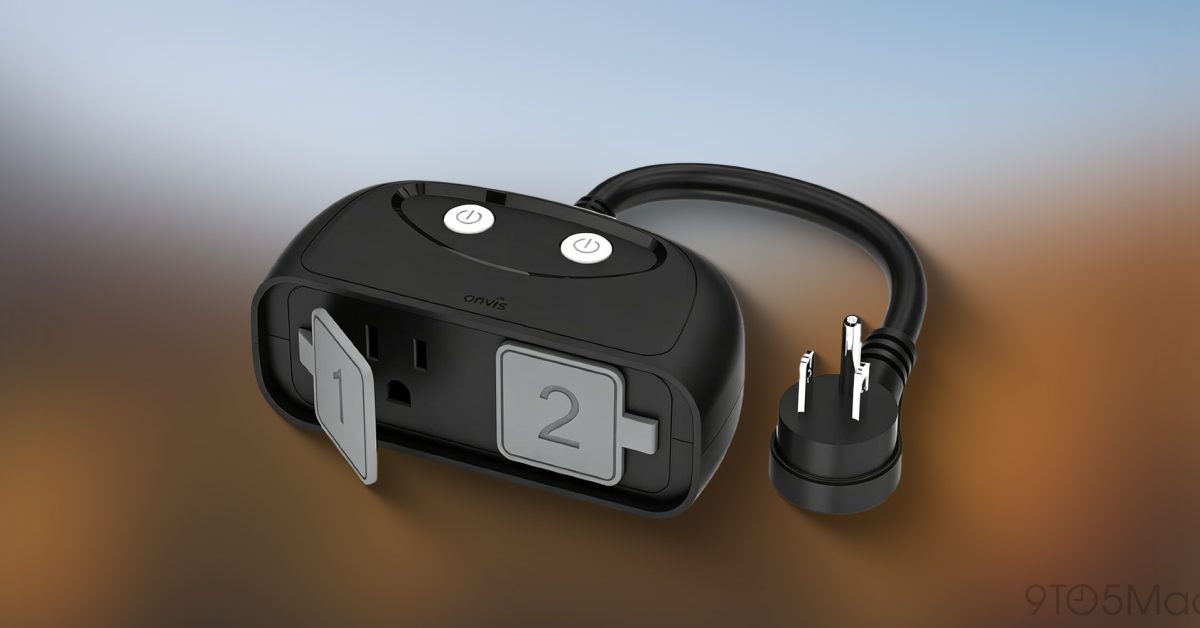
Onvis released its new outdoor smart plug with Matter over Thread support, a combination that sets it apart from most outdoor plugs currently on the market.
By Dillip Chowdary • Oct 10, 2026 • Source: 9to5Mac
Onvis has released a new outdoor smart plug that combines Matter over Thread connectivity, real-time energy monitoring, and IP65 weather resistance in a single device — available now on Amazon. According to 9to5Mac's report, the plug is designed for homeowners who want reliable outdoor automation without depending on Wi-Fi signal strength at the edge of their property.
This piece covers every specification, compatibility requirement, and practical use case for the Onvis Outdoor Smart Plug — including how Thread routing works outdoors, what energy monitoring surfaces inside Apple Home, and what buyers should know before purchasing. It is aimed at Apple Home users considering outdoor smart home hardware heading into the holiday decorating season.
What HomeKit Weekly shipped
Onvis released its new outdoor smart plug with Matter over Thread support, a combination that sets it apart from most outdoor plugs currently on the market. The plug supports Apple Home, Amazon Alexa, Google Home, and SmartThings natively, meaning buyers are not locked into a single ecosystem. It carries an IP65 weather-resistance rating, handles loads up to 1,800 watts, and includes real-time power usage tracking that feeds directly into a Matter-compatible smart home system — no separate app required.
The plug went on sale immediately on Amazon. Onvis has been a consistent supplier of Apple Home-compatible accessories for years, and this release targets a specific product gap: outdoor plugs that ship with all current smart home standards built in from day one rather than requiring a proprietary bridge or hub.
What changed for builders in HomeKit Weekly
| Specification | Detail |
|---|---|
| Connectivity | Matter over Thread |
| Max load | 1,800 W |
| Weather rating | IP65 |
| Ecosystem support | Apple Home, Alexa, Google Home, SmartThings |
| Energy data destination | Apple Home energy view (no separate app) |
| Hub required | HomePod, HomePod mini, or Apple TV 4K for full Apple Home features |
The jump from Wi-Fi to Thread matters most in brick or masonry homes where exterior walls can block router signal. Thread is a mesh protocol in which devices relay traffic through one another, so an outdoor plug at the far end of a yard can route through other Thread devices rather than depending on a direct line to the router. That architecture makes placement more flexible and connectivity more reliable than Wi-Fi-based outdoor plugs.
Advertisement
Tech Pulse Daily
Get tomorrow's pulse first
Join engineers who read Tech Pulse before stand-up. Free, weekday mornings.
How to install or upgrade HomeKit Weekly
The Onvis Outdoor Smart Plug works with Apple Home, Amazon Alexa, Google Home, and SmartThings through the Matter standard — no proprietary app is needed to add it. For Apple Home users, a HomePod, HomePod mini, or Apple TV 4K must already be present on the network to take full advantage of the plug's features, since those devices serve as the Thread border router that bridges the plug to the home network.
# Apple Home: scan the Matter QR code from the plug's packaging in the Home app
# Alexa: use the Alexa app → Devices → Add Device → Matter
# Google Home: use the Google Home app → Add → Set up device → Matter
# SmartThings: use the SmartThings app → Add → Scan QR code
Schedules and automations are configured entirely inside the native smart home app — Apple Home, Alexa, Google Home, or SmartThings. A common setup for Apple Home users is a sunset-triggered automation that turns landscape lights on at dusk and off at a fixed time, built entirely within the Home app without any third-party tool.
Gotchas and compatibility in HomeKit Weekly
IP65 protection covers dust ingress and low-pressure water jets, which means rain and sprinkler spray are within spec. It does not cover submersion or high-pressure washing, so placement should avoid standing water accumulation or direct hose pressure. The 1,800-watt limit covers landscape lighting, holiday light strings, outdoor fans, and outdoor heaters in most residential configurations, but large pool pumps or high-draw appliances should be checked against that ceiling before purchase.
Apple Home users specifically need a HomePod, HomePod mini, or Apple TV 4K already active on the network — the plug does not create its own Thread border router. Buyers who rely solely on an iPad or iPhone as a home hub will not get full Thread functionality. Users on other platforms have no such restriction, since Alexa, Google Home, and SmartThings each maintain their own Thread infrastructure through compatible speakers or hubs.
What to watch after HomeKit Weekly
Onvis has not announced additional outdoor accessories alongside this plug, but the release signals that the company is actively bringing its lineup in line with current Matter and Thread standards. The energy monitoring feature — which surfaces consumption data directly in Apple Home's energy view — is a practical addition as utility costs rise and homeowners look for granular visibility into which outdoor devices are drawing power.
Thread's mesh architecture makes this plug a building block for a broader outdoor smart home setup: each Thread device added extends the mesh and improves reliability for others. Buyers adding outdoor lighting, sensors, or additional plugs in Thread-compatible form factors will benefit from the cumulative coverage the Onvis plug contributes to the network from the moment it is powered on.
Developer Action Items
- ☐ Diff the official changelog for Google / Apple / Amazon before you bump — APIs, defaults, and removed flags only.
- ☐ Install through the vendor's documented channel in staging; keep a one-command rollback and time-box the canary.
- ☐ Grep your repo for old flag names, lockfile pins, and plugin versions that the notes mark as breaking.
- ☐ Prefer the first patch cut over the day-zero tag unless you have a reason to be on the leading edge.
- ☐ If 9to5Mac did not name a region, plan, or SKU, screenshot the official availability line before you promise it to users.
HomeKit Weekly FAQ
Does the Onvis outdoor smart plug require a hub?
No hub from Onvis is needed, but Apple Home users must have a HomePod, HomePod mini, or Apple TV 4K on the network to serve as a Thread border router for full functionality.
What smart home platforms does the Onvis outdoor plug support?
It supports Apple Home, Amazon Alexa, Google Home, and SmartThings through the Matter standard.
What is IP65 weather resistance?
IP65 means the plug is fully protected against dust and can withstand low-pressure water jets such as rain or sprinkler spray, but is not rated for submersion or high-pressure washing.
How does Thread improve outdoor smart plug reliability?
Thread is a mesh protocol in which devices route traffic through each other rather than each requiring a direct Wi-Fi connection to the router, making it more reliable in locations where exterior walls or distance weaken router signal.
What is the maximum load the Onvis outdoor plug supports?
It supports up to 1,800 watts, covering common outdoor uses such as landscape lighting, holiday decorations, outdoor fans, and outdoor heaters.
Sources

Author
Dillip Chowdary
Writes Tech Bytes coverage of AI, engineering, and the tools that actually ship. Editor of Tech Pulse Daily.
Related on Tech Bytes
Hackers abuse Google Ads, Bing redirects to push Claude ClickFix attacks
Read →
Liquid AI's d1 is available on AI Gateway
Read →
Citrix Urges Immediate Patching of Critical NetScaler Vulnerability
Read →
Apple marks first Apple TV 4K ‘vintage’ with new model imminent
Read →
Today's Tech Pulse briefing
Full briefing →
Advertisement