HomeKit Weekly: ULTRALOQ releases its first UWB smart lock that works
Hands-free smart lock unlocks/entry has always been a bit ahead, marketing-wise, compared to what the technology offers.
By Dillip Chowdary • Sep 26, 2026 • Source: 9to5Mac
ULTRALOQ launched the Bolt Mission, its first smart lock to use Ultra-Wideband (UWB) spatial technology, bringing a precision-based approach to hands-free home entry to Apple Home users. The Bolt Mission represents a departure from the GPS and Bluetooth geofencing methods that have long powered auto-unlock features on smart locks — technology that has historically promised more than it delivers.
This piece breaks down how UWB changes the mechanics of proximity detection, what it means for Apple Home and HomeKit users specifically, and what builders or early adopters should verify before committing to a UWB-based lock setup.
HomeKit Weekly: what actually changed
ULTRALOQ's Bolt Mission is the company's first lock to incorporate UWB, the same short-range radio technology Apple uses in the iPhone's U1 and later chips for spatial precision tasks like AirDrop directionality and Precision Finding in the Find My network. Standard smart locks have relied on Bluetooth Low Energy and GPS-based geofencing to trigger auto-unlock events. Those systems work by detecting that a phone has entered a rough geographic zone — a circle drawn around a home — which introduces latency, false triggers, and the occasional frustrating miss when the phone's location ping lags behind the user's actual position.
The Bolt Mission uses UWB to calculate a finer-grained distance and angle between the lock hardware and a user's iPhone. Rather than checking whether a device has crossed a wide perimeter, the lock can sense when a person is physically close to the door and approaching it. That specificity is the core change ULTRALOQ is shipping with this product.
HomeKit Weekly: how it works
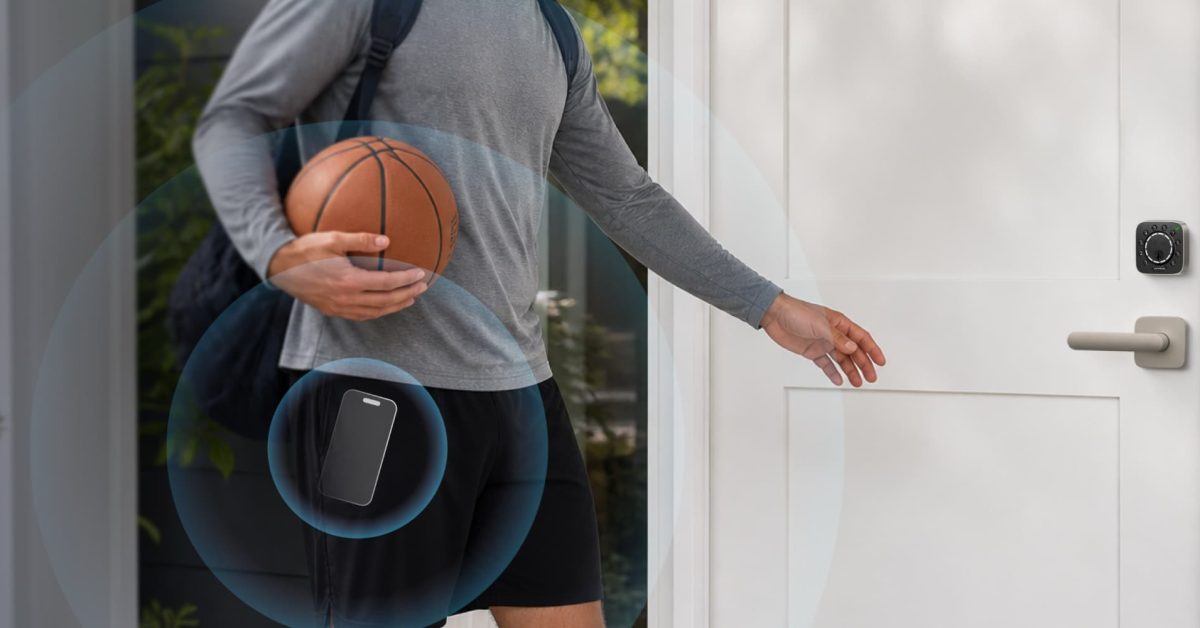
UWB operates by exchanging rapid radio pulses between two compatible chips and measuring the time-of-flight of those signals to derive precise distance — typically accurate to within centimeters rather than the meters or tens of meters that Bluetooth and GPS location circles produce. When a paired iPhone with a U1-generation or newer chip comes within the lock's UWB detection range, the Bolt Mission can initiate an unlock sequence tied directly to physical proximity rather than a geofence event.
Advertisement
Tech Pulse Daily
Get tomorrow's pulse first
Join engineers who read Tech Pulse before stand-up. Free, weekday mornings.
The lock also works within Apple Home, meaning it surfaces in the Home app, responds to Siri, and can participate in HomeKit automations. Users who have the lock paired can set up scenes or automations that respond to the lock's state — locked, unlocked, door open — alongside other HomeKit accessories. The underlying UWB unlock behavior is handled at the hardware and firmware level between the iPhone and the lock itself, with the HomeKit layer handling home-state reporting and remote access through a home hub like an Apple TV or HomePod.
HomeKit Weekly: why it matters now
Hands-free unlocking has been a recurring frustration in the smart home category. Location-based auto-unlock on previous locks worked inconsistently because GPS and Bluetooth geofencing were never designed for door-level granularity. A geofence triggers when a phone estimates it has crossed a radius, which means the lock can fire too early — while the user is still in the driveway — or too late, after they are already standing at the door waiting. The practical result was that many users turned auto-unlock off entirely and relied on app taps or keypads.
UWB addresses the geometry of the problem rather than adding another layer of software heuristics on top of an imprecise signal. If the proximity detection works as specified, the Bolt Mission could rehabilitate auto-unlock as a feature category. For Apple users already invested in HomeKit, a lock that resolves both the reliability problem and integrates natively into the Home app removes two separate objections at once.
HomeKit Weekly: who is affected
For installers and builders doing smart home integrations, the Bolt Mission introduces a lock that requires verifying UWB hardware compatibility on the client's phone, not just an app install. Homes already using a HomePod mini or Apple TV as a home hub will get the full remote access and automation feature set without additional infrastructure. Anyone running an Android-primary household will not have access to the UWB unlock feature, though the lock's other access methods remain available.
HomeKit Weekly: what to watch
The central question for the Bolt Mission is whether UWB proximity detection holds up to the same everyday conditions that defeated geofence-based auto-unlock: thick doors, metal frames, concrete walls, multi-story layouts, and the variable radio environment of a real home. UWB's centimeter-level precision is well-documented in controlled settings; how the Bolt Mission implements detection thresholds, debounce timing, and false-negative handling in production hardware is what reviewers and early users will need to stress-test.
A second area to watch is Apple's own roadmap. Apple has steadily expanded what the home architecture can do with UWB, and a lock that is natively in the Apple Home ecosystem is positioned to benefit from future platform changes — including any expansion of how CarKey or the home unlock credential stack uses spatial radio. ULTRALOQ has not announced pricing or a shipping date for the Bolt Mission in the available information, so buyers should track that announcement before making purchasing decisions based on specs alone.
Developer Action Items
- ☐ Diff the official changelog for Apple before you bump — APIs, defaults, and removed flags only.
- ☐ Install through the vendor's documented channel in staging; keep a one-command rollback and time-box the canary.
- ☐ Grep your repo for old flag names, lockfile pins, and plugin versions that the notes mark as breaking.
- ☐ Prefer the first patch cut over the day-zero tag unless you have a reason to be on the leading edge.
- ☐ If 9to5Mac did not name a region, plan, or SKU, screenshot the official availability line before you promise it to users.

Author
Dillip Chowdary
Writes Tech Bytes coverage of AI, engineering, and the tools that actually ship. Editor of Tech Pulse Daily.
Related on Tech Bytes
Advertisement