HomeView will include these Apple apps at launch
Apple confirmed nineteen first-party apps for HomeView ahead of its November 13 release, with four services requiring a paired iPhone connection.
By Dillip Chowdary • Oct 16, 2026 • Source: 9to5Mac
Apple opened pre-orders for HomeView, an entirely new product category running previously unseen software, ahead of its official retail release date of November 13. While the primary software experience on the hardware centers on voice interactions driven by Siri AI alongside customizable clock faces, the device also includes a classic Home Screen organized around an application grid. According to 9to5Mac's report, Apple confirmed the roster of first-party applications shipping on the platform on day one, outlining both built-in utilities and services that depend directly on an active smartphone link.
This breakdown details the complete launch catalog of Apple software confirmed for the device, how onboard tools interface with local network hardware, and what external audio and video services qualify for immediate access. It serves household consumers, smart home early adopters, and Apple ecosystem owners evaluating whether the hardware meets their day-to-day utility requirements before launch shipments begin arriving next month.
HomeView will include these Apple apps: what actually changed
Apple revealed nineteen dedicated first-party applications scheduled to appear on the device on day one. The default software roster includes Alarms, Audiobooks, Calendar, Classical Music, FaceTime, Find My, Home, Intercom, Messages, Music, News, Podcasts, Reminders, Safari, Settings, Timers, TV, Weather, and World Clock. Almost every listed utility arrives preinstalled directly on the unit, giving owners standard clock instruments, household intercom controls, messaging tools, and direct web browsing right out of the box.
The configuration alters how select media applications function on a dedicated smart display. Rather than operating fully as standalone software, four specific services—Audiobooks, Classical Music, News, and TV—require a tethered iPhone connection to deliver their content catalogs. While clock and communication tools run independently on the hardware, extended reading and media streaming rely directly on external handset handshakes over local network infrastructure.
HomeView will include these Apple apps: how it works
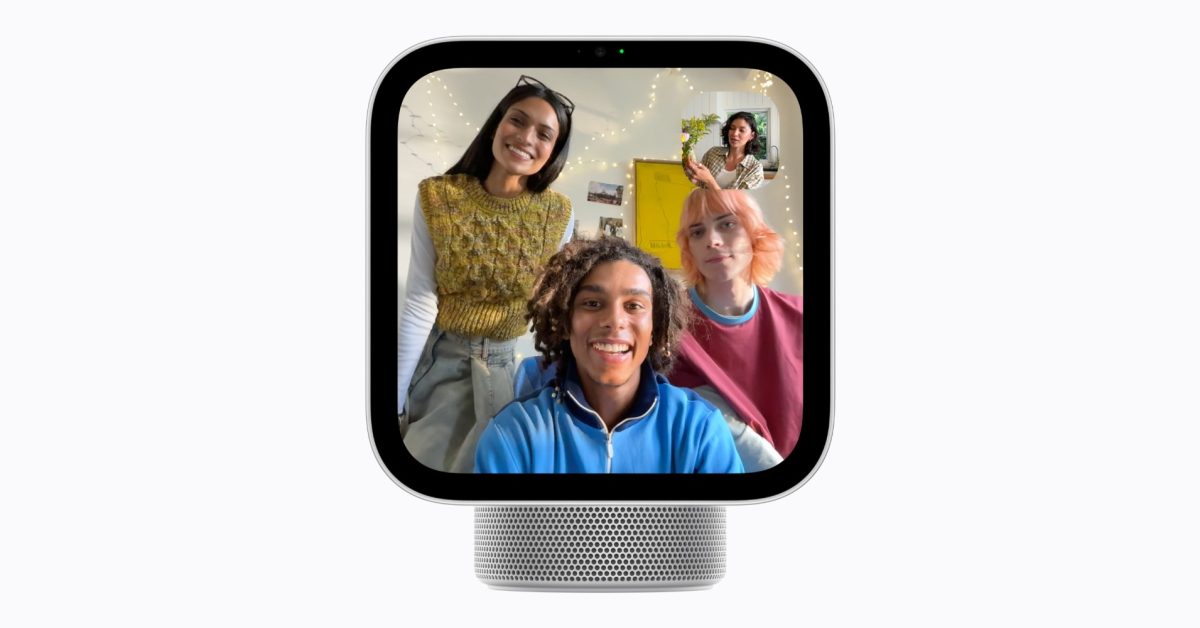
HomeView structures user interaction through a dual interface layer pairing conversational voice prompts with touch grid navigation. Users access system features through voice conversations handled by Siri AI or through widget-like customizable faces across the primary screen. Swiping into the classic Home Screen exposes standard application icons arranged in a familiar grid, allowing direct touch launches for core utilities like Reminders, Calendar, Safari, and HomeKit device toggles.
Content delivery divides local hardware execution from paired network requirements based on Apple documentation. The four tethered applications function across local Wi-Fi, drawing access and authentication through an iPhone residing on the identical home network. For software outside Apple's catalog, third-party developers can appear on day one if they currently maintain an active CarPlay version and fall under official audio or video media classifications, enabling services like Spotify to run at release.
Advertisement
Tech Pulse Daily
Get tomorrow's pulse first
Join engineers who read Tech Pulse before stand-up. Free, weekday mornings.
HomeView will include these Apple apps: why it matters now
The app lineup signals how Apple plans to balance local household processing against companion device dependencies. Equipping a desktop hardware unit with browser access, dedicated communication channels through Messages and FaceTime, and household automation hubs establishes functional overlap with both iPads and HomePod voice systems. At the same time, the reliance on a co-located iPhone for baseline media apps clarifies that the operating system remains closely tied to the company's broader mobile framework rather than functioning as a wholly detached household appliance.
Media integration rules also matter immediately for third-party platforms planning their smart display roadmaps. By borrowing CarPlay compatibility criteria for audio and video streaming, Apple creates a streamlined transition path for media providers to run on launch day without building entirely custom interface architectures from scratch. That choice provides instant access to recognized platforms while keeping the initial software environment strictly curated around qualified entertainment and household tasks.
HomeView will include these Apple apps: who is affected
Prospective buyers planning to place HomeView in family living areas face immediate functional considerations. Household members who do not carry an active iPhone or whose devices operate on separate network setups will find Audiobooks, Classical Music, News, and TV non-functional during everyday use. Because full media access requires local Wi-Fi pairing to a supported handset, communal spaces without permanent smartphone proximity will lean primarily on clock, alarm, timer, intercom, and HomeKit controls.
Users seeking dedicated visual media management are also impacted by specific software omissions at release. The launch catalog lacks a dedicated Photos application, meaning owners cannot freely browse complete image albums or scroll photo libraries directly on the screen. While Apple provides Photos faces and interactive widgets to surface pictures as background elements, direct gallery navigation remains absent from the initial Home Screen grid.
HomeView will include these Apple apps: what to watch
Attention now turns to hardware deployment performance when pre-orders begin arriving on November 13. Practical testing across varied residential Wi-Fi configurations will demonstrate how reliably tethered services like News, Audiobooks, and Apple TV establish contact with host iPhones in real-world environments. Observers will also track whether third-party streaming options, including Spotify, achieve dependable playback using their adapted media framework on early production units.
Post-release software iterations will determine whether Apple expands the standalone capabilities of the platform over time. Observers will watch future system revisions for native standalone versions of dependent media programs, expanded developer classifications beyond existing audio and video guidelines, and potential additions of omitted core utilities like a dedicated Photos browsing app to fully leverage the display hardware.
Developer Action Items
- ☐ Diff the official changelog for Apple before you bump — APIs, defaults, and removed flags only.
- ☐ Install through the vendor's documented channel in staging; keep a one-command rollback and time-box the canary.
- ☐ Grep your repo for old flag names, lockfile pins, and plugin versions that the notes mark as breaking.
- ☐ Prefer the first patch cut over the day-zero tag unless you have a reason to be on the leading edge.
- ☐ If 9to5Mac did not name a region, plan, or SKU, screenshot the official availability line before you promise it to users.
HomeView will include these Apple apps FAQ
What Apple apps are available on HomeView at launch?
The launch lineup includes Alarms, Audiobooks, Calendar, Classical Music, FaceTime, Find My, Home, Intercom, Messages, Music, News, Podcasts, Reminders, Safari, Settings, Timers, TV, Weather, and World Clock.
Which HomeView applications require an iPhone connection to work?
Audiobooks, Classical Music, News, and TV depend on an active connection to an iPhone connected to the same Wi-Fi network.
Can third-party services like Spotify run on HomeView day one?
Third-party services can run at launch if they offer an existing CarPlay version and are categorized under audio or video software.
When does Apple HomeView release and begin shipping?
HomeView is available for pre-order immediately and officially ships to customers on November 13.
Sources

Author
Dillip Chowdary
Writes Tech Bytes coverage of AI, engineering, and the tools that actually ship. Editor of Tech Pulse Daily.
Related on Tech Bytes
Gemini 4 Argon available on Google Cloud, built to help solve your business’ hardest…
Read →
Helidon 27 Introduces Restructured Programming Models and New Messaging and Data Modules
Read →
Gemini 4 Argon for Robotics
Read →
New Apple TV 4K vs previous model: Here’s everything new
Read →
Today's Tech Pulse briefing
Full briefing →
Advertisement