How to handle user, connector, and agent auth in Gemini Enterprise
Google Cloud published architecture guidelines for Gemini Enterprise's StreamAssist API, detailing three-layer authentication for custom frontends.
By Dillip Chowdary • Nov 20, 2026 • Source: Google Developers Blog
At a glance
- Product
- Gemini Enterprise StreamAssist
- Developer
- Google Cloud
- Author
- Neeraj Agrawal
- Publication date
- November 20, 2026
- Required IAM role
- Discovery Engine User
- Federated storage
- Gemini Enterprise Keystore
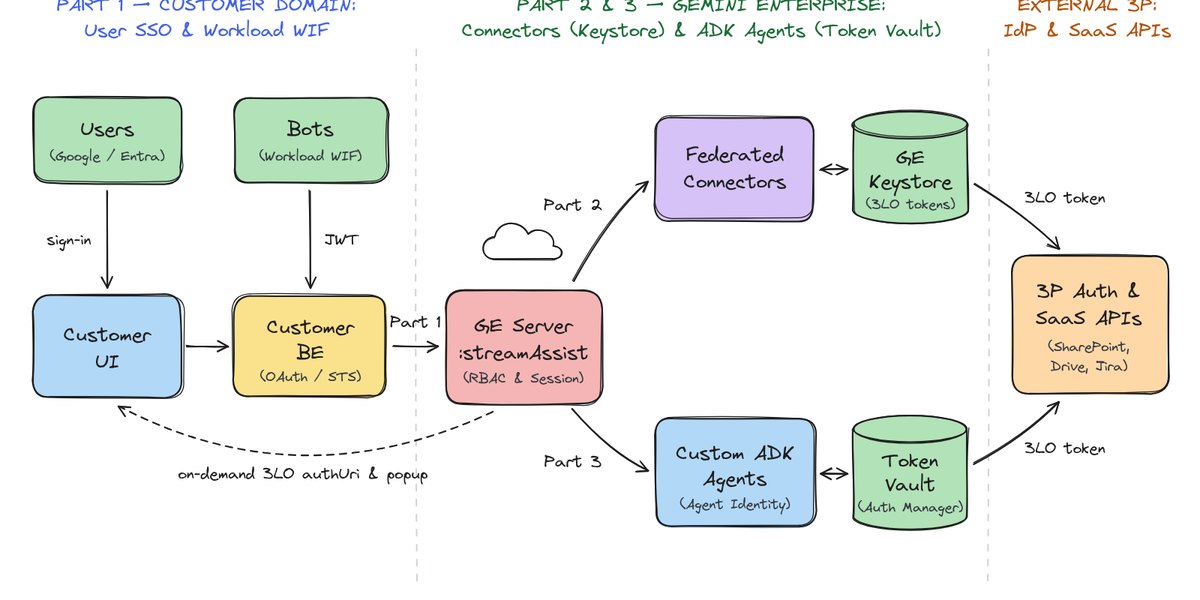
Google Cloud detailed the architectural requirements for developers building custom frontends on top of Gemini Enterprise's StreamAssist API, according to Google Developers Blog's report. While the out-of-the-box Gemini Enterprise web application automatically resolves authentication flows behind the scenes, custom enterprise interfaces embedded in corporate portals or intranets must explicitly handle three distinct authentication layers.
This architectural guide addresses enterprise developers, security engineers, and frontend teams building bespoke interfaces over Google Cloud's AI infrastructure. It breaks down the implementation steps across user-level access tokens, Federated Connector authorizations, and on-demand agent security.
01Three patterns for StreamAssist authentication
Applications interacting with the StreamAssist API must establish the identity of the calling principal using one of three keyless patterns. When an enterprise operates entirely on Google Workspace or Cloud Identity, Customer UI authenticates employees directly using Google Identity Services to retrieve an OAuth 2.0 user token scoped to the Google Cloud Platform, which Customer BE forwards as a Bearer token.
For companies using external identity providers such as Microsoft Entra ID or Okta, the implementation relies on Workforce Identity Federation. Customer BE exchanges the employee's incoming OIDC token at Google Security Token Service against the Workforce Pool Provider. This exchange produces a federated Google access token that preserves individual group memberships and document access control lists.
Shared bots, scheduled processes, or collaboration webhooks that require no user personalization rely on Workload Identity Federation instead of static service account JSON keys. Customer BE fetches an application token from the external identity provider, exchanges it at Google STS against a project-level Workload Identity Pool, and issues requests to StreamAssist under a unified machine identity.
Note: Every calling principal requires the Discovery Engine User IAM role on the GCP project, and human user flows require an active Gemini Enterprise license assigned in the Admin Console.
02Architectural comparison of identity flows
Choosing between human identity patterns and workload identity patterns defines how Gemini Enterprise enforces data isolation across queries. Pattern 1A and Pattern 1B isolate user chat history, respect document-level permissions, and allow personal connector authorization. In contrast, Pattern 1C funnels all traffic through a single service identity suited strictly for public knowledge repositories.
Advertisement
Tech Pulse Daily
Get tomorrow's pulse first
Join engineers who read Tech Pulse before stand-up. Free, weekday mornings.
| Pattern | Identity Type | Identity Provider | Token Exchange Mechanism | Target Use Case |
|---|---|---|---|---|
| Pattern 1A | Human User | Google Workspace / Cloud Identity | Google Identity Services direct token | Personalized portal with Google login |
| Pattern 1B | Human User | Microsoft Entra ID / Okta | Google STS via Workforce Identity Pool | Enterprise intranet with external IdP |
| Pattern 1C | Workload / Machine | External application IdP | Google STS via Workload Identity Pool | Shared bots, Slack, Teams webhooks |
03Federated Connector discovery and Keystore tokens
Native Federated Connectors search external enterprise systems like Google Drive, Microsoft SharePoint Online, Jira, Box, ServiceNow, and Confluence in real time. Because these systems enforce strict personal access rights, every employee must authorize each connector individually via three-legged OAuth. Gemini Enterprise manages these credentials internally, storing refresh tokens inside a managed Keystore so the customer backend never stores third-party credentials.
- Step 1 Customer UI requests the engine's available connectors from Customer BE.
- Step 2 Customer BE queries GE Server with the user's Bearer token to list attached connectors and verify credential status.
- Step 3 GE Server inspects the Keystore and either refreshes an existing token or returns an authorization URL.
- Step 4 Customer BE passes the connector list to Customer UI, which renders an Authorize Button for unconsented services.
04Consent popups and authorization code exchange
When a user clicks the Authorize Button for an unauthenticated connector, Customer UI launches the authorization URL in a popup directed to the third-party authentication server. Following authentication, the provider redirects the window to Google's GE FE Server OAuth redirect page, which relays the authorization code and state back to Customer UI through browser postMessage before closing the popup.
- Step 5 Customer UI opens the authorization URL in a popup window pointing to the third-party authorization server.
- Step 6 The third-party server redirects to Google's GE FE Server after the employee signs in and approves scopes.
- Step 7 GE FE Server transmits the callback URL with the authorization code to Customer UI via postMessage and closes the popup.
- Step 8 Customer UI passes the received callback payload to Customer BE.
- Step 9 Customer BE requests GE Server to exchange the code with the third-party token endpoint and store the refresh token in the Keystore.
- Step 10 GE Server confirms successful token storage to Customer BE.
- Step 11 Customer BE confirms authorization to Customer UI and appends the connector's data store ID to subsequent StreamAssist queries.
05On-demand per-tool OAuth for custom ADK agents
Enterprise deployments often incorporate custom Agent Development Kit agents hosted on Vertex AI Agent Engine that interface with disparate systems like Google Drive and SharePoint. Applying static OAuth configurations at the root agent registration level causes the system to block entire agent conversations upfront, demanding broad permissions before a user even triggers a relevant prompt.
Developers avoid upfront credential blocking by configuring protected sub-agent tools with GcpAuthProvider, which routes authentication through GCP Auth Manager's Token Vault. Deploying the agent with Agent Identity enabled allows StreamAssist to intercept requests and display a targeted, on-demand three-legged OAuth popup only when the specific protected tool is invoked.
Frequently asked questions
What IAM permissions are mandatory to call the StreamAssist API?
Every principal calling the StreamAssist API must have the Discovery Engine User IAM role on the Google Cloud project, and human user flows require an active Gemini Enterprise license assigned in the Admin Console.
How does Gemini Enterprise store third-party credentials for Federated Connectors?
Third-party refresh tokens from three-legged OAuth flows are held directly in Gemini Enterprise's managed Keystore, removing the need for customer backends to persist sensitive credentials in their own databases.
Why should developers avoid static root OAuth configurations on custom ADK agents?
Static configurations at the root level block the entire agent conversation upfront; using GcpAuthProvider and Token Vault with Agent Identity ensures that three-legged OAuth popups trigger only on demand when a protected tool executes.
Sources

Author
Dillip Chowdary
Writes Tech Bytes coverage of AI, engineering, and the tools that actually ship. Editor of Tech Pulse Daily.
Related on Tech Bytes
Advertisement