How to securely connect internal Cloud Run MCP servers to Gemini Enterprise
Organizations deploying StreamableHTTP MCP servers to Cloud Run frequently face immediate networking blocks when turning on internal-only ingress rules.
By Dillip Chowdary • Nov 20, 2026 • Source: Google Developers Blog
At a glance
- Product
- Gemini Enterprise MCP integration
- Platform
- Google Cloud Run
- Author
- Neeraj Agrawal
- Publication date
- November 20, 2026
- Gateway mode
- Agent-to-Anywhere
- Private access VIP
- 199.36.153.8/30
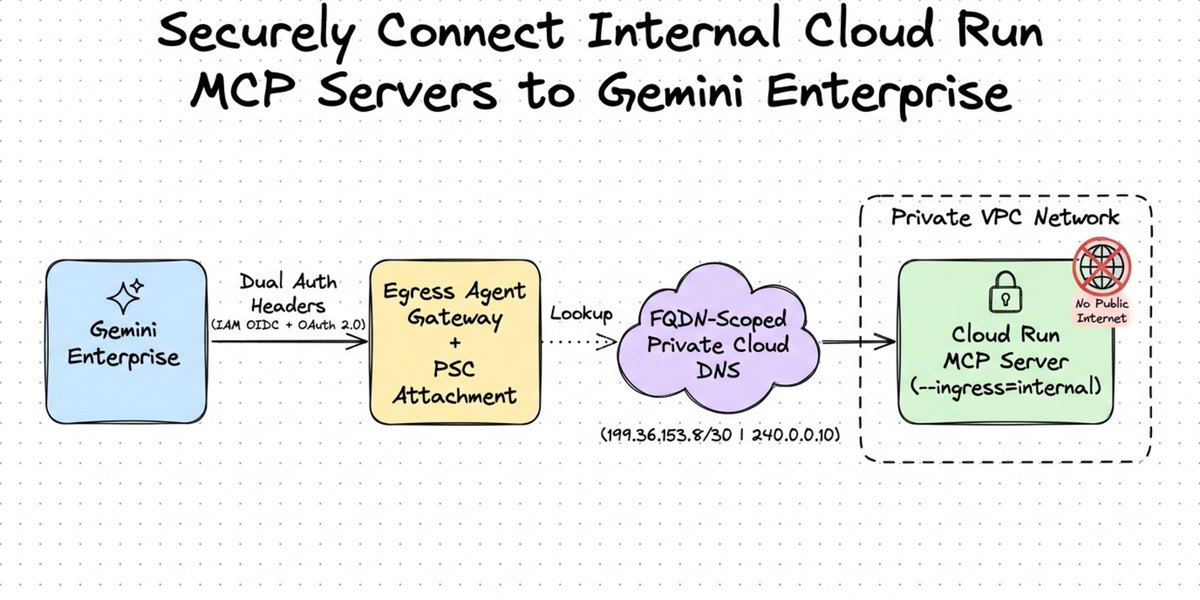
Google released an architectural implementation enabling enterprises to connect Gemini Enterprise privately to internal StreamableHTTP Model Context Protocol servers hosted on Google Cloud Run, according to Google Developers Blog's report. The deployment architecture combines Google Cloud Egress Agent Gateway, Private Service Connect network attachments, fully qualified domain name scoped Private Cloud DNS, and dual-layer authorization. Neeraj Agrawal, a forward deployed engineer at Google Cloud, detailed the enterprise setup on November 20, 2026.
This report examines how platform engineers, network architects, and cloud security teams can bridge tenant-managed Gemini Enterprise environments to internal-only serverless workloads. Moving custom AI agent tools from prototype to production requires preventing public internet ingress, preventing domain-wide DNS hijacks across Shared Virtual Private Clouds, and validating caller identity at both infrastructure and user tiers. The guidance provides reference implementation scripts on GitHub for reproducible multi-region configurations.
01Internal ingress and shared network collisions
Organizations deploying StreamableHTTP MCP servers to Cloud Run frequently face immediate networking blocks when turning on internal-only ingress rules. Enabling internal ingress forces Cloud Run to reject standard public web requests from Gemini Enterprise with an HTTP 404 response at Google's edge network. Production systems require traffic to originate strictly within an enterprise Virtual Private Cloud network while remaining invisible to the open internet.
Large enterprise deployments frequently operate hundreds of Cloud Run services managed through a centralized Shared Hub VPC. Overriding the entire dot run dot app wildcard domain inside Private Cloud DNS breaks resolution and network routing for every unrelated Cloud Run service on that shared network. Infrastructure teams must therefore resolve specific tool endpoints privately without polluting enterprise routing domains.
Dual-layer authentication adds another architectural constraint for production AI agent integration. Every tool call must independently verify that the network request comes from an authorized Gemini Enterprise tenant instance, while application code inside the container must validate the signed-in human user before performing actions. Meeting all three requirements requires coordinated network bridges across tenant boundaries.
02Two-bridge private virtual private cloud routing
Because Cloud Run operates as a serverless service rather than a Compute Engine virtual machine with a fixed subnet IP, connecting Gemini Enterprise requires a two-bridge routing topology. Bridge one links a regional Egress Agent Gateway operating in Agent-to-Anywhere mode directly into a regional subnet using a Private Service Connect network attachment. This mechanism injects a managed network interface into regions like us-central1 or europe-west1 without assigning public IP addresses or requiring inbound firewall openings.
Bridge two forwards the packet from the internal VPC subnet to Google's serverless Cloud Run frontend so internal ingress policies recognize the origin network. Platform architects can implement bridge two using either standard Subnet Private Google Access or a Global PSC Endpoint for Google APIs. The global endpoint approach injects a dedicated single-host internal route into the VPC, making it suitable for hardened networks lacking default internet routes.
| Routing mechanism | Target virtual IP range | Route requirement | Extra endpoints needed |
|---|---|---|---|
| Subnet Private Google Access | 199.36.153.8/30 | Default 0.0.0.0/0 route | Zero extra VPC endpoints |
| Global PSC Endpoint for Google APIs | 240.0.0.10 | Injected /32 internal route | Internal forwarding rule targeting all-apis |
03Exact domain matching in private cloud dns
Advertisement
Tech Pulse Daily
Get tomorrow's pulse first
Join engineers who read Tech Pulse before stand-up. Free, weekday mornings.
When an Egress Agent Gateway handles a tool call targeting a Cloud Run MCP server URL, it resolves the destination hostname once before routing the packet into the private VPC. Relying on public DNS resolution directs traffic to public IP addresses, causing an HTTP 502 timeout because Private Service Connect network attachments do not route out to the public internet.
Engineers resolve this failure by creating a Private Cloud DNS managed zone scoped strictly to the exact fully qualified domain name of the MCP service rather than a wildcard record. Cloud DNS applies longest-suffix matching, ensuring that peering this specific domain with the Agent Gateway leaves all other Cloud Run hostnames across the Shared VPC resolving through standard paths.
During the HTTPS handshake, the Agent Gateway establishes a connection to the private virtual IP while preserving the original service hostname inside the TLS Server Name Indication and HTTP Host header. Cloud Run's serverless infrastructure reads these headers at ingress to dispatch the request to the exact container instance.
04Dual-header infrastructure and user identity validation
Gemini Enterprise enforces identity by attaching two independent authorization headers to every outgoing MCP request. The infrastructure layer utilizes the X-Serverless-Authorization header, which carries a Google-signed OpenID Connect ID token representing the project's Gemini Enterprise service agent. Cloud Run IAM validates this token against the Cloud Run Invoker role at the infrastructure edge and strips the header before passing the packet into the container.
The application layer delivers the end-user OAuth 2.0 access token intact inside the standard Authorization Bearer header. Custom middleware within the MCP server inspects the bearer token, verifies its signature against Google OAuth endpoints, and enforces user-specific data boundaries before executing backend logic. Requests missing valid bearer tokens return an HTTP 401 response from the application container.
Note: Cloud Run IAM strips the X-Serverless-Authorization header at the edge after successful verification, preventing downstream container code from needing to parse infrastructure service agent signatures.
05Five-step deployment workflow across cloud console
Google outlines a five-stage implementation workflow supported by automation scripts and Cloud Console configuration procedures:
- Lock down Cloud Run and grant service invoker access Deploy the StreamableHTTP MCP server with internal-only ingress and IAM authentication, then grant the Cloud Run Invoker role to the project Gemini Enterprise service agent.
- Provision the VPC, PSC Network Attachment, and Egress Agent Gateway Enable Private Google Access on the subnet, create an auto-accepting Private Service Connect network attachment, initialize an Egress Agent Gateway in Agent-to-Anywhere mode, and bind egress authorization policies.
- Configure FQDN-scoped Private Cloud DNS and DNS peering Create a private managed zone attached to the VPC for the exact service hostname, map the A record to the private virtual IP, and establish DNS peering on the Agent Gateway.
- Bind the Agent Gateway and register the MCP server in Gemini Enterprise Navigate to Security Configuration in the Gemini Enterprise console, bind the gateway, register the custom MCP server with OAuth 2.0 client credentials, and enable Actions mode.
- Verify private MCP calls in Cloud Logging Run a test prompt in the Gemini Enterprise interface to verify in Cloud Logging that tool discovery, initialization, and execution requests pass both IAM and OAuth 2.0 validation checks.
gcloud run deploy mcp-server --no-allow-unauthenticated --ingress internal```bash
gcloud projects add-iam-policy-binding PROJECT_ID --member="serviceAccount:service-PROJECT_NUMBER@gcp-sa-gemini.iam.gserviceaccount.com" --role="roles/run.invoker"
```
PSC endpoint VIP: 240.0.0.10Frequently asked questions
Why do public calls from Gemini Enterprise fail when Cloud Run ingress is set to internal?
When internal ingress is enabled on Cloud Run, all traffic originating from the public internet is blocked at Google's edge with an HTTP 404 response.
How does FQDN-scoped DNS prevent routing issues in a Shared VPC?
Private Cloud DNS uses longest-suffix matching, so mapping only the single fully qualified domain name keeps all other services resolving normally across the shared network without overriding the wildcard domain.
What two headers handle security on each MCP request?
The X-Serverless-Authorization header carries an OIDC token verified by Cloud Run IAM at the edge, while the Authorization Bearer header passes the user OAuth 2.0 token to container middleware.
Sources

Author
Dillip Chowdary
Writes Tech Bytes coverage of AI, engineering, and the tools that actually ship. Editor of Tech Pulse Daily.
Related on Tech Bytes
Advertisement