Indie App Spotlight: ‘Hoardware’ makes it easy to track your Apple device
Hoardware launched on the App Store as a free iOS 17 tracking utility that catalogs Apple hardware, serial numbers, and firmware versions without any fees.
By Dillip Chowdary • Oct 17, 2026 • Source: 9to5Mac
Apple collectors managing multiple generations of devices now have an inventory utility called Hoardware, built to catalog hardware specifications, software builds, and identifying information in a centralized interface. As detailed in 9to5Mac's report featured in Michael Burkhardt's weekly Indie App Spotlight series on October 17, 2026, the tool serves as an organizational hub for personal collections. The utility launched on the App Store as a free download for devices running iOS 17 and later, operating without advertising banners, paid subscriptions, or in-app purchases.
This report examines how Hoardware functions, what organizational tools it delivers, and how collectors can deploy it to track legacy hardware alongside current daily devices. Designed for hobbyists archiving vintage iPhones as well as everyday consumers with multi-device setups, the software provides structured fields that manual lists omit. By analyzing its intake mechanisms, software update tracking, and cloud synchronization, this overview details everything owners need to understand before establishing their digital equipment records.
Indie App Spotlight: what actually changed
The arrival of Hoardware transforms how hardware owners document their Apple devices by replacing unstructured spreadsheets with an automated catalog. Instead of manually entering technical specifications for every piece of gear, users navigate a comprehensive pre-populated list and select their equipment. The application automatically populates corresponding hardware specifications, model details, and official product imagery directly into the entry. Users then add unique identifiers like serial numbers, installed operating system releases, and custom notes, establishing a standardized inventory for extensive collections without tedious manual typing.
In addition to individual item logging, the application incorporates a dedicated coverage dashboard that maps software distribution across an entire hardware assortment. This coverage view aggregates registered units to display exactly how many devices remain on each specific iOS build, giving collectors immediate insight into their software ecosystem. Furthermore, Hoardware establishes an active notification channel for firmware. The app monitors official software updates for registered devices and sends direct alerts when new versions drop, informing users faster than standard Apple device notifications typically communicate them.
Indie App Spotlight: how it works
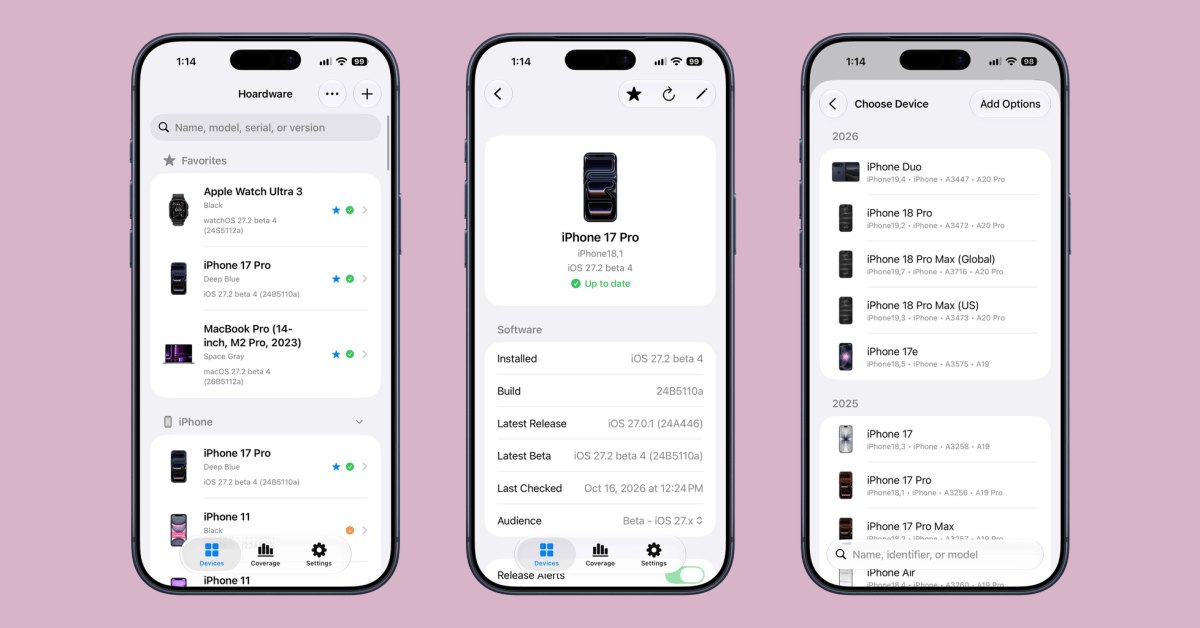
Setting up an inventory within Hoardware follows a streamlined workflow centered on a prebuilt device database. Users begin by scrolling through a comprehensive product directory covering various Apple hardware generations. Once the user taps the appropriate model, the application automatically inputs primary specifications and displays reference hardware imagery on the device card. From there, owners input personal hardware attributes, including physical serial numbers, exact installed software versions, and custom notations. This structured entry sequence keeps technical specifications consistent across different product eras without requiring external research.
Managing large inventories is facilitated by organization features designed for quick visual retrieval. Collectors can designate specific hardware units as favorites, allowing highlighted items to stand out at the top of a crowded list rather than becoming lost within dozens of entries. To protect user data across devices, Hoardware integrates native iCloud synchronization, seamlessly mirroring collection records, custom notes, and favorite designations across the user's connected Apple devices. The application requires iOS 17 or later, ensuring full compatibility with modern system frameworks while maintaining fluid performance.
Advertisement
Tech Pulse Daily
Get tomorrow's pulse first
Join engineers who read Tech Pulse before stand-up. Free, weekday mornings.
Indie App Spotlight: why it matters now
For technology archivists, tracking operating system versions has become as critical as documenting physical casing condition. Many vintage devices, particularly early iPhone releases, possess unique value when kept on specific legacy firmware iterations. Updating a vintage unit often permanently alters its historical software state. Hoardware directly addresses this preservation requirement through its coverage tab, providing a centralized summary showing exactly how many devices run each iOS release. This software breakdown helps preservationists track their firmware distribution accurately and prevent unintended updates across rare historical hardware.
The utility also stands out by adopting an accessible software distribution model on the App Store. While numerous utility applications lock core features like cloud synchronization, unlimited catalog entries, or notifications behind recurring subscription fees, Hoardware provides its entire toolkit entirely free. There are no advertising placements, no in-app purchases, and no subscription tiers. This clean distribution structure allows hobbyists to catalog extensive collections without facing paywalls or worrying about recurring costs, establishing a reliable archival platform that functions within Apple's native iCloud ecosystem.
Indie App Spotlight: who is affected
The primary group benefiting from Hoardware consists of dedicated Apple hardware collectors and technology archivists. Users who maintain large collections of vintage iPhones, varied model revisions, and legacy accessories can organize their holdings with consistent technical precision. By providing designated input fields for model numbers, serial numbers, and custom notes alongside automatic device photography, the app consolidates fragmented paperwork into a portable database. Collectors can flag priority units as favorites to locate specific exhibits instantly, replacing ad-hoc notes with a structured index accessible on their primary daily device.
Beyond serious collectors, regular consumers and multi-device household managers gain significant practical benefits from the app's software tracking features. Users maintaining multiple family devices, secondary testing phones, or newly purchased hardware can record their active fleet to receive prompt software update alerts. Because Hoardware alerts users to incoming updates faster than standard system update dialogues typically appear on idle devices, owners can apply critical security patches or firmware releases without delay. Coupled with automatic iCloud syncing, users across households can inspect their equipment records without creating third-party accounts.
Indie App Spotlight: what to watch
The ongoing effectiveness of Hoardware will largely depend on the developer's commitment to maintaining its internal device database as Apple releases new hardware. Whenever Apple introduces new iPhone models, revised chipsets, or refreshed product lines, the application must quickly incorporate those specifications into its pre-populated selection list. In addition, the catalog's visual appeal relies on automatic device photography, requiring updated imagery for every new release. Ensuring comprehensive coverage for older and newer devices alike will determine whether the application remains the preferred inventory solution for Apple collectors.
Users should also track the performance of Hoardware's update notification feature across upcoming software rollouts. Maintaining reliable update alerts that outpace Apple's native notification system requires continuous background monitoring as Apple adjusts its distribution servers. Furthermore, as the user base expands, observers will watch whether the developer maintains the current completely free distribution model without ads or subscriptions. For now, running on iOS 17 and later with seamless iCloud synchronization, Hoardware establishes an accessible tracking tool that gives Apple enthusiasts complete control over their hardware inventories.
Developer Action Items
- ☐ Verify the claim on the official Apple / iOS page (or 9to5Mac), not from this recap alone.
- ☐ Name the surface that moved — API, policy, model, hardware, or commercial terms — before you Slack the thread.
- ☐ Assign one owner a day to read the primary material and decide: this-sprint, this-quarter, or noise.
- ☐ Do not change production on day-one coverage. Watch the vendor changelog and one independent write-up first.
Indie App Spotlight FAQ
How much does Hoardware cost on the App Store?
Hoardware is completely free to download on the App Store. It operates without advertising, in-app purchases, or subscription fees.
What are the system requirements for running Hoardware?
The application requires a device running iOS 17 or later. It syncs the user's inventory across hardware using personal iCloud storage.
How does Hoardware assist with tracking vintage iPhone collections?
The app provides a pre-populated device list that automatically inputs specifications and photos, while users log serial numbers, custom notes, and exact iOS versions. A coverage tab then shows how many devices remain on each specific software release.
Can Hoardware notify users about incoming Apple software updates?
Yes, Hoardware includes an update notification system that tracks new software releases for registered hardware. It notifies users when updates drop, often delivering alerts faster than Apple's native system notifications.
Sources

Author
Dillip Chowdary
Writes Tech Bytes coverage of AI, engineering, and the tools that actually ship. Editor of Tech Pulse Daily.
Related on Tech Bytes
Advertisement