Indie App Spotlight: ‘Milton’ lets you turn your old iPad into a home
Developer Josh launched Milton to turn older iPads running iPadOS 17 into family home dashboards, offering a $14.99 lifetime iCloud Family license.
By Dillip Chowdary • Nov 14, 2026 • Source: 9to5Mac
Independent developer Josh released Milton, a dedicated home dashboard application designed to turn older iPads into centralized household smart displays without recurring subscription fees. Detailed in 9to5Mac's report, the software requires iPadOS 17 or later and targets households looking for an alternative to Apple's newly launched HomeView hardware. It establishes a fixed shared screen for daily logistics across the entire family.
This breakdown examines Milton's interface modules, chore automation tools, cookbook parsing capabilities, hardware requirements, and one-time licensing model. It is written for Apple ecosystem households, parents organizing daily domestic routines, and users evaluating whether to repurpose idle tablet hardware instead of purchasing dedicated smart screens.
01Repurposed hardware and smart display alternatives
Apple introduced its dedicated HomeView smart display this week to serve as an ambient home control station, prompting renewed focus on central household displays. Rather than requiring users to purchase specialized consumer hardware, Milton transforms idle tablets into persistent wall or counter displays. The setup requires only an older tablet capable of running iPadOS 17 or higher.
The software originated from the developer's personal need to coordinate home logistics between a software engineer and an oncology pharmacist partner. Rather than purchasing a dedicated Skylight calendar display or paying recurring annual software fees, they placed an existing household iPad into a magnetic case and mounted it directly to their refrigerator.
Milton operates as a static, shared hub for household members moving through common living areas. It avoids the hardware cost of newly marketed tabletop appliances while utilizing Apple hardware that families already keep in storage drawers.
02Modular dashboard tiles and remote synchronization
Milton's primary interface consists of a modular grid where families organize information across customizable widgets. The layout presents immediate daily details including calendar entries, daily chores, shared shopping lists, weather forecasts, a live clock, a digital photo frame, and a general to-do list. Users can arrange these components to keep the most urgent household schedules front and center.
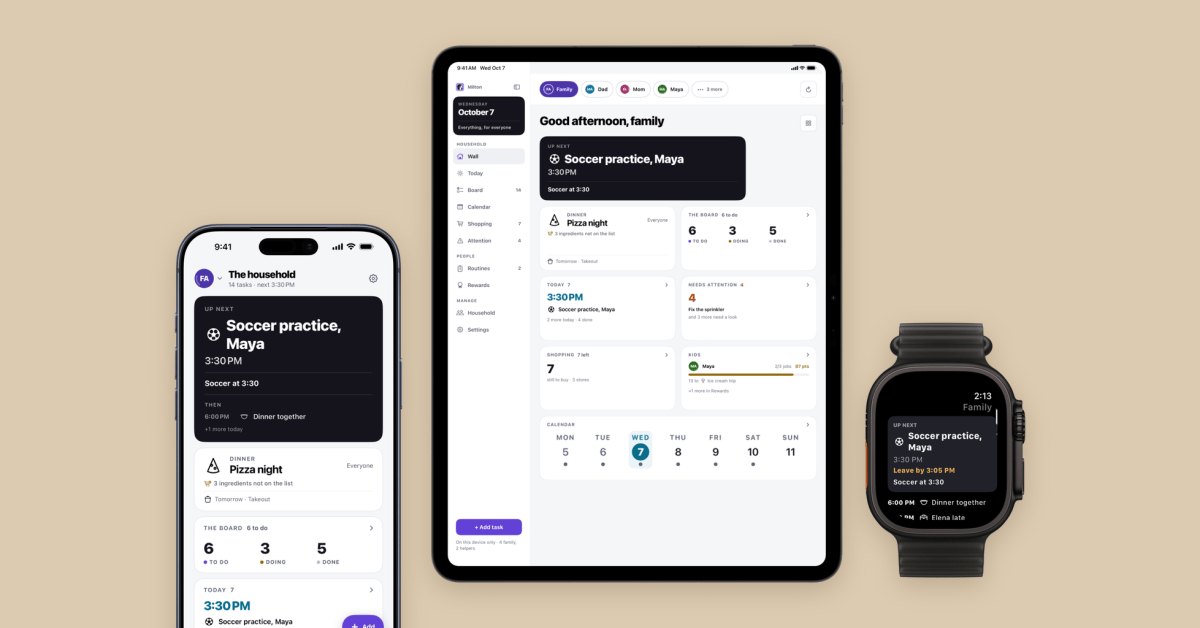
Every widget configured on the central tablet automatically populates the screen for anyone standing in the room. This format keeps schedule coordination visible without requiring individual family members to check personal notifications or unlock private devices during busy morning routines.
The software also bridges the physical kitchen display with individual mobile devices outside the house. Household members can sync the entire dashboard configuration directly to their iPhones, allowing parents to review chore statuses, check shopping lists, or update schedules remotely while away from home.
Advertisement
Tech Pulse Daily
Get tomorrow's pulse first
Join engineers who read Tech Pulse before stand-up. Free, weekday mornings.
03Family chore points and parental verification
Milton includes an integrated task incentive system designed to encourage children to complete household routines and daily chores. Parents assign specific tasks to individual children, who earn cumulative points as they finish each item. Household administrators establish custom target goals, allowing children to unlock predetermined family rewards after collecting enough points.
The platform prevents children from prematurely claiming rewards through an explicit parental approval mechanism. While children can mark designated tasks complete on the screen, points remain uncredited until a parent signs off on the finished work. This requirement ensures that children actually complete their duties rather than simply tapping interface buttons.
By combining visual task tracking with verified milestone incentives, the system converts chore tracking into an objective daily game. Families can run recurring daily habits on the shared board without relying on paper chore charts or oral reminders.
04Recipe photo parsing and grocery lists
The application functions as an active kitchen assistant by digitizing traditional print cooking materials directly through the tablet's camera. Users photograph physical cookbook pages, and Milton parses the captured text to generate structured, step-by-step interactive cooking guides on the kitchen counter display.
When a captured recipe requires ingredients not currently available in the kitchen, Milton extracts those missing components immediately. Users can append those specific items directly to the shared family grocery list with a single action, keeping kitchen inventory synchronized with meal plans.
This workflow eliminates manual transcription between physical books, mobile note applications, and grocery reminders. The system keeps dinner planning, recipe instructions, and shopping preparation linked within the same visual dashboard interface.
05One-time pricing tiers and family sharing
Milton distributes its foundational organizer tools through a free tier available on the App Store. The initial download includes the core dashboard grid, basic tile layouts, and local organizational tools without requiring upfront payment, allowing users to test refrigerator mounting and daily utility without financial commitment.
Unlocking multi-user coordination, multi-device synchronization, and personal device sharing requires purchasing one of two lifetime licenses. Milton Individual costs $4.99 as a one-time purchase, while Milton Family costs $14.99 as a single payment that connects directly to the user's Apple iCloud Family Sharing group.
The one-time licensing model deliberately avoids annual subscription charges common among competing organizer applications. Families can maintain connected iPhone and iPad installations across multiple household members without accruing recurring monthly overhead.
Indie App Spotlight FAQ
What operating system does Milton require?
Milton requires iPadOS 17 or later to run on older iPads, allowing them to function as home dashboards.
How much does Milton cost?
Milton is free to download for core single-device features, while a multi-device individual license costs a one-time fee of $4.99 and a family license costs a one-time fee of $14.99.
How does the chore system ensure tasks are finished?
Milton includes a parental sign-off requirement that prevents points from being awarded until a parent confirms the chore was actually completed.
How does Milton handle cookbook recipes?
Users take photos of physical cookbook pages, which Milton parses into step-by-step guides while automatically adding missing ingredients to the shared shopping list.
Sources

Author
Dillip Chowdary
Writes Tech Bytes coverage of AI, engineering, and the tools that actually ship. Editor of Tech Pulse Daily.
Related on Tech Bytes
Advertisement