Indie App Spotlight: ‘Pumpkin Lights’ adds a fun jack-o-lantern to your
Pumpkin Lights brings a free, ray-traced jack-o-lantern to the macOS Sonoma menu bar, letting users toggle dark mode and run Shortcuts by pulling a 3D cord.
By Dillip Chowdary • Oct 31, 2026 • Source: 9to5Mac
An independent Mac developer has launched Pumpkin Lights, a dedicated menu bar utility that brings a ray-traced jack-o-lantern to the top of macOS screens. Designed for Halloween, the free tool toggles between light and dark mode by pulling a hanging decoration. As reported in 9to5Mac's report, the application provides a tactile replacement for standard Control Center toggles.
This report examines the utility's mechanics, automation triggers, physical simulations, and compatibility requirements for Mac users seeking interactive desktop customization. Built for everyday operators and power users alike, the coverage explores how the software uses real-time lighting to transform routine system switching into an engaging interface element. It details the complete feature set so readers can evaluate and configure the software directly.
Indie App Spotlight: what actually changed
The software transforms the static Mac menu bar by introducing an interactive three-dimensional jack-o-lantern that hangs directly from the top edge of the display. Unlike conventional menu bar items that rely on flat monochrome icons, the utility renders a real-time ray-traced pumpkin model complete with an internal candle whose glow passes through a carved face. The application expands upon the developer's prior Festivas menu bar release from the previous year, offering users options to grow distinct pumpkin styles, select four color variants, and customize the hanging cord.
In addition to seasonal jack-o-lantern designs, the utility includes an optional hanging light bulb model that provides the same functional behavior for year-round desktop use. Both objects incorporate dedicated physics simulation, enabling users to click, swing, spin, and toss the suspended items across the screen. This dynamic behavior changes how system state is modified, replacing hidden Control Center sliders with a tangible object. By modeling physical cord movement and surface illumination, the release upgrades a routine interface interaction into an active, tactile simulation.
Indie App Spotlight: how it works
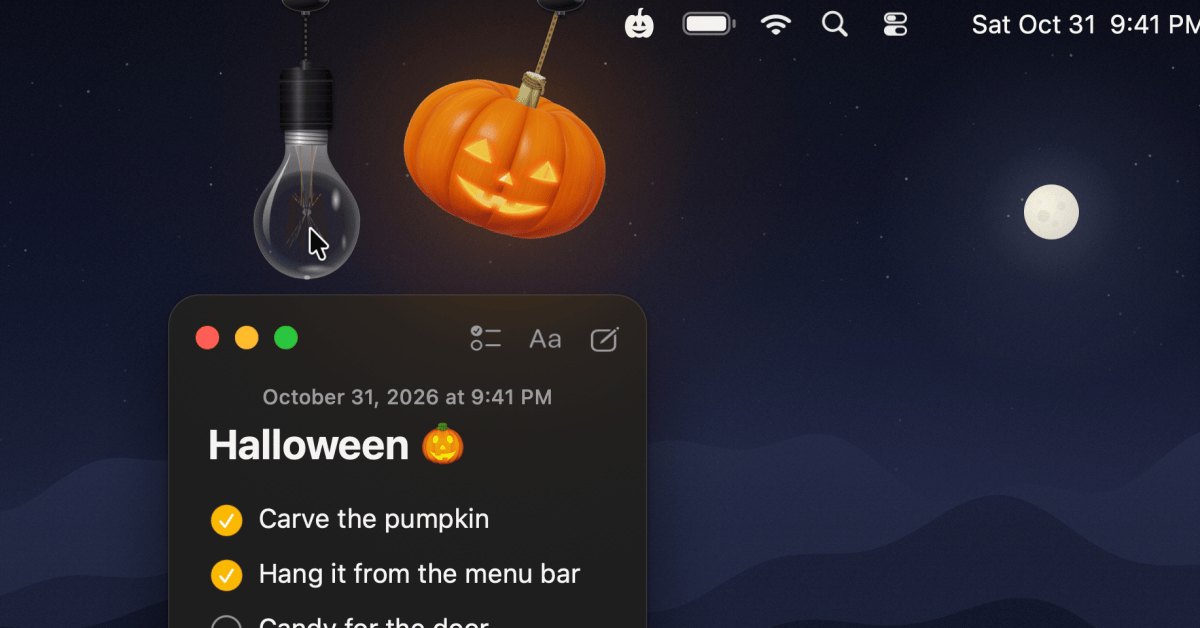
The primary mechanism relies on cursor interaction with the rendered cord or lantern, which immediately toggles macOS between light mode and dark mode by default. Ray tracing calculates dynamic light reflection as the model moves, casting candle illumination across the pumpkin while the cord reacts to cursor movement. Explaining the design philosophy, the developer stated that toggling display appearance is something users do daily without thinking, yet it remains buried in Control Center or System Settings. The developer wanted an interaction that feels like touching a real object.
Beyond switching appearance modes, the utility offers alternative triggers that map to different system functions when the cord is pulled. Users can configure the application to launch a preferred program, navigate to a chosen website, prevent the Mac from sleeping, mute sound, run a terminal command, or execute a customized macOS Shortcut. The developer spent significant time refining cord movement and surface light distribution, ensuring the suspended item continues to feel responsive after extensive use, whether configured as a holiday pumpkin or an everyday light bulb.
Advertisement
Tech Pulse Daily
Get tomorrow's pulse first
Join engineers who read Tech Pulse before stand-up. Free, weekday mornings.
Indie App Spotlight: why it matters now
The release illustrates how independent developers are reviving tactile software design on modern desktop systems. While operating systems increasingly hide controls behind menus and flat icons, this utility treats routine adjustments as interactive physical events. By employing real-time ray tracing and active physics simulations on modern Mac hardware, the app proves that menu bar tools can deliver engaging visual feedback without incurring monetary costs. It gives users immediate, enjoyable access to routine toggles that are typically buried several clicks deep within native system preference panels.
The utility also addresses seasonal desk personalization by pairing festive visual themes with functional automation capabilities. Instead of acting as an ephemeral holiday novelty discarded after October, the software supports practical workflows through custom shell commands and Shortcuts integration. The inclusion of the alternate light bulb design ensures the tool remains practical long after Halloween concludes. By focusing on detailed cord momentum and real-time candle illumination, the developer created a lightweight desktop tool engineered to remain engaging rather than becoming an annoyance during daily computing sessions.
Indie App Spotlight: who is affected
The software is targeted directly at Mac owners operating macOS 14 Sonoma or later versions of Apple's desktop operating system. Users on supported hardware gain access to the utility at zero financial expense, with no subscription tiers or locked features. However, individuals running older versions of macOS cannot install the software, establishing a clear compatibility threshold. For eligible users, the tool offers a customized visual accent for external monitors and built-in laptop screens without requiring administrative modifications to core system files.
Mac power users who frequently execute custom shell scripts, trigger automated Shortcuts, or adjust display modes will find the application particularly useful. Users who prefer strictly static menu bar layouts can swap the pumpkin model for the more subdued light bulb or adjust rope properties to minimize visual distractions. Because the software is provided as a free standalone utility directly from the developer's website, it represents an accessible workflow addition for everyday Mac users seeking festive seasonal aesthetics paired with genuine daily operating system functionality.
Indie App Spotlight: what to watch
Mac desktop users can follow the developer on Twitter and check the official download website for future software version updates, performance refinements, and potential new three-dimensional models. Given that the utility already supports both the Halloween jack-o-lantern and the standard hanging light bulb, future releases might introduce additional seasonal items or expanded customization options for rope physics and candle lighting. Users should watch for any refinements to shortcut execution, expanded custom command triggers, and extended controls over model interactions as user feedback accumulates.
The release also sets a precedent for how independent Mac utilities can blend interactive physics simulations with standard operating system tools. Moving from the earlier Festivas app to Pumpkin Lights showcases an ongoing experimentation with interactive desktop toys that double as practical system shortcuts. Those interested in trying the tool can download it directly, confirm their system runs macOS 14 Sonoma or later, and test out its various trigger actions, four color choices, and physics-based models directly from their Mac menu bar.
Developer Action Items
- ☐ Verify the claim on the official Cursor / macOS page (or 9to5Mac), not from this recap alone.
- ☐ Name the surface that moved — API, policy, model, hardware, or commercial terms — before you Slack the thread.
- ☐ Assign one owner a day to read the primary material and decide: this-sprint, this-quarter, or noise.
- ☐ Do not change production on day-one coverage. Watch the vendor changelog and one independent write-up first.
Indie App Spotlight FAQ
How much does Pumpkin Lights cost to download?
Pumpkin Lights is completely free to download directly from the developer's website. There are no paid tiers or in-app purchases required.
What are the system requirements to run Pumpkin Lights on a Mac?
The utility requires a Mac running macOS 14 Sonoma or later. Macs running earlier versions of macOS are not supported.
What actions can Pumpkin Lights trigger besides toggling dark mode?
In addition to switching between light and dark mode, users can configure the app to open an application or website, keep the Mac awake, mute sound, run a terminal command, or launch a macOS Shortcut.
Can the appearance of the hanging decoration be customized?
Yes, users can choose between multiple pumpkin designs, pick from four different color variants, customize the hanging rope, or switch to an alternate hanging light bulb model.
Sources

Author
Dillip Chowdary
Writes Tech Bytes coverage of AI, engineering, and the tools that actually ship. Editor of Tech Pulse Daily.
Related on Tech Bytes
Advertisement