Instagram now lets you edit your stories after you post them
Instagram now lets creators edit text, stickers, and music on published Stories within a 15-minute window while preserving all views, likes, and replies.
By Dillip Chowdary • Nov 19, 2026 • Source: The Verge
At a glance
- Platform
- Announcement leader
- Adam Mosseri
- Initial discovery
- Spotted by Alessandro Paluzzi in April
- Editing window
- Up to 15 minutes after sharing
- Preserved metrics
- Views, likes, and replies
- New creative tools
- Sticker sheets, fonts, blur, and gradient backgrounds
Instagram has released an update that permits users to edit published Stories without losing existing views, likes, or replies, as detailed in The Verge's report. The social platform now allows account holders to modify text, music, stickers, and drawings directly on live posts. Instagram head Adam Mosseri confirmed that these adjustments remain available for up to 15 minutes immediately following the initial publication.
This report outlines the operational mechanics of the Story editor, the preservation of engagement metrics, and newly introduced creative tooling across the mobile application. The breakdown is designed for social media managers, daily creators, and casual users who need to correct typos or update media assets without resetting their audience reach.
01Post adjustments within fifteen minutes
Instagram head Adam Mosseri announced that the platform now supports direct edits to Stories for up to 15 minutes after they go live. Users can alter text elements, swap or include background music, place stickers, and adjust custom drawings without publishing an entirely new update. The feature addresses minor oversights that previously required deleting content right after distribution.
The formal rollout follows an earlier discovery by reverse engineer Alessandro Paluzzi, who first identified Instagram testing the editing capability in April. The finalized implementation restricts retroactive modifications strictly to the quarter-hour timeframe following publication. Once this post-upload threshold passes, the shared media locks into its existing state across the network.
Note: In-place modifications to text, music, stickers, and drawings remain restricted to the initial 15 minutes following publication. After this operational window expires, creators can no longer alter active Story assets without removing the upload entirely from the platform.
02Deletion avoidance and engagement preservation
Prior to this release, fixing an error on a published Story required taking down the original asset and starting the upload sequence from scratch. This manual deletion wiped out all accumulated views, direct replies, and viewer reactions tied to the post. Creators facing minor spelling errors or missing music tracks were forced to sacrifice audience interaction to make routine corrections.
The updated system keeps all audience responses intact while the author applies changes to the active post. Retaining incoming messages, likes, and viewer statistics eliminates the distribution penalty historically associated with fixing minor mistakes. Creators can now refine published media without compromising the reach accrued during the initial minutes of distribution.
| Story action | Previous workflow | Updated workflow | | Post modification | Delete and repost | In-place editing | | Interaction history | Views, likes, and replies lost | Engagement fully preserved | | Modification window | Unrestricted deletion | 15 minutes after sharing |
By shielding metrics from erasure, the update alters the standard workflow for routine content maintenance on the network. Accounts that rely on early view counts and engagement data can quickly revise graphic elements while preserving every response. The system balances editing flexibility with data continuity for active publishers.
Advertisement
Tech Pulse Daily
Get tomorrow's pulse first
Join engineers who read Tech Pulse before stand-up. Free, weekday mornings.
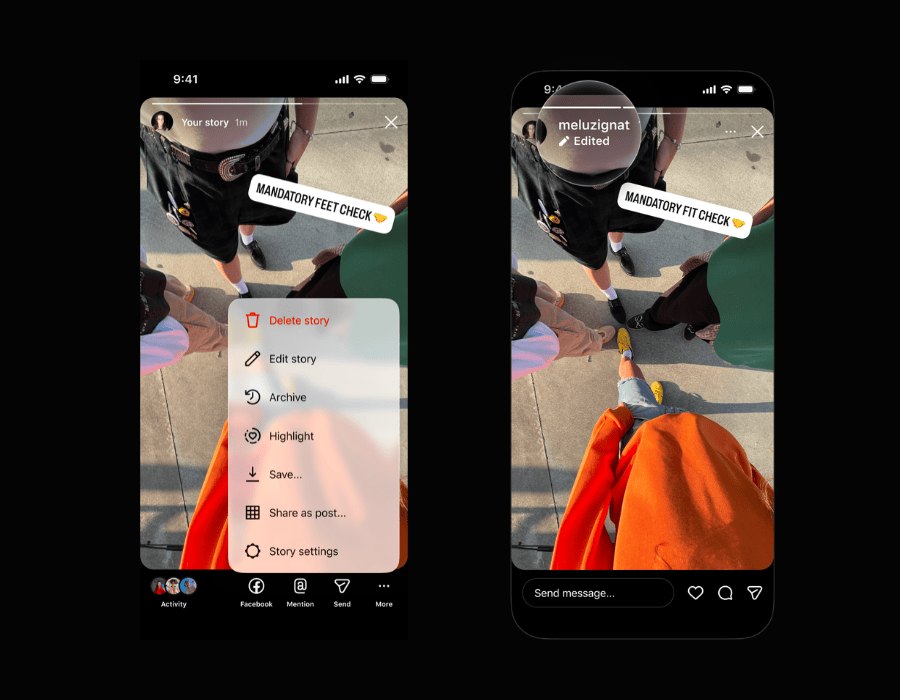
03Three-dot menu editing sequence
Applying changes to a live post relies on the existing Story viewer controls rather than a separate management dashboard. Users initiate the workflow directly from their personal feed while viewing the active media item. The editing interface mirrors the standard creative suite available during initial post preparation.
- Story selection Open the active Story containing the items that require adjustment.
- Menu access Select the three-dot menu icon located in the bottom-right corner of the mobile screen.
- Editor activation Tap Edit Story from the available options to begin modifying text, music, drawings, or stickers.
Once the editor loads, creators can select specific stickers, rewrite text layers, or reassign music tracks directly on the canvas. The interface enables rapid corrections without forcing users to navigate away from the post view. After confirming the adjustments, the updated Story immediately replaces the earlier version in viewer feeds.
04Sticker sheets and typographic tools
Alongside the editing capability, Instagram introduced an overhaul of its sticker library to streamline asset discovery. The application presents stickers on organized sheets designed to make browsing through large catalogs faster for mobile users. This organizational update reduces the time spent searching for visual components during post composition.
The creative toolkit also expands with fresh typography options, broader color palettes, and alternative geometric shapes for stickers. Creators can apply these updated styles to customize overlays and differentiate recurring visual posts across their feeds. These design additions integrate directly into both the initial creation screen and the retrospective editing panel.
Refreshed sticker assets enable accounts to maintain distinct visual formatting without relying on external design software before posting. Providing accessible sticker sheets and diverse fonts allows creators to react quickly to breaking announcements or personal updates. The enhanced aesthetic controls ensure that revised Stories match the creator's intended presentation style.
05Multi-photo selection and gradient backgrounds
The update introduces adjustments to the multi-photo selection process inside the Story composer. Users selecting multiple pictures from their device storage experience a revised selection flow designed to simplify bulk uploads. This refinement targets creators who publish sequential photo narratives or multi-part visual galleries.
Instagram added backdrop customization tools featuring solid colors, blur filters, and multi-tone gradient options. These background styles provide visual framing when photos do not match standard vertical screen dimensions. Creators can toggle between solid tones, soft blur effects, or dynamic gradients to complement their selected imagery.
Combining background controls with revised photo handling offers creators greater flexibility when sharing mixed media from their camera rolls. Accounts can establish consistent visual themes across sequential posts without leaving the native application interface. These layout improvements function alongside the 15-minute editing window to elevate overall presentation quality.
Frequently asked questions
How long do users have to edit an Instagram Story after posting?
Users can edit text, music, stickers, and drawings for up to 15 minutes after sharing a Story. Once that time window expires, the published post can no longer be edited in place.
What happens to existing views, likes, and replies when a Story is edited?
Instagram preserves all accumulated views, likes, and replies when changes are made. Creators no longer lose their audience interaction data when correcting an error.
Where is the Story editing option located in the app?
Users can access the tool by opening their published Story and selecting the three-dot menu in the bottom-right corner. Tapping Edit Story opens the modification interface.
What additional creative features were included in this Instagram update?
Instagram added new fonts, colors, and shapes for stickers, organizing them onto browseable sticker sheets. The platform also updated multi-photo selection and introduced new blur, solid color, and gradient background options.
Sources

Author
Dillip Chowdary
Writes Tech Bytes coverage of AI, engineering, and the tools that actually ship. Editor of Tech Pulse Daily.
Related on Tech Bytes
Advertisement