Llama.cpp benchmark dashboard for AMD Ryzen and Radeon
On November 26, 2026, ggml-org introduced a Hugging Face dashboard that tracks llama.cpp PP512 and TG128 speed on the Radeon 8060S and Radeon AI Pro R9700S.
In short
AMD developers on Ryzen and Radeon · November 26, 2026 · Public dashboard on Hugging Face · Pick hardware, model, and build
By Dillip Chowdary • Nov 28, 2026 • Source: Hugging Face Blog
At a glance
- Who it is for
- AMD developers on Ryzen and Radeon
- The number
- November 26, 2026
- Available
- Public dashboard on Hugging Face
- What to do
- Pick hardware, model, and build
- GPUs
- Radeon 8060S and AI Pro R9700S
- Runs
- Weekly, 10 repetitions per configuration
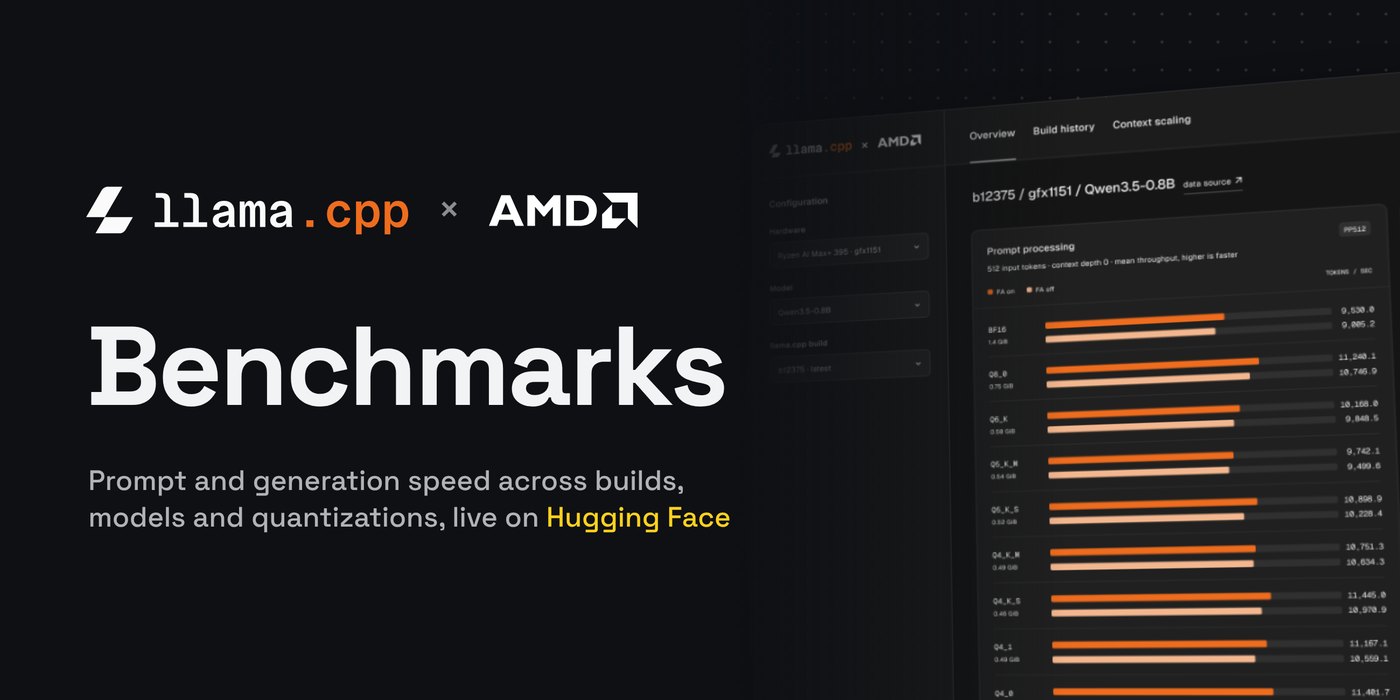
The source has a clear five-part structure.The public-bucket section is short of the length rule.On November 26, 2026, ggml-org introduced the llama.cpp × AMD Benchmark dashboard on Hugging Face, a public tracker of prompt-processing and text-generation speed across llama.cpp builds, models, and quantizations on AMD Ryzen and Radeon hardware, according to Hugging Face Blog's report.
This article covers the sidebar, three tabs, the PP512 and TG128 tests, the weekly llama-bench runs, and the public JSONL files. AMD developers on Ryzen and Radeon hardware can choose a listed Radeon GPU, a model, and a llama.cpp build, then compare quantizations and follow the scores over time.
01Configuration sidebar and chart tabs
Hardware, Model, and llama.cpp build are the three controls in the Configuration sidebar. The current hardware choices are the Radeon 8060S (gfx1151) and the Radeon AI Pro R9700S (gfx1201). A developer uses that selection to compare quantizations, or to follow one hardware target, model, and quantization across recorded builds.
The Overview tab compares quantizations for one hardware target, one model, and one llama.cpp build. Its two charts are PP512, 512 input tokens with no generation, and TG128, 128 generated tokens, and both series start at context depth zero. The Build history tab tracks those same PP512 and TG128 scores across all recorded builds for the hardware, model, and quantization already selected.
The Context scaling tab shows how token-generation throughput changes as the existing context grows, for the selected build, hardware, model, and quantization. ggml-org said local inference performance changes as models, kernels, and builds evolve, and that it wants those changes easy to inspect for any AMD developer. The benchmark workflow and the underlying results are public, so a reader can inspect how the inference tests are run.
02PP512 and TG128 throughput tests
The dashboard shows two separate tests, and both are measured in tokens per second. PP512 processes 512 input tokens and shows how quickly the model handles a prompt. TG128 generates 128 tokens and shows how quickly the model produces output.
| Test | Workload | What it helps you assess |
|---|---|---|
| PP512 | Process 512 input tokens | How quickly the model processes a prompt |
| TG128 | Generate 128 tokens | How quickly the model produces output |
Advertisement
Tech Pulse Daily
Get tomorrow's pulse first
Join engineers who read Tech Pulse before stand-up. Free, weekday mornings.
Both tests start at context depth zero, written as n_depth=0. PP512 measures processing of 512 input tokens without generation, and TG128 measures generation of 128 tokens without a pre-existing context. The point drawn on the chart is the mean throughput, recorded as avg_ts.
03Weekly llama-bench binary runs
The benchmarks use the prebuilt binaries distributed through llama-install.sh, the build and installation project behind llama.app. Public gfx1151 and gfx1201 workflows, for the Radeon 8060S and the Radeon AI Pro R9700S, are scheduled weekly and run the standard benchmarks with llama-bench. Flash Attention is tested on and off, with 10 repetitions per configuration.
The model set evolves and currently includes Inkling 2 Mini, Qwen, Gemma, gpt-oss, and LFM models. The mix covers dense architectures and mixture-of-experts architectures. Available GGUF formats include Q4_K_M, Q8_0, other quantizations, and higher-precision formats such as BF16 and F16.
Note: The gfx1151 and gfx1201 workflows are public and weekly, and ggml-org says the model set evolves.
04Public bucket and JSONL paths
The explorer reads directly from the public ggml-org/install.sh-benches-data Storage Bucket on Hugging Face. A data-source link beside the chart title opens the folder for the build, the hardware, and the model that are currently selected. Readers use that folder to investigate one result, make their own charts, or compare the published scores with a local run.
Standard results are stored as <build>/<hardware>/<model>/<quant>.jsonl inside the folder the chart link opens. Workload sweeps stay in that same build, hardware, and model folder and use the filename <quant>-tg.jsonl. The quant slot names the GGUF format under test, including Q4_K_M, Q8_0, other quantizations, and higher-precision BF16 and F16.
05AMD infrastructure and model requests
The authors asked readers to try the dashboard and to inspect the data. Trying it means choosing Hardware, Model, and a llama.cpp build, then reading PP512 and TG128 in Overview and in Build history, plus generation throughput on the Context scaling tab. Inspecting the data means opening the JSONL in ggml-org/install.sh-benches-data for that selection.
Frequently asked questions
What is the llama.cpp AMD benchmark dashboard?
It is a Hugging Face dashboard from ggml-org that tracks llama.cpp prompt-processing and text-generation speed on AMD Ryzen and Radeon hardware. Readers compare builds, models, and quantizations. ggml-org introduced it on November 26, 2026.
Which AMD GPUs are on the dashboard?
The current hardware choices are the Radeon 8060S (gfx1151) and the Radeon AI Pro R9700S (gfx1201). Public workflows for those two ids run weekly.
What do PP512 and TG128 measure?
Both are tokens-per-second tests that start at context depth zero (n_depth=0). PP512 processes 512 input tokens with no generation, and TG128 generates 128 tokens with no pre-existing context. The chart plots the mean throughput, avg_ts.
How does ggml-org run the llama.cpp AMD benchmarks?
Weekly gfx1151 and gfx1201 workflows benchmark prebuilt binaries from llama-install.sh, the build and installation project behind llama.app, using llama-bench. Flash Attention is run on and off, with 10 repetitions per configuration. Current models include Inkling 2 Mini, Qwen, Gemma, gpt-oss, and LFM, in GGUF formats such as Q4_K_M, Q8_0, BF16, and F16.
Where are the llama.cpp AMD benchmark results stored?
The explorer reads the public ggml-org/install.sh-benches-data Storage Bucket on Hugging Face. Standard results use / / / .jsonl, and workload sweeps in that folder use -tg.jsonl. The data-source link beside the chart title opens the folder for the selected build, hardware, and model.
Sources

Author
Dillip Chowdary
Writes Tech Bytes coverage of AI, engineering, and the tools that actually ship. Editor of Tech Pulse Daily.
Related on Tech Bytes
Advertisement