iOS 27.2 has two CarPlay improvements, here’s what’s new
Apple updated CarPlay in iOS 27.2 with conversational Siri AI memory and revamped the Apple Podcasts Home tab with separate rows for new and active episodes.
By Dillip Chowdary • Nov 14, 2026 • Source: 9to5Mac
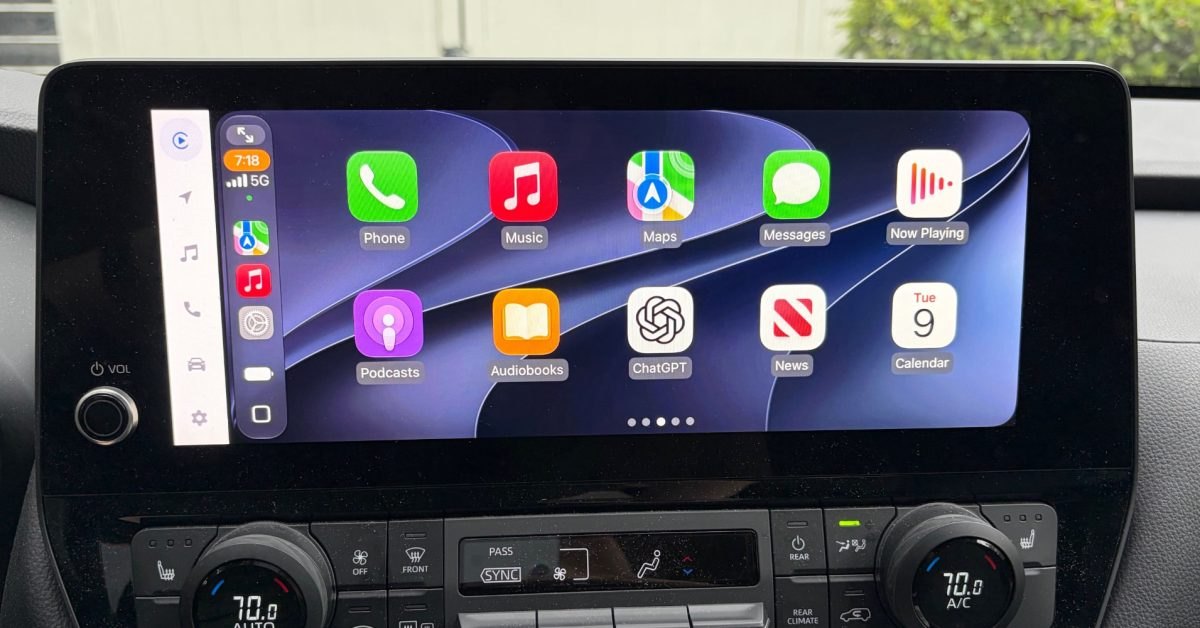
Apple released iOS 27.2 last month, introducing dedicated system enhancements for Messages, Apple TV, and vehicle integration through Apple CarPlay. While the broader operating system milestone delivered cross-device capabilities across the ecosystem, drivers gained two targeted functional refinements inside vehicle infotainment displays. According to 9to5Mac's report, the release focuses on upgrading spoken in-car intelligence alongside a substantial structural redesign of how media queues behave on automotive touchscreens.
This technical overview details the revised audio queue architecture, conversational memory expansions, and contextual data retrieval systems operating across vehicles running CarPlay. Fleet operators, daily commuters, and mobile engineers integrating vehicle entertainment systems can evaluate how these updates affect dashboard playback flows and on-road voice interaction. The changes streamline queue navigation while bringing personal context from phone services directly into hands-free driving workflows.
01Apple Podcasts Home tab and episode queue
The primary interface adjustment in CarPlay arrives within Apple Podcasts, where Apple restructured the default Home tab layout. The traditional Up Next queue previously grouped all upcoming audio together without separating freshly published material from partially heard episodes. Under iOS 27.2, the application splits playback tracking into two dedicated rows titled New Episodes and Continue Playing to prevent backlog clutter.
The New Episodes row gathers solely the latest releases from subscribed shows, giving drivers immediate access to newly dropped content without manual filtering. Directly underneath that row, the Continue Playing shelf isolates episodes that have already begun playback so users can resume listening precisely where they paused. This structural distinction eliminates tedious scrolling on dashboard screens and simplifies navigation during travel.
| Feature | Before iOS 27.2 | In iOS 27.2 |
|---|---|---|
| Apple Podcasts Queue | Single unified Up Next queue | Separate New Episodes and Continue Playing rows |
| Siri AI Assistant Context | Single query exchange memory | Multi-session conversation recall across previous drives |
| Assistant Source Retrieval | Standard device application index | Photos in Messages, event attendees, voicemails, Safari data |
| Apple Music Interface | Standard music player icon | Updated app icon and revised interface accents |
02Siri AI conversational memory across drives
Beyond media playback navigation, iOS 27.2 expands the capabilities of the onboard assistant through a pair of notable Siri AI upgrades. Drivers interacting with CarPlay can now rely on assistant memory that recalls information shared across past spoken conversations. Rather than treating every voice session as an isolated query, the assistant maintains continuity across different driving trips.
According to official release notes from Apple, Siri AI remembers specific conversational context such as restaurant recommendations provided during earlier journeys. A driver can reference earlier recommendations without restating location criteria or starting an inquiry from scratch. This persistence bridges the gap between parked planning and active transit by preserving spoken dialogue history across driving intervals.
Adapting to an assistant that remembers previous dialogue requires an adjustment for drivers accustomed to rigid command-response systems. However, retaining conversational context makes vehicle voice interaction substantially more practical when operating on busy roads. The car cabin functions as an ideal environment for conversational memory because drivers depend entirely on voice rather than touch displays.
Advertisement
Tech Pulse Daily
Get tomorrow's pulse first
Join engineers who read Tech Pulse before stand-up. Free, weekday mornings.
03Expanded data sources across vehicle apps
The second major Siri AI advancement in iOS 27.2 broadens the sources of information the voice assistant queries before answering. The upgraded platform draws context from personal content stored across multiple native services rather than relying solely on general web lookups. In automotive environments, this multi-source indexing allows drivers to pull relevant details hands-free while maintaining focus on the road.
Release documentation indicates Siri AI can extract answers from photos attached to Messages, calendar event attendee lists, and recorded voicemails. Furthermore, the system processes browsing history and saved Reading List items from Safari to generate comprehensive responses. These expanded data channels allow drivers to retrieve addresses, contact details, or meeting logistics sent by colleagues without glancing at their phones.
Operating these expanded sources inside CarPlay demonstrates how on-device assistant models unify disparate communications into audible briefings. Rather than switching between messaging logs, calendar appointments, and voice recordings, motorists can pose natural queries to retrieve key logistical facts. The integration ensures critical trip details remain readily accessible through voice commands throughout highway transit.
04Apple Music application icon and visual refresh
Alongside functional changes to podcasts and voice interactions, iOS 27.2 delivers subtle visual refinements to the onboard music experience. Apple introduced a redesigned Apple Music application icon on the CarPlay home screen alongside minor cosmetic tweaks within the player interface. These modifications mirror a broader visual rebranding that Apple recently deployed across its music streaming ecosystem.
While visual styling updates alter aesthetic presentation rather than core audio playback mechanics, the revised icon standardizes branding across Apple hardware platforms. Dashboard tiles reflect the refreshed gradient styling and simplified glyph geometry introduced in recent system software updates. The updated interface keeps typography, playback controls, and playlist views consistent with modern design standards across iOS 27.
05In-car charging accessories and vehicle tracking hardware
Maintaining seamless connectivity for iOS 27.2 features requires compatible hardware accessories that support continuous data and power delivery. High-draw tasks like continuous GPS routing, conversational voice processing, and local media streaming place significant operational demands on paired smartphones. Equipping passenger cabins with capable power adapters ensures reliable system performance over long journeys.
Common vehicle setups utilize in-car chargers equipped with two USB-C ports and two USB-A ports to support multi-device passenger charging simultaneously. Drivers also rely on MagSafe car mounts paired with durable ten-foot USB-C to USB-A cables to maintain stable physical placement and steady device charging. These physical connections preserve wired CarPlay stability while preventing unexpected battery depletion during extended transit.
Vehicle owners also integrate AirTag 2 tracking hardware, available in single-pack and four-pack configurations, to monitor parked automobile locations alongside CarPlay connections. Combining location tracking with robust charging hardware and updated iOS 27.2 software establishes a dependable vehicle environment. Drivers benefit from streamlined podcast queues, capable voice assistance, and reliable physical accessories across every commute.
IOS 27.2 has two CarPlay improvements, here’s FAQ
What changes did Apple make to Apple Podcasts in CarPlay with iOS 27.2?
Apple reorganized the Home tab by replacing the unified Up Next queue with two distinct sections named New Episodes and Continue Playing. New Episodes lists unplayed releases from followed shows, while Continue Playing tracks started episodes.
How does Siri AI improve inside vehicles running CarPlay on iOS 27.2?
Siri AI can recall past conversations from previous sessions, allowing drivers to ask follow-up questions about past recommendations like restaurants. The assistant also draws context from photos attached in Messages, calendar event attendees, voicemails, Safari history, and Reading List.
What visual updates arrived for Apple Music in iOS 27.2?
The update includes a redesigned Apple Music application icon alongside minor visual tweaks across the interface. These adjustments align with Apple's broader brand refresh for the music streaming platform.
Which hardware accessories complement the iOS 27.2 CarPlay experience?
Drivers can pair the software updates with dual-port in-car chargers featuring two USB-C and two USB-A ports, MagSafe car mounts, ten-foot USB-C to USB-A cables, and AirTag 2 trackers.
Sources

Author
Dillip Chowdary
Writes Tech Bytes coverage of AI, engineering, and the tools that actually ship. Editor of Tech Pulse Daily.
Related on Tech Bytes
Advertisement