iOS 27.3 adds new face unlock feature for iPhone Duo
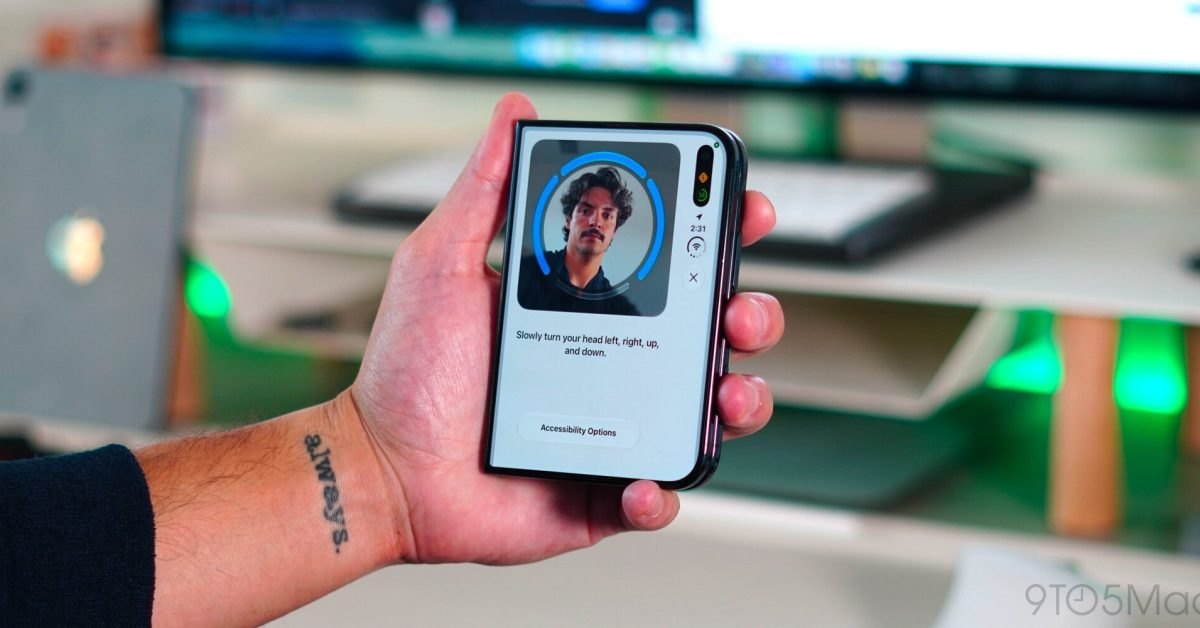
Apple released the iOS 27.3 beta for iPhone Duo, introducing front camera facial recognition on the outer display and an automatic lock setting when closed.
By Dillip Chowdary • Nov 17, 2026 • Source: 9to5Mac
At a glance
- Product
- iPhone Duo
- Software
- iOS 27.3 beta
- Author
- Chance Miller
- Inactivity timeout
- 45 minutes
- Security limit
- Lock screen unlock only
- Folding option
- Lock device when closed
Apple released the iOS 27.3 beta software update, introducing dedicated enhancements for iPhone Duo that add front camera facial recognition and an automatic locking setting when closed. According to 9to5Mac's report, the developer build centers on foldable device management and biometric security. The update allows owners to unlock the closed exterior display by looking at it, while also addressing folding screen behavior.
This article outlines the technical operation, security guardrails, inactivity limits, and configuration options included within the iOS 27.3 release. It is tailored for iPhone Duo owners, mobile developers, and technical professionals assessing foldable phone software and biometric authentication policies. Readers will find complete setup specifications, interface details, and hardware comparisons from Apple's latest dual-screen update.
01Front camera recognition on outer display
The core addition in iOS 27.3 enables optical facial recognition through the camera mounted on the exterior shell of the iPhone Duo. Users facing the closed device can unlock the phone by looking at the glass without touching the biometric scanner. The feature relies entirely on standard front-facing optics to identify facial geometry rather than dedicated depth-sensing projector arrays.
Apple designed this entry option exclusively for the compact folded state of the handset to streamline quick interactions on the outer cover screen. Because the iPhone Duo lacks the hardware needed for Face ID, the operating system treats visual matching as an assisted convenience tool. When unfolded into its dual-screen format, the handset disables camera unlock and requires standard physical verification.
02Touch ID setup and local storage
Configuration of the visual entry tool occurs within system preferences under the Touch ID and Passcode administration pane. Inside the settings menu, Apple specifies that the system pairs the front camera with recent Touch ID or passcode authentication to quickly unlock the closed device. Apple confirms that face recognition data never leaves your device during processing.
System setup follows a defined path through the mobile configuration menus to activate external camera authentication on compatible hardware:
- System update Install the iOS 27.3 beta release on iPhone Duo.
- Settings navigation Open Settings and select the Touch ID and Passcode preference menu.
- Camera toggle Enable front camera recognition to permit glance-based unlocking while closed.
03Security guardrails and forty-five minute timeouts
Advertisement
Tech Pulse Daily
Get tomorrow's pulse first
Join engineers who read Tech Pulse before stand-up. Free, weekday mornings.
Because standard front camera recognition lacks the depth validation of Face ID or capacitive scanning, Apple implemented strict operational boundaries. The visual match functions only to unlock the iPhone Duo, preventing sensitive actions from authorizing through camera frames alone. Transactions through Apple Pay, keychain password retrieval, and protected application access strictly require physical Touch ID confirmation or passcode input.
A mandatory inactivity threshold disables optical unlocking whenever the iPhone Duo remains idle for forty-five consecutive minutes. Once that timing limit passes without an active session, background security routines suspend camera scanning and require manual authentication. The user must touch the physical sensor or enter their passcode to re-establish trust before optical recognition can operate again.
Note: Optical face recognition functions exclusively on the exterior cover screen and automatically deactivates after forty-five minutes of inactivity. To re-enable camera unlocking, owners must authenticate manually using Touch ID or enter their primary device passcode.
04Folding actions under display and brightness
The second major feature introduced in iOS 27.3 delivers a dedicated hardware toggle within the Display and Brightness preferences. When enabled, folding the iPhone Duo immediately locks the device rather than transitioning active application sessions from the interior display to the outer screen. This behavioral shift ensures private workspace contents shut down instantly whenever the physical panels close.
Prior to this beta release, owners managed display transitions by creating custom automation routines to force screen sleep upon hinge closure. Chance Miller of 9to5Mac noted that many iPhone Duo users had urged Apple to provide this capability natively, having previously run personal shortcuts to mimic the action. The native setting eliminates third-party shortcut reliance and establishes a consistent folding response across the device.
05Authentication methods and retail pricing adjustments
The adjustments in iOS 27.3 highlight differences across Apple's security tiers and hardware pricing catalog. While the original iPhone launched in 2007 under Steve Jobs with numeric protection, the iPhone Duo balances dual displays through separate biometric methods. The matrix below outlines how camera unlock compares against integrated biometric sensors across authorization scope and hardware requirements.
| Authentication method | Hardware sensor | Supported actions | Inactivity timeout |
|---|---|---|---|
| Camera unlock | Outer front camera | Lock screen access only | 45 minutes |
| Touch ID | Biometric sensor | Apple Pay, passwords, apps | None |
| Passcode | System keypad | Apple Pay, passwords, apps | Master fallback |
Alongside software releases, current retail pricing reveals promotional discounts across the broader Apple ecosystem catalog. Apple Watch Series 12 starts from $329 against a regular $399 price tag, while AirPods Pro 3 sell for $179 from a standard $249 tier. Customers also see discounts of up to $250 on the M5 MacBook Air and up to $150 on the M6 Mac mini alongside the updated Apple TV 4K and HomeView.
Frequently asked questions
Does iPhone Duo support Face ID in iOS 27.3?
No, the iPhone Duo lacks the hardware required for Face ID. The new feature uses the standard front camera on the outer display for facial recognition.
Can the front camera authorize Apple Pay or passwords?
No, the camera only unlocks the device. Transactions for Apple Pay, password access, and protected applications still require Touch ID or a passcode.
What happens after forty-five minutes of inactivity?
The facial recognition feature is disabled after 45 minutes without an unlock. Users must enter their passcode or use Touch ID to reactivate it.
Where can users enable the lock on close setting?
The option is located in Settings under Display & Brightness. When enabled, folding the phone locks the device rather than transitioning to the outer screen.
Sources

Author
Dillip Chowdary
Writes Tech Bytes coverage of AI, engineering, and the tools that actually ship. Editor of Tech Pulse Daily.
Related on Tech Bytes
Advertisement