Let Gemini tackle repetitive chores on your Mac
Google launched computer use in the Gemini app for Mac, enabling background automation across local apps and websites while keeping the cursor completely free.
By Dillip Chowdary • Nov 19, 2026 • Source: Google Keyword Blog
At a glance
- Product
- Gemini app for Mac
- Feature
- Computer use
- Release date
- November 19, 2026
- Availability
- English in the United States
- Platform
- macOS
- Distribution
- gemini.google/mac
Google launched computer use capabilities within the Gemini app for Mac on November 19, 2026, allowing the assistant to navigate desktop software and websites autonomously to complete multi-step projects. According to Google Keyword Blog's report, the system handles typing, clicking, form entries, and menu navigation directly on the user's computer while running tasks silently in the background.
This report details how the Mac client executes multi-application workflows, maintains user control through permissions and live previews, and protects local productivity without seizing the physical mouse. It is designed for Mac users, creative professionals, and technical operators seeking to automate repetitive data extraction, presentation assembly, and digital asset staging across local files and the web.
01Background task automation across desktop applications
Michael Friedman, Group Product Manager for the Gemini App, announced that the client can now perform multi-step routines across local files, desktop applications, and web pages. Users describe desired tasks in natural language, prompting the assistant to coordinate routine actions that previously required manual interaction across separate windows. The tool processes inputs to eliminate repetitive manual clicking, interface navigation, and routine data entry.
The software operates across disparate desktop environments by bridging native macOS file storage with online browser sessions. Rather than requiring specialized script configurations or complex terminal setups, the integration interprets ordinary workflow descriptions to manipulate standard desktop interfaces. This capability enables users to delegate tedious coordination between local directories and internet services directly to the assistant.
By taking over mechanical input responsibilities, the application targets multi-step chores that typically consume dozens of manual clicks. Users assign goals ranging from basic form completion to complex software interactions without writing automation rules. The system translates conversational prompts into discrete mouse movements, clicks, keystrokes, and menu selections to execute the requested workload.
02Isolated window execution with cursor freedom
The software operates inside an isolated background window rather than taking control of the active display. A live preview feeds continuous progress directly into the Gemini chat interface, keeping the execution visible at every stage. This design prevents the automated agent from disrupting the user's primary workspace during long operations.
Because the automation remains confined to its dedicated background session, the hardware cursor and primary screen stay completely responsive. Users can continue typing documents, designing visual assets, or participating in video conference calls without cursor hijacking or display freezing. The system executes background clicks and keystrokes independently of the active foreground application.
This background architecture eliminates the common productivity bottleneck where computer automation locks the screen. Operators do not need to surrender their workstation while the model navigates multiple applications and websites. Routine office duties and creative tasks can run concurrently alongside the user's manual work without graphical interference.
03App permission controls and action approvals
Advertisement
Tech Pulse Daily
Get tomorrow's pulse first
Join engineers who read Tech Pulse before stand-up. Free, weekday mornings.
Safety architecture within the client requires explicit user authorization before the assistant interacts with specific macOS applications. Operators choose exact application boundaries and maintain authority over which local software the assistant can open or inspect. This granular structure ensures the model cannot interact with unapproved programs on the machine.
The platform features real-time oversight mechanisms that allow users to watch every operational step live inside the preview pane. Operators retain the ability to pause execution immediately at any moment during a sequence. Crucial steps require mandatory user approval before the assistant executes the corresponding action.
By embedding human intervention into automated tasks, the client prevents unintended file modifications and unauthorized transactions. Users verify sensitive inputs before forms are submitted or local data is altered. These guardrails ensure that automated actions remain strictly aligned with the operator's intentions throughout multi-step workflows.
04Creative modeling and document form processing
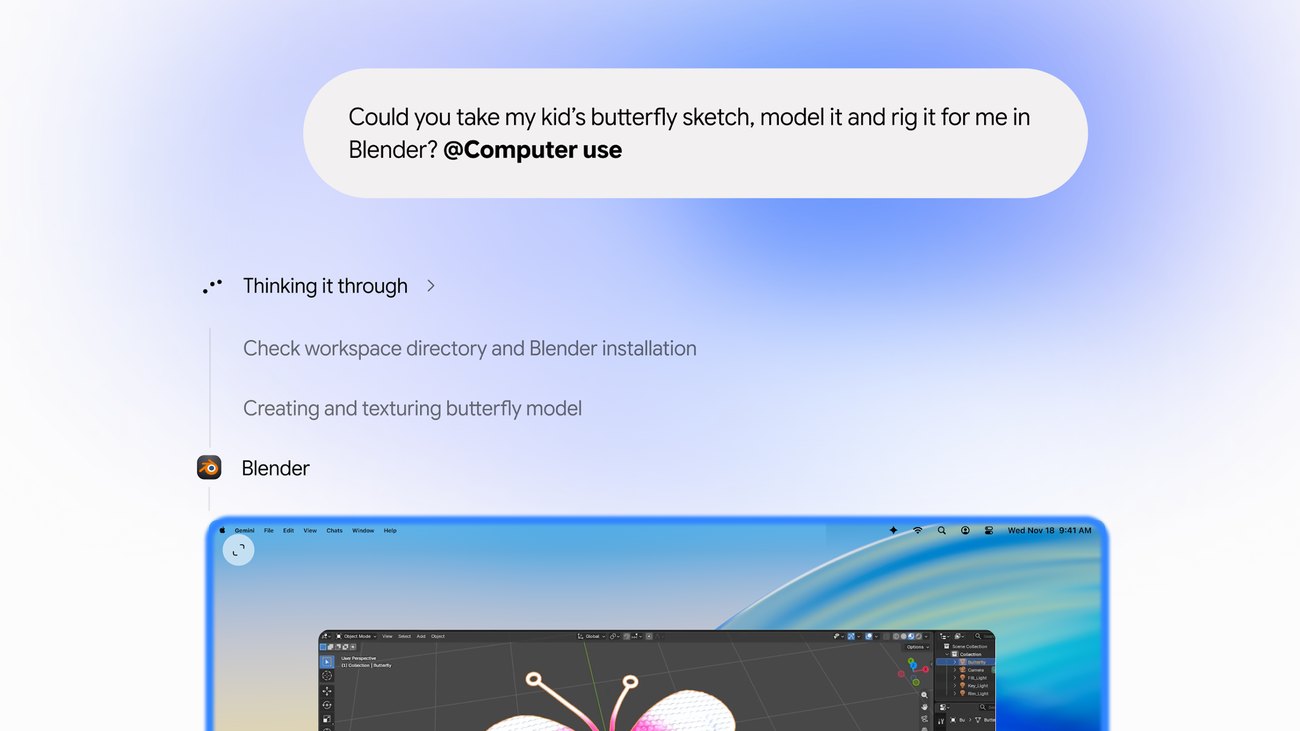
Creative production tasks can be accelerated by delegating routine configuration chores directly to the assistant. The tool can automate batch color-grading routines across image libraries inside specialized design programs. It can also configure 3D environments, including interpreting a sketch to assemble and rig a model within Blender.
The client also streamlines clerical documentation by processing unstructured information stored in local PDF files. The assistant reads addresses, package dimensions, and item weights directly from digital documents to populate multi-box shipping forms online. This extraction removes the necessity of copy-pasting numbers across separate browser windows.
Automating these manual handoffs reduces the time spent on administrative overhead during creative and logistics work. Designers avoid repetitive asset setup, while shippers eliminate errors stemming from manual transcription between documents and courier portals. The system bridges desktop graphic utilities and browser submission forms seamlessly.
05Multi-region slide generation and listing staging
Business reporting routines benefit from automated data aggregation across distributed corporate tools. The assistant accesses live analytical dashboards across several regional territories to harvest current metrics and capture interface screenshots. It then arranges these gathered indicators directly into structured presentations inside Google Slides.
E-commerce sellers can use the application to process merchandise catalogs stored on local storage drives. The system inspects product photography within an image folder, conducts online market pricing research, documents product attributes, and stages draft listings across digital resale platforms.
Note: Computer use is currently rolling out in English for users located in the United States within the Gemini app for Mac. Operators can download the desktop application directly from gemini.google/mac to begin automating workflows.
Frequently asked questions
What is computer use in the Gemini app for Mac?
It is an automation feature that allows Gemini to navigate desktop applications, local files, and websites to complete multi-step tasks by handling clicking, typing, and form entries.
Does Gemini take over the computer screen while running tasks?
No, Gemini operates inside an isolated background window while showing a live preview in chat, leaving the user's cursor and main display free.
How do users maintain privacy and control over automated actions?
Users specify which applications Gemini can access, watch every step in real time, pause operations at any point, and approve key actions before they take place.
Where is computer use currently available?
The feature is rolling out in English for users in the United States and can be accessed by downloading the Gemini app for Mac at gemini.google/mac.
Sources

Author
Dillip Chowdary
Writes Tech Bytes coverage of AI, engineering, and the tools that actually ship. Editor of Tech Pulse Daily.
Related on Tech Bytes
Advertisement