Open.Dotlet – a 30-key keypad for saved Codex tasks
Open.Dotlet released Alpha 0.6.0-alpha.2, bringing open-source software and 30-key macro tablet designs to trigger single read-only Codex CLI tasks.
By Dillip Chowdary • Nov 14, 2026 • Source: opendotlet.com
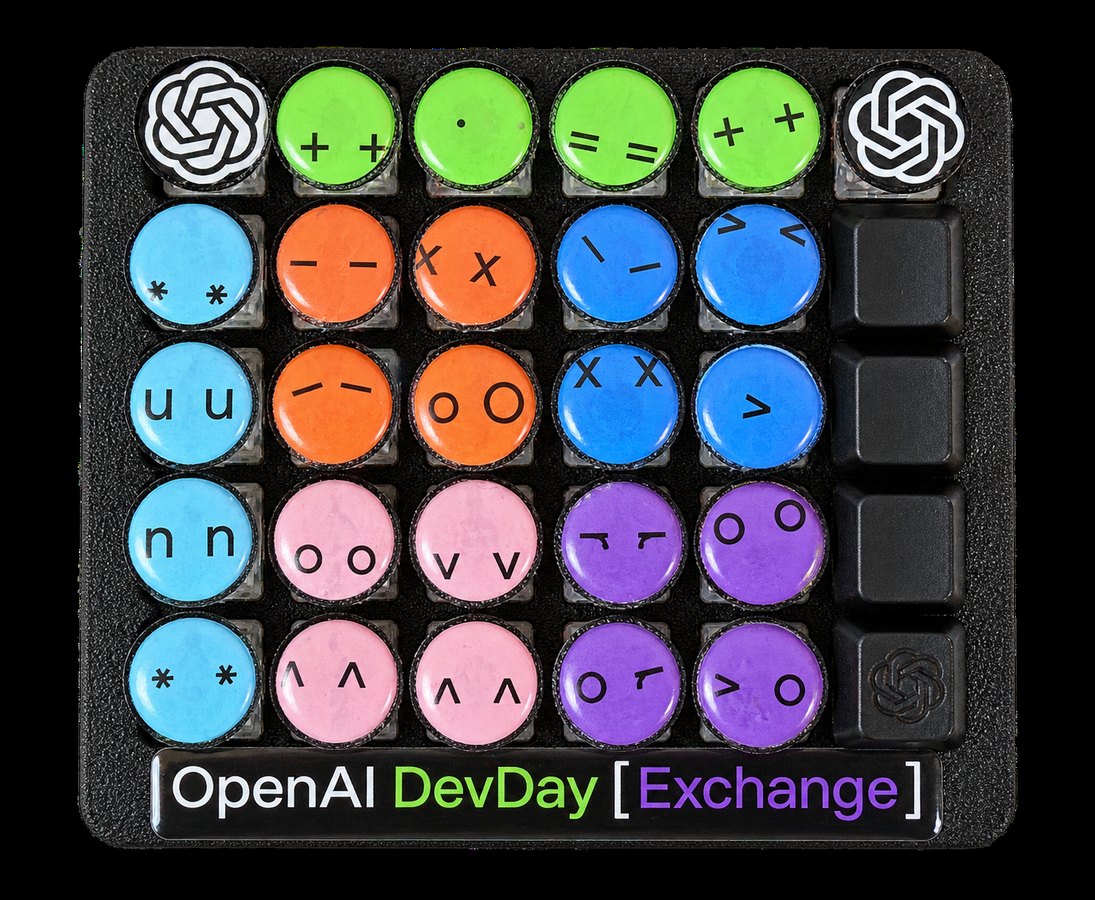
Open.Dotlet released an open-source alpha system allowing software developers to trigger saved automation routines through dedicated physical keypads, according to opendotlet.com's report on the project. The utility, designated as the OpenAI Dev Day Exchange Edition, pairs desktop controls with an optional thirty-key prompting tablet that assigns repetitive tasks directly to individual buttons.
This release details the initial Alpha 0.6.0-alpha.2 build, covering operating system installers, authentication workflows, hardware prototyping instructions, and current execution limits. The project targets engineers who rely heavily on repetitive command-line routines and seek a dedicated desktop surface to initiate unattended coding jobs without context switching across multiple terminal windows.
01Hardware prototype and the thirty-key layout
The physical interface concept emerged from simple adhesive labels before expanding into a full thirty-key prompting tablet designed for repetitive developer workflows. Builders assemble their own hardware interface using open-source specifications alongside custom sticker colour combinations. A physical prototype with an artificial intelligence removed background demonstrates the compact layout intended for active engineering desks.
Demonstration materials accompanying the release include a thirty-second product film showcasing an animated product photograph alongside authentic desktop application interface captures. That short preview incorporates an artificial intelligence generated British voiceover produced with OpenAI technology and original background music created through ElevenLabs. A separate app walkthrough constructed entirely from actual application screenshots provides an unedited view of the software layout.
Each individual dotlet key acts as a dedicated physical trigger mapped to a specific programming chore within an active code repository. Instead of opening a terminal and retyping flags, the developer assigns a single recurring job to one physical switch. Pressing the button initiates the routine immediately, removing the friction of manual command assembly during long programming sprints.
02Task assignment and companion app progress
The setup process requires users to select an active project folder and designate a specific code maintenance task worth repeating regularly. Developers input and save the target prompt directly inside the companion application interface before binding it to a chosen key. Once programmed, one deliberate press of the dotlet switch starts the saved operation without requiring additional confirmation.
After initiation, users monitor execution status directly through the companion app display while the underlying model works through the prompt. The software provides real-time progress indicators before rendering the final generated answer directly on the desktop screen. This visibility allows programmers to verify completed tasks or inspect code output before copying results into their projects.
During the current alpha phase, the runtime environment enforces strict operational boundaries to maintain desktop stability and predictable execution. The software runs exactly one saved read-only Codex task at a time, preventing overlapping jobs from causing local system conflicts. Direct multi-task execution and write operations remain unavailable until future development cycles expand the runtime engine.
Advertisement
Tech Pulse Daily
Get tomorrow's pulse first
Join engineers who read Tech Pulse before stand-up. Free, weekday mornings.
03Signed desktop downloads and operating system support
Developers can evaluate the platform entirely through on-screen controls before deciding to assemble or attach a physical thirty-key tablet. The official release distribution ships as Alpha 0.6.0-alpha.2 packaged inside compressed ZIP archives for immediate extraction. Each official package includes checksum data, complete release notes, and structured installation documentation to assist initial setup.
For Apple hardware, the downloadable client targets Apple Silicon architecture running macOS 14 or later versions. The distribution files are fully signed and notarized through Apple developer certificates to ensure seamless installation without operating system gatekeeper blocks. The installer bundles a complete Python runtime, removing the need to configure secondary interpreter environments locally.
The Windows ecosystem receives a dedicated package compiled for 64-bit Windows 11 environments alongside a browser companion tool. This distribution features a digitally signed launcher binary that simplifies security validation during local workstation deployment. Engineers who prefer custom configurations or alternative platforms can also build the entire project directly from the published source code.
04Local command-line sign-in and billing rules
Running the software requires an established installation of the official Codex command-line interface alongside an active authenticated session. Rather than requesting API keys directly through the project website, the client leverages your existing local command-line sign-in state. This design choice prevents sensitive authentication tokens from being exposed to third-party web forms during setup.
Direct API key execution handled natively inside the Open.Dotlet desktop application remains planned for a later release milestone. In the interim, any automated requests initiated through the Codex tooling inherit the billing limits and account tiers configured on your OpenAI Platform profile. Developers must exercise standard operational vigilance, as sustained automated tasks can incur standard API consumption charges.
Project documentation explicitly reminds users to keep their secret API credentials private and to review official OpenAI authentication guidelines when managing tokens. Because the system triggers remote computational jobs with a single physical touch, monitoring account usage dashboards prevents unexpected expenses. Adhering to credential management best practices ensures that rapid macro execution does not compromise development infrastructure.
05Community hardware builds and planned companion links
The creator team positions Open.Dotlet as an open-source gift distributed directly to the wider OpenAI developer community. Software contributors and hardware builders are encouraged to share custom enclosure modifications, operational ideas, and distinct sticker colour schemes. This open distribution model lets developers adapt the physical interface to their specific desk configurations and ergonomic preferences.
Beyond standalone keypad usage, the desktop software includes architectural provisions designed to interface with OpenPromptlet. The technical connection between the two systems remains in active development, pointing toward a broader interconnected ecosystem of physical and software-based prompt tools. Once completed, this integration will provide unified command dispatching across complementary prompt-engineering hardware surfaces.
For now, early adopters can test the software on screen, configure their first prompts, and experiment with custom physical controller layouts. Community members can monitor ongoing repository commits as the team refines device communication protocols and readies subsequent alpha builds. The ongoing work bridges software automation and tactile hardware controllers for modern artificial intelligence engineering.
Dotlet – a 30-key keypad for saved Codex tasks FAQ
What is Open.Dotlet and how does it work?
Open.Dotlet is an open-source system that lets developers map saved Codex prompts to on-screen buttons or a custom thirty-key hardware tablet. Pressing a key initiates a saved, read-only automation task for an active project, with progress and results displayed in the companion app.
Do you need to enter an OpenAI API key on the website to use Open.Dotlet?
No, the alpha uses your local Codex CLI sign-in rather than requiring you to enter an API key on the site. Direct API-key execution inside the Open.Dotlet desktop application is planned for a future update.
Which operating systems support the Open.Dotlet alpha?
Signed and notarized packages are available for Apple Silicon Macs running macOS 14 or higher, and signed installers with a browser companion are available for 64-bit Windows 11. Users can also build the application directly from source code.
Can the Open.Dotlet alpha run multiple Codex tasks at the same time?
The current Alpha 0.6.0-alpha.2 release is limited to running one saved read-only Codex task at a time. The companion application tracks the progress of that single task and outputs the resulting text on screen.
Sources

Author
Dillip Chowdary
Writes Tech Bytes coverage of AI, engineering, and the tools that actually ship. Editor of Tech Pulse Daily.
Related on Tech Bytes
Advertisement