Scrine – Joyscroll books. Read any book one sentence at a time
Scrine launched an iOS and web reading app that turns books into one-sentence card feeds with speed-reading modes and Claude-powered AI tutoring.
By Dillip Chowdary • Nov 08, 2026 • Source: scrine.io
Reading long-form prose often stalls when readers confront uninterrupted blocks of text, a dynamic developer Scrine addresses with its reading application. According to scrine.io's report, the software converts digital books, documents, and web articles into short, swipeable card feeds that display only a single sentence or two on screen at a time. The platform provides four distinct reading formats, including card-based feeds and rapid serial visual presentation modes, alongside an integrated contextual artificial intelligence tutor powered by Anthropic's Claude model family. The product runs on iPhone devices requiring iOS 17 or later and also operates across desktop and mobile web browsers without demanding upfront payment.
This analysis details Scrine's reader architecture, multi-format display mechanics, file compatibility rules, subscription tiers, and system capabilities. It serves students, researchers, knowledge workers, and casual readers evaluating modular reading workflows, speed-reading utilities, and on-demand artificial intelligence comprehension assistants. The breakdown examines how the tool parses documents, operates alongside existing electronic publishing standards, manages data privacy across external model application programming interfaces, and distributes features across free and paid tiers.
Scrine – Joyscroll books. Read any book one: what actually changed
The reading workflow departs from standard full-page electronic book readers by dicing continuous prose into self-contained vertical card streams. Instead of confronting dense chapters across static digital pages, users swipe upward to advance through an item sentence by sentence, or swipe downward to review preceding lines. An automated playback setting advances the cards on a preset timer, reducing manual physical input to zero during continuous reading sessions. The core architecture also supports standard vertical page scrolling featuring a dynamic reading highlight that tracks along the text as eyes move across the document.
Beyond basic card feeds, the release integrates speed-reading mechanics through two dedicated delivery modes called Stream and Flash. Stream runs sentences horizontally across the display in a continuous line matching an operator-defined speed. Flash delivers rapid serial visual presentation, flashing single words consecutively in one fixed position on the display to prevent saccadic eye movement across lines. Users can also toggle bionic text formatting across reading layouts, which bolds the starting letters of each word to guide ocular tracking through complex vocabulary.
Scrine – Joyscroll books. Read any book one: how it works
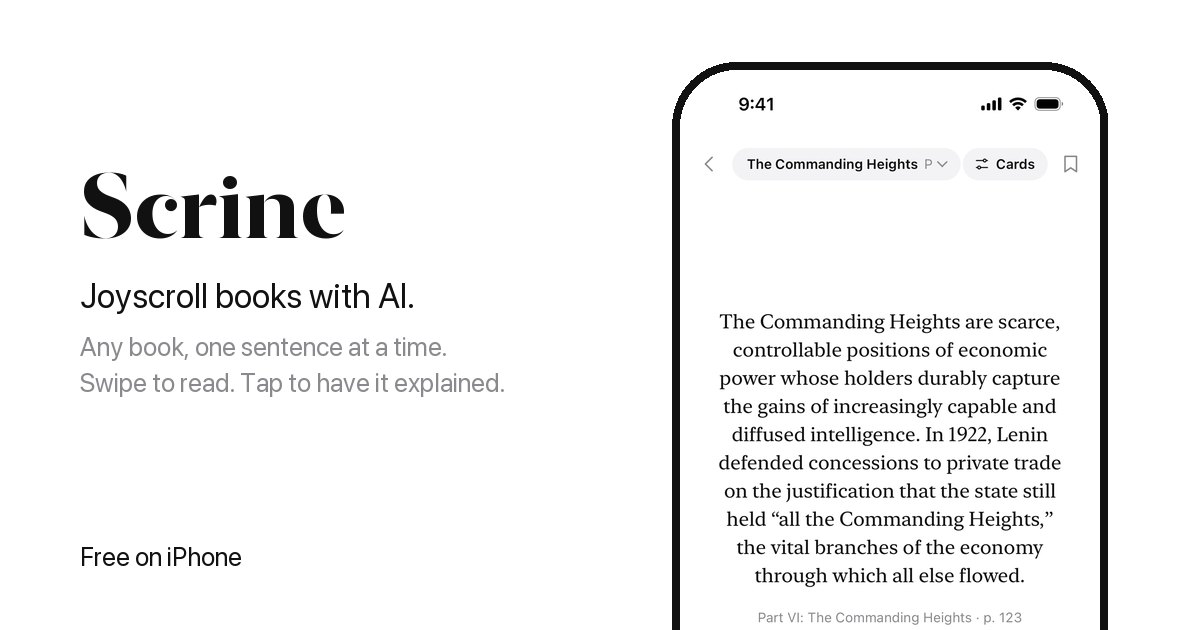
Importing text into the engine occurs via local file uploads, system share sheets, or pasted universal resource locators. The application parses EPUB files, Portable Document Format documents, Microsoft Word docx files, Markdown files, HTML pages, and plain text. Users running Safari, Apple Mail, or the iOS Files application can route files directly into their reading queue using the native operating system share sheet. The service also maintains an Explore library populated with thousands of public-domain books that users can open immediately without importing personal files or creating an account.
When readers encounter dense phrasing or complex concepts, tapping the Explain command summons an artificial intelligence tutor powered by Anthropic's Claude model. The system transmits only the active passage and adjacent context to the model, which returns explanations calibrated from middle school comprehension through graduate school analysis. Readers can ask follow-up questions within the active passage thread, request plain-language rewrites, generate end-of-chapter recall or synthesis quizzes, and commit tutor outputs directly into organized, book-specific note directories alongside user highlights and bookmarks.
Advertisement
Tech Pulse Daily
Get tomorrow's pulse first
Join engineers who read Tech Pulse before stand-up. Free, weekday mornings.
Scrine – Joyscroll books. Read any book one: why it matters
Digital reading rates regularly suffer when readers encounter dense, archaic prose or academic textbooks that presuppose advanced domain knowledge. Dividing long-form text into bite-sized units reduces the psychological friction associated with massive physical or digital reading backlogs. Pairing that visual breakdown with on-demand model querying eliminates the need to exit an electronic reader to look up unfamiliar terminology, historical background, or intricate arguments in separate search engines or reference applications, preserving reader focus within a single context.
The technical design addresses persistent user concerns regarding privacy and lock-in across commercial artificial intelligence tools. Anthropic does not use the document snippets transmitted through Scrine's Claude implementation to train foundation models, limiting data exposure to runtime inference requests. Meanwhile, persistent reading statistics, reading streak trackers, and notes organized by title remain linked to user profiles registered via Apple, Google, or direct email authentication codes, allowing personal archives to sync seamlessly across device upgrades.
Scrine – Joyscroll books. Read any book one: who is affected
The software targets individual readers, students navigating dense academic literature, and digital book collectors holding unencrypted files. Because the software supports arbitrary Word, Markdown, and PDF imports alongside standard web article links, knowledge workers can digest technical whitepapers, news analysis, and internal documentation using card-based or speed-reading interfaces. Students reading historical literature or technical volumes benefit directly from adjustable explanation levels that unpack archaic syntax or advanced disciplinary terminology without manual prompt engineering.
However, consumers whose digital libraries reside entirely within copy-protected commercial ecosystems face clear functional limitations. Scrine opens digital rights management-free documents exclusively, preventing direct imports of protected Amazon Kindle purchases or proprietary electronic bookstore downloads. Users must supply unencrypted EPUB or PDF documents from independent retailers, open repositories, or their own authored notes, or restrict their reading to the public-domain volumes hosted within the application's native Explore catalog.
Scrine – Joyscroll books. Read any book one: what to watch
Adoption trajectories will depend on reader conversion across Scrine's three-tier pricing model. The base Free tier costs zero dollars, supplying the core Cards reader, personal file imports, notes, highlights, bookmarks, the Explore public-domain catalog, and three trial artificial intelligence responses. Upgrading to the Plus tier costs 3.99 dollars weekly, 9.99 dollars monthly, or 59.99 dollars annually, unlocking Page, Stream, Flash, automated pacing, and bionic text. The Pro tier costs 5.99 dollars weekly, 14.99 dollars monthly, or 89.99 dollars annually, adding unlimited Claude explanations, threaded follow-ups, chapter quizzes, and plain-language rewrites.
Platform expansion remains another operational area to track following the initial launch. The client operates exclusively on Apple iPhone hardware running iOS 17 or later, accompanied by a universal browser client available at scrine.io/app. Android users currently lack a native operating system client, relying entirely on web browser access. Observers will monitor whether future updates add direct synchronization for third-party cloud storage drives, native Android applications, or support for additional document formats and enterprise knowledge repositories.
Developer Action Items
- ☐ Verify the claim on the official Anthropic / Claude / Apple page (or Hacker News Front Page), not from this recap alone.
- ☐ Name the surface that moved — API, policy, model, hardware, or commercial terms — before you Slack the thread.
- ☐ Assign one owner a day to read the primary material and decide: this-sprint, this-quarter, or noise.
- ☐ Do not change production on day-one coverage. Watch the vendor changelog and one independent write-up first.
Scrine – Joyscroll books. Read any book one FAQ
What file formats does Scrine support?
Scrine imports EPUB, PDF, Word docx files, Markdown, HTML, plain text, and web articles via pasted links or the iOS share sheet, provided the files do not contain digital rights management copy protection.
How much does Scrine cost?
Scrine is free to use with the standard Cards reader and three artificial intelligence answers, while optional Plus subscriptions cost 9.99 dollars monthly or 59.99 dollars yearly, and Pro subscriptions cost 14.99 dollars monthly or 89.99 dollars yearly.
Which artificial intelligence model powers Scrine's tutor?
Explanations, chapter quizzes, and text rewrites are generated using Anthropic's Claude model, which processes only the selected passage with surrounding context without using data to train future models.
Sources

Author
Dillip Chowdary
Writes Tech Bytes coverage of AI, engineering, and the tools that actually ship. Editor of Tech Pulse Daily.
Related on Tech Bytes
Advertisement