Sonos just launched Live Activities on iPhone
The addition comes after months of user requests and follows a turbulent period for the company marked by a controversial app redesign and executive changes.
By Dillip Chowdary • Oct 10, 2026 • Source: 9to5Mac
Sonos released an update to its iOS application on August 17, 2026, bringing native support for Lock Screen Live Activities to iPhone users. The addition comes after months of user requests and follows a turbulent period for the company marked by a controversial app redesign and executive changes. According to 9to5Mac's report, the new feature delivers persistent playback controls directly to the iOS Lock Screen, allowing users to view and control audio playback without navigating into the dedicated app interface.
This article details how the new Live Activities integration functions, the technical requirements for interacting with playback controls, and the current limitation set outlined by Sonos. It also covers platform availability across Apple devices, including how the feature interacts with Apple Watch and CarPlay, and places the rollout in context with previous reporting on the company's software roadmap. The breakdown is intended for Sonos hardware owners, iOS users tracking smart home media controls, and audio enthusiasts monitoring Sonos software updates.
Sonos just launched Live Activities on iPhone: what actually changed
The latest update to the Sonos app on iOS introduces Live Activities, a feature that surfaces active audio sessions directly on the iPhone Lock Screen. Following an app overhaul that led to user backlash and the eventual departure of the company's chief executive officer, Sonos has focused on restoring missing features and delivering long-standing software requests. The integration provides real-time visibility into active playback environments, showing the specific room or speaker group currently playing audio once a user starts media and leaves the application.
While the primary interface functions on the iPhone Lock Screen, security requirements govern how users interact with the widget. To make playback adjustments directly from the Live Activity interface, iPhone owners must first authenticate using Face ID or a Passcode. For users who prefer not to display the widget, Sonos included an option to toggle Live Activities off entirely within the application settings. Additionally, traditional external control methods such as AirPlay, Bluetooth, or supported streaming service integrations remain fully operational alongside the new widget.
Sonos just launched Live Activities on iPhone: how it works
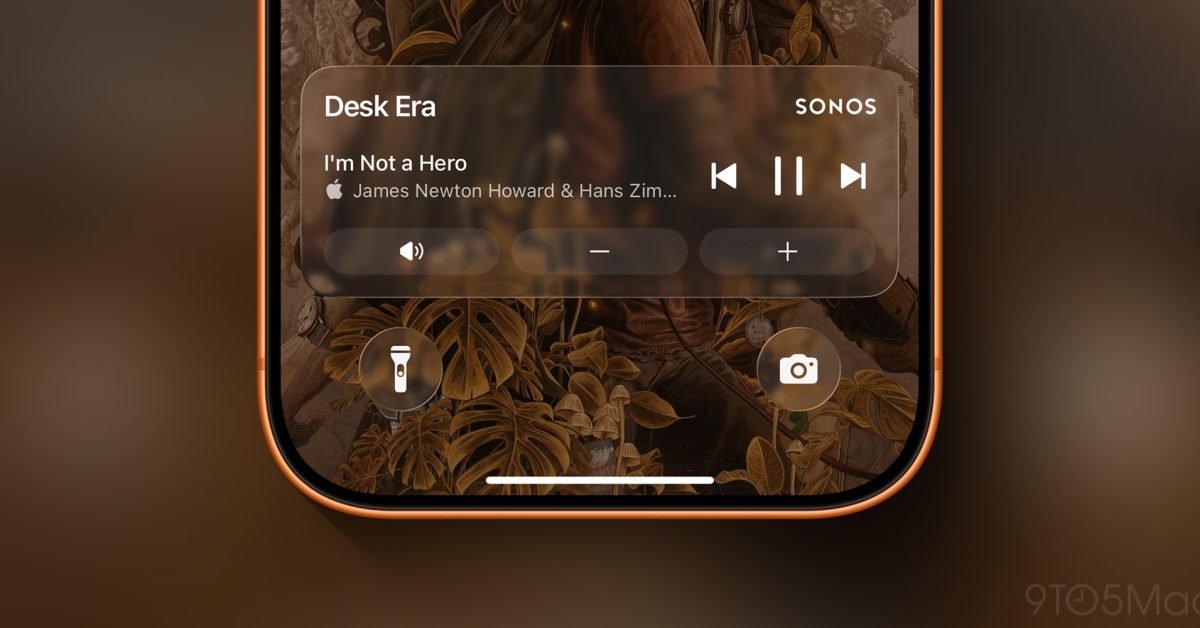
The Live Activity triggers automatically after audio playback is initiated inside the Sonos application and the user closes or moves away from the app interface. The widget displays details about the active audio session, highlighting the last room or grouped set of speakers designated for playback. Once audio stops, the Live Activity remains visible on the Lock Screen for a 15-minute window before automatically dismissing itself from the screen.
Sonos outlined several technical limitations accompanying the initial launch. Album artwork is omitted from the current Live Activity display, though Sonos noted on Reddit that alternative methods to enhance the Lock Screen visual experience are under exploration. On connected platforms like Apple Watch and CarPlay, the Live Activity widget will appear but in a restricted state, as active playback controls are not currently supported on those accessory platforms.
Advertisement
Tech Pulse Daily
Get tomorrow's pulse first
Join engineers who read Tech Pulse before stand-up. Free, weekday mornings.
Sonos just launched Live Activities on iPhone: why it matters now
Support for Live Activities represents the fulfillment of a long-requested feature that Bloomberg reported was in development back in February 2026. Sonos users have experienced significant software changes over the past two years, making the delivery of requested features a key element of the company's software stabilization efforts. By integrating directly into iOS Lock Screen APIs, Sonos reduces the friction required to check or pause playing audio across home speaker networks.
The release also highlights Sonos' ongoing work to refine its iOS application experience following the controversial redesign. By adopting native iOS platform capabilities like Live Activities, the company aims to align its system controls more closely with native Apple Music and iOS media player behaviors, while maintaining custom functionality for multi-room speaker groupings.
Sonos just launched Live Activities on iPhone: who is affected
All iPhone owners using the latest update of the official Sonos app on iOS can access the new Live Activities feature. The rollout impacts household members managing multi-room audio installations, as the widget reflects room-specific and grouped-speaker playback states. Users who stream audio to Sonos hardware via alternative protocols, including AirPlay, Bluetooth, or direct partner app integrations, retain standard playback controls outside of the main app.
Apple ecosystem users with connected Apple Watch devices or CarPlay setups will see the Live Activity interface surface on those screens, though interactive controls remain unavailable on secondary displays for now. Users who do not wish to utilize Lock Screen widgets can manually disable the functionality within the Sonos app settings menu.
Sonos just launched Live Activities on iPhone: what to watch
Moving forward, software updates may address current feature gaps noted by the development team, specifically the inclusion of album art within the Lock Screen widget. Sonos indicated that visual enhancements for the Lock Screen experience are being explored, which could bring rich media metadata to future iterations of the Live Activity interface.
Users should also monitor subsequent app updates for expanded interactive control support on connected Apple devices. While Apple Watch and CarPlay displays currently mirror the Live Activity without active controls, future releases could expand control functionality across the broader Apple hardware ecosystem as Sonos continues updating its software stack.
Developer Action Items
- ☐ Diff the official changelog for Apple / iOS before you bump — APIs, defaults, and removed flags only.
- ☐ Install through the vendor's documented channel in staging; keep a one-command rollback and time-box the canary.
- ☐ Grep your repo for old flag names, lockfile pins, and plugin versions that the notes mark as breaking.
- ☐ Prefer the first patch cut over the day-zero tag unless you have a reason to be on the leading edge.
- ☐ If 9to5Mac did not name a region, plan, or SKU, screenshot the official availability line before you promise it to users.
Sonos just launched Live Activities on iPhone FAQ
When did Sonos launch Live Activities on iPhone?
Sonos officially released Live Activities support in its iOS app update on August 17, 2026.
How do you control playback from the Sonos Live Activity on the Lock Screen?
Users must first unlock their iPhone using Face ID or a Passcode before making playback adjustments on the Live Activity widget.
Do Live Activities work on Apple Watch and CarPlay?
Live Activities appear on Apple Watch and CarPlay, but interactive playback controls are not currently supported on those devices.
How long does the Live Activity stay on screen after music stops?
The Live Activity automatically disappears 15 minutes after audio playback has stopped.
Sources

Author
Dillip Chowdary
Writes Tech Bytes coverage of AI, engineering, and the tools that actually ship. Editor of Tech Pulse Daily.
Related on Tech Bytes
Fairphone is launching its latest repairable phone in the US too
Read →
Detroit startup Grounded raises $5M to customize electric and gas-powered vans
Read →
BGP Role model: tracking the adoption of RFC 9234
Read →
We still don’t know how people are really using AI
Read →
Today's Tech Pulse briefing
Full briefing →
Advertisement