Sync all apps you build in Codex, Claude, or locally
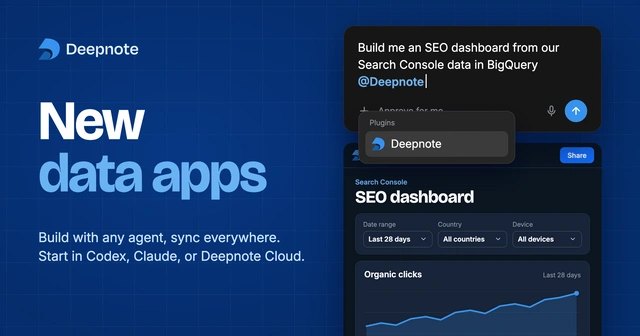
Deepnote launched rebuilt data apps that let engineers build custom tools in Claude, Codex, or local editors and run them on notebooks with live data.
By Dillip Chowdary • Nov 19, 2026 • Source: deepnote.com
At a glance
- Product
- Rebuilt Deepnote data apps
- Authoring tools
- Claude, Codex, Deepnote agent, local toolchains
- Backend engines
- Notebooks running SQL, Python, and R
- Warehouse integrations
- Snowflake, Databricks, BigQuery, ClickHouse
- Connection protocols
- Model Context Protocol, ChatGPT, Claude
- Access roles
- App user, View, and Edit
Deepnote launched completely rebuilt data apps that allow software teams to create interactive applications with custom interfaces powered by computational notebooks. According to deepnote.com's report, developers can construct these tools inside Deepnote, through external agents like Claude and Codex, or within local toolchains before hosting and sharing them in Deepnote. The release transforms previously static outputs from artificial intelligence tools into persistent software connected directly to live enterprise data warehouses, shared metric definitions, and organizational access controls.
This report details the architectural changes behind the platform, multi-agent development workflows, shared metric definitions, automated execution schedules, and enterprise access governance. It is designed for data analysts, analytics engineers, software developers, and engineering leaders deploying collaborative internal tools without managing separate frontend and backend hosting stacks. Readers will learn how these rebuilt systems link AI-generated interfaces to live query engines across Snowflake, Databricks, BigQuery, and ClickHouse.
01Custom interfaces backed by notebook engines
In previous iterations, Deepnote applications consisted of individual notebook blocks arranged sequentially across a page. The redesigned architecture replaces this layout with a fully custom interface generated from natural language prompts by the Deepnote agent or third-party assistants. Despite the modernized user-facing design, a computational notebook continues to operate as the foundational execution backend behind every deployed application.
The underlying notebook engine processes SQL queries, Python scripts, and additional languages like R to manage data transformations and complex computations. Because computations run through live analytical scripts, queries execute directly against enterprise data sources without relying on manual file exports. Notebook input elements, including date pickers, dropdown menus, and categorical filters, bind directly to user interface controls to supply interactive parameters for every calculation.
Every created application resides natively within the Deepnote workspace alongside hundreds of native enterprise integrations. The hosting environment connects directly to modern cloud warehouses, including Snowflake, Databricks, Google BigQuery, and ClickHouse, ensuring that analytical workloads execute against active production databases. Regardless of whether an engineer prompts an external model or writes code locally, the application remains tied to the same unified project environment.
02Multi-agent authoring through Model Context Protocol
Engineers can initiate an application inside Claude, continue development using OpenAI Codex, or build directly with the integrated Deepnote agent. Team members collaborate across the same underlying Deepnote project without being required to share identical code editors or purchase matching artificial intelligence subscriptions. The project files, notebook scripts, and interface definitions serve as a unified starting point across distributed technical teams.
Integration occurs through the Deepnote plugin, which links to external environments via the Model Context Protocol or through native integrations in ChatGPT and Claude. Once connected, developers prompt their chosen agent to construct interfaces using existing analyses, tables, and credentials stored within the Deepnote workspace. A colleague can subsequently open the same project from another agent, add a predictive forecast, or tailor the interface for leadership presentations.
During development, the built-in Deepnote agent analyzes active work to suggest relevant next steps, alternative data comparisons, and interface expansions. Users can click these automated recommendations to explore alternative analytical angles or iteratively improve application features. For developers who prefer working in terminal environments or private editors, the platform allows local application authoring with subsequent deployment directly to Deepnote cloud infrastructure.
03Reusable metric definitions and shared modules
Advertisement
Tech Pulse Daily
Get tomorrow's pulse first
Join engineers who read Tech Pulse before stand-up. Free, weekday mornings.
Artificial intelligence agents can rapidly generate visual dashboards, but they typically lack company-specific business context, such as corporate revenue definitions. Deepnote bridges this gap by connecting agents directly to workspace data sources, historical analyses, and standardized calculation repositories during the generation phase. This contextual grounding ensures that autonomous agents select verified tables, calculate business metrics accurately, and build upon established engineering work.
Shared notebook modules allow engineering teams to define core calculations once and reuse them across distinct internal tools and analytical reports. For instance, an executive revenue review dashboard and a customer health tracker can rely on identical underlying revenue definitions while addressing completely different operational teams. When maintainers update a calculation in a central module, those adjustments propagate automatically to importing notebooks the next time those notebooks execute.
Autonomous coding agents can also reference and ingest analytical data from notebooks belonging to separate applications, provided the source project permissions permit access. Deepnote illustrates this centralized architecture through Lindquett Software, a demonstration company that operates five connected data applications sharing unified underlying logic. The platform provides documentation outlining governance practices for defining single-source metrics and restricting editing authority to designated team leads.
04Scheduled notebook runs and workspace discovery
Workspace members can configure automated schedules on the underlying notebook to recalculate results before important team meetings or update metrics every morning. Automating these notebook runs guarantees that viewers encounter refreshed numbers whenever they interact with the application interface. Organizations can grant end users access strictly to the published interface while reserving project-level editing and inspection permissions for technical team members.
Applications can be published to specific internal teams or distributed across the entire organization depending on operational requirements. Centralized workspace controls allow administrators to manage project permissions, track deployments, and maintain visibility over running workloads. In addition, the centralized Deepnote homepage serves as an internal catalog where colleagues can discover operational tools, review available dashboards, and fork existing projects for new analytical initiatives.
05Granular permissions and warehouse identity controls
Administrators manage security by strictly separating access to published application interfaces from underlying computational notebooks and database connection strings. Deepnote provides three distinct permission tiers to govern how colleagues interact with projects, ensuring sensitive query logic remains protected from unauthorized modifications.
| Role | Access Level | Capabilities |
|---|---|---|
| App user | Published interface | Interact with published controls, date pickers, and visual outputs |
| View | Project viewer | Open and inspect underlying notebooks, files, and project queries |
| Edit | Project editor | Modify code, alter notebook transformations, and adjust settings |
For enterprises with strict data governance policies, supported per-user OAuth integrations ensure that warehouse queries execute under the specific database permissions of the individual viewer. The platform also includes private output settings that isolate user execution results and prevent individual queries from being shared across the organization. These identity controls ensure that team members access only the database records authorized by their specific warehouse credentials.
Note: Public applications utilize the integrations configured in the host workspace, requiring teams to review query scopes carefully before sharing. Workspace administrators maintain the authority to disable public application sharing entirely across the organizational account to prevent accidental external data exposure.
Frequently asked questions
What are the rebuilt Deepnote data apps?
Deepnote data apps are custom, interactive applications built with AI agents or local tools that run on a computational notebook backend. The notebook executes queries and transformations in SQL, Python, or R while connecting to cloud data warehouses.
How do developers build Deepnote apps using external AI assistants?
Teams can connect the Deepnote plugin via Model Context Protocol or native integrations in ChatGPT and Claude. Developers then prompt their external agent to build applications using their workspace data and existing notebook analyses.
How do shared metric definitions work across different apps?
Teams define calculations once inside shared notebook modules and reuse them across multiple applications and analyses. Any updates made to a central calculation module automatically apply to importing notebooks the next time they run.
What access controls govern who can view or edit an app?
Deepnote provides App user permissions for the published interface, View permissions for inspecting the project, and Edit permissions for modifying code. Integrations support per-user OAuth to enforce individual warehouse credentials and private outputs to keep query results separate.
Sources

Author
Dillip Chowdary
Writes Tech Bytes coverage of AI, engineering, and the tools that actually ship. Editor of Tech Pulse Daily.
Related on Tech Bytes
Advertisement