Terminal borders that don't cost a cell: Comments
Ratatui maintainer Joshka released a specification and prototype for terminal cell borders that draw lines on boundaries without wasting entire rows or columns.
By Dillip Chowdary • Nov 15, 2026 • Source: joshka.net
Ratatui maintainer Joshka released a working prototype and specification for terminal cell borders that draw thin lines directly along cell boundaries instead of using entire rows and columns. Described in detail in joshka.net's report, the protocol introduces cell-level border attributes that allow developers to frame terminal user interfaces without wasting display space on traditional box-drawing glyphs. The author implemented the mechanism as a working patch for the Ghostty terminal emulator, built demonstration applications in Ratatui, and published the draft specification to gather feedback from terminal and TUI authors.
This report examines how the proposed protocol works across terminal cells, the formatting limitations it removes, how wire escape sequences operate, and how applications detect feature support. Terminal interface designers, command-line tool authors, and terminal emulator developers running data-dense interfaces will find the approach directly applicable to reducing layout bloat.
01Terminal space costs of box-drawing characters
Traditional terminal applications rely on the Unicode Box Drawing block, which offers 128 characters for lines, corners, and joins. Because every box-drawing character is treated as ordinary text, each line segment consumes an entire row or column inside the terminal grid. On a 16-inch laptop screen running a readable 200 by 50 cell window, an interface with multiple nested panels can easily sacrifice six to eight rows purely for decorative borders.
Box-drawing characters also create functional defects when text shares an edge with a border. Applications cannot place a boundary directly beneath an active text field or around a single-row button without introducing extra padding.
Furthermore, rounded corners built from text glyphs suffer from background-color mismatches, producing discolored square artifacts in the corners whenever panel backgrounds differ from surrounding surfaces. When users copy text out of framed panels, terminal emulators capture the box-drawing characters, requiring manual cleanup of vertical bar glyphs when pasting into external applications.
02Cell attributes and segment edge geometry
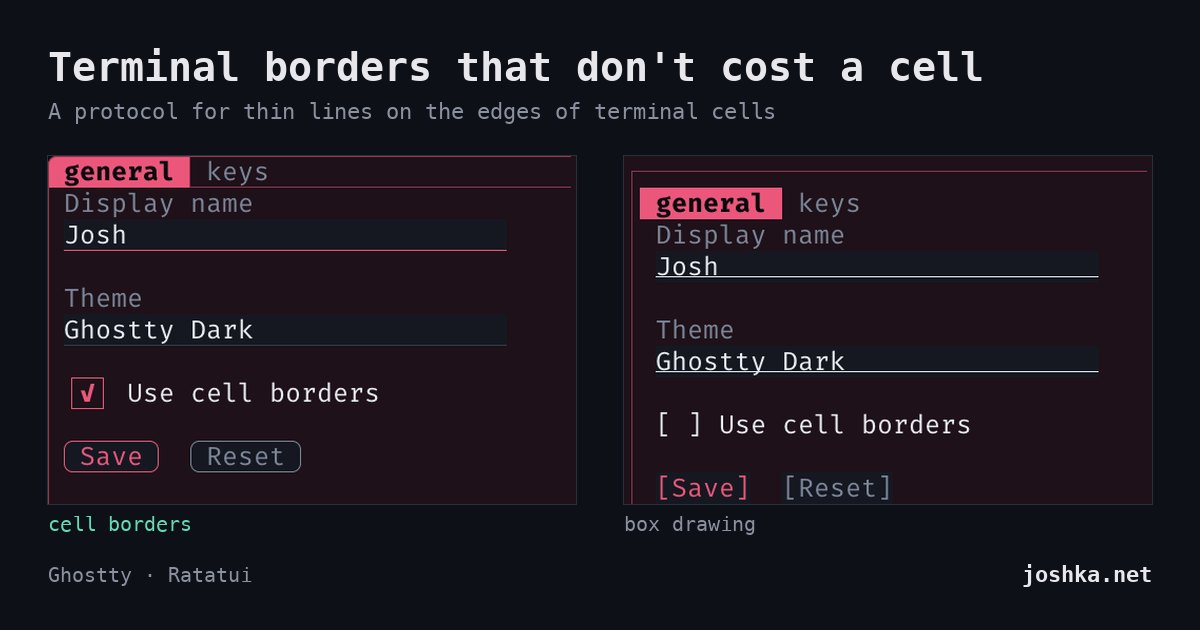
The protocol treats a border as an internal cell attribute comparable to a background color. Each individual cell can carry up to twelve distinct line segments, encompassing two half segments on each of its four perimeter edges alongside four radiating arms from the cell center. Because every segment tracks its own color, width, placement, and visual style, the terminal emulator renders the strokes directly over the cell grid rather than replacing character slots.
Dividing the outer edges into half segments allows borders to align flush against quadrant block characters. This geometry makes it possible to outline partial shapes that sit half a cell inward from the main grid. Because borders are stored directly within cell metadata, line strokes naturally follow text behavior, remaining intact when lines scroll, insert, erase, or reflow.
Advertisement
Tech Pulse Daily
Get tomorrow's pulse first
Join engineers who read Tech Pulse before stand-up. Free, weekday mornings.
03Visual styles and edge priority merging
Supported stroke appearances include solid, double, dashed, and dotted lines. Cell corners and centers can render square or rounded joins with anti-aliased arcs and configurable radii. Rounded joints support an outside color parameter, which paints the exterior corner zone cleanly even when a pane sits on a contrasting background.
When two adjoining cells assign borders to a shared edge, the terminal merges both strokes into a single visible boundary. An explicit priority rule dictates which stroke displays: the segment with higher designated priority wins, followed by the wider line width, and finally the segment positioned to the right or bottom. This priority mechanism prevents an active, focused pane from losing half of its visual outline to an adjacent panel rendered later in the draw order.
04Escape sequences and terminal capability queries
The communication layer encodes commands into Device Control String escape sequences under a dedicated namespace formatted as ESC P 1 + b cell-border followed by operations and fields. The primary operational path uses a cursor pen that holds active border settings like a background color, applying styled borders to every character printed until cleared by SGR 0. Dedicated rectangle commands allow applications to assign or wipe borders across existing cell spans without altering the cursor pen.
Applications detect terminal support by sending a cell-border capability query immediately followed by a Primary Device Attributes DA1 inquiry. Terminals supporting the protocol return a capability reply outlining active extension fields, whereas unsupported emulators simply ignore the unknown sequence and reply only to DA1. When the DA1 response arrives unaccompanied, the client application falls back to standard box-drawing characters and reserves the necessary outer rows and columns.
05Historical precedents and prototype evolution
Earlier systems attempted line rendering without providing complete per-cell control. DEC ruled lines in DECterm extension 43 drew rectangular boundaries that scrolled with text, but lines were fixed at one pixel in the default foreground color and remained visible after screen clears. Standard SGR sequences 51 through 65 defined framed and encircled attributes, yet lacked color parameters, stroke widths, and bottom edges, while Win32 console flags and PDCurses lacked halves, custom widths, and lower perimeter boundaries.
An initial prototype was implemented in the Rio terminal emulator using Application Program Command escape sequences. Community feedback prompted a transition to DCS sequences because legacy emulators such as Kermit 95 interpret APC payloads as executable commands. The revised specification designates itself as version 1 to mark the initial written draft, keeping the core requirements down to solid strokes, pen control, and rectangle operations while leaving advanced styles as optional capabilities.
Terminal borders that don't cost a cell FAQ
How does the terminal cell border protocol save screen space?
It draws lines along the borders of existing cells instead of allocating entire rows and columns to box-drawing characters. This allows panes, buttons, and input fields to run flush against edges without consuming display space.
How does an application know if a terminal supports cell borders?
An application issues a cell-border capability query followed by a DA1 request. If the terminal responds to DA1 without first replying to the cell-border query, the application falls back to traditional box-drawing glyphs.
What happens when two adjacent cells draw on the same edge?
The terminal merges the shared edge into a single stroke. The stroke with higher assigned priority wins, followed by the wider stroke, and then the stroke positioned to the right or below.
Sources

Author
Dillip Chowdary
Writes Tech Bytes coverage of AI, engineering, and the tools that actually ship. Editor of Tech Pulse Daily.
Related on Tech Bytes
Advertisement