This tiny iOS 27 camera feature really makes a huge difference
Apple added customizable camera controls to iOS 27, letting iPhone 18 Pro owners pin manual tools like aperture and shutter speed for one-tap shooting.
By Dillip Chowdary • Nov 14, 2026 • Source: 9to5Mac
Apple introduced customizable camera controls in iOS 27 alongside dedicated Pro controls on the iPhone 18 Pro, allowing users to place manual photography tools directly onto the primary viewfinder screen. According to 9to5Mac's report, the update gives mobile photographers single-tap access to hardware settings that previously required digging through layered menus inside the stock application. By bridging the gap between default camera simplicity and specialized manual adjustments, the operating system update alters how creators interact with mobile imaging hardware on Apple devices.
This analysis breaks down the configuration mechanics, interface changes, and functional workflows introduced by Apple for both still photography and video recording. It serves photographers, videographers, and daily iPhone 18 Pro owners who want dedicated manual adjustments without launching external software. Readers will learn the exact steps required to edit the default interface, pin essential exposure tools, and configure single-tap access across shooting modes.
01Manual settings across standalone camera applications
Mobile photographers frequently turn to third-party camera utilities because these applications replicate the tactile ergonomics and layout of standalone hardware cameras. Dedicated developer tools traditionally surface manual controls directly on the primary capture screen rather than burying them beneath submenus. This design grants instant visibility over key exposure elements during active shooting sessions.
The primary advantage of these specialized utilities centers on continuous access to shutter speed, white balance, and variable aperture adjustments. In addition to exposure parameters, creators rely on the ability to toggle immediately between manual and automated focus points. Having these specific parameters exposed on the main display prevents missed moments during fast-paced photographic assignments.
While standalone applications deliver comprehensive utility, transitioning away from the default operating system environment introduces minor operational friction. Photographers often prefer the rapid system-level integration of native software if manual tools are readily available. The presence of core exposure toggles has historically defined the divide between third-party utilities and native camera software.
02Stock interface navigation and menu editing
Apple integrated a comprehensive suite of Pro controls directly into the iPhone 18 Pro stock camera software. By default, the native interface stores these specialized manual settings inside a dedicated menu panel. Accessing them initially requires the photographer to execute a preliminary screen tap before making adjustments.
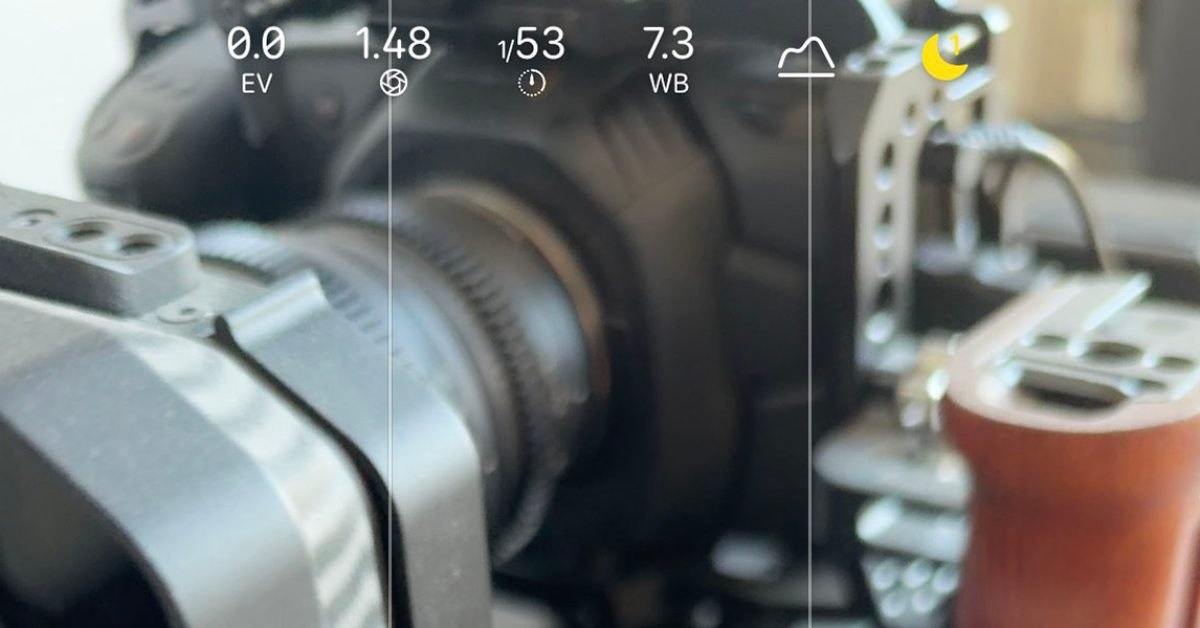
The release of iOS 27 resolved that menu friction by introducing direct interface customization inside the native camera view. To modify the display, users open the standard menu cluster and tap the Edit button situated in the top-left corner when holding the device vertically. This action activates configuration mode across the active interface.
From the editing layout, creators can select individual hardware controls and place them directly onto the main capture window. Relocating these options eliminates the need to traverse multi-step navigation paths during live shooting. The resulting configuration ensures critical photographic tools remain responsive to a single screen tap at all times.
Advertisement
Tech Pulse Daily
Get tomorrow's pulse first
Join engineers who read Tech Pulse before stand-up. Free, weekday mornings.
03Still capture configuration and exposure parameters
In still photography mode, pinning primary controls transforms daily shooting routines on the iPhone 18 Pro. Placing aperture, shutter speed, and white balance directly on the viewfinder screen mirrors traditional mechanical controls. Photographers can adjust their depth of field and color balance instantly without shifting attention away from framing.
Direct placement of the exposure compensation toggle provides a substantial mechanical advantage during live image capture. Adjusting exposure through a dedicated pinned control proves markedly faster than using the traditional vertical drag gesture across the preview image. This dedicated tap interface prevents unintended framing shifts while fine-tuning luminance values.
Adding one-tap access to the real-time histogram completes the still photography layout on the device. By viewing luminance distribution directly alongside manual exposure controls, photographers evaluate clipping risks before pressing the shutter. This combination ensures precise exposure calculations without relying on third-party analytical overlays.
04Video recording controls and focus selection
Configuring the stock camera application for video capture follows a similarly customized layout on iOS 27. Videographers retain essential exposure parameters on the main display, including aperture, white balance, and exposure compensation. Maintaining these persistent controls ensures uniform lighting and color temperature throughout continuous recording sequences.
The video interface benefits further from persistent histogram monitoring alongside direct frame-rate adjustments. Pinning frame-rate selections allows operators to switch capture cadences quickly to suit changing action scenes or creative requirements. Eliminating menu navigation during video setup keeps shooting pacing consistent across production setups.
Focus management represents another critical customization option specifically tailored for motion capture. Adding a direct toggle between manual focus and autofocus modes lets videographers dictate depth transitions on demand. Because focus adjustments occur frequently while recording, single-tap access significantly minimizes disruptions during video production.
05Native camera adoption and third-party roles
The arrival of customizable screen controls in iOS 27 reduces dependence on third-party photography applications for standard assignments. By offering direct access to manual aperture and exposure parameters, Apple enables creators to remain inside the stock application more frequently. The native experience delivers quick responsiveness while matching the core manual ergonomics of specialized tools.
Specialized third-party camera software continues to serve an important function for advanced creative production. Independent applications still provide niche processing pipelines, specialized capture modes, and unique file workflows required by professional productions. However, the baseline convenience of native manual controls satisfies daily shooting demands for many creators.
Combining hardware capabilities on the iPhone 18 Pro with customizable interface layouts creates an efficient balance for visual creators. Having manual controls, exposure compensation, and histograms accessible in a single tap elevates native mobile photography. This subtle software modification establishes the stock camera as a capable primary tool for photos and video.
This tiny iOS 27 camera feature really makes FAQ
How do you customize controls in the iOS 27 camera app?
Open the camera menu and tap the Edit button located in the top-left corner when holding the iPhone vertically. From there, select any control to add it directly to the main screen for single-tap access.
What manual controls are available on the iPhone 18 Pro?
The iPhone 18 Pro provides manual controls for aperture, shutter speed, white balance, exposure compensation, and focus mode selection between manual and autofocus. It also includes a real-time histogram display.
Why use exposure compensation instead of dragging on the screen?
Tapping a dedicated exposure compensation button provides a faster and more consistent way to adjust luminance than dragging up or down directly on the photo preview.
What extra settings are useful when configuring video mode?
Video mode benefits from instant access to frame-rate toggles and focus mode switching, alongside aperture, white balance, exposure compensation, and the histogram.
Sources

Author
Dillip Chowdary
Writes Tech Bytes coverage of AI, engineering, and the tools that actually ship. Editor of Tech Pulse Daily.
Related on Tech Bytes
Advertisement