Turn a photo of a pile of Lego blocks to a build with Claude
Mister Blocks launched a free AI tool that analyzes a photo of loose bricks to generate four verified custom models with step-by-step 3D building guides.
By Dillip Chowdary • Nov 10, 2026 • Source: misterblocks.com

Mister Blocks launched an artificial intelligence building platform that converts a single photograph of loose plastic bricks into custom construction plans, according to misterblocks.com's report. The web-based system analyzes the photographed pile, catalogues every detected component including hidden pieces, and generates four distinct model options complete with interactive three-dimensional step-by-step instructions.
This breakdown details the photo ingestion process, physical validation rules, custom generation prompts, and curated category catalogs available on the site. The platform serves builders, hobbyists, and parents seeking practical ways to repurpose loose bricks without purchasing new retail sets or sorting pieces manually.
01Single photograph brick scanning and cataloging
The system initiates its workflow when a user uploads a single photograph of loose construction bricks spread across paper. The recognition engine registers assorted standard elements, wheels, flat plates, and unusual geometry directly from that solitary snapshot. It identifies individual items even when loose bricks rest partially obscured beneath other components in the pile.
Users achieve optimal detection accuracy by arranging loose pieces across a white paper surface with studs facing upward and avoiding overlapping edges. The computer vision pipeline can also process an image of an existing assembled structure. In that scenario, the system visually breaks down the completed assembly and proposes alternate projects from those reclaimed parts.
Every detected piece is inventoried into an exact parts list restricted strictly to what the user currently possesses. The software tracks individual components to ensure every identified brick is allocated only once across an assembly. This closed inventory prevents the system from suggesting structural designs that require missing, unowned, or unavailable plastic elements.
02Four automated designs and three-dimensional instructions
From the single inventory scan, the platform simultaneously produces four distinct construction plans tailored to the available components. The resulting output balances variety by providing instructions for an automobile, a utility work truck, a non-vehicular object, and an aircraft. This distribution gives users multiple building options across completely different functional styles without requiring separate prompt queries.
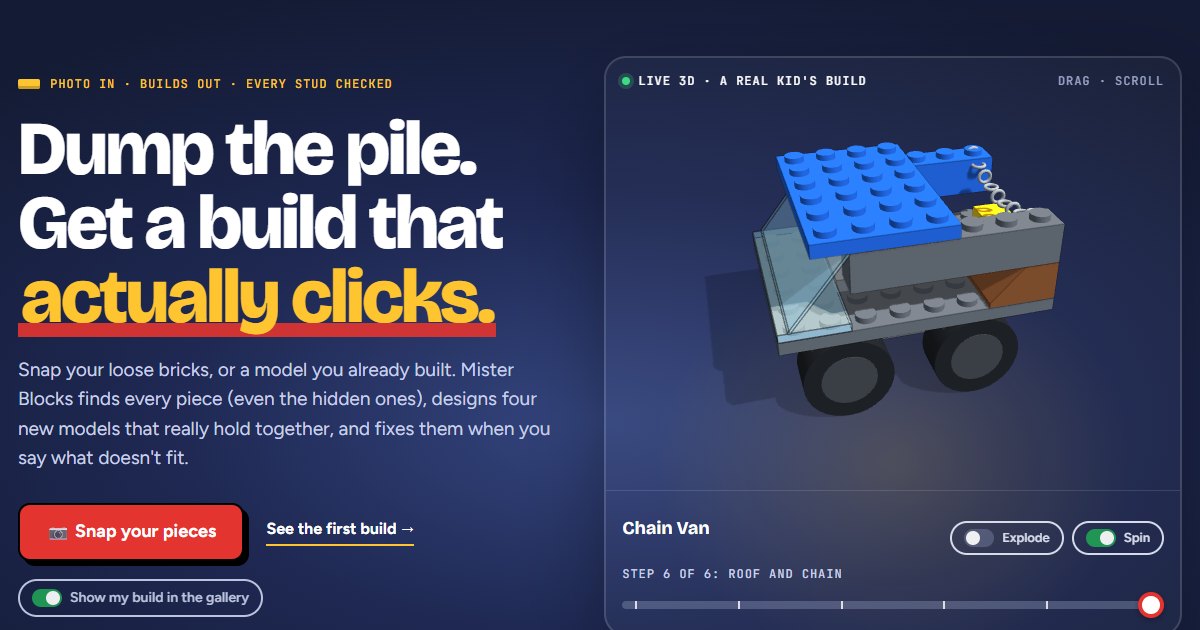
Each generated project provides step-by-step assembly guides paired with a complete parts breakdown. Rather than relying on flat two-dimensional sketches, the system delivers rotatable three-dimensional digital instructions directly in the browser interface. Builders can examine every construction milestone from multiple vantage points to verify piece placement and alignment.
The four designs exclusively reuse the user's available supply, eliminating guesswork around piece compatibility. Because the generator allocates pieces from a unified inventory count, users can construct their selected model immediately without supplemental elements. Each structural path is mapped directly to standard fabrication techniques derived from real toy components.
Advertisement
Tech Pulse Daily
Get tomorrow's pulse first
Join engineers who read Tech Pulse before stand-up. Free, weekday mornings.
03Physical validation rules and stud connectivity testing
Before presenting any construction plan to the user, an automated checker evaluates the structural integrity of the model brick by brick. The verification routine ensures that every piece connects securely to studs situated directly beneath it. The platform strictly rejects designs containing floating components or elements requiring adhesive materials.
The validation suite also enforces mechanical clearance rules to guarantee that vehicular designs remain fully functional after physical assembly. Wheel assemblies undergo testing to confirm that rubber tires never make contact with adjacent chassis or body components. This design constraint originated after an early prototype utility truck built by a child suffered from friction that prevented its wheels from rolling.
If a physical model fails during assembly, users can submit feedback directly through an integrated conversational chat interface. Builders can either type a description of an ill-fitting part or upload a photograph of the physical build in progress. The AI builder interprets the problem report and recalculates the structural model to provide corrected assembly steps.
04Custom subject generation and category model libraries
Beyond processing loose brick photographs, the tool allows builders to request custom designs on demand by entering descriptive prompts. Users can ask the engine to construct specific objects such as vehicles, architecture, or popular characters. The system conducts automated research into the requested subject, translates the visual features into standard building elements, and prepares printable assembly guides.
The platform also maintains a curated repository of twelve specialized model categories featuring free step-by-step instructions. This catalog includes seven car designs, seven work truck models, seven robot assemblies, and thirteen easy starter projects. Users can also access six sculpture plans, five sports guides, five anime subjects, and nine detailed portraits of famous historical or cultural figures.
The remaining collections supply building guides for four Pokémon characters, three space exploration vehicles, three city buildings, and three mythical dragons. Every entry in the public catalog represents a fully modeled digital assembly. Visitors can open any item from the gallery to manipulate the model in three dimensions and follow the complete sequence of instructions.
05Platform independence and free access terms
Mister Blocks operates as an independent community fan resource with no corporate affiliation to the official toy manufacturer. The trademark for the interlocking plastic bricks remains the exclusive property of the LEGO Group, which does not sponsor or endorse the third-party application. Operating independently allows the service to focus directly on consumer-driven utility for existing hobbyists and families.
All core functionality across the website remains available without subscription fees or financial transactions. Users can upload photographs, receive automated model suggestions, run custom subject generation requests, and review public instruction catalogs entirely for free. The platform does not require paid tier upgrades or paywalls to unlock three-dimensional building steps or parts inventories.
The system requires users to supply clear physical inputs to maintain reliable automated detection and structural checking. Builders must place pieces flat on clean surfaces without overlapping components so the image recognizer can parse stud configurations properly. When these conditions are met, the software accurately generates physically viable constructions from miscellaneous parts collections.
Turn a photo of a pile of Lego FAQ
Is Mister Blocks an official product of the LEGO Group?
No, Mister Blocks is an independent fan site. The LEGO Group holds the trademark for the toy brand and does not sponsor or endorse the application.
How much does it cost to use Mister Blocks to design new builds?
The service is entirely free. Users do not pay for photo analysis, custom build generation prompts, or any of the category building guides and 3D instructions.
What four models does Mister Blocks create from a photo of loose bricks?
The software generates construction plans for a car, a work truck, an object that is not a vehicle, and a flying craft. Each model uses only the parts detected in the user's photo and comes with a 3D guide and parts list.
What rules must users follow when taking a photo of their brick pile?
Builders should spread their loose pieces on white paper with studs facing up and make sure the parts do not touch or overlap. Users can also photograph an already assembled model, which the AI will disassemble to recommend new projects.
Sources

Author
Dillip Chowdary
Writes Tech Bytes coverage of AI, engineering, and the tools that actually ship. Editor of Tech Pulse Daily.
Related on Tech Bytes
Advertisement