Vercel Billing CLI is now available: You can now check your team’s billing
Vercel introduced unified terminal billing commands in CLI 65.17.0, letting teams inspect balances, download invoices, and preview upcoming charges.
In short
Vercel teams and developers on all account tiers · Version 65.17.0 · Immediate access across all account plans · Run vercel upgrade in the terminal
By Dillip Chowdary • Nov 20, 2026 • Source: Vercel Blog
At a glance
- Who it is for
- Vercel teams and developers on all account tiers
- The number
- Version 65.17.0
- Available
- Immediate access across all account plans
- What to do
- Run vercel upgrade in the terminal
- Paid requirement
- Upcoming estimates require paid tier
- Structured output
- Append json flag for automation
Vercel added native billing management commands to the Vercel CLI in version 65.17.0 to let teams inspect balances, review invoices, and preview upcoming charges directly from the terminal, according to Vercel Blog's report.
The tool is designed for engineering teams and organization administrators managing deployment infrastructure across all Vercel account tiers. Users can upgrade their local CLI installation and immediately run billing overview commands to track account balances and download invoice files.
01Unified commands under vercel billing
Vercel restructured its command-line interface to centralize commercial operations under a single command namespace. All existing account management tools, including resource consumption tracking, enterprise agreements, and spending limits, now sit together under the unified vercel billing entry point. This structure eliminates fragmented top-level commands across developer terminal workflows.
Teams previously invoked standalone subcommands to monitor individual financial metrics. Under the updated interface, developers access resource usage, contractual terms, and spending ceilings through standardized nested paths. This consolidation mirrors the administrative hierarchy of modern cloud infrastructure while keeping daily operational syntax consistent across development environments.
Access to billing overview data and historical records is available across all plan tiers. Account visibility remains governed by existing team permission structures established in the organizational settings. Team members without administrative privileges continue to see standard access controls applied when running billing queries.
02Team account overview and metadata
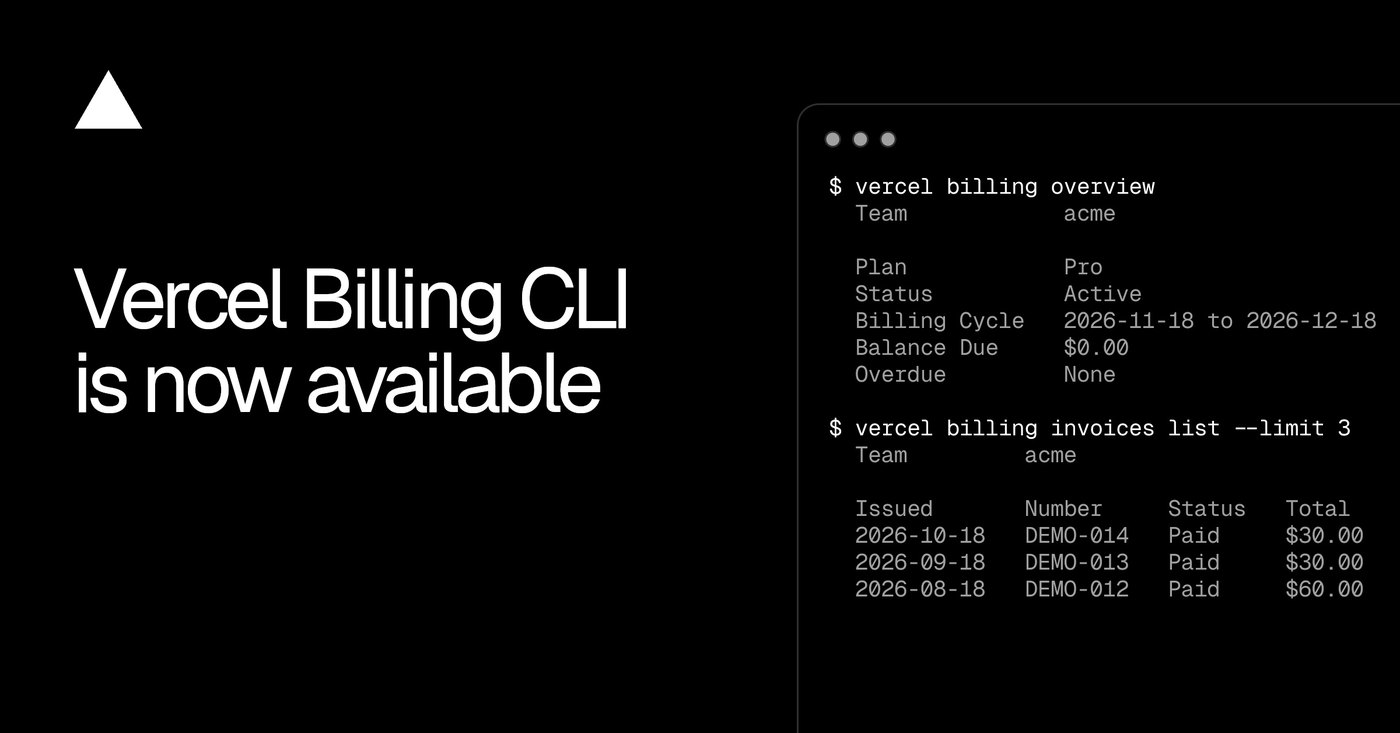
The overview subcommand provides a centralized summary of organizational account health directly within the active terminal session. Running the command displays the assigned subscription tier, current operational status, active billing cycle dates, total balance due, and outstanding invoice counts. Teams can also pass an optional scope parameter to inspect specific linked accounts.
Starting with release 65.17.0, the command expands summary reports with formal invoice metadata. The generated terminal output displays registered physical billing addresses, official corporate tax identification numbers, and custom purchase order values. These additions provide financial verification details without forcing operators to open a web browser.
Note: Access to team overview metrics and historical billing records is open to all account tiers, though execution remains strictly subject to existing workspace permissions. Organization members must possess proper administrative authorization to view sensitive balance numbers and corporate tax details in the terminal output.
03Invoice inspection and charge estimates
The invoice management subcommands allow developers to audit past billing cycles, retrieve portable documents, and forecast upcoming financial obligations. The inspection workflow operates across specific invoice identifiers to expose full line items directly in console output. Teams can also download official PDF invoices directly to local disks for accounting distribution.
Account administrators can inspect upcoming charges before the active cycle concludes to avoid budgetary surprises. The command lists estimated totals alongside provisional line items accrued during the current billing month. This forecast capability provides immediate visibility into projected resource spend before final settlement occurs.
Advertisement
Tech Pulse Daily
Get tomorrow's pulse first
Join engineers who read Tech Pulse before stand-up. Free, weekday mornings.
Note: Upcoming invoice estimates require an active paid subscription, and all projected figures remain preliminary calculations that may fluctuate until the billing cycle officially closes. Teams operating on non-paid tiers cannot generate upcoming invoice estimates from the command line.
- List recent invoices Run the invoices list command with limit three to view recent records and obtain specific invoice identifiers.
- Inspect line items Call the inspect subcommand using the exact identifier to examine itemized charges.
- Download PDF documents Retrieve official invoice copies to local storage using the download command with the identifier.
- Preview upcoming accruals Execute the upcoming subcommand to view estimated charges and preliminary line items before cycle close.
04Command migration and legacy aliases
The restructuring renames three historical operational commands to maintain structural alignment across the platform. Legacy pathways for checking resource consumption, enterprise contracts, and budgetary limits have been mapped into the new billing hierarchy. This update creates a predictable namespace for engineering leads and financial administrators alike.
To prevent broken scripts and preserve muscle memory, Vercel maintains backward compatibility across all modified pathways. The original command invocations continue to function as direct aliases to the newly grouped subcommands. Development pipelines relying on older syntax will proceed without interruption while teams transition.
| Command path | Legacy alias | Unified command | Supported in 65.17.0 |
|---|---|---|---|
| Usage metrics | vercel usage | vercel billing usage | Yes |
| Contract terms | vercel contract | vercel billing contract | Yes |
| Spending budgets | vercel budgets | vercel billing budgets | Yes |
| Invoice metadata | Not available | vercel billing overview | Yes |
05Terminal upgrade and workflow automation
Integrating the new billing toolchain into ongoing operations requires updating the local command-line client to the latest distribution. Developers execute the standard upgrade utility to install current binaries across their workstations. Once upgraded, all unified billing paths and metadata inspection flags become immediately available.
Automated infrastructure workflows and external software agents can consume financial metrics without scraping unstructured text. Appending the json flag to the overview command or any invoice subcommand instructs the CLI to emit structured output. This machine-readable format enables automated reporting scripts to monitor team spending programmatically.
vercel upgradevercel billing overview
vercel billing overview --scope <team>vercel billing invoices list --limit 3
vercel billing invoices inspect <INVOICE_ID>
vercel billing invoices download <INVOICE_ID>
vercel billing invoices upcomingvercel billing overview --jsonFrequently asked questions
Which Vercel CLI version includes configured invoice details?
Version 65.17.0 and later includes configured invoice metadata such as billing address, tax ID, and purchase order numbers.
Are upcoming charge estimates available on free Vercel accounts?
No, upcoming invoice estimates require an active paid subscription. Upcoming charges remain estimates that can change until the billing period closes.
How can automated scripts and agents parse Vercel billing data?
Developers can append the --json flag to vercel billing overview or any vercel billing invoices subcommand to output structured JSON data.
What happens to existing commands like vercel usage and vercel budgets?
Existing usage, contract, and budget commands are now grouped under vercel billing, while previous command names continue to operate as aliases.
Sources

Author
Dillip Chowdary
Writes Tech Bytes coverage of AI, engineering, and the tools that actually ship. Editor of Tech Pulse Daily.
Related on Tech Bytes
Advertisement