Want to see your live AI usage on your Mac’s icons
Designer Michael Flarup launched IconSwapper for macOS at a $19 promotional price to display live ChatGPT and Claude usage limits directly on desktop icons.
In short
Mac users tracking AI limits and customizing icons · $19 promotional launch price rising to $29 · macOS platform via developer website · Install utility, choose target app, and enable live icon
By Dillip Chowdary • Nov 20, 2026 • Source: TechCrunch
At a glance
- Who it is for
- Mac users tracking AI limits and customizing icons
- The number
- $19 promotional launch price rising to $29
- Available
- macOS platform via developer website
- What to do
- Install utility, choose target app, and enable live icon
- Core technology
- Real-time Metal shaders rendering to Dock
- Base location
- Copenhagen design studio
Designer Michael Flarup launched IconSwapper for macOS at a promotional price of $19 before an increase to $29, according to TechCrunch's report.
The desktop tool is designed for Mac users who want to monitor generative software quotas or personalize their interface without editing protected system directories. Readers can install the utility today to configure live tracking triggers for active artificial intelligence clients.
01Live quota tracking on Dock icons
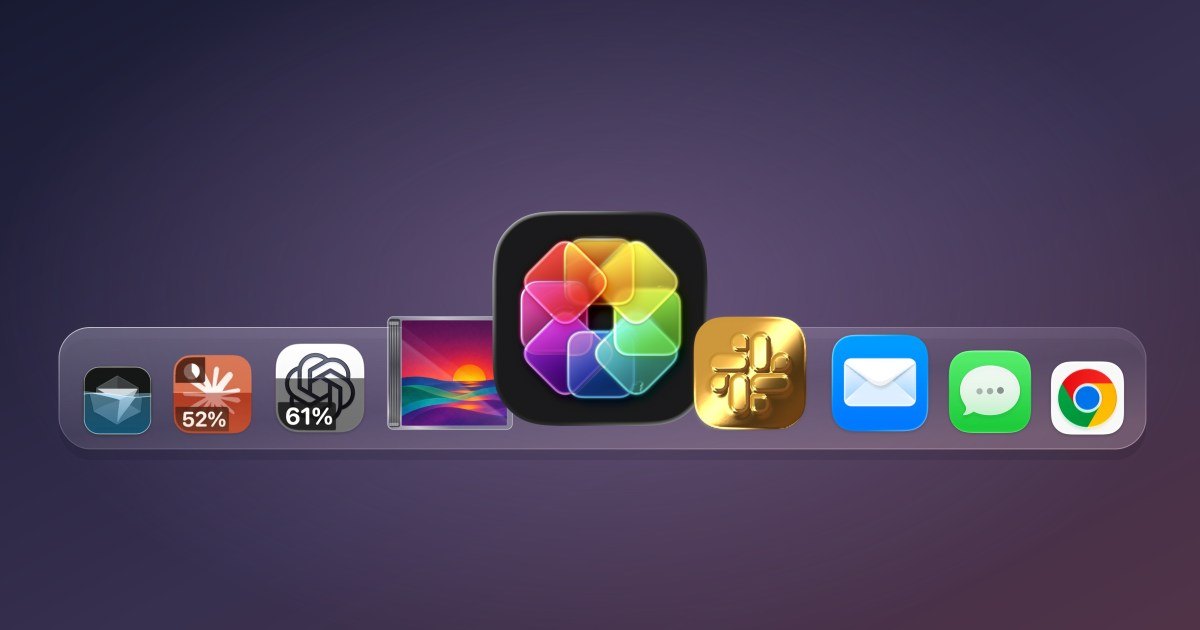
The new macOS utility allows desktop users to replace standard software graphics with reactive artwork that presents live data streams directly inside the application dock. While the software supports aesthetic visual modifications including shading and custom styling, its primary functional utility centers on monitoring artificial intelligence consumption. Users can replace official dock badges with active indicators that continuously reflect current generation volume.
The application actively monitors token consumption and limit reset schedules across developer and writing assistants including ChatGPT, Claude, and Cursor. Instead of opening browser dashboards or standalone monitoring tools to inspect account status, users observe metric updates directly on their dock icons. This direct visualization introduces continuous administrative awareness while keeping the underlying desktop environment uncluttered.
Desktop operators who keep crowded docks can also observe customized icon behaviors inside the standard macOS application switching interface. Visual indicators persist across the Command-Tab bar as active programs change focus during routine computer usage. This dual placement guarantees that critical account threshold notifications remain accessible regardless of dock visibility settings or overlapping workspace windows.
02Dynamic response setup across desktop apps
Configuration requires minimal technical background because the application handles icon binding through a direct graphical selection interface. Users choose a running application from a list and assign specific automated responses to alter the icon state. The tool immediately attaches the dynamic layer to the selected target without altering the core software package.
- Application installation Deploy the utility package to the local macOS system environment.
- Target selection Choose the specific software program intended for dynamic icon generation.
- Response configuration Assign active behavioral triggers that monitor the selected application.
Beyond specialized artificial intelligence clients, the utility links with standard macOS utilities and third-party programs to provide reactive desktop animations. Safari can be configured so its compass dial tracks active file downloads and webpage loading progress in real time. Similarly, the system Finder icon can adjust its facial orientation so its eyes follow cursor motion across the display.
| Application category | Supported software | Live icon behavior |
|---|---|---|
| Artificial intelligence | ChatGPT, Claude, Cursor | Live usage limits and quota reset tracking |
| Native macOS tools | Safari, Finder, Mail, Messages, Music | Compass load status and cursor-tracking eyes |
| Third-party software | Chrome, Spotify | Interactive playback and navigation animations |
Advertisement
Tech Pulse Daily
Get tomorrow's pulse first
Join engineers who read Tech Pulse before stand-up. Free, weekday mornings.
03Stock asset library and editing toggles
The program incorporates a broad set of integrated visual modification settings managed through standard button clicks and graphical switches. Users adjust dimensional styling, surface shading, and color parameters without interacting with graphic design suites or scripting consoles. These visual controls allow rapid personal styling adjustments across both individual applications and broad dock groupings.
The utility supplies an extensive collection of preconfigured replacement icons ready for immediate deployment across popular software titles. Users select alternative graphics directly from the internal library or import personal image files to establish unique aesthetic themes. The bundled repository provides varied stylistic alternatives suited for modern application environments.
Import tools accept custom graphical assets to ensure that specialized internal tools or niche utilities receive matching desktop treatments. Once an operator imports an external asset, the internal engine applies lighting effects and shader enhancements consistently across the artwork. This workflow unifies custom external iconography with existing desktop design standards.
04System theme restrictions and design history
The software was created by Copenhagen-based designer Michael Flarup, who operates a design studio and has produced custom Mac iconography since the early 2000s. Flarup previously authored a published book examining the evolution and craft of application icons. His extended background in graphic interface development informed the technical architecture required to personalize modern desktop environments.
Developing an icon customization tool presented substantial technical challenges due to the strict security architecture implemented in recent editions of macOS. Apple maintains system-level protections over default application bundles and provides no native theming framework for user-level modifications. Direct replacement of system files risks operating system instability and conflicts with software integrity checks.
To circumvent operating system limitations, Flarup engineered an alternate approach that renders graphical updates directly over existing icons without modifying disk files. This dynamic drawing layer allows custom shaders, movement, and real-time operational metrics to function safely. The resulting framework preserves underlying file integrity while providing flexible display capabilities.
05Real-time Metal shaders and pricing tiers
The rendering pipeline processes icon artwork through custom Metal shaders executed continuously on the local graphics hardware. Flarup explained that the technical breakthrough involved figuring out how to send the Dock a bitmap for another running app and have it draw that frame itself directly in real time. The artwork maintains synchronization as icons shift through dock magnification and task switching.
This hardware-accelerated pipeline enables visual reactions, such as casting simulated light sweeps across golden surfaces when the cursor hovers nearby. Flarup noted that this architecture allows an app icon to animate while thinking, adding that software used every day could be a little more fun and a lot more personal. These reactions transform static launcher symbols into responsive functional dashboards.
Note: The utility is currently available as a one-time purchase for $19 during its launch promotional period before advancing to its standard $29 retail cost. All features run locally on macOS hardware without recurring subscription tiers or mandatory cloud processing.
Frequently asked questions
What is IconSwapper for Mac?
IconSwapper is a macOS utility created by designer Michael Flarup that replaces official application icons with custom designs and live data displays.
Which AI applications can IconSwapper track?
The utility tracks real-time usage metrics and account limit resets for ChatGPT, Claude, and Cursor directly on the Mac desktop.
How does IconSwapper render dynamic icons on macOS?
The application runs artwork through custom Metal shaders in real time and sends bitmaps directly to the macOS Dock and Command-Tab switcher.
How much does IconSwapper cost?
IconSwapper is sold as a one-time purchase for $19 during its launch promotional period, with the regular retail price later increasing to $29.
Sources

Author
Dillip Chowdary
Writes Tech Bytes coverage of AI, engineering, and the tools that actually ship. Editor of Tech Pulse Daily.
Related on Tech Bytes
Advertisement