WhatsApp introduces a new bottom navigation bar on Android
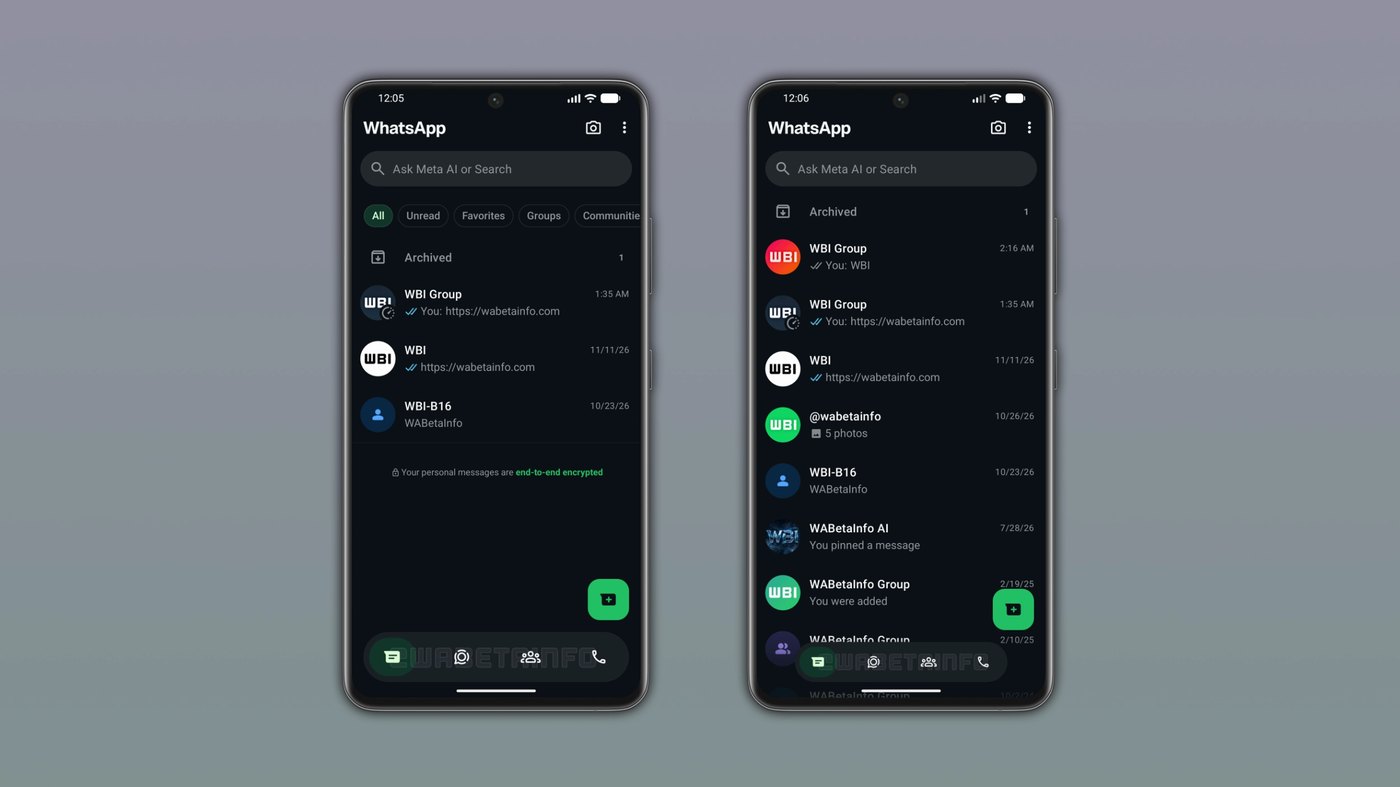
WhatsApp rolled out a floating bottom navigation bar that shrinks into a compact pill during scrolling in the WhatsApp beta for Android 2.26.45.5 build.
By Dillip Chowdary • Nov 15, 2026 • Source: WABetaInfo
WhatsApp rolled out a major navigation overhaul on Android alongside several communication tools across its latest test builds. According to details documented in WABetaInfo's report, the messaging platform detached the primary bottom navigation bar from the screen perimeter to create an interactive floating interface. This release arrived alongside ephemeral media sharing, protected view-once text records, interactive location status updates, and refreshed contact directory tabs.
This comprehensive report covers seven distinct features deployed across recent WhatsApp beta updates for Android and iOS. It serves active beta testers, mobile power users, and engineers tracking platform design patterns and privacy controls across modern messaging ecosystems. Readers will find exact functionality details, interface mechanics, security limitations, and specific version identifiers for every newly introduced feature.
01Floating navigation pill and adaptive scroll bar
The redesigned bottom navigation bar rolled out to select participants running the WhatsApp beta for Android 2.26.45.5 build. WhatsApp detached the bar from the display edges, allowing it to float visibly above conversation screens. Below the floating container, developers implemented a progressive blur filter that introduces a gradual transition between the elevated navigation row and content behind it.
When users browse their chat index, the navigation bar dynamically adapts to downward vertical movement. Scrolling down causes WhatsApp to shrink the component in width and height until it becomes a compact floating pill. Although the icons remain visible throughout navigation, the collapsed pill consumes significantly less display space until an upward scroll restores the bar.
WhatsApp also altered its primary tab selection styling across the bottom strip. The previous pill-shaped tab highlight changed to a circular outline that frames active icons during selection. Furthermore, subscribers using WhatsApp Plus can apply custom accent colors across the client, and WhatsApp directly reflects those chosen shades onto the selected bottom navigation tab.
02Screen protection for view once text messages
WhatsApp deployed ephemeral view-once text messaging to an initial group of Android beta testers. Users create these temporary entries by composing text inside the chat input field and pressing and holding the send button. That action triggers a contextual menu where participants select the dedicated view-once toggle before dispatching the transmission into the conversation thread.
Recipients do not encounter the view-once text directly within the regular chat thread when opening a conversation. Instead, WhatsApp opens an isolated interface to present the incoming message content. Once the recipient closes that dedicated screen, WhatsApp locks the record permanently and prevents anyone from opening it again.
Strict privacy controls govern view-once text messages while open on recipient displays. WhatsApp actively blocks hardware screenshot captures and screen recording routines while anyone reads the temporary content. Furthermore, the platform strips out copying capabilities, disables message forwarding to other chats, and blocks users from saving the text locally.
Advertisement
Tech Pulse Daily
Get tomorrow's pulse first
Join engineers who read Tech Pulse before stand-up. Free, weekday mornings.
03Ephemeral media capture with Instants and Zaps
WhatsApp is developing a dedicated disappearing media framework named Instants to mirror the ephemeral format found on Instagram. Under this upcoming layout, the application places a lightning bolt shortcut icon directly at the top of the main Chats tab. Tapping that shortcut immediately activates an exclusive camera viewfinder dedicated to capturing instant media files.
Instants enforce strict capture boundaries that prohibit uploads from local device photo galleries. Users must shoot real-time photographs or video clips directly through the built-in instant camera tool before sharing them with contacts. Once the chosen recipient views the transmitted file, the instant media item disappears automatically from recipient view.
Engineers quickly refined the Instants framework by introducing Zaps as the specific media packets generated through the instant camera. Participants can dispatch a Zap to individual contacts or broad group channels. If senders deliver multiple Zaps into one conversation, WhatsApp automatically bundles them into an aggregate unit with a count indicator, leaving permanent records for senders.
04Dedicated contacts tab replacing bottom community shortcuts
The WhatsApp beta for Android 2.26.45.2 update introduced a dedicated Contacts tab on the primary bottom navigation row. This new placement directly replaces the previous Communities shortcut to provide members with accelerated directory management. To preserve community access, WhatsApp implemented an independent filter within the main chat list, rendering the dedicated Communities bottom bar entry redundant.
The revised Contacts interface pins designated favorite contacts to the top of the screen for rapid access. Participants can organize their directory entries through three distinct sorting filters based on alphabetical arrangement, upcoming birthdays, or recent contact activity. Sorting by activity surfaces currently connected friends at the top of the list and marks them with a green dot.
WhatsApp mirrored this dedicated Contacts tab rollout across the iOS beta client as well. The iOS interface allows participants to add new contacts, review online indicators, and issue chat invitations from a unified screen. Status details like last seen timestamps and live online activity only appear if contacts explicitly permit visibility inside their privacy settings.
05Interactive location status cards and expanded stickers
A native Location tool is currently under development within the WhatsApp status composition workflow on Android. Users invoke the option by opening the bottom sheet menu located inside the Updates tab. Once users authorize location permissions, WhatsApp automatically detects geographic coordinates and attaches the live place data directly to the user post.
The platform formats broadcast locations as interactive map cards containing a green marker pin, the identified place title, and the full address. When contacts view the published update, they can tap a button positioned at the top of the display to expand the map card. This interaction launches an enlarged map preview that allows viewers to inspect surrounding details closely.
In addition to map updates, the WhatsApp beta for Android 2.26.46.1 package brought a redesigned creation hub for custom text stickers. Members open the sticker keyboard and select the text sticker option to reveal an interactive search panel that renders dynamic styles in real time. WhatsApp also expanded its available text sticker catalog from five options to ten selectable templates.
WhatsApp a new bottom navigation bar FAQ
Which WhatsApp update introduces the floating bottom navigation bar?
The floating bottom navigation bar is available in the WhatsApp beta for Android 2.26.45.5 update. It detaches from screen edges, includes a progressive blur effect, and shrinks into a compact pill while scrolling.
How do users send view-once text messages on WhatsApp?
Users type their text into the chat bar, press and hold the send button to reveal an options menu, and select the view-once setting. WhatsApp blocks screenshots, screen recording, copying, and forwarding while the recipient reads the message.
What is the difference between WhatsApp Instants and Zaps?
Instants is an ephemeral camera feature accessed via a lightning bolt button in the Chats tab for real-time captures without gallery uploads. The resulting photos and videos sent to contacts are called Zaps, which can be grouped together in chats and disappear after viewing.
What replaces the Communities tab in the bottom navigation bar?
WhatsApp beta for Android 2.26.45.2 replaces Communities with a Contacts tab featuring favorites and sorting by alphabetical order, birthdays, or activity. Communities remain accessible through a dedicated filter located in the main chat list.
Sources

Author
Dillip Chowdary
Writes Tech Bytes coverage of AI, engineering, and the tools that actually ship. Editor of Tech Pulse Daily.
Related on Tech Bytes
Advertisement