WhatsApp introduces smart message text actions for chats
The practical mechanics of interacting with shared information inside conversations have changed significantly through format-specific option menus.
By Dillip Chowdary • Nov 08, 2026 • Source: WABetaInfo
WhatsApp is rolling out smart message text actions on the latest versions of its application for Android and iOS, allowing the platform to automatically detect structured information inside chat threads. As detailed in WABetaInfo's report, the feature recognizes phone numbers, dates, physical addresses, and email addresses directly within message text, visually highlighting them with a dotted underline so users can execute contextual shortcuts with a single tap.
This report covers how WhatsApp detects specific information patterns, the precise actions enabled across different data formats, the privacy safeguards governing on-device processing, and the broader pipeline of related chat and media enhancements currently reaching beta testing. The guide is designed for messaging users, community managers, and mobile professionals seeking to streamline day-to-day communications without exposing private conversation text to external infrastructure.
WhatsApp smart message text actions for chats: the announcement
WhatsApp announced the rollout of smart message text actions across its latest Android and iOS client releases, aiming to eliminate manual copying and app switching during everyday conversations. When inbound or outbound chat messages contain identifiable logistical information, WhatsApp places a dotted underline beneath the recognized string to indicate that an interactive shortcut is available. Users can tap the underlined text to open a menu of relevant operational choices, or ignore the prompt and continue reading their conversation without interruption.
The rollout brings native contextual actions directly into the messaging stream, mirroring operating-system level data detection while preserving the visual continuity of the interface. Rather than requiring third-party keyboard utilities or manual text selection handles, the platform identifies data patterns automatically. The system targets everyday conversational elements such as business phone numbers, scheduled meeting dates, physical map coordinates, and contact email addresses to accelerate routine interactions inside chat threads.
What actually changed with WhatsApp smart message text actions for chats
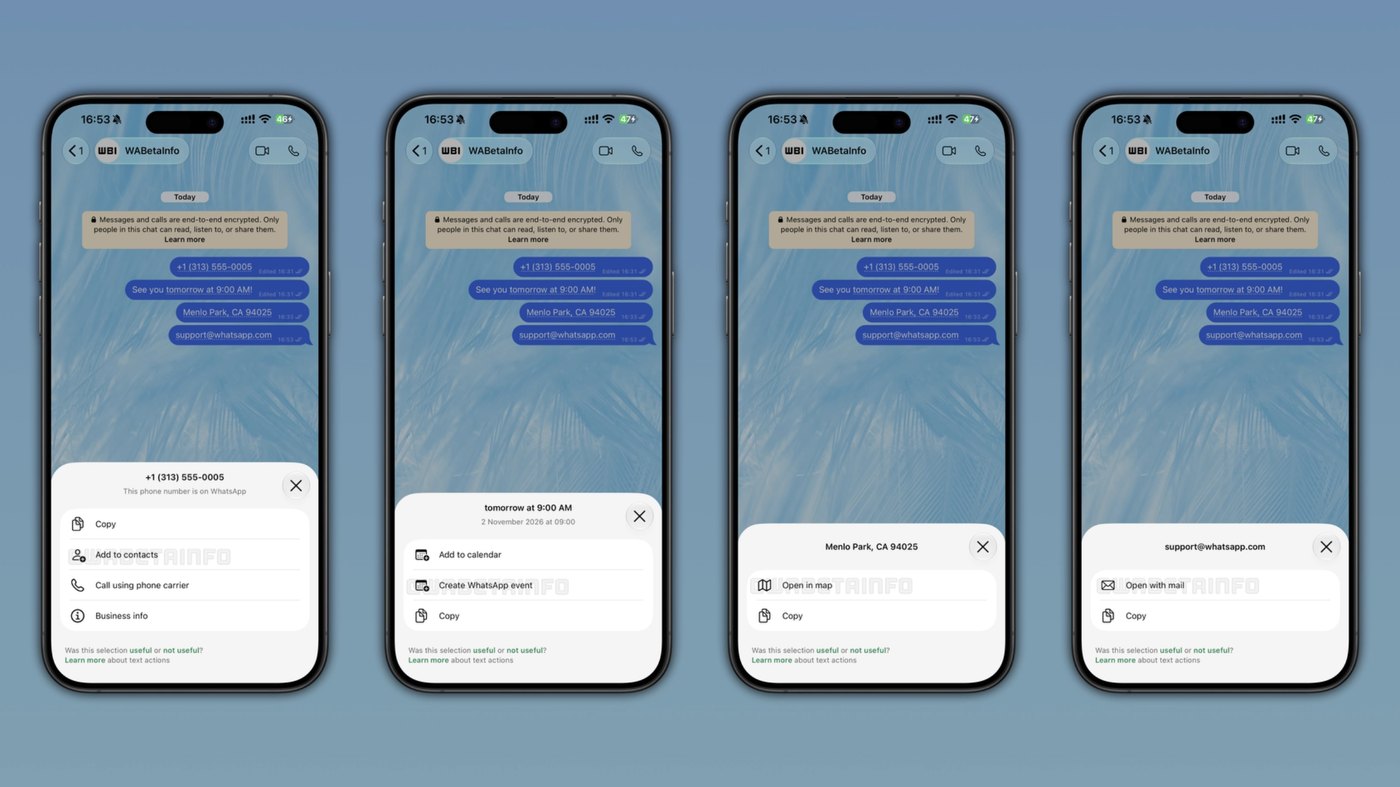
The practical mechanics of interacting with shared information inside conversations have changed significantly through format-specific option menus. When WhatsApp detects a phone number, the app allows users to copy the digits, add the number directly to their contacts, or immediately place an outgoing call using their cellular phone carrier. When dates and times are identified, users can copy the information, add the entry directly to their device calendar, or create a new event inside WhatsApp. Recognized physical addresses offer options to copy the string or open the location directly inside navigation map applications.
Crucially, WhatsApp executes this recognition and generates all contextual text actions locally on the device itself without transmitting conversation text to remote servers. Because the analysis takes place entirely on-device, the feature operates without compromising the platform's standard end-to-end encryption. Message contents remain inaccessible to WhatsApp and parent company Meta during the identification process, ensuring that sensitive contact records, meeting agendas, and physical addresses maintain standard client-side privacy guarantees.
Advertisement
Tech Pulse Daily
Get tomorrow's pulse first
Join engineers who read Tech Pulse before stand-up. Free, weekday mornings.
Who should care about WhatsApp smart message text actions for chats
Daily communicators and professionals who coordinate scheduling and client logistics inside chat groups stand to benefit directly from the integrated shortcuts. Users who frequently receive meeting proposals no longer need to highlight timestamps, switch to a calendar application, and manually copy details between windows. Instead, tapping a recognized date allows immediate calendar entry or native in-chat event creation, significantly reducing the cognitive friction of managing appointments across multiple mobile productivity tools.
Similarly, individuals and businesses exchanging customer service contacts or storefront locations can navigate directly to dialers or mapping applications without copying errors. For users dealing with high-volume logistical conversations, the non-intrusive dotted underline indicator ensures that interactive triggers remain visible without cluttering message bubbles or blocking reading flow. The local processing model also ensures that security-conscious organizations can adopt these interactive conveniences without introducing compliance risks regarding plaintext server telemetry.
How to try WhatsApp smart message text actions for chats
To access smart message text actions, users must install the latest official release of WhatsApp on Android or iOS through their respective application storefronts. Once the client is updated, testing the capability simply requires receiving or sending a message containing an explicit phone number, a recognizable date format, an email address, or a physical street address. When the text renders, users will see the recognized entity marked with a dotted underline that responds immediately to a standard finger tap.
Because WhatsApp deploys features through staged server-side activations, availability may vary among user cohorts even on identical software builds. Some beta testers and general users receive access immediately, while others must wait for gradual regional availability over time. If the dotted underline does not appear beneath recognized data strings following an update, users must wait for subsequent client releases or server-side feature flag propagation to activate the functionality on their accounts.
What to watch after WhatsApp smart message text actions for chats
The arrival of message text actions coincides with several adjacent communication and media features moving through WhatsApp's testing pipeline. On Android, WhatsApp is working on contextual chat previews activated by long-pressing a conversation, allowing users to view recent messages without opening the chat window or sending read receipts. WhatsApp is also testing original quality media sharing without compression for future WhatsApp Plus subscribers, as well as fine-grained phone number privacy controls in beta version 2.26.45.1 that offer Everyone, My contacts, My contacts except, and Nobody options.
Concurrently, WhatsApp is deploying recent media suggestions above the chat bar or camera icon on Android and iOS, alongside generative image expansion within the drawing editor. In WhatsApp beta for Android 2.26.44.6, the company is also rolling out dedicated chats powered by Meta AI, allowing users to create separate AI conversations with custom names and profile pictures accessible through a dedicated filter. Users should watch for how these incoming media, privacy, and preview tools integrate alongside contextual text actions in upcoming updates.
Developer Action Items
- ☐ Diff the official changelog for Meta / iOS / Android before you bump — APIs, defaults, and removed flags only.
- ☐ Install through the vendor's documented channel in staging; keep a one-command rollback and time-box the canary.
- ☐ Grep your repo for old flag names, lockfile pins, and plugin versions that the notes mark as breaking.
- ☐ Prefer the first patch cut over the day-zero tag unless you have a reason to be on the leading edge.
- ☐ If WABetaInfo did not name a region, plan, or SKU, screenshot the official availability line before you promise it to users.
WhatsApp smart message text actions for chats FAQ
What specific formats do WhatsApp smart message text actions recognize?
The feature recognizes phone numbers, dates, times, physical addresses, and email addresses directly within conversation text.
Does WhatsApp smart message text detection affect end-to-end encryption?
No, WhatsApp processes message text and generates contextual shortcuts locally on the device without sharing message data with external servers.
What actions can users take when WhatsApp detects a date or time?
Users can copy the recognized date and time, add it directly to their device calendar, or create a new event within WhatsApp.
What happens when a user taps a recognized phone number in chat?
Tapping an underlined phone number allows the user to copy the digits, add the entry to their contacts, or place a voice call using their phone carrier.
Sources

Author
Dillip Chowdary
Writes Tech Bytes coverage of AI, engineering, and the tools that actually ship. Editor of Tech Pulse Daily.
Related on Tech Bytes
Advertisement