WhatsApp is refining the channel migration tool on Android
WhatsApp is refining its Android channel migration tool with smart suggestions in beta build 2.26.43.2 to sort followed feeds into chats or archives.
By Dillip Chowdary • Oct 26, 2026 • Source: WABetaInfo
WhatsApp is developing an upgraded migration workflow on Android that uses automated smart suggestions to sort followed channels into conversations or archives, according to WABetaInfo's report on recent development builds. Discovered in the WhatsApp beta for Android 2.26.43.2 update on the Google Play Store, the refined utility analyzes user engagement patterns to suggest where each channel belongs. The incoming system marks a shift from earlier tests, giving participants granular control over their broadcast feeds before completing the transition.
This breakdown covers the technical design of the channel migration screen, the options provided for sorting active versus dormant broadcasts, and the broader architectural shift away from the Updates tab on Android. It is intended for administrators managing channel broadcasts, active community members, and Android users tracking interface changes across recent beta releases. By detailing the sorting logic, manual override controls, and upcoming navigation redesign, this report explains how account holders can organize their message lists without losing access to essential updates.
WhatsApp is refining the channel migration: what actually changed
The initial iteration of the migration mechanism, uncovered in the WhatsApp beta for Android 2.26.39.1 build, required individuals to select a single universal destination for all followed channels. In that earlier configuration, WhatsApp evaluated three distinct layouts for displaying broadcast feeds within the Chats tab, prompting people to direct every channel either into the primary chat list or entirely into the archive folder. This blanket setup created friction for subscribers who engaged heavily with certain content creators while only casually checking periodic notices from others.
With the discovery of the WhatsApp beta for Android 2.26.43.2 update on the Google Play Store, the developers changed course toward a more flexible setup. Rather than applying a single uniform rule across an entire subscription list, the refined tool presents individual recommendations tailored to each channel. The updated interface displays each channel alongside a dedicated dropdown menu showing the recommended action, allowing account holders to retain high-priority channels in plain sight while delegating low-priority broadcasts to the background archive folder.
WhatsApp is refining the channel migration: how it works
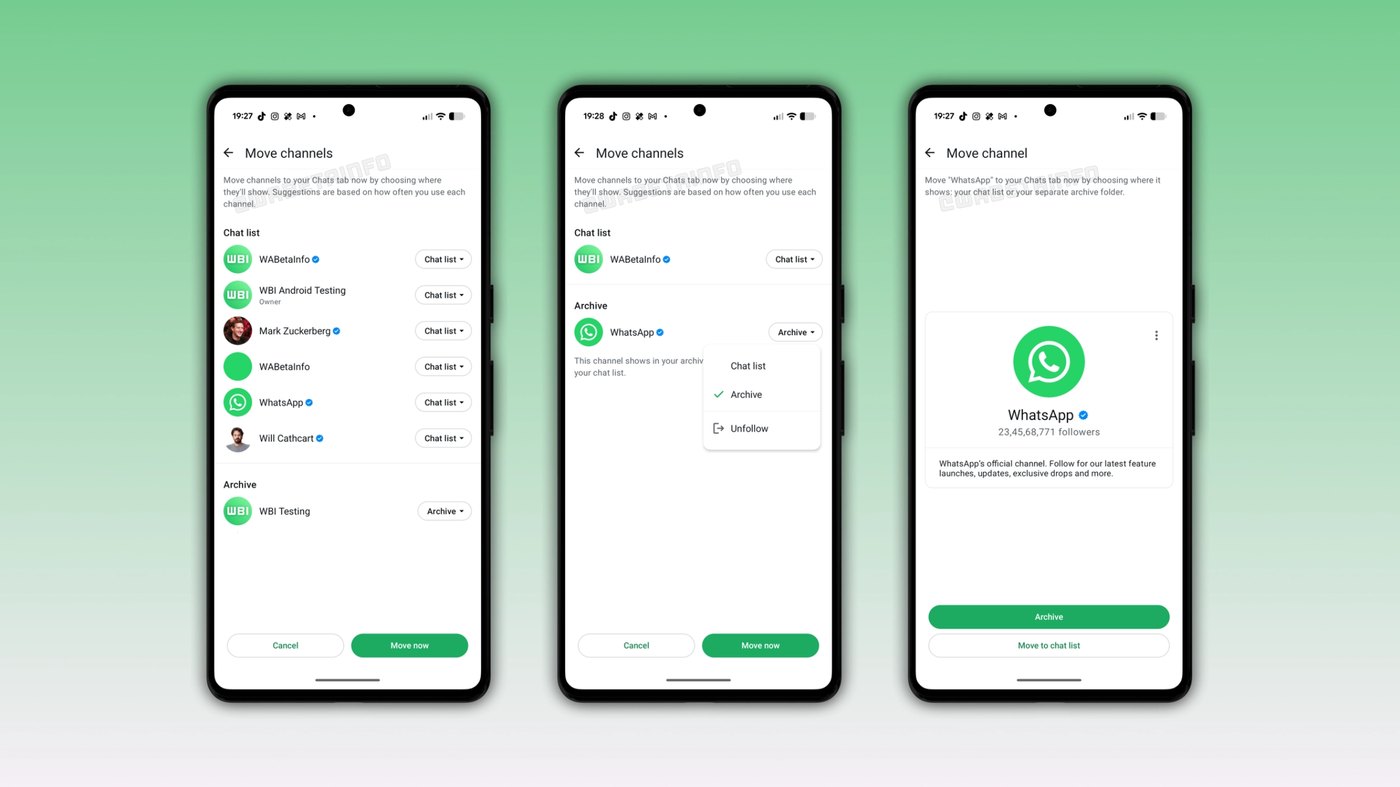
The smart suggestion engine works by analyzing how frequently an account holder interacts with each followed channel before generating a placement recommendation on the migration screen. Channels that record frequent user engagement and regular message reads are automatically queued for placement in the main chat list alongside personal conversations. In contrast, channels with minimal interaction or long periods of inactivity receive recommendations pointing toward the archive folder, preventing low-traffic broadcast alerts from cluttering the primary messaging interface.
On the migration screen, users can review the dropdown selector attached to each channel entry to inspect or modify the automated choice. The interface presents three explicit actions for every item: keeping the channel in the main chat list, routing it into the archive folder for quiet access, or unfollowing the channel entirely from that single screen. Once the preferences are set, tapping the Move now button applies the sorting rules across all selected channels simultaneously and completes the entire transfer process.
Advertisement
Tech Pulse Daily
Get tomorrow's pulse first
Join engineers who read Tech Pulse before stand-up. Free, weekday mornings.
WhatsApp is refining the channel migration: why it matters now
The introduction of automated recommendations solves a significant usability bottleneck for account holders who follow dozens or hundreds of broadcast channels across the platform. Manually sorting through an extensive roster of subscriptions would require significant time and effort if users had to evaluate and classify each entry individually without assistance. By pre-populating the migration checklist based on documented interaction levels, the updated system allows individuals to complete the transition in seconds while retaining the authority to override specific decisions.
This refinement also lays the necessary groundwork for a complete structural reorganization of the main navigation layout within the Android application. Moving channels into the Chats tab removes the operational justification for maintaining a separate Updates tab inside the interface. By transferring channel broadcasts to the main conversation screen where status updates already display for several users, WhatsApp can streamline navigation while establishing clearer distinctions between active communications, archived material, and contact directories.
WhatsApp is refining the channel migration: who is affected
This interface shift directly impacts Android users who track broadcast channels and rely on the Updates tab to discover new content from publishers, organizations, and public figures. Under the new layout, individuals who maintain large subscription libraries will no longer need to navigate to an isolated tab to check community bulletins or announcements. Because the migration allows items to sit in the archive folder, users can follow numerous channels without having constant notifications disrupt the order of their direct peer-to-peer conversations.
Channel creators and community organizers will also see changes in how audience members encounter and interact with their daily posts. Placing high-engagement channels directly alongside standard chat threads increases visibility, but the presence of an in-flow unfollow option alongside archive recommendations means inactive subscribers can prune unwanted feeds during setup. Organizations managing large communities will need to ensure their broadcasts remain relevant and engaging so that automated suggestions consistently place their feeds into the main conversation view.
WhatsApp is refining the channel migration: what to watch
The most notable structural evolution following the migration will be the permanent retirement of the Updates tab in favor of a dedicated Contacts tab. Because status updates already appear at the top of the Chats tab for certain testing cohorts and channels will now reside there as well, the legacy tab becomes obsolete. The replacement Contacts tab will focus strictly on real-time communication tools, enabling individuals to see which address book connections are currently online and initiate direct outreach without unnecessary search friction.
At present, the refined channel migration tool remains in active development and has not yet been rolled out to general public testers or broader beta participants. WhatsApp has not published an official schedule or release window for enabling the tool on the Google Play Store production track. Android users should monitor upcoming beta builds succeeding version 2.26.43.2 to see when the migration screen activates and how the Contacts tab integrates into stable platform releases.
Developer Action Items
- ☐ Verify the claim on the official Google / Android page (or WABetaInfo), not from this recap alone.
- ☐ Name the surface that moved — API, policy, model, hardware, or commercial terms — before you Slack the thread.
- ☐ Assign one owner a day to read the primary material and decide: this-sprint, this-quarter, or noise.
- ☐ Do not change production on day-one coverage. Watch the vendor changelog and one independent write-up first.
WhatsApp is refining the channel migration FAQ
What does the refined WhatsApp channel migration tool do?
The refined tool introduces smart suggestions that recommend whether each followed channel should move to the main chat list or the archive folder based on user activity. Users can accept the automated placements or manually override any suggestion before confirming the move.
Can users unfollow channels directly from the migration screen?
Yes. In addition to keeping channels visible in the chat list or moving them into the archive folder, the migration screen allows users to unfollow channels directly.
What will happen to the Updates tab after channels migrate?
WhatsApp plans to replace the Updates tab with a new Contacts tab once status updates and channels are relocated to the Chats tab. The Contacts tab will display which contacts are online and provide faster access to address book entries.
When will the refined channel migration tool become available?
The tool is currently in development within the WhatsApp beta for Android 2.26.43.2 update on the Google Play Store and is not yet available for beta testing. WhatsApp has not announced an official public release date.
Sources

Author
Dillip Chowdary
Writes Tech Bytes coverage of AI, engineering, and the tools that actually ship. Editor of Tech Pulse Daily.
Related on Tech Bytes
Advertisement