WhatsApp is rolling out a new bottom navigation bar on Android
WhatsApp is rolling out a floating bottom navigation bar in Android beta 2.26.45.5 that compresses into a compact pill when users scroll down chat lists.
By Dillip Chowdary • Nov 11, 2026 • Source: WABetaInfo
WhatsApp is rolling out an adaptive floating bottom navigation bar for Android beta testers that shrinks into a compact pill during scrolling and detaches entirely from the display edges. According to details shared in WABetaInfo's report, the updated design replaces the previous static interface across core tabs on Google Play Store test builds. The interface refresh removes text labels, introduces circular highlights for active icons, and adds a progressive blur effect beneath the navigation container.
This breakdown examines the complete visual overhaul, the dynamic scrolling mechanics, and the underlying layout compatibility across Android devices. The analysis serves Android beta testers, interface designers, and daily WhatsApp users who want to track upcoming navigation changes before the public launch. It details build version numbers, tab configurations, visual refinements, and the staged rollout schedule currently underway.
01Floating navigation bar and icon highlights
WhatsApp designed the new navigation bar to float completely above the screen rather than anchoring directly to display edges. By removing text labels underneath each destination, the interface takes up considerably less screen real estate than the legacy layout. The selection style also moves away from the previous pill container to a circular highlight around the active destination icon.
The floating element persists across primary application tabs including Chats, Updates, Contacts, and Calls. The architecture also integrates support for the dedicated You tab, allowing select participant accounts to navigate between five distinct bottom destinations. Testers Muhammad Hammad, Aksaqa, and A7mad helped identify these visual adjustments as builds moved past the initial 2.26.41.6 test phase.
Initial testing of the floating structure began in WhatsApp beta for Android 2.26.41.6 with rounded outer corners and stripped-down iconography. WhatsApp refined those assets in the subsequent 2.26.45.3 release before broadening access in the 2.26.45.5 package. The resulting layout maintains a clean presentation that keeps primary navigation tools readily reachable above active conversation feeds.
02Dynamic sizing across chat list scrolling
The navigation element actively responds to user gestures by adjusting its physical dimensions based on scroll direction. When a user scrolls down through conversations, the bar automatically contracts in both width and height to form a small floating pill. This automated shrinkage keeps icons visible while freeing up vertical space for message previews and timestamps.
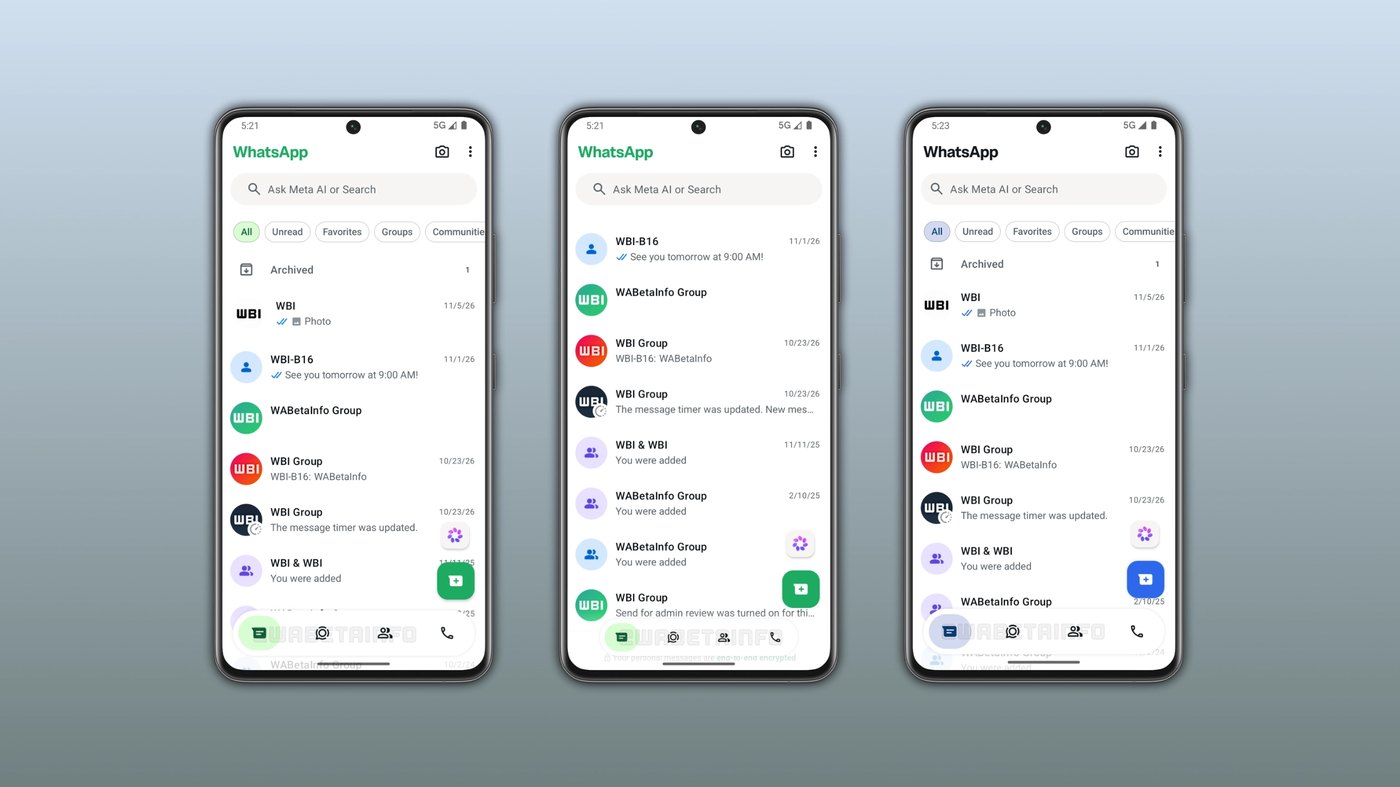
Swiping upward reverses the compression and smoothly expands the navigation container back to its complete proportions. This adaptive response ensures navigation targets remain immediately accessible whenever a reader pauses or moves backward through their list. The mechanical transition prevents the navigation bar from obstructing messages during rapid downward reading sessions.
The responsive sizing system functions consistently across all active conversation feeds, status lists, and contact directories. Because the floating pill retains active touch points throughout its contracted state, users maintain control without needing to trigger a full upward scroll first. The motion profile creates an unobtrusive browsing experience that minimizes visual distraction throughout longer chat feeds.
Advertisement
Tech Pulse Daily
Get tomorrow's pulse first
Join engineers who read Tech Pulse before stand-up. Free, weekday mornings.
03Progressive blur and edge-to-edge layout
WhatsApp implemented a progressive blur effect positioned directly beneath the floating navigation bar. This visual filter creates a gradual, soft transition between the floating controls and the conversational content passing underneath. Without this optical diffusion, the detached container would project a harsh, jarring boundary against message bubbles and contact names.
The blur treatment integrates cleanly with Android edge-to-edge display systems so conversations extend beneath system chrome without visual clipping. By smoothing the contrast between background layers and elevated elements, WhatsApp aligns the messaging client with contemporary operating system aesthetic standards. The container maintains clarity across both light and dark backgrounds during active chat reviews.
The softer underlay also prevents overlapping text from producing illegible visual artifacts as message rows slide under the floating buttons. By blending the layered surfaces gradually, the client maintains comfortable visual legibility without imposing opaque borders. The polished treatment gives the client a cohesive aesthetic that complements earlier updates such as the iOS beta Contacts tab.
04Theme accents and custom color support
The refreshed navigation bar incorporates the core application color palette directly into active tab indicators. Under standard configurations, WhatsApp highlights selected icons with a vibrant green circular backdrop to signal the active screen. This green accent ensures high contrast against surrounding interface components across primary messaging surfaces.
Users subscribed to WhatsApp Plus gain expanded personalization privileges that apply directly to this navigation component. When these subscribers designate an alternate theme hue, the interface maps that custom color across the selected circular tab highlight. This synchronization ties the floating navigation bar into custom user themes without altering standard icon spacing or responsiveness.
Applying unified accent colors prevents the detached navigation pill from feeling disconnected from surrounding menus and headers. The consistent styling reinforces current screen placement whether a user browses conversations, status updates, or account settings. This accent integration preserves clear tab identification while granting supported users enhanced cosmetic control over their messaging environment.
05Google Play Store beta rollout timeline
WhatsApp is distributing the floating navigation interface through the Google Play Store beta channel. The refined presentation surfaced in WhatsApp beta for Android 2.26.45.5 after initial compatibility appeared in version 2.26.45.3. Distribution remains limited to an initial cluster of enrolled testers while engineers evaluate performance and interface stability.
Because deployment follows a server-controlled activation curve, updating to the latest build does not guarantee instant access for every participant. WhatsApp plans to expand account eligibility incrementally across additional testing groups over the coming weeks. The company has not published an official schedule for bringing the floating bar to stable production releases.
Enrolled Android beta testers who do not yet see the floating pill must wait for server-side authorization on their accounts. WhatsApp continues collecting feedback from early participants to fine-tune scrolling transitions and layout scaling before broader releases. Broader availability will proceed in successive deployment rings as testing milestones are satisfied.
WhatsApp is rolling out a new bottom FAQ
Which WhatsApp version includes the floating bottom navigation bar?
The feature is rolling out on WhatsApp beta for Android version 2.26.45.5, with earlier compatibility identified in build 2.26.45.3. It is currently accessible to select beta testers via the Google Play Store.
How does the new navigation bar react when scrolling through chats?
Scrolling downward automatically compresses the navigation bar in width and height into a compact floating pill while keeping tab icons visible. Scrolling back upward immediately restores the container to its complete dimensions.
How many tabs are supported in the updated navigation bar?
The navigation bar displays Chats, Updates, Contacts, and Calls, and also supports a dedicated You tab. Accounts with the You tab enabled can access five navigation destinations across the bottom bar.
Can users customize the color of the bottom navigation bar?
The bar uses green by default for active tab highlights, but WhatsApp Plus subscribers can select custom accent colors. The chosen hue automatically applies to the circular selection highlight around the active tab icon.
Sources

Author
Dillip Chowdary
Writes Tech Bytes coverage of AI, engineering, and the tools that actually ship. Editor of Tech Pulse Daily.
Related on Tech Bytes
Advertisement