WhatsApp is rolling out a new Contacts tab on Android beta
WhatsApp is rolling out a dedicated Contacts tab in Android beta 2.26.45.2, replacing Communities to let users sort online contacts and view pinned favorites.
By Dillip Chowdary • Nov 09, 2026 • Source: WABetaInfo

WhatsApp is rolling out a dedicated Contacts tab on the bottom navigation bar for Android beta testers, replacing the Communities tab. As detailed in WABetaInfo's report, the update appeared in WhatsApp beta for Android versions 2.26.45.1 and 2.26.45.2 after tests in build 2.26.40.3. The tab provides direct access to address book contacts, presence indicators, and pinned conversations.
This report details interface adjustments in the Android beta build, contact sorting mechanisms, and how replacing Communities reshapes navigation. The analysis is intended for Android beta testers, community managers tracking Meta app layouts, and messaging users evaluating contact visibility and privacy settings.
WhatsApp is rolling out a new Contacts tab: what actually changed
The primary interface adjustment replaces the bottom navigation bar slot previously occupied by Communities with a dedicated Contacts hub. Inside this refreshed view, WhatsApp organizes address book entries by placing a Favorites section at the top of the screen, allowing users to view pinned contacts and start conversations faster. Beneath the Favorites shelf, the application displays the complete contact list. Users can adjust how this directory appears by choosing between three distinct list sorting options: alphabetical order, birthdays, and contact activity.
At the bottom of the contact directory, WhatsApp added a shortcut to open a chat with Meta AI, which shows a green dot over its icon because the assistant is always available. The update also adds shortcuts to share invite links to external applications alongside an option to invite Instagram followers to chat on WhatsApp. In the bottom right corner, a floating action button opens a screen where users can enter a first name, last name, username, and phone number, with syncing to the device address book.
WhatsApp is rolling out a new Contacts tab: how it works
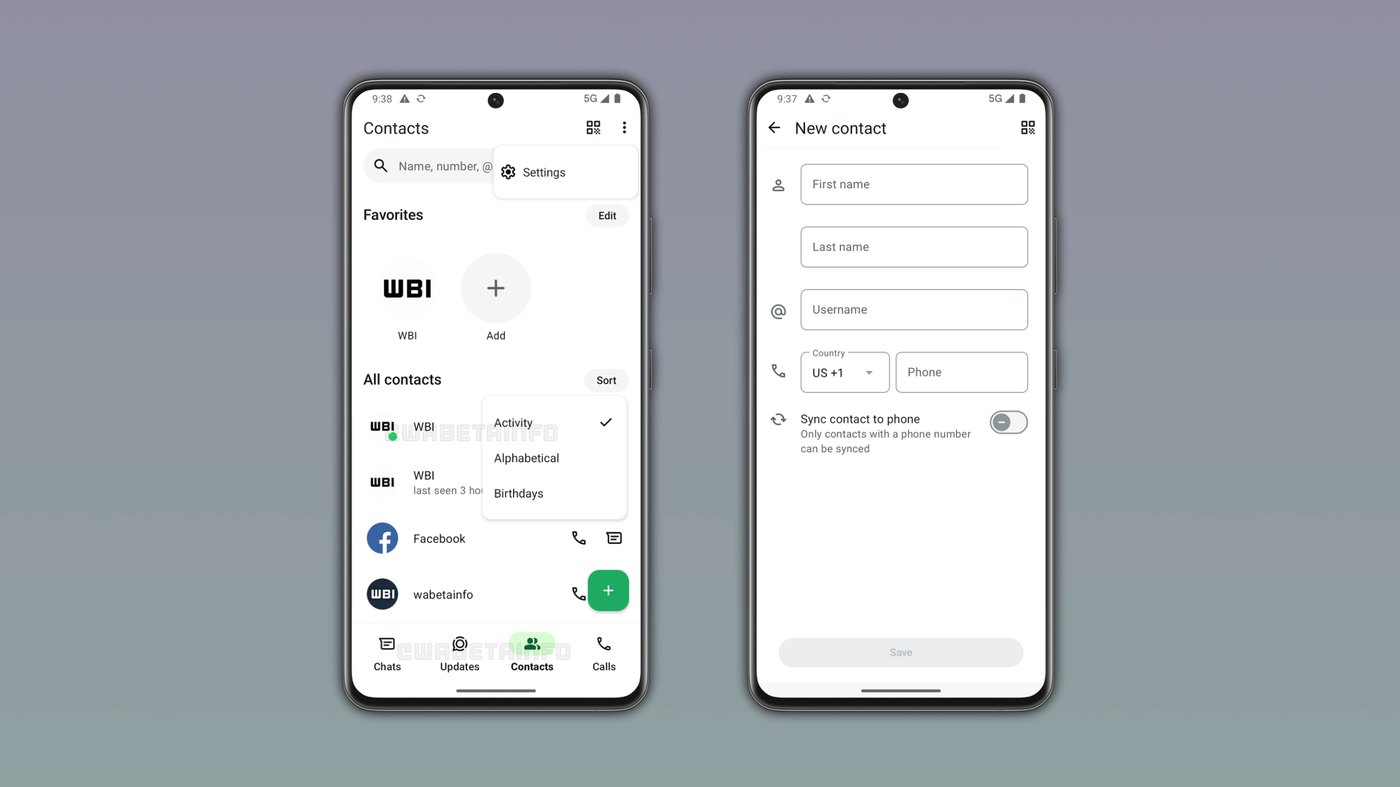
Sorting through the Contacts view relies on account privacy permissions and active connection status. Selecting the activity sort option places online contacts at the top of the list, marking each available person with a visible green dot. Contacts who are not currently online appear lower in the directory, sorted according to their last seen timestamp. This status information is visible only when the corresponding contact shares their last seen and online status, ensuring individual privacy choices remain fully respected across the revised interface layout.
Adding contacts occurs through the floating action button positioned at the bottom right corner of the display. Tapping this button brings up the contact creation screen where users input the contact's first name, last name, username, and phone number. While the interface includes an option to sync newly added entries directly to the phone, WhatsApp can only sync contacts that possess a phone number to the local address book on the device. Meanwhile, external sharing shortcuts generate invite links for other installed apps.
Advertisement
Tech Pulse Daily
Get tomorrow's pulse first
Join engineers who read Tech Pulse before stand-up. Free, weekday mornings.
WhatsApp is rolling out a new Contacts tab: why it matters
The decision to remove Communities from the primary navigation bar addresses redundancy created by recent chat organization features. WhatsApp introduced a filter directly within the chat list that lets people view their joined communities without needing an independent navigation tab. Because that chat filter provides complete access to community channels, retaining a dedicated Communities tab on the bottom bar became unnecessary. Reallocating that position gives users a functional hub dedicated to personal contact management instead of keeping an underused group directory on the main bar.
Providing a centralized Contacts tab speeds up direct communication by eliminating the need to browse through extensive conversation histories. Rather than scrolling through the standard chat feed to locate recently active acquaintances, users can glance at the activity list to see who is available to chat in real time. Combining pinned favorites, sorting parameters, and direct invitation channels into one interface simplifies contact discovery and lets users launch private message exchanges or interact with Meta AI far more efficiently than before.
WhatsApp is rolling out a new Contacts tab: who is affected
The update is currently reaching participants in the Google Play Beta Program who install WhatsApp beta for Android versions 2.26.45.1 and 2.26.45.2. WhatsApp is deploying the interface change gradually, which means only certain beta testers have access to the tab immediately after updating. Those who do not see the revised bottom navigation bar will receive it over the coming weeks as testing expands. WhatsApp has not yet announced a timeline for rolling out the Contacts tab to stable, production versions of the application.
The appearance of the navigation bar also depends on whether accounts are enrolled in separate experimental interface trials. Some users already have a dedicated Meta AI tab that previously replaced Communities, giving their app a different navigation structure. For these testers, WhatsApp may evaluate a layout where Contacts replaces Meta AI, or include them in trials where other surfaces are adjusted. Because WhatsApp tests multiple navigation configurations simultaneously, the layout of the bottom navigation bar can differ substantially from one beta account to another.
WhatsApp is rolling out a new Contacts tab: what to watch
Future testing will determine how WhatsApp consolidates remaining navigation elements, including status updates, channels, and Meta AI shortcuts. The company previously moved status updates to the top of the Chats tab and continues developing tools to migrate broadcast channels directly into the chat list. If broadcast channels join standard conversations, WhatsApp could test removing or replacing the Updates tab altogether. Observers should track whether the navigation bar evolves toward a streamlined layout that retains only essential messaging surfaces across diverse tester groups.
Users and developers should also watch whether WhatsApp expands local address book synchronization beyond phone numbers to include usernames entered in the contact creation dialog. In addition, broader availability across the Google Play Store beta will signal whether WhatsApp intends to make the Communities replacement permanent for all Android users. As engineering teams collect feedback on contact sorting, birthday tracking, and Instagram invitations, subsequent beta releases will reveal whether this dedicated Contacts tab becomes standard across stable global versions of the platform.
Developer Action Items
- ☐ Verify the claim on the official Meta / Android page (or WABetaInfo), not from this recap alone.
- ☐ Name the surface that moved — API, policy, model, hardware, or commercial terms — before you Slack the thread.
- ☐ Assign one owner a day to read the primary material and decide: this-sprint, this-quarter, or noise.
- ☐ Do not change production on day-one coverage. Watch the vendor changelog and one independent write-up first.
WhatsApp is rolling out a new Contacts tab FAQ
Which WhatsApp versions include the new Contacts tab?
The Contacts tab is available in WhatsApp beta for Android versions 2.26.45.1 and 2.26.45.2 through the Google Play Store.
What tab does the new Contacts tab replace on Android?
WhatsApp is replacing the Communities tab on the bottom navigation bar with the new Contacts tab in this initial phase.
How does the Contacts tab show who is online?
Sorting by activity displays online contacts at the top with a green dot, provided users share last seen and online permissions.
Can contacts added with only a username sync to phone storage?
No, WhatsApp only syncs newly created contacts to the device address book if they include a phone number.
Sources

Author
Dillip Chowdary
Writes Tech Bytes coverage of AI, engineering, and the tools that actually ship. Editor of Tech Pulse Daily.
Related on Tech Bytes
Advertisement