WhatsApp is rolling out new text sticker designs on Android
WhatsApp is rolling out an updated sticker keyboard on Android that adds a dedicated bottom sheet entry point and doubles text sticker designs from 5 to 10.
By Dillip Chowdary • Nov 14, 2026 • Source: WABetaInfo
WhatsApp has launched an updated text sticker creation interface on Android that doubles the number of available visual formats and adds a direct entry point inside the sticker picker. According to WABetaInfo's report, the messaging platform has incorporated a dedicated generator into its bottom sheet menu to help testers locate sticker creation tools without typing into search boxes. The deployment expands custom text stickers from five variants to ten distinct designs, allowing users to send stylised messages on demand.
This report examines the revised sticker interface, the expanded catalogue of decorative styles, the updated generation flow, and the phased deployment schedule across Android devices. Android beta testers and active WhatsApp communicators will find practical guidance on locating the new bottom sheet controls and creating expressive graphic elements within chat conversations.
01Creation options in the sticker bottom sheet
WhatsApp has restructured its sticker picker by placing a direct creation prompt alongside existing media tools. Users begin by launching the standard sticker keyboard inside any chat thread and tapping the option to build a generic sticker. The application then displays a bottom sheet menu offering a choice between generating a sticker from an existing photo or creating a text sticker.
Selecting the text sticker option opens a dedicated interface with a focused input bar positioned across the top of the screen. This arrangement establishes a unified workspace where both media stickers and typographic graphics originate from identical keyboard access points. Users no longer need to search across separate menus to convert typed sentences into graphic assets.
The dedicated bottom sheet path replaces older discovery steps that lacked visible interface prompts. By standardising creation controls in one shared modal window, WhatsApp gives equal visibility to image stickers and text creations. Testers can switch between converting device photographs and styling chat phrases without leaving their current messaging view.
02Real-time generation across ten visual themes
Typing into the top input field triggers an immediate live preview across ten unique visual options simultaneously. Every character entered into the prompt automatically regenerates all ten sticker representations without requiring users to press a confirmation button or refresh the panel. The same phrase appears across multiple distinct aesthetics instantly.
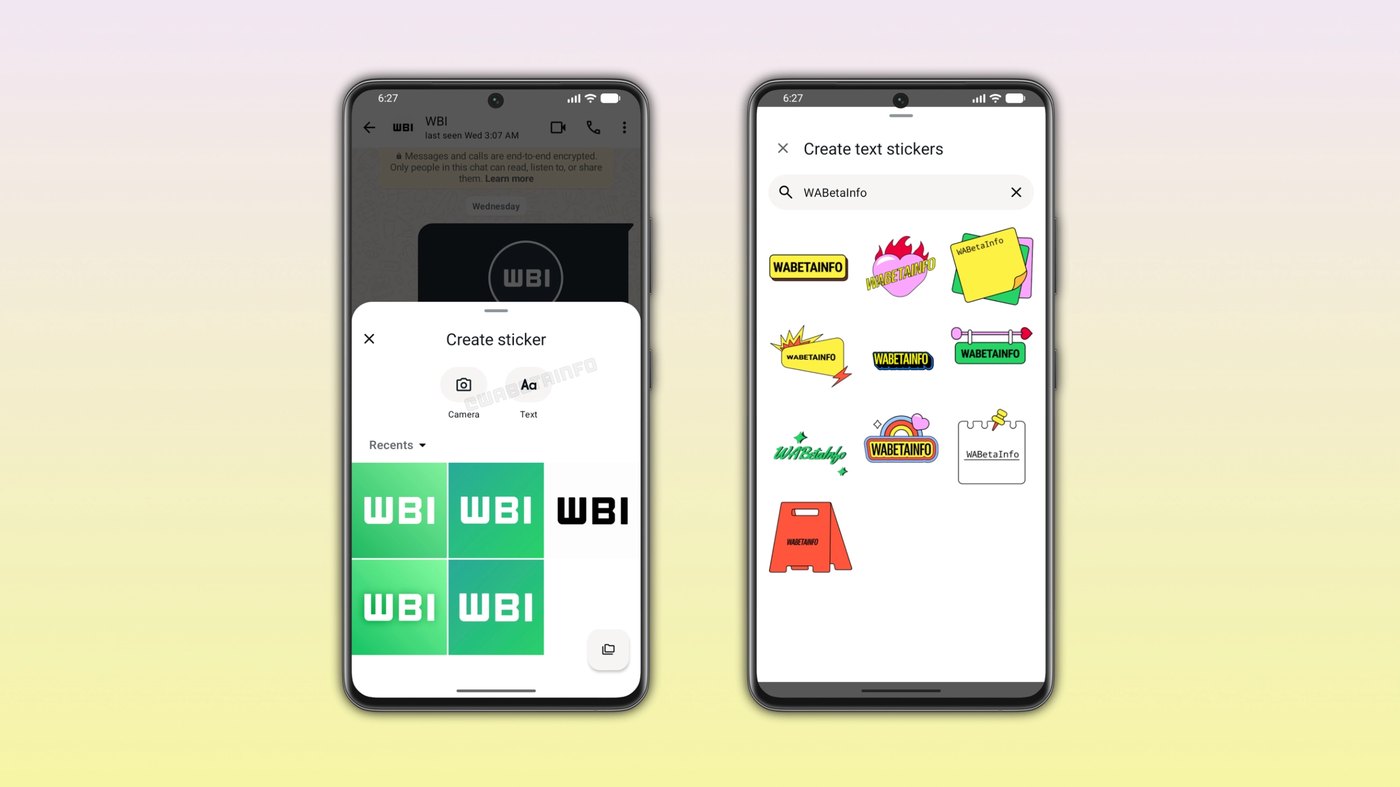
The real-time mechanism allows senders to refine their phrasing while evaluating design balance across every available preset. Users can tap any rendered variation to transmit it directly into the active conversation, or continue typing to adjust sentence length and punctuation. This immediate preview reduces friction by showing final formatting before transmission.
Doubling the output from five styles to ten designs significantly expands conversational variety for recurring phrases. The wider selection helps prevent repetitive messaging aesthetics during long chat exchanges. Users maintain creative control over casual greetings, emphasis markers, and reaction phrases by comparing ten complete layouts side by side.
Advertisement
Tech Pulse Daily
Get tomorrow's pulse first
Join engineers who read Tech Pulse before stand-up. Free, weekday mornings.
03Visual designs from post-it notes to calligraphy
The expanded ten-piece collection introduces distinct graphic treatments suited for different conversational tones and messaging contexts. The roster features a bright yellow label design, a pink heart wrapped in flames, a classic post-it note aesthetic, and an elegant handwritten calligraphy presentation. Each layout applies specific typography and background ornamentation to the user's text.
Additional presets incorporate modern digital treatments alongside playful signage formats. The pack contains a dark background illuminated with lightning bolts, a dimensional sticker featuring a prominent cast shadow, a bright green graphic, and a multicoloured dynamic styling. These options provide distinct alternatives to standard monospace chat typography.
The set concludes with a minimalist plain white frame design and an authentic red A-frame pavement sign. Senders can select understated borders for professional or neutral notes, or apply vivid decorative accents when sharing celebratory news. The complete collection ensures typed phrases match the mood of diverse discussions.
04Dedicated creation flow replacing search field discovery
The updated entry point resolves long-standing usability limitations associated with the original text sticker launch in WhatsApp beta for Android 2.26.1.18. Under that earlier release, generating text stickers required typing phrases into the sticker keyboard search bar. Because the app provided no instructional prompts, most users never discovered the generator.
Relying on a search field obscured the generator because participants typically use search inputs exclusively to retrieve installed graphic packs. Testers unfamiliar with the hidden behaviour had no visual indication that typing arbitrary words would produce typographic stickers. The workflow remained largely unused outside informed beta testing circles.
Integrating text generation directly alongside photo sticker options provides clear discoverability within established navigation routines. Users navigating to create custom content now encounter explicit choices between camera roll imports and real-time text styling. This structural refinement embeds typographic creation into standard chatting habits without requiring specialised knowledge.
05Android beta rollout across Google Play accounts
The refreshed text sticker interface and expanded ten-style collection are currently distributed through WhatsApp beta for Android version 2.26.46.1. The package is available to registered testing participants through the Google Play Store, with initial discovery credit attributed to tester shw_9876. Compatibility remains tied to this designated beta release channel.
Distribution follows a phased deployment model, meaning access is activated gradually across server clusters rather than reaching all participants simultaneously. Users running the correct version number may still await backend activation on their individual accounts. WhatsApp will expand availability to larger testing groups over the coming weeks.
Meta has not published a formal public release date or confirmed when the feature will transition to stable Android channels. Production users must await further testing progression before accessing the bottom sheet toggle and expanded design catalogue. Ongoing beta evaluations will determine stability before general worldwide availability occurs.
WhatsApp is rolling out new text sticker FAQ
How do users access the new text sticker generator on Android?
Users open the sticker keyboard, tap the option to create a generic sticker, and select the text sticker option from the bottom sheet menu.
How many text sticker styles are available in the updated WhatsApp beta?
WhatsApp has expanded the collection from five styles to ten real-time designs, including calligraphy, a post-it note, and a pink heart with flames.
Which version of WhatsApp includes the new text sticker entry point?
The feature is rolling out to select testers running WhatsApp beta for Android version 2.26.46.1 from the Google Play Store.
Sources

Author
Dillip Chowdary
Writes Tech Bytes coverage of AI, engineering, and the tools that actually ship. Editor of Tech Pulse Daily.
Related on Tech Bytes
Advertisement