WhatsApp is testing a new media hub for the iOS app
WhatsApp is testing an iOS media hub in beta 26.42.10.74 that shows only received photos, videos, and links, and it is not yet available for beta testing.
By Dillip Chowdary • Oct 27, 2026 • Source: WABetaInfo
WhatsApp is developing a media hub for the iOS app settings, where users can see photos, videos, and links from their chats without opening each conversation. According to WABetaInfo's report, the work is in the WhatsApp beta for iOS 26.42.10.74 update on TestFlight. The hub is under development and is not yet available for beta testing. It shows only media the user received, so sent and received messages stay separate.
This piece covers the iOS tabs, filters, search, and item actions, and the Mac and Web media hub WhatsApp introduced last year. It is for iOS users who receive photos, videos, and links, and for testers following the 26.42.10.74 TestFlight build.
WhatsApp is testing a new media hub: what actually changed
Last year, WhatsApp introduced a centralized place on Mac and Web for shared media. The hub displays photos, videos, links, and documents from all conversations on one screen, so users do not need to open their chats individually. Users can search by sender or caption, sort by date or file size, and forward or delete multiple items at once. This makes it easier to find a specific photo, video, or link without scrolling through conversations. WhatsApp is now working on bringing the same feature to the iOS app.
On iOS, WhatsApp will introduce the media hub in the app settings and is testing it as a new section. That section displays received media: photos, videos, and links others shared with the user. Media the user sent to others does not appear. WhatsApp will not include disappearing media in this new screen. The work is in the WhatsApp beta for iOS 26.42.10.74 update, available on TestFlight. The feature is under development and is not yet available for beta testing.
WhatsApp is testing a new media hub: how it works
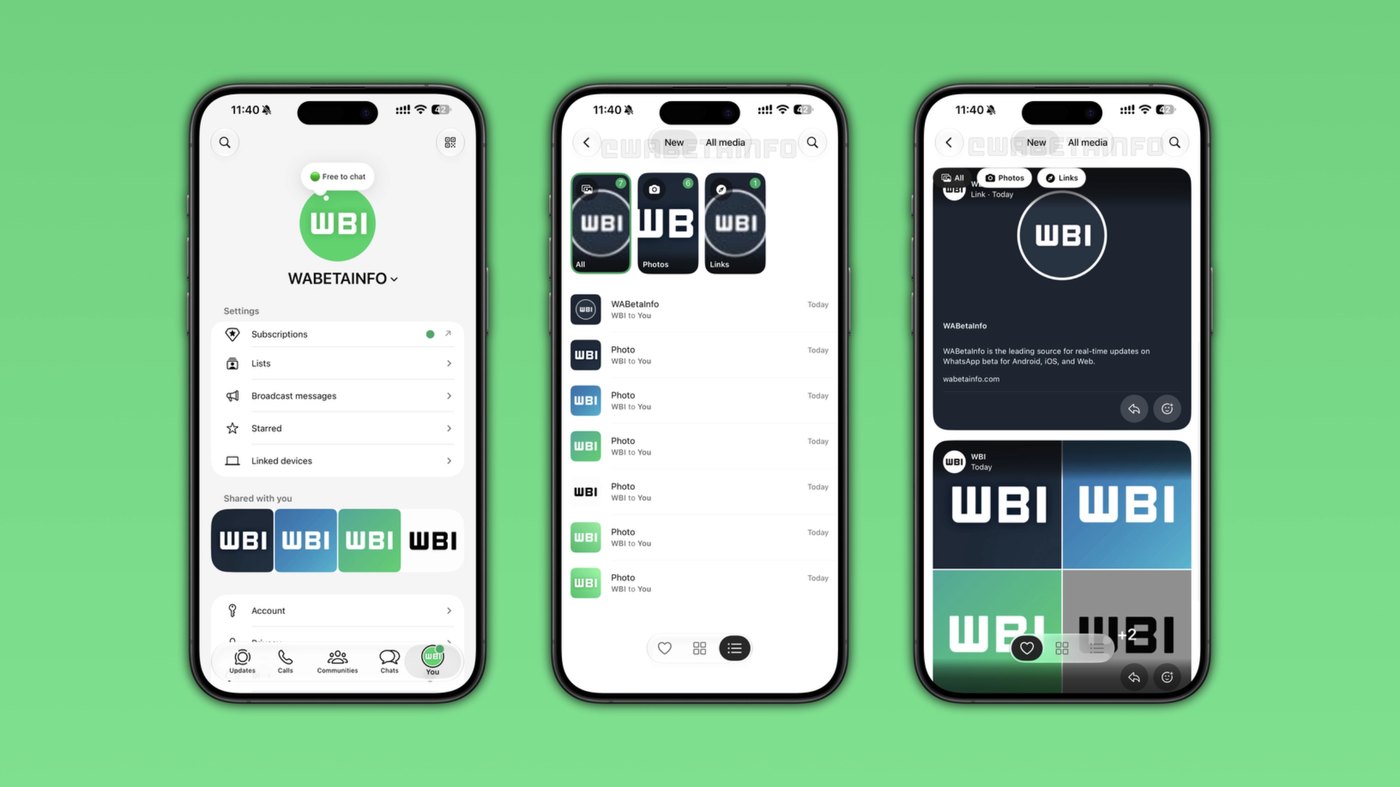
Once users open the hub, they can see recently received media or all media. The New tab shows media that the user received recently. The All media tab shows everything. Users filter this section by choosing everything, photos, videos, or links. Tapping Photos or Videos shows only media content. Tapping Links shows only shared links. Users can switch between a list view and a grid view. The first tab holds media received recently, and the All media tab holds every received item.
Users find messages they reacted to by tapping the heart symbol at the bottom of the screen. The filter finds specific images and videos without scrolling through everything else. Users tap the search button at the top and search by the caption on a photo or video, even if they do not remember when they received it. Search is compatible with links, so a specific URL shared in a conversation can be found. Users do not have to scroll through the chat interface.
Advertisement
Tech Pulse Daily
Get tomorrow's pulse first
Join engineers who read Tech Pulse before stand-up. Free, weekday mornings.
WhatsApp is testing a new media hub: why it matters now
WhatsApp will place the media hub in the app settings, which makes it simpler for users to review photos, videos, and links. From any item, users can forward a photo, video, or link to another conversation without opening the chat where they received it. They can add a reaction, star the item to save it, or open that conversation. These actions will make the hub useful for finding specific photos, videos, and links quickly. The hub shows only received media, so sent and received messages stay separate.
A caption search finds a photo or video when the user does not remember when it was received. Link search finds a specific URL shared in a conversation. The heart symbol at the bottom shows images and videos the user reacted to, without scrolling through everything else. List view and grid view are the two ways to scan the set. The New tab limits the view to media received recently, while the All media tab shows everything. WhatsApp will not include disappearing media in this new screen.
WhatsApp is testing a new media hub: who is affected
The feature is for users of the iOS app, and it is not available yet. WhatsApp has the media hub under development and will release it to some beta testers in a future update. WhatsApp has not announced when this feature will be available. The work appears in the WhatsApp beta for iOS 26.42.10.74 update, which is available on TestFlight. Even in that build, the feature is not yet available for beta testing, so no tester can try the hub yet.
The hub is for users looking up media they received. They will see photos, videos, and links others shared with them. Media the user sent to others does not appear, and disappearing media is left out of the new screen. Mac and Web users have had a hub since last year. That hub shows photos, videos, links, and documents from all conversations on one screen. Those users can search by sender or caption, sort by date or file size, and forward or delete multiple items at once.
WhatsApp is testing a new media hub: what to watch
WhatsApp will release the iOS media hub to some beta testers in a future update. The company has not announced when this feature will be available. Until that update, the feature stays under development and is not yet available for beta testing. The work appears in the WhatsApp beta for iOS 26.42.10.74 update on TestFlight, as a new section that displays received media. That section is the media hub in the app settings, and it lists only media the user received.
The New tab shows recently received media, and the All media tab shows everything. Users can choose everything, photos, videos, or links, and tap Photos, Videos, or Links. List and grid views are available. The heart symbol at the bottom finds reacted messages. Search at the top takes a caption or a specific URL. Users can forward an item, add a reaction, star it to save it, or open the conversation where it was received. Sent media and disappearing media are excluded.
Developer Action Items
- ☐ Verify the claim on the official iOS page (or WABetaInfo), not from this recap alone.
- ☐ Name the surface that moved — API, policy, model, hardware, or commercial terms — before you Slack the thread.
- ☐ Assign one owner a day to read the primary material and decide: this-sprint, this-quarter, or noise.
- ☐ Do not change production on day-one coverage. Watch the vendor changelog and one independent write-up first.
WhatsApp is testing a new media hub FAQ
Is the WhatsApp media hub available on iOS yet?
No. It is under development in the WhatsApp beta for iOS 26.42.10.74 on TestFlight and is not yet available for beta testing. WhatsApp will release it to some beta testers in a future update and has not announced when.
What will the iOS media hub show?
It shows photos, videos, and links the user received. Media the user sent does not appear, and WhatsApp will not include disappearing media. The New tab lists recently received media, and the All media tab lists everything.
How do filters and search work in the media hub?
Users can choose everything, photos, videos, or links, and they can switch between a list view and a grid view. The heart symbol at the bottom finds messages they reacted to. The search button at the top searches by caption and can find a specific shared URL.
What can users do with an item in the hub?
They can forward a photo, video, or link to another conversation without opening the chat where they received it. They can add a reaction, star the item to save it, or open that conversation.
What did the Mac and Web media hub already include?
Last year, WhatsApp introduced a hub on Mac and Web that shows photos, videos, links, and documents from all conversations. Users there can search by sender or caption, sort by date or file size, and forward or delete multiple items at once.
Sources

Author
Dillip Chowdary
Writes Tech Bytes coverage of AI, engineering, and the tools that actually ship. Editor of Tech Pulse Daily.
Related on Tech Bytes
Advertisement