WhatsApp is testing an in-app browser for chats on iOS
WhatsApp is testing a built-in iOS browser in beta version 26.41.10.72 that lets users open any chat link inside conversations without switching to Safari.
By Dillip Chowdary • Oct 19, 2026 • Source: WABetaInfo
WhatsApp is developing a built-in browser for iOS that allows users to open web links directly within conversation screens, according to findings in WABetaInfo's report. Discovered in the WhatsApp beta for iOS 26.41.10.72 update on TestFlight, the feature lets people view shared pages without switching to Safari or Google Chrome.
This report covers how the internal browser functions, its configuration controls, device-level data privacy protections, and user management options. It is designed for iPhone owners and business communicators who regularly exchange digital links and want to understand how WhatsApp handles link navigation without routing traffic outside the messaging client.
WhatsApp is testing an in-app browser: what actually changed
WhatsApp is moving from a tightly limited link viewer to a universal in-app browser that supports any shared web address. The platform previously experimented with an embedded viewer in the WhatsApp beta for iOS 25.14.10.72 update, allowing users to tap certain business links without jumping to Safari. However, that earlier version strictly applied to commercial websites meeting specific technical rules, including mandatory HTTPS encryption. Because non-qualifying links failed those requirements, most URLs shared in everyday chats still forced users to exit the conversation and launch an external browser.
The new WhatsApp beta for iOS 26.41.10.72 update on TestFlight lifts those restrictions entirely. Instead of restricting embedded viewing to pre-screened business pages, WhatsApp is engineering the in-app browser to open any link received or sent in chat threads. Standard articles, personal websites, and general media links will load inside the conversation interface alongside business domains. Removing the whitelist mechanism creates an identical viewing experience for every hyperlink, eliminating the disjointed behavior where select commercial pages opened within the app while regular web addresses opened externally.
WhatsApp is testing an in-app browser: how it works
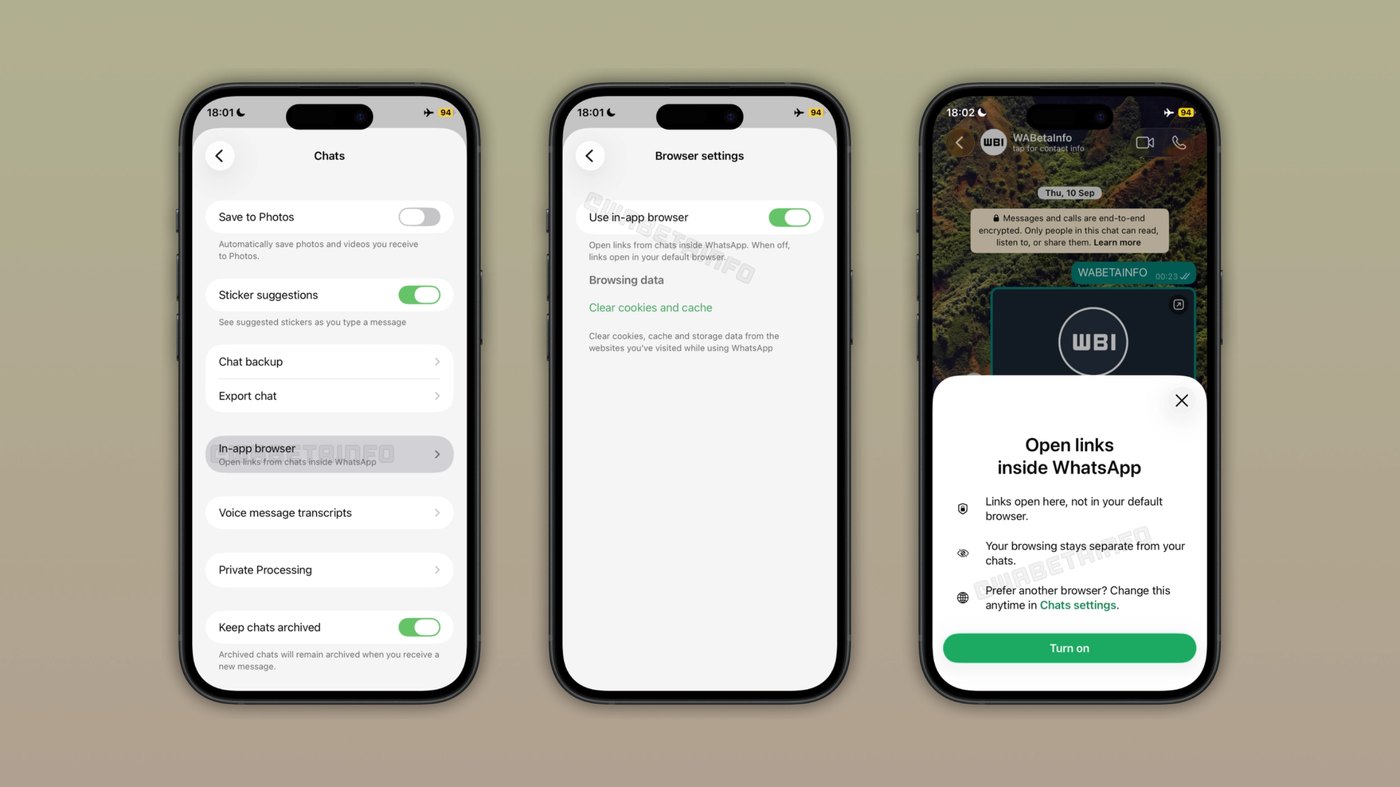
Users will manage the feature through an explicit toggle situated in the application settings. WhatsApp will add an option named In-app browser, giving people manual authority over their link-opening behavior. When someone activates this preference for the first time, the client displays an explanatory bottom sheet detailing how the feature functions. This prompt clarifies that tapping external links will henceforth display web pages natively within WhatsApp rather than redirecting to the default browser. The setup remains entirely reversible, allowing users to restore their default system browser whenever they prefer.
Once enabled, clicking any chat link opens an independent browsing layer directly above the message thread. This browsing session operates separately from the conversation, letting individuals inspect online articles without disrupting their chat view or losing their message position. If a user wishes to view a page in their system browser instead, they can select that choice from an integrated three-dot menu. Additionally, WhatsApp includes dedicated data management tools within the browser settings screen, enabling users to clear accumulated site cache and cookies stored on their device.
Advertisement
Tech Pulse Daily
Get tomorrow's pulse first
Join engineers who read Tech Pulse before stand-up. Free, weekday mornings.
WhatsApp is testing an in-app browser: why it matters now
Opening external links frequently creates disruption for people engaged in active conversations. Under the current operating model, tapping a link pulls the user out of WhatsApp and launches Safari, Chrome, or another third-party browser installed on iOS. This constant application switching fragments communication, clutters mobile task switchers, and slows down discussions when exchanging multiple references. Rendering pages directly inside the conversation screen provides an immediate reading flow for people who frequently open multiple links during chats, allowing them to consult references quickly and resume messaging without manual app switching.
Privacy boundaries form an equally vital consideration for this architecture. WhatsApp cannot see which links are shared in conversations, nor can it identify which specific links users tap. Browsing data is retained locally on the hardware device, operating under the same storage framework utilized by Safari. Neither WhatsApp nor Apple can track user navigation or inspect visited pages. By combining local data isolation with user-facing cookie and cache purge options, the software prevents centralized tracking while giving users full control over device storage footprints.
WhatsApp is testing an in-app browser: who is affected
The change directly impacts iOS participants who regularly share web resources, articles, and documentation inside individual and group messages. Instead of accumulating multiple abandoned tabs in Safari or Chrome, participants can inspect linked material in an ephemeral layer and dismiss it instantly. Readers retain complete discretion over their workflow, meaning anyone who relies on external browser extensions or saved autofill credentials can simply leave the in-app browser toggle switched off in settings to preserve their traditional external browser behavior without penalty.
Businesses engaging with customers will also observe a more unified experience across their shared web destinations. Under the earlier 25.14.10.72 release, only select HTTPS corporate links loaded internally, creating an inconsistent presentation where some corporate pages stayed inside WhatsApp while others launched Safari. Broadening the capability to all links provides uniform viewing across personal recommendations and commercial storefronts alike. Furthermore, the inclusion of the three-dot menu ensures that recipients can open any destination in Safari if they encounter rendering issues or prefer external tools.
WhatsApp is testing an in-app browser: what to watch
The in-app browser is currently in active software development and remains unavailable to general beta testers or public audiences. The functionality was identified within the WhatsApp beta for iOS 26.41.10.72 build hosted on Apple's TestFlight framework. WhatsApp plans to release the capability to select beta testers in an upcoming iOS build before organizing a wider public rollout. Because engineering work is ongoing, registered testers on TestFlight will be monitoring subsequent package updates to identify when the settings toggle becomes operational for external evaluation.
WhatsApp has not published a formal public release schedule or commercial availability date for the feature. Observers will be tracking whether WhatsApp refines the browser controls, adjusts data management toggles, or introduces automated clearing intervals for local cookies. Another element to watch is whether equivalent in-app link rendering reaches the Android client, which recently received two separate interface updates. Until WhatsApp initiates controlled beta testing and validates rendering stability across diverse web standards, the in-app browser will remain confined to internal development branches.
Developer Action Items
- ☐ Verify the claim on the official Google / iOS page (or WABetaInfo), not from this recap alone.
- ☐ Name the surface that moved — API, policy, model, hardware, or commercial terms — before you Slack the thread.
- ☐ Assign one owner a day to read the primary material and decide: this-sprint, this-quarter, or noise.
- ☐ Do not change production on day-one coverage. Watch the vendor changelog and one independent write-up first.
WhatsApp is testing an in-app browser FAQ
Can WhatsApp or Apple track which links you open in the in-app browser?
No, WhatsApp cannot see the links shared in chats or which destinations you open. Neither WhatsApp nor Apple can monitor your browsing activity, and all session data is saved locally on your device like Safari.
How do you turn on the in-app browser inside WhatsApp for iOS?
Users can activate the feature by navigating to app settings and toggling the In-app browser option. An explanatory bottom sheet appears during first-time setup, and users can disable the toggle at any time to restore their default browser.
Can you still open chat links in Safari or Google Chrome?
Yes, you can tap the three-dot menu inside the in-app browser to open any active webpage in your default external browser. Alternatively, leaving the in-app browser toggle disabled in settings ensures all links launch externally by default.
When will the in-app browser be available to all WhatsApp users?
WhatsApp has not announced a public launch date because the feature is currently in active development. Discovered in the iOS 26.41.10.72 TestFlight build, it will roll out to select beta testers in a future update first.
Sources

Author
Dillip Chowdary
Writes Tech Bytes coverage of AI, engineering, and the tools that actually ship. Editor of Tech Pulse Daily.
Related on Tech Bytes
Advertisement