WhatsApp is testing Organizations to manage large communities
WhatsApp is developing an Organizations feature in Android beta 2.26.43.1 to give community admins a central screen for managing member rosters and sub-groups.
By Dillip Chowdary • Oct 26, 2026 • Source: WABetaInfo
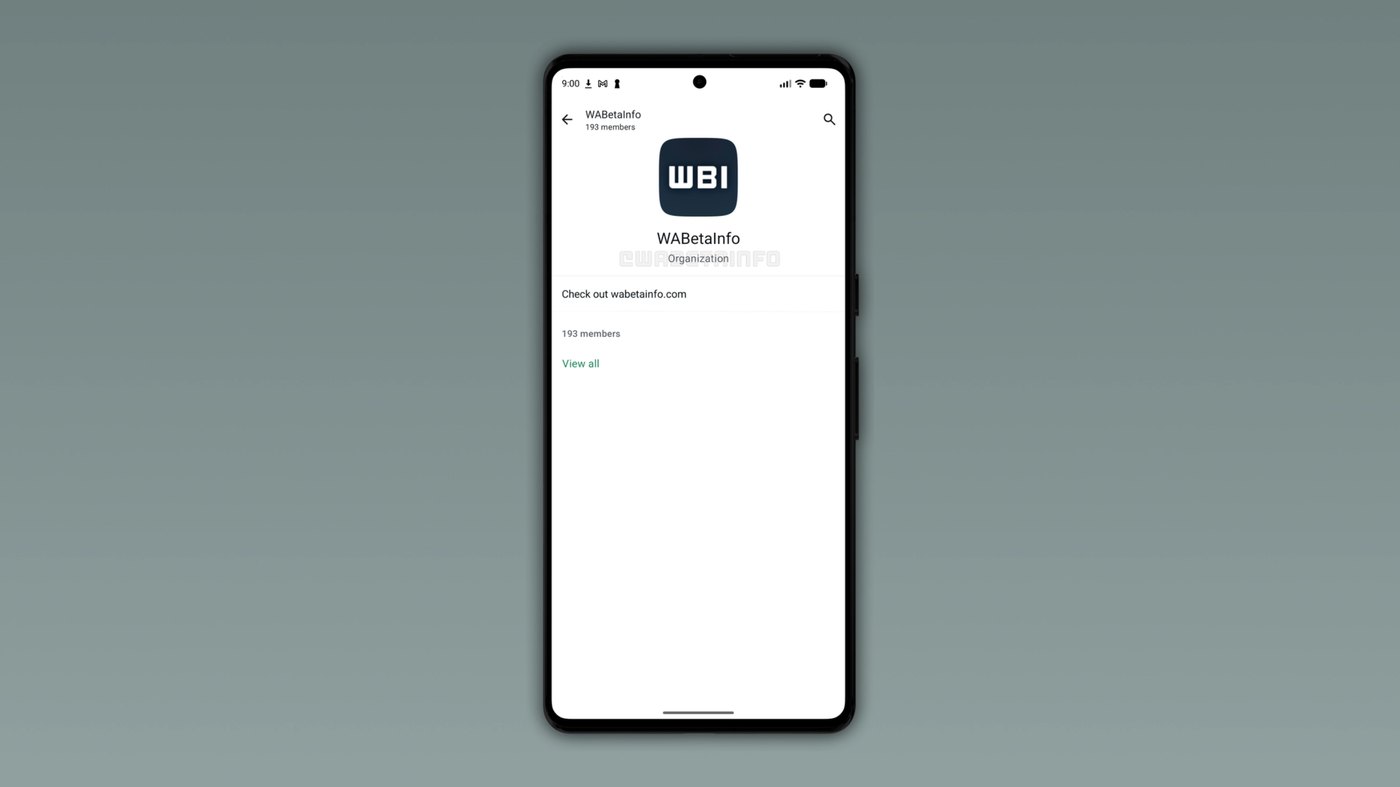
WhatsApp is developing a new administrative feature called Organizations to help community admins manage large networks of chat groups. Discovered within the WhatsApp beta for Android 2.26.43.1 update on Google Play Store, the interface introduces a dedicated administrative layer on top of community hubs. According to WABetaInfo's report, the tool remains in early development and is not yet available for testing. WhatsApp designed the feature to give leaders an administrative console displaying high-level details, member rosters, and sub-group allocations from a single screen.
This report examines how the Organizations interface functions, how it builds on the Communities architecture launched in 2022, and what management controls it offers to group moderators. It breaks down the boundary between member-facing communication spaces and administrator-only governance panels, tracing how WhatsApp addresses the friction of coordinating hundreds of participants across multiple sub-groups. The analysis is structured for community admins, organizational leaders in schools and workplaces, and technical coordinators who manage group messaging systems and need to track platform changes before public release.
WhatsApp is testing Organizations to manage: what actually changed
The core change identified in the Android 2.26.43.1 beta update is a dedicated management screen designed strictly for community administrators. Previously, community leaders navigated individual chat threads and sub-groups separately to confirm which participants belonged to each conversation. The new Organizations layout replaces that disjointed process with an overarching administrative surface that summarizes the structure. On this centralized display, administrators can view the registered organization name, an accompanying descriptive summary, and an aggregate count of all members enrolled across the specific community.
Beneath the aggregate counter, the update incorporates a dedicated roster inspection interface accessed through a specific action button. When an administrator taps the View all option, the application opens a complete member list that details every participant alongside their active sub-group memberships. Rather than clicking through separate conversations to map user distribution, administrators gain an organized directory within one view. This interface does not alter member permissions; instead, it establishes an administrative dashboard where managers review collective membership data without disrupting routine chat operations.
WhatsApp is testing Organizations to manage: how it works
Organizations operates as a private management layer positioned directly above the existing community infrastructure rather than replacing it. In day-to-day use, a WhatsApp community continues to function as the umbrella structure uniting related groups, where members join sub-groups and receive announcements through the dedicated announcement group. The Organization component lives entirely inside the administrator view. General members cannot view the Organization screen, cannot browse the complete member directory, and do not receive alerts regarding organization-level management changes, ensuring that standard member communication remains completely untouched.
From an administrative standpoint, the interface functions as a centralized verification panel. When supervising large networks, admins check the organization screen to see total community numbers in a unified header. Tapping the View all option reveals exactly which specific sub-groups each user belongs to across the wider network. This mechanism eliminates the requirement to inspect individual chat rosters manually, allowing moderators to quickly verify participant placement, audit sub-group allocations, and spot unassigned community users directly from one primary management control screen.
Advertisement
Tech Pulse Daily
Get tomorrow's pulse first
Join engineers who read Tech Pulse before stand-up. Free, weekday mornings.
WhatsApp is testing Organizations to manage: why it matters now
The development of Organizations resolves a structural management limitation that emerged after WhatsApp launched Communities in 2022. That feature, introduced during the WhatsApp beta for Android 2.22.19.3 release cycle, allowed organizations to group multiple topical chats under one umbrella with a shared announcement group. While that model succeeded for small networks, managing communities that grew to encompass hundreds of members and dozens of sub-groups became increasingly difficult. Admins were forced to navigate groups separately to determine who was participating in each conversation.
Without a consolidated member roster, verifying participant placement across extensive community networks required opening each individual group settings page one by one. This repetitive administrative workload proved especially burdensome for institutional organizations like schools and workplaces that coordinate multiple conversational sub-units. By introducing a central administrative view with full participant mapping, WhatsApp directly addresses that operational oversight bottleneck. The update equips community admins with dedicated built-in tools to manage expanding rosters without requiring external spreadsheets or complicated manual member cross-referencing across separate groups.
WhatsApp is testing Organizations to manage: who is affected
The arrival of Organizations directly impacts community admins who manage large group directories across expanding networks. Coordinators managing educational setups like schools, workplace teams, and civic groups that rely on WhatsApp to link related groups will receive centralized oversight over their rosters. Admins who previously spent hours tracking who joined which sub-group can now review the structure from a single console. This utility simplifies basic moderation duties by showing total numbers and group distributions without forcing admins to leave the main settings panel.
In contrast, everyday community members will notice no change in how they experience their chats or interact with groups. Because Organizations serves strictly as an administrative management layer, regular users will not see the organization screen, browse the full membership directory, or interact with new controls. Member participation remains confined to joining topical sub-groups and reading announcements published by administrators. The update does not alter privacy boundaries between general chat members, ensuring that the community remains focused on everyday communication while management tools stay restricted.
WhatsApp is testing Organizations to manage: what to watch
Because WhatsApp Organizations is in very early stages of development, the feature is not available for testing by beta users or the general public. WhatsApp included the underlying code inside the WhatsApp beta for Android 2.26.43.1 release, but functionality remains restricted during initial testing. The platform has not announced a release schedule or rollout timeline. As with early beta discoveries, WhatsApp is evaluating how the feature operates, and the company may alter its design or decide against releasing it if development expectations are not met.
Future beta builds on the Google Play Store will show whether WhatsApp expands the tool beyond view-only member inspection. Community managers will want to watch whether upcoming updates introduce interactive controls, such as assigning users directly to sub-groups or filtering participants by activity status from the organization dashboard. Further testing cycles will also reveal whether Organizations expands to desktop and iOS platforms alongside Android. For now, the feature represents an exploratory initiative aimed at improving community administration as testing continues over coming cycles.
Developer Action Items
- ☐ Diff the official changelog for Google / Android 2.26.43.1 before you bump — APIs, defaults, and removed flags only.
- ☐ Install through the vendor's documented channel in staging; keep a one-command rollback and time-box the canary.
- ☐ Grep your repo for old flag names, lockfile pins, and plugin versions that the notes mark as breaking.
- ☐ Prefer the first patch cut over the day-zero tag unless you have a reason to be on the leading edge.
- ☐ If WABetaInfo did not name a region, plan, or SKU, screenshot the official availability line before you promise it to users.
WhatsApp is testing Organizations to manage FAQ
What is WhatsApp Organizations?
WhatsApp Organizations is an upcoming administrative management feature that gives community leaders a dedicated space to oversee community details, total membership counts, and participant sub-group allocations.
How is an Organization different from a WhatsApp Community?
A community is the communication space where members join sub-groups and receive updates from announcement groups, whereas an Organization is an administrative layer visible only to admins for managing member rosters.
In which WhatsApp update was the Organizations feature spotted?
The feature was discovered under development in the WhatsApp beta for Android 2.26.43.1 update available on the Google Play Store.
Can regular group members access the WhatsApp Organizations dashboard?
No, Organizations is designed exclusively as an administrative tool, meaning regular community members will not see the screen, browse the member list, or experience changes to their chat interface.
Sources

Author
Dillip Chowdary
Writes Tech Bytes coverage of AI, engineering, and the tools that actually ship. Editor of Tech Pulse Daily.
Related on Tech Bytes
Advertisement