WhatsApp launches more Liquid Glass updates on iOS
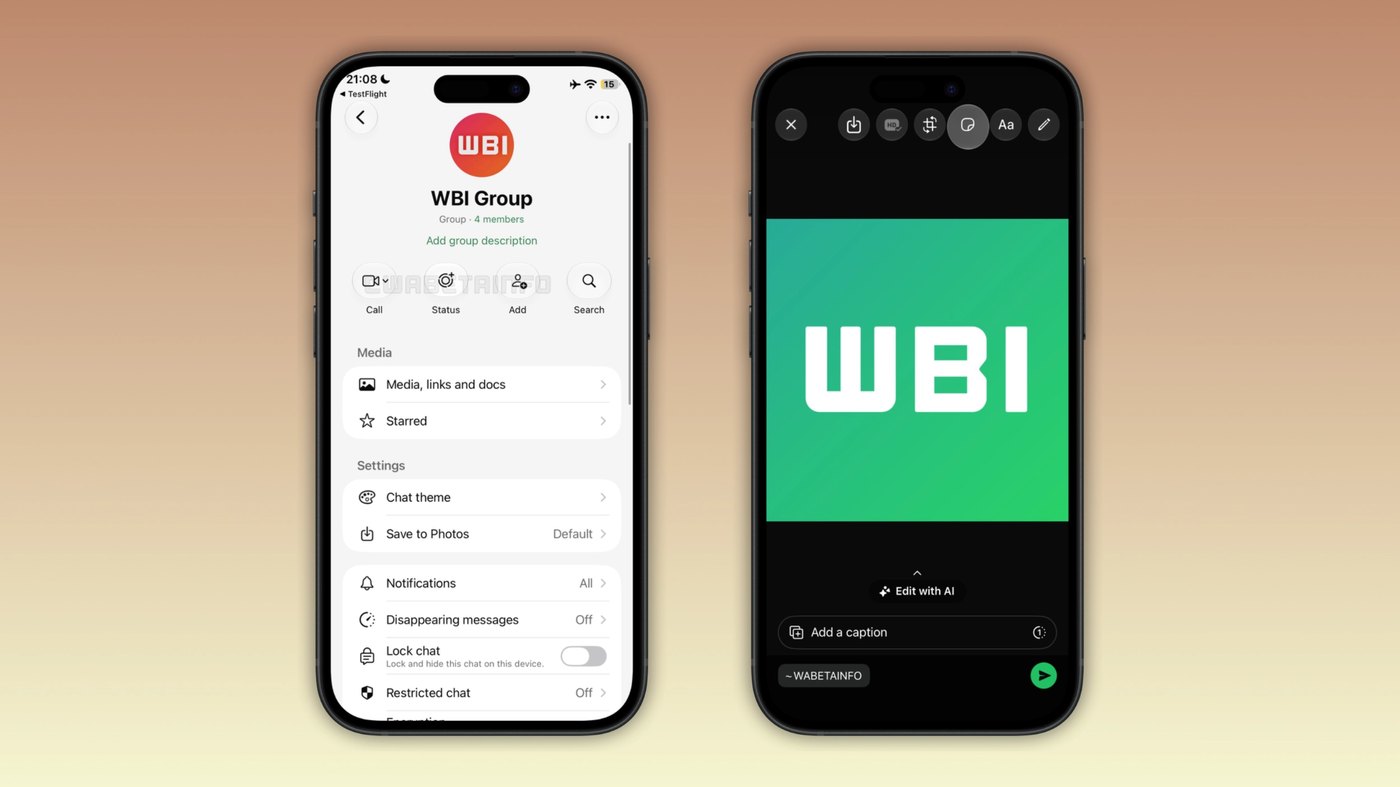
WhatsApp rolled out its Liquid Glass interface to the chat info screen and drawing editor in iOS beta 26.45.10.70, expanding phased TestFlight testing.
By Dillip Chowdary • Nov 16, 2026 • Source: WABetaInfo
At a glance
- Product
- WhatsApp for iOS
- Compatible build
- Beta version 26.45.10.70
- Platform
- iOS 26 and iOS 27
- Price
- Free
- Availability
- TestFlight beta testers and select App Store users
- Rollout scope
- Phased expansion over coming weeks
WhatsApp launched an expanded deployment of Apple's Liquid Glass interface style across two additional views on its iOS client, bringing translucent styling to contact details and drawing utilities. According to WABetaInfo's report, the visual revision reaches compatible devices running the WhatsApp beta for iOS 26.45.10.70 build on TestFlight as well as select production accounts. The release advances Meta's phased effort to unify WhatsApp with Apple's modern platform design language by replacing opaque controls with layered translucent materials.
This report details the exact screen modifications, the controls receiving glass styling, previous implementation milestones, and current account availability for iPhone users. It serves mobile engineers, product designers, and regular WhatsApp users tracking interface modernization and system design compliance on iOS. The coverage outlines how individual controls behave across light and dark modes while explaining the ongoing rollout schedule across testing channels.
01Floating media progress bar and interface foundations
WhatsApp began incorporating Liquid Glass styling after Apple introduced the visual aesthetic in iOS 26. Initial transitions introduced translucent materials into primary navigation surfaces across the application, covering the chat list, bottom tab bar, top navigation bar, and contextual message menus. These early updates established visual depth by letting background elements show through structural app containers without compromising legibility.
The platform advanced this interface treatment in the WhatsApp beta for iOS 26.39.10.70 update, which revised the native video player. In that build, developers converted the playback progress bar into a floating component positioned along the top edge of the screen with rounded corners. The progress container uses a glass-like background that dynamically adjusts its tint when an iPhone toggles between light and dark modes.
Testing assistance for these iterative media player evaluations and visual reports was credited to community contributors IgnacioAF, Federico Trevisani, and futurebound. Their testing confirmed that the floating playback bar aligned with the translucent principles introduced in earlier navigation layers. Despite those improvements, key functional panels outside of playback remained bound to older, opaque visual treatments.
02Translucent action buttons across chat info headers
The latest WhatsApp beta for iOS 26.45.10.70 update targets the dedicated contact and group information screens. Situated directly below the contact portrait or group title, WhatsApp presents quick-action buttons designed for rapid interaction. These controls allow participants to start an audio or video call, create a status update, add a participant to an existing group, or search conversational message history.
Under the refreshed interface, WhatsApp replaced the flat, solid backing of these action items with the Liquid Glass aesthetic. The updated buttons exhibit a translucent sheen that reveals underlying wallpaper patterns and message content positioned beneath the header. The treatment preserves icon clarity and text contrast while eliminating rigid rectangular boundaries that previously separated action items from the profile background.
By converting these interactive elements into glass containers, the chat details panel blends naturally into scrolling content beneath it. Group administrators and individual callers gain identical tactile feedback, but with visual layering that reacts directly to the underlying interface. This revision addresses one of the most visible legacy surfaces left behind during the initial iOS 26 design transition.
03Media drawing editor toolbar and editing controls
Advertisement
Tech Pulse Daily
Get tomorrow's pulse first
Join engineers who read Tech Pulse before stand-up. Free, weekday mornings.
The second major visual revision in build 26.45.10.70 appears inside the integrated media drawing editor. Users access this creation space whenever they capture or select a photo or video before sending it into a conversation. A primary toolbar sits across the top of this workspace, providing editing controls to draw freehand, insert text overlays, place expressive stickers, and crop image boundaries.
With the new release, WhatsApp migrated this top utility bar to the Liquid Glass material standard. Each icon button within the toolbar now floats over a translucent backdrop rather than an opaque banner, showing the media frame passing directly behind the tools. The visual adjustments maintain consistent tool spacing and touch targets while harmonizing the drawing workspace with the rest of the application.
This modification ensures that image and video framing remains visible edge-to-edge during editing operations. Creators can align text blocks, position stickers, or crop borders with better awareness of peripheral image details beneath the active controls. The unified translucent appearance eliminates abrupt visual disconnects between media capture, editing canvases, and subsequent in-chat message viewing.
04Platform design consistency across modern iOS releases
Meta is executing a multi-stage overhaul to keep WhatsApp synchronized with modern Apple design specifications. Apple debuted Liquid Glass alongside the release of iOS 26, prompting third-party applications to rethink interface depth, contrast, and translucency. While WhatsApp quickly overhauled main conversation feeds, message bubbles, and media playback tools, secondary utilities like chat information and drawing canvases lagged behind.
Integrating Liquid Glass across these remaining screens establishes visual continuity throughout the client. This aesthetic alignment has become increasingly prominent following the general availability of iOS 27, where third-party ecosystems have broadly adopted translucent materials. The updated chat details and drawing editors ensure WhatsApp feels native alongside system applications and modern App Store competitors running on current iOS software.
Note: WhatsApp continues active development on further Liquid Glass refinements across remaining corners of the iOS client, with additional visual iterations planned for future updates. Meta has not yet revealed which specific panels will transition next or whether desktop companions will adopt matching translucent properties. Engineers are prioritizing interface consistency across modern Apple software releases before closing the multi-version visual transition.
05TestFlight distribution and App Store account availability
The expanded Liquid Glass design is currently rolling out to registered beta participants who install the WhatsApp beta for iOS 26.45.10.70 package through TestFlight. Meta is simultaneously enabling the feature for selected accounts running the latest stable build downloaded directly from the official Apple App Store. Access remains controlled through server-side account flags, meaning installing the compatible build does not immediately activate the glass controls for all users.
Because WhatsApp distributes interface updates through phased waves, availability will expand to additional accounts over coming weeks. Accounts that do not yet exhibit translucent styling across the chat info header or drawing editor must wait for future server triggers or subsequent client updates. The company has not published an official timeline detailing when the entire global user base will receive the updated visuals.
Users interested in testing these visual updates should maintain the newest client version available through TestFlight or the App Store. Once an account is activated within the rollout cohort, the updated action buttons and translucent drawing toolbars appear automatically without requiring manual configuration switches. Broader availability will continue expanding gradually as Meta monitors stability across varied iPhone hardware profiles.
Frequently asked questions
Which new screens in WhatsApp for iOS feature the Liquid Glass design?
WhatsApp added the Liquid Glass design to the contact and group chat info screen and the top toolbar in the media drawing editor.
Which version of WhatsApp includes these Liquid Glass updates?
The updates are available in the WhatsApp beta for iOS 26.45.10.70 build distributed via TestFlight, as well as selected latest versions on the App Store.
Which actions feature translucent buttons on the chat info screen?
The translucent buttons allow users to place a call, create a status update, add a member to a group, or search for messages.
When will the new Liquid Glass design be available to all WhatsApp users?
WhatsApp is rolling out the updates gradually to more accounts over coming weeks, but the company has not announced an exact date for universal availability.
Sources

Author
Dillip Chowdary
Writes Tech Bytes coverage of AI, engineering, and the tools that actually ship. Editor of Tech Pulse Daily.
Related on Tech Bytes
Advertisement