WhatsApp launches sound sticker messages on Android and iOS
WhatsApp is rolling out sound stickers across Android and iOS alongside a 14-day message scheduler and built-in international Travel eSIM data roaming plans.
By Dillip Chowdary • Nov 29, 2026 • Source: WABetaInfo
At a glance
- Lead feature
- Sound stickers with audio playback
- iOS build
- WhatsApp beta for iOS 26.45.10.73
- Android build
- WhatsApp beta for Android 2.26.47.4
- Scheduling window
- 10 minutes to 14 days in advance
- Roaming partners
- Jio, Smart Axiata, Smart, Verizon, 1Global
- Sticker guidelines
- Manual review before store publishing
WhatsApp is rolling out interactive sound sticker messages across its official Android and iOS clients, allowing chat participants to tap animated visuals to hear synchronized audio clips directly within conversations. According to WABetaInfo's report, the new media capability forms part of a broader set of messaging tools, security safeguards, and connectivity features deployed across recent beta releases.
This comprehensive briefing covers the technical mechanics behind sound sticker creation, ephemeral text enforcement, automated delivery scheduling, native cellular roaming installation, and visual interface redesigns. The report is written for active smartphone users, mobile developers, and enterprise communication administrators who need verified operational details on the latest client updates.
01Animated video conversion and audio tracks
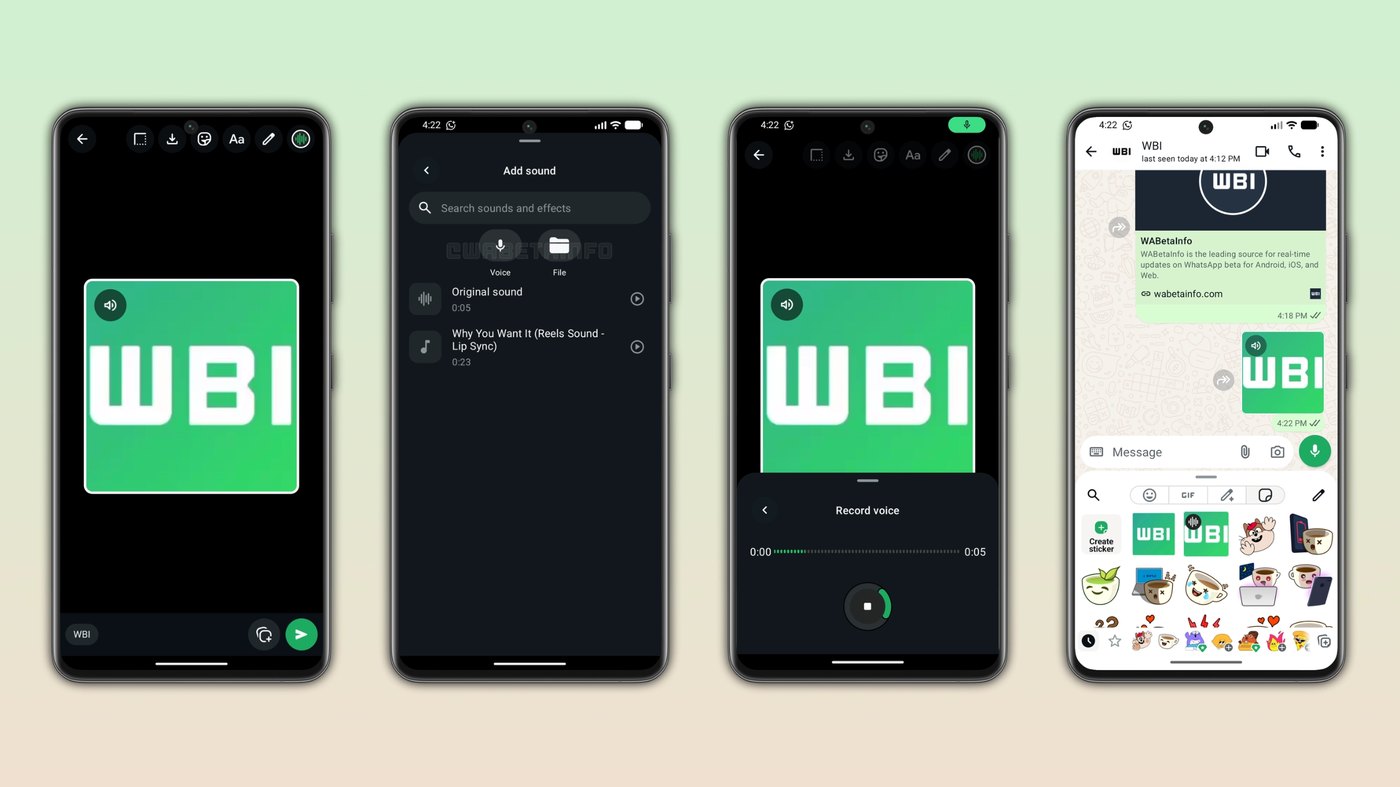
Users can generate custom sound stickers directly from the native sticker keyboard by choosing an existing video clip stored in their local device gallery. WhatsApp converts the selected clip into an animated graphic, after which creators tap a dedicated audio button located at the top of the editing screen. The workflow lets people attach audio clips without relying on third-party mobile editing software.
The built-in audio library supplies multiple input channels for the attached sound, including the original video track, predefined sound effects, external files imported from the Files application, and freshly recorded voice notes. In chat threads, WhatsApp displays a compact speaker icon over the sticker to signify attached media. To prevent unexpected disruptions during conversations, the application mutes all sound stickers by default until tapped.
Note: WhatsApp secures both the animated sticker visual and its accompanying audio track using standard end-to-end encryption protocols. Because some capabilities remain under staged rollout, users who cannot yet view or assemble sound stickers must wait for forthcoming application releases on Android and iOS.
02View once texts and screenshot prevention
Ephemeral text handling arrives through the WhatsApp beta for iOS 26.45.10.73 release, extending disappearing privacy safeguards to standard written messages. Senders activate the safeguard by typing their text into the chat bar and holding down the standard send control until the view-once prompt appears. Selecting that prompt dispatches the message immediately under single-view restrictions.
The client actively restricts device screen capture utilities, preventing recipients from taking screenshots or initiating system screen recordings while displaying the text on screen. Furthermore, WhatsApp disables copying, forwarding, and external saving mechanisms for the entire duration of the viewing session. Once the recipient navigates away or closes the message panel, WhatsApp permanently removes the content from the local conversation thread.
03Offline queue and message scheduling timers
Advertisement
Tech Pulse Daily
Get tomorrow's pulse first
Join engineers who read Tech Pulse before stand-up. Free, weekday mornings.
WhatsApp is launching message scheduling globally for all standard users across both Android and iOS installations. Authors initiate delivery scheduling by pressing and holding the primary chat send button, which opens a scheduling dialogue to define future dispatch timings. The system enforces an operational delivery window that requires a minimum scheduling threshold of 10 minutes and permits dispatches up to 14 days in advance.
The scheduling system functions autonomously on client infrastructure, dispatching the queued text at the target moment even if the originating handset loses network connectivity or goes entirely offline. Recipients receive the transmission as a standard incoming entry without any visual indicators or metadata revealing prior scheduling. Senders can inspect pending items or remove unwanted dispatches prior to broadcast through the chat info panel.
04Account travel eSIM setup and telco partners
Discovered in the WhatsApp beta for Android 2.26.47.4 build before official rollout across Android and iOS, built-in Travel eSIM plans provide mobile data roaming directly within account settings. WhatsApp is partnering with several major telecommunications operators to provision international coverage, including Jio, Smart Axiata, Smart Communications, Verizon, and 1Global. The native data package allows subscribers to travel abroad while retaining their existing primary telephone number for messaging contacts.
Users access the cellular marketplace through their Account settings screen to evaluate destination connectivity choices. The search tool lets travelers locate coverage by country name or organize results using filters for popular destinations, specific countries, broader regions, and global packages. WhatsApp displays clear package breakdowns so users can choose between unlimited data and fixed data plans before payment.
Purchasing and deploying the roaming profile involves a brief on-screen installation sequence directly inside the client:
- Access settings Open the Travel eSIM section located inside Account settings.
- Select plan Pick either an unlimited data or fixed data package.
- Review summary Tap Buy plan to view destination coverage, plan details, and total price.
- Install eSIM Tap Install eSIM and wait for the green checkmark confirming successful installation.
- Activate connection Arrive at the destination where the eSIM activates automatically upon network connection.
05Dual camera viewfinder and sticker pack distribution
WhatsApp is deploying a dual camera capture mode to select Android beta testers, enabling simultaneous recording from front and rear device sensors. When activated, the interface presents the rear camera feed across the full display while housing the front-facing sensor in a compact rectangular window in the upper right corner. Users can reposition this floating window anywhere on screen or tap the rotate button to swap sensor orientations.
The dual camera functionality supports both still photographic captures and continuous video recordings. Users can broadcast the resulting dual-sensor media across personal chats, group conversations, broadcast channels, and ephemeral status updates. This flexibility lets creators narrate live surroundings and personal reactions within a unified composition without requiring secondary production tools.
In addition to camera enhancements, WhatsApp is streamlining the iOS interface with a minimal tab bar showing unlabeled icons for Updates, Calls, Contacts, Chats, and You. Separately, the company is building a dedicated application named WhatsApp Stickers for the Google Play Store and App Store. The standalone hub will let creators publish packs publicly, subject to manual compliance reviews against official Sticker Guidelines prior to distribution.
Frequently asked questions
How do sound stickers work on WhatsApp?
Users tap a sound sticker in a chat to play its attached audio. Senders create them from gallery videos and attach original audio, preset effects, voice notes, or Files app audio tracks.
What are the limits for scheduling messages on WhatsApp?
Users can schedule messages between 10 minutes and 14 days in advance. Dispatches send even when the device is offline, and recipients cannot see that a message was scheduled.
How does WhatsApp protect view-once text messages?
In WhatsApp beta for iOS 26.45.10.73, the client blocks screenshots and screen recordings while viewing the message. Recipients cannot copy, forward, or save the text, which disappears after closing.
Can users keep their original number when using a Travel eSIM on WhatsApp?
Yes. Travel eSIM data plans provide international data while preserving the user's existing primary phone number for chats and calls.
Sources

Author
Dillip Chowdary
Writes Tech Bytes coverage of AI, engineering, and the tools that actually ship. Editor of Tech Pulse Daily.
Related on Tech Bytes
Advertisement