You can adjust the position of the trackball on Keychron’s new wireless
Keychron launched the T1 HE wireless trackball mouse with underside dials for millimeter thumb adjustment, starting preorders at $59.99 for December delivery.
By Dillip Chowdary • Nov 14, 2026 • Source: The Verge
Keychron launched the T1 HE Wireless Adjustable Trackball Mouse, adding mechanical adjustment dials beneath the casing. As noted in The Verge's report, dual dials on the base let users adjust the 34mm trackball horizontally and vertically across several millimeters. This mechanism ensures the sphere rests squarely under the thumb across different hand sizes.
This report details the physical adjustments, hardware specifications, Launcher software controls, and battery ratings of Keychron's latest pointer. The analysis serves trackball users, office workers, and ergonomics enthusiasts evaluating customizable desktop peripherals alongside established models from mainstream hardware manufacturers.
01Dual dials for millimeter thumb adjustment
A pair of dials on the underside of the mouse fine-tunes the physical position of the 34mm trackball. One dial controls horizontal placement while the companion dial governs vertical alignment for varying hand sizes. Users can also extend or retract the ball along its mount.
The adjustment mechanism remains limited to just a few millimeters of travel in either direction. Despite the small distance, those subtle movements help the ball sit squarely beneath the resting thumb without awkward reaching. Small positional changes improve ergonomics and comfort during long daily computing sessions.
Because hands and fingers come in various sizes, fixed trackball housings often force unnatural wrist and finger angles. Keychron designed the T1 HE dials to let users align the ball with their natural hand anatomy. This physical tuning makes the mouse far more comfortable for regular desktop navigation.
02Comparison with earlier compact keyboard trackballs
Keychron introduced its first trackball peripheral at CES 2026 under the Nape Pro product name. That initial model featured a slim, compact chassis engineered to sit flush against the side of an external keyboard. Its narrow form factor prioritized minimal desk space over sculpted palm support.
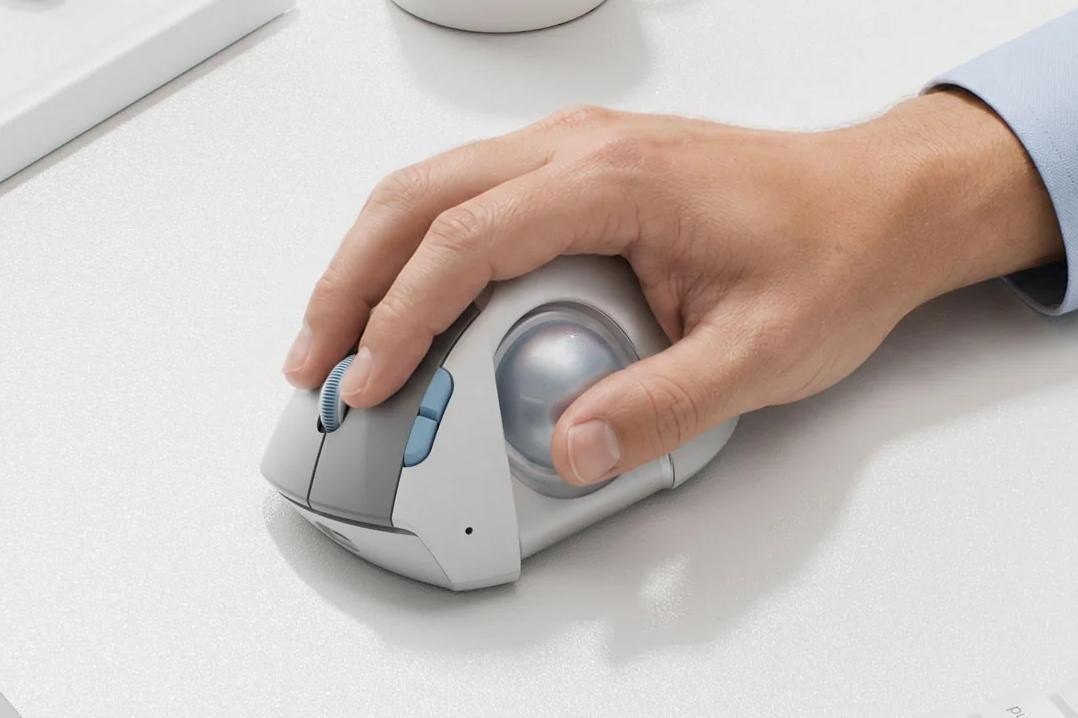
The new T1 HE adopts an ergonomic form factor resembling traditional trackball mice from Logitech and Kensington. The chassis houses a 34mm ball positioned along the side, elevating the hand into an angled resting posture. This contoured profile emphasizes palm support and thumb-driven tracking over keyboard integration.
Transitioning from the flush Nape Pro layout to a side-mounted sphere brings Keychron into mainstream ergonomic categories. Placing the ball on the side delegates navigation exclusively to the thumb while keeping the forearm stationary. The underside dial mechanism provides a physical customization feature absent on competing static housings.
Advertisement
Tech Pulse Daily
Get tomorrow's pulse first
Join engineers who read Tech Pulse before stand-up. Free, weekday mornings.
03Preorder pricing colors and December shipping
The T1 HE is currently available for preorder through Keychron's official online store at a retail price of $59.99. Buyers can choose between three distinct casing finishes: standard black, clean white, and a translucent shell. The pricing establishes an accessible entry point for an adjustable wireless trackball.
Customer shipments are scheduled to commence in early December following the conclusion of the initial preorder period. Early orders placed directly through the Keychron website will be fulfilled as inventory arrives. The scheduled December release ensures the device reaches consumers before the end of the year.
The translucent color option exposes the internal frame and mechanical adjustment components through a see-through exterior shell. Alongside traditional black and white finishes, this transparent casing appeals to users who appreciate visible hardware engineering. All three color selections share identical internal specifications, dial assemblies, and retail pricing.
04Optical sensor ranges and Launcher customization
The internal optical tracking sensor offers an adjustable sensitivity range spanning from 100 DPI to 2,400 DPI. A dedicated hardware button on the mouse allows operators to cycle through sensitivity presets without opening software. This quick-toggle capability lets users rapidly adapt cursor speed to different desktop tasks.
Advanced customization is managed using the official Keychron Launcher software application on connected computers. The utility provides an interface for calibrating custom DPI values, remapping button actions, and creating multi-step command macros. Users can configure specific profiles to match their daily productivity and software workflows.
A total of six customizable buttons are integrated into the body of the T1 HE mouse. Operators can program each button using the Launcher utility to trigger essential desktop shortcuts or navigation actions. Combining physical preset switching with software macro mapping gives users granular control over their computing setup.
05Battery life ratings and triple connectivity
The mouse is powered by an internal 600mAh rechargeable battery built for long operational periods between charges. Operating over a wireless Bluetooth connection yields up to 106 hours of continuous use on a full charge. This power efficiency allows users to work for weeks without connecting a charging cable.
Users can also connect using the included 2.4GHz wireless receiver for environments requiring dedicated wireless pairing. When operating via the 2.4GHz dongle, the 600mAh battery delivers up to 98 hours of continuous operation. The packaged receiver provides a reliable wireless alternative alongside the onboard Bluetooth pairing mode.
For tethered setups or continuous operation during battery depletion, the T1 HE functions over a standard USB-C cable. Plugging the cable directly into a computer powers the mouse while recharging the internal 600mAh battery. This wired functionality ensures uninterrupted tracking without waiting for the battery to replenish.
You can adjust the position of the trackball FAQ
How much does the Keychron T1 HE cost and when will it ship?
Preorders cost $59.99 on Keychron's website, with shipments starting in early December.
How is the trackball adjusted on the T1 HE?
Underside dials adjust the 34mm ball horizontally and vertically by a few millimeters.
What is the battery runtime on the T1 HE?
The 600mAh battery provides up to 106 hours via Bluetooth and 98 hours over 2.4GHz wireless.
What sensor settings does the T1 HE support?
The optical sensor ranges from 100 to 2,400 DPI, configured using preset buttons or Keychron Launcher software.
Sources

Author
Dillip Chowdary
Writes Tech Bytes coverage of AI, engineering, and the tools that actually ship. Editor of Tech Pulse Daily.
Related on Tech Bytes
Advertisement