Apple TV launches new sign language accessibility feature
Apple launched a sign language accessibility feature for Apple TV original films on Friday, adding synced ASL and BSL interpreter feeds on version 27.2.
By Dillip Chowdary • Nov 10, 2026 • Source: 9to5Mac
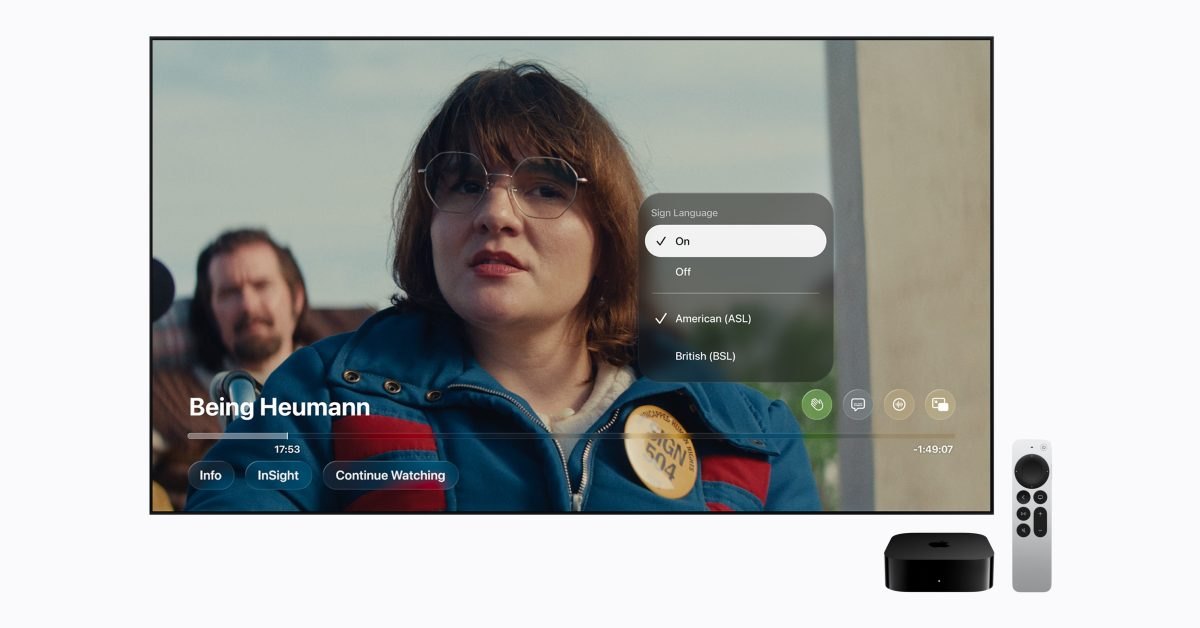
Apple released a dedicated sign language accessibility option for the Apple TV streaming service, adding synchronized video interpretation to select original films. According to 9to5Mac's report, the capability brings visual translation overlays directly into the video player for viewers watching original programming. The rollout introduces support for major sign languages across Apple devices this week.
This report details the release schedule for eligible titles, device operating system prerequisites, setup instructions, and in-player playback settings. It provides viewers who rely on sign language, accessibility advocates, and Apple TV subscribers with a complete guide to finding and enabling the new visual interpretation overlays.
01Sign language interpretation for original movies
Apple designed the accessibility system to display a human signing interpreter in the corner of the screen during video playback. The interpreter window remains continuously synchronized with the dialogue and action occurring in the movie frame. This setup allows viewers who communicate through sign language to follow original films without depending exclusively on written text subtitles.
The platform offers two distinct translation formats, letting subscribers choose between American Sign Language and British Sign Language. Viewers select their preferred linguistic mode depending on their region or dialect requirements. This dual-language support ensures native accessibility across English-speaking audiences using different standard sign systems.
Because visual translation occupies active screen space, the video player presents the signing window alongside the primary production without obstructing central action. Viewers receive frame-locked visual signing alongside the standard audio and subtitle tracks. Apple intends the presentation to remain unobtrusive while providing continuous visual access throughout eligible full-length movies.
02First streaming titles and release timeline
The sign language feature arrives this Friday with the debut of the new original film Being Heumann. Subscribers can also access synchronized interpretation on the same launch day for F1: The Movie. Both premiere releases serve as the introductory catalog entries demonstrating the accessibility capability.
Apple confirmed that additional films will receive sign language options later this year. The military naval drama Greyhound and the upcoming release Way of the Warrior Kid are scheduled to add compatible signing tracks in the coming months. These planned additions expand the roster of feature films supported by the visual interpretation track.
Support for more titles across the streaming service will follow after these initial rollouts. The company is staging deployment across individual releases rather than applying sign language interpretation to the entire back catalog at once. Additional original films will gain the option as translations are completed.
Advertisement
Tech Pulse Daily
Get tomorrow's pulse first
Join engineers who read Tech Pulse before stand-up. Free, weekday mornings.
03Operating system requirements across devices
Accessing the new functionality requires subscribers to run version 27.2 or later on their personal Apple hardware. Supported hardware includes iPhone, iPad, and Mac computers running updated builds of the native Apple TV application. Devices on older system releases cannot render the new player interface or the synced interpreter overlay.
Apple confirmed that the accessibility feature will also reach some versions of the Apple TV application on third-party platforms. Non-Apple streaming hardware and television sets running compatible builds will receive the functionality according to their specific app versioning. Users must verify their local platform build supports the updated playback controls.
Software compatibility remains tied directly to the player framework within the version 27.2 generation. Subscribers on iPhone, iPad, and Mac must verify that their systems meet the baseline version threshold before the controls appear. Updating to the required build enables the underlying media engine to synchronize video with the interpreter stream.
04Settings configuration and player controls
By default, the sign language controls remain hidden inside the streaming application interface. To access the feature, users must first open the system Settings application, navigate to the TV app preferences section, and enable the Sign Language display option. This initial switch exposes the relevant playback tools inside the media viewer.
Once the system toggle is switched on, an eligible movie will display a new Sign Language button within the standard on-screen player controls. Viewers can tap or select this icon at any point during playback to activate the interpretation feed. The control operates as a quick toggle directly beside standard media options.
Selecting the button allows viewers to switch between American Sign Language and British Sign Language modes or turn the interpreter off entirely. The system immediately loads the selected signing feed without pausing or resetting playback progress. Users can switch modes or disable the display during the movie as needed.
05Catalog metadata badges and search filters
Apple updated its catalog browsing interface so subscribers can identify supported titles before pressing play. Information pages for movies show sign language availability directly beside existing subtitle and audio language metadata. This indicator lets viewers confirm whether a movie includes interpretation prior to beginning playback.
Subscribers can also search the streaming catalog using specific phrase queries to surface compatible movies quickly. Typing "with ASL" returns original films that provide American Sign Language interpretation. Entering "with BSL" filters the library for productions configured with British Sign Language tracks.
These targeted search strings function alongside standard genre categories and title searches in the application. Viewers can instantly isolate compatible releases across the broader streaming collection. The catalog tags ensure that as more movies gain signing tracks, eligible titles remain readily discoverable through simple text queries.
Apple TV FAQ
Which Apple TV movies include sign language interpretation at launch?
The feature launches this Friday with Being Heumann and F1: The Movie. Greyhound and Way of the Warrior Kid will add sign language tracks later this year, with more titles to follow.
Which software versions support the new Apple TV sign language feature?
Users need an iPhone, iPad, or Mac running version 27.2 or later to access the functionality in the Apple TV app. The feature will also be available on select versions of the Apple TV app on other platforms.
How do you enable sign language interpretation in Apple TV?
Go to the Settings app, select the TV app menu, and enable the Sign Language display toggle. During playback on an eligible movie, tap the new Sign Language button in the player controls and select American Sign Language or British Sign Language.
How can subscribers find movies that support sign language on Apple TV?
Sign language availability is displayed alongside subtitle and audio language information on movie details pages. Users can also search using the queries "with ASL" or "with BSL" to locate compatible titles.
Sources

Author
Dillip Chowdary
Writes Tech Bytes coverage of AI, engineering, and the tools that actually ship. Editor of Tech Pulse Daily.
Related on Tech Bytes
Advertisement