CleanMyMac now helps you clean up Gmail and manage Chrome tabs
MacPaw rolled out Email Cleanup for Gmail and Browser Care for Google Chrome tabs to CleanMyMac subscribers to free cloud storage and Mac system memory.
By Dillip Chowdary • Nov 07, 2026 • Source: 9to5Mac
MacPaw expanded CleanMyMac beyond local disk maintenance on November 5, 2026, rolling out two utilities targeting Google services to help subscribers clear cloud storage and system memory. According to 9to5Mac's report, the release adds Email Cleanup for Gmail account management alongside Browser Care for Google Chrome tab monitoring. Rather than limiting maintenance routines to local caches, temporary application files, and system logs, the software developer is extending its utility suite directly into everyday web workflows to manage digital clutter throughout the workday.
This release covers cloud storage management across Google accounts and active memory consumption inside Google Chrome browser sessions. The integration is aimed at professionals, knowledge workers, and Mac owners who rely on Google cloud services and maintain dozens of open browser tabs during daily work. By linking native desktop monitoring to cloud mailboxes and web extensions, the software coordinates file purges and process suspensions across connected platforms while keeping browsing data stored locally on the computer.
CleanMyMac now helps you clean up Gmail: the announcement
MacPaw announced the addition of Email Cleanup and Browser Care to its Mac utility suite on November 5, 2026. The two tools expand the software from traditional macOS disk maintenance and optimization tasks into daily productivity applications, specifically addressing digital clutter generated across Google platforms. Company representatives stated that both tools are designed to help users tackle digital clutter throughout their workday, focusing on services where unmanaged files and persistent browser tasks routinely accumulate.
The update rolls out immediately to all users holding an active CleanMyMac subscription. Instead of packaging the features into a separate utility or requiring an additional standalone purchase, MacPaw added both modules directly into the existing application ecosystem. Subscribers can access the new toolsets to audit storage and browser processes right away, marking a notable strategic move by the Mac maintenance developer to supervise web-based cloud environments alongside local operating system health.
What actually changed with CleanMyMac now helps you clean up Gmail
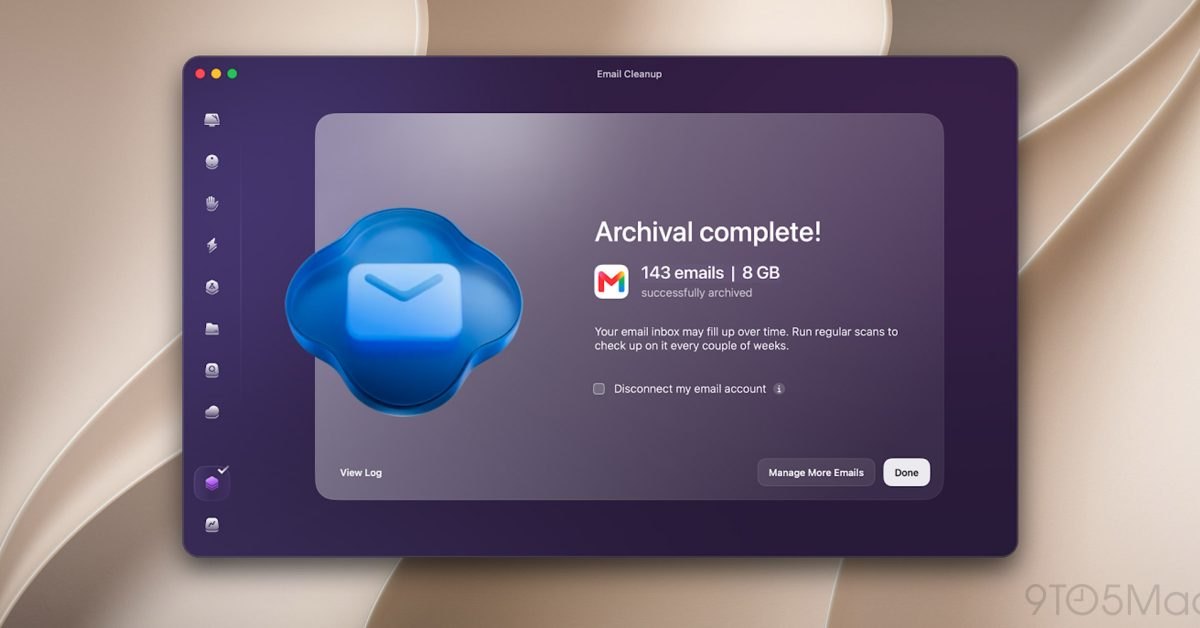
Email Cleanup introduces dedicated management tools for Gmail mailboxes, allowing users to bulk-delete unwanted messages, unsubscribe from mailing lists, and sort through their inbox archive. The tool filters messages by sender, category, calendar year, or attachment size to locate large files that consume account quotas. Because Gmail storage is shared across Google Drive and Google Photos, identifying and permanently deleting large messages allows account holders to reclaim shared cloud capacity across their entire Google ecosystem.
Browser Care targets system RAM usage through a dedicated Google Chrome extension that links directly to the desktop CleanMyMac application. The extension monitors memory metrics in near real time, identifies tabs consuming excessive resources, detects duplicate tabs across open windows, and highlights background pages left open for hours or days. MacPaw emphasized that safety guardrails remain active: Email Cleanup requires explicit user confirmation before applying deletions, Browser Care only suspends or closes tabs when commanded, and page titles, contents, and browsing history stay local.
Advertisement
Tech Pulse Daily
Get tomorrow's pulse first
Join engineers who read Tech Pulse before stand-up. Free, weekday mornings.
Who should care about CleanMyMac now helps you clean up Gmail
Heavy Google Chrome users and Gmail account holders facing storage limits stand to benefit most from the twin utilities. Users working with tight cloud capacity limits often struggle to locate multi-megabyte attachments or years of promotional mailings spread across separate Google services. By surfacing large attachments and old threads grouped by year or sender, Email Cleanup gives account owners an organized interface to recover storage without manually building complex inbox search filters inside the webmail interface.
Mac users who keep numerous background browser windows open during research or multitasking also gain practical controls over memory contention. Chrome is known for consuming substantial system RAM when dozens of background tabs run simultaneously, causing desktop slowdowns and increasing battery drain. Browser Care helps users isolate memory-heavy tabs that degrade macOS responsiveness, enabling workers to pause inactive background processes, eliminate redundant duplicate tabs, and maintain focus without closing their active project windows.
How to try CleanMyMac now helps you clean up Gmail
Subscribers can access both features immediately through their existing CleanMyMac software installation on macOS. Mac users with an active CleanMyMac plan can open the desktop client to initialize the Email Cleanup tool and connect their Gmail account to review pending inbox cleanups. The interface guides users through sorting mail by attachment size, reviewing broad categories, and validating bulk deletions before any emails or attachments are permanently purged from the server.
Setting up Browser Care requires installing the companion Chrome browser extension and linking it directly with the native CleanMyMac application. Once installed, the extension monitors browser memory activity across active and background windows, communicating resource statistics back to the desktop dashboard. Users can inspect near real-time memory usage metrics, locate duplicate URLs, flag tabs that have sat idle for days, and manually choose whether to pause or close resource-heavy processes.
What to watch after CleanMyMac now helps you clean up Gmail
In the coming weeks, users should observe how effectively Email Cleanup handles large mailboxes and whether permanent message purges reliably update Google account storage limits across Drive and Photos. Because Google treats quota recalculations across linked services as a single pool, monitoring how quickly shared storage updates after bulk deletions will demonstrate the tool's day-to-day effectiveness. Account owners will also want to monitor whether confirmation workflows remain smooth during large unsubscribe operations across various newsletter senders.
On the browser side, Chrome users should monitor how seamlessly the browser extension coordinates with CleanMyMac during intensive multitasking sessions. The key operational test will be whether pausing resource-intensive background tabs provides noticeable memory relief on machines with modest RAM without disrupting active sessions. Additionally, observers can watch whether MacPaw considers extending similar browser maintenance extensions and webmail cleanup tools to other platforms, such as Safari, Microsoft Edge, or Microsoft Outlook accounts.
Developer Action Items
- ☐ Diff the official changelog for Google / macOS / Windows before you bump — APIs, defaults, and removed flags only.
- ☐ Install through the vendor's documented channel in staging; keep a one-command rollback and time-box the canary.
- ☐ Grep your repo for old flag names, lockfile pins, and plugin versions that the notes mark as breaking.
- ☐ Prefer the first patch cut over the day-zero tag unless you have a reason to be on the leading edge.
- ☐ If 9to5Mac did not name a region, plan, or SKU, screenshot the official availability line before you promise it to users.
CleanMyMac now helps you clean up Gmail FAQ
What are the two new features added to CleanMyMac?
MacPaw added Email Cleanup, which manages Gmail inboxes and shared storage, and Browser Care, which monitors Google Chrome tabs and memory usage.
How does Browser Care connect to CleanMyMac?
Browser Care operates through a Google Chrome browser extension that connects directly to the CleanMyMac application on the Mac.
Who has access to the new CleanMyMac Gmail and Chrome features?
Both features are rolling out to users with an active CleanMyMac subscription.
Is user data kept private when using these tools?
Yes, Email Cleanup requires user confirmation before making any changes, Browser Care only closes or pauses tabs when instructed, and browsing history, page titles, and content remain stored locally on the Mac.
Sources

Author
Dillip Chowdary
Writes Tech Bytes coverage of AI, engineering, and the tools that actually ship. Editor of Tech Pulse Daily.
Related on Tech Bytes
Advertisement