Copilot impact dashboard adds chat and VS Code agent usage
GitHub updated its Copilot impact dashboard to track Copilot Chat and the VS Code Agents window, expanding tracked developer features to nine categories.
By Dillip Chowdary • Nov 07, 2026 • Source: GitHub Changelog
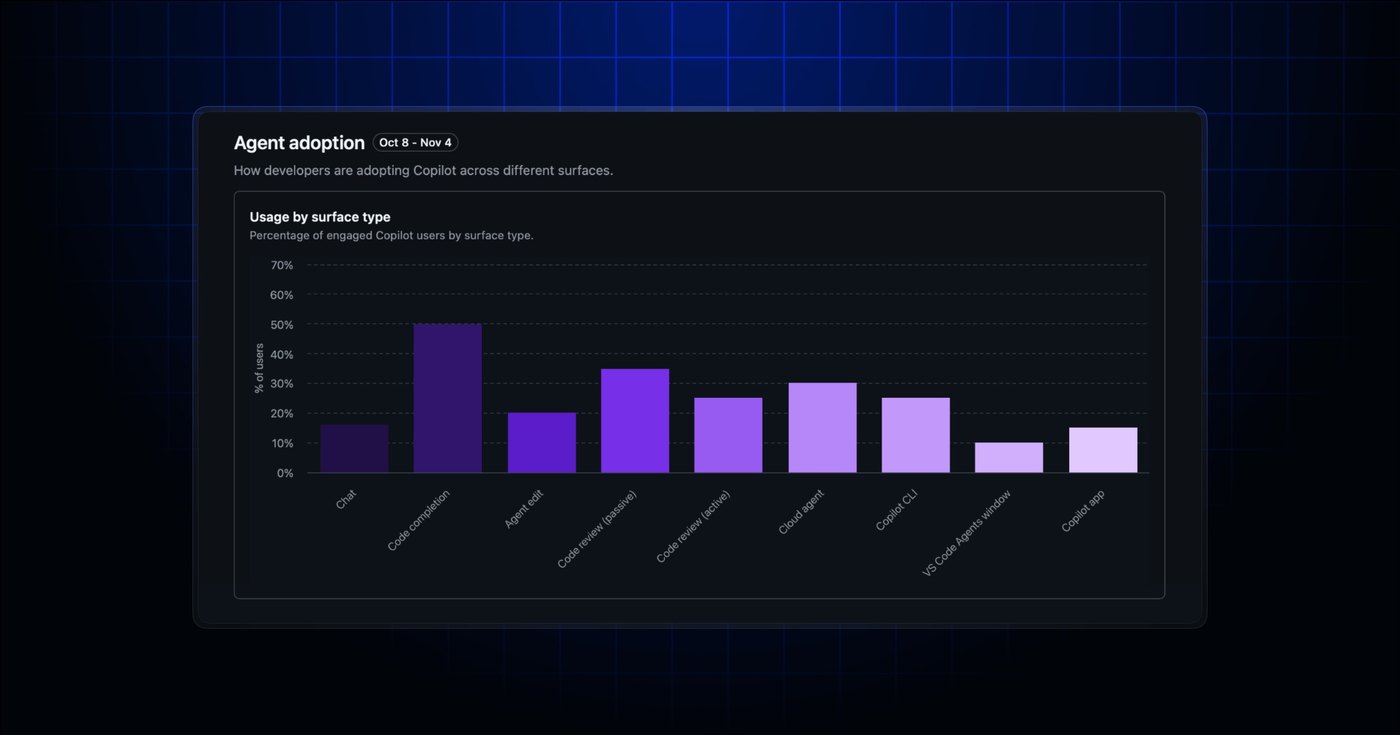
GitHub expanded its analytics visibility by updating the Agent adoption chart inside the Copilot impact dashboard to track developer interactions across nine Copilot experiences. According to GitHub Changelog's report, engineering leaders and administrators can now track usage metrics for Copilot Chat and the VS Code Agents window directly alongside previously tracked surfaces. As part of this telemetry revision, GitHub renamed its passive adoption cohort to chat-first users, addressing reporting blind spots where developers who rely heavily on conversational workflows were inaccurately classified as inactive.
This breakdown covers the telemetry schema adjustments, interface terminology updates, API field additions, and administrative permission boundaries governing GitHub Copilot metrics. The analysis is targeted at enterprise owners, billing managers, organization administrators, and engineering leaders who manage Copilot seat utilization, evaluate AI developer tooling investments, or parse telemetry data via enterprise usage reports to gauge software engineering team engagement.
What Copilot impact dashboard adds chat vs Code shipped
The Copilot impact dashboard Agent adoption chart gained direct telemetry support for Copilot Chat alongside the dedicated VS Code Agents window. Previously, engineering managers reviewing telemetry were limited to seven tracked feature categories, leaving conversational interactions and specialized editor agent surfaces unrepresented in the primary adoption visualization. Bringing these additions into the dashboard expands the total number of tracked feature experiences to nine, enabling organizations to observe where developers initiate code assistance, clarify requirements, or run agent-driven workspace edits across their daily programming workflows.
Alongside the expanded chart, GitHub officially renamed the cohort previously labeled Passive users to Chat-first users. Under earlier reporting definitions, developers who spent substantial working time inside conversational prompts without triggering other milestone actions were marked passive, creating misleading activity summaries for team leads. The updated chat-first designation accurately accounts for engineers who actively rely on conversational assistance across their environments but have not triggered qualifying feature events across two distinct days within the standard 28-day measurement window.
What changed for builders in Copilot impact dashboard adds chat vs Code
For engineering organizations evaluating feature adoption, telemetry reports now expose granular metrics under the copilot_feature_engagement.totals_by_feature data key. Enterprise and organization 28-day usage exports include distinct records for chat alongside vscode_agent. Telemetry continues to follow standard engagement criteria, requiring a developer to use a qualifying capability on at least two separate days within the trailing 28-day rolling window to count as engaged. Furthermore, engagement accounting is non-exclusive, meaning an individual software developer who executes agent edits in VS Code is simultaneously counted within chat metrics due to shared conversational usage metrics capture.
| Metric Surface | Previous Scope | Updated Scope |
|---|---|---|
| Tracked feature experiences | 7 features | 9 features |
| Reporting category additions | None | chat, vscode_agent |
| Intermediate cohort label | Passive users | Chat-first users |
| Historical report backfill | 7 features | Unchanged (7 features) |
Adoption phase calculations remain intentionally isolated from these two interface additions. While Copilot Chat and the VS Code Agents window log user engagement within telemetry tables, interactions across either surface do not qualify a developer for progressing between higher adoption phases. In the raw API payloads, chat-first developers still resolve to the No Cohort value, ensuring historical cohort group totals remain numerically consistent for enterprise pipelines that aggregate Copilot adoption progression over multi-quarter schedules.
How to install or upgrade Copilot impact dashboard adds chat vs Code
Access to the newly tracked data requires no manual package upgrades, as metrics populate automatically across the administrative web interface and backend REST reporting endpoints for qualifying organizations. Administrators monitoring API endpoints or inspecting usage metrics programmatic feeds can verify their organizational configuration and retrieve updated 28-day reports via standard tools:
Advertisement
Tech Pulse Daily
Get tomorrow's pulse first
Join engineers who read Tech Pulse before stand-up. Free, weekday mornings.
gh api /orgs/{org}/copilot/usageTo review feature totals programmatically across enterprise units, query the engagement summary:
gh api /enterprises/{enterprise}/copilot/usageTo configure your default organization context when polling metrics from terminal scripts:
gh config set prompt enabledWithin the web interface, the updated metrics display directly within the Agent adoption chart for accounts where organizational telemetry policies are active. Because these telemetry additions operate on a trailing 28-day calculation window, administrative users simply log into the GitHub Enterprise or Organization dashboard, navigate to the Copilot section, and review the updated breakdown containing both Copilot Chat and VS Code Agents window records.
Gotchas and compatibility in Copilot impact dashboard adds chat vs Code
A key constraint involves historical reporting continuity across organization exports. Telemetry reports generated for dates prior to this update do not retroactively calculate or display chat or VS Code Agents window engagement figures, preserving only the original seven features. Organizations that maintain data warehousing pipelines must account for the arrival of new keys in copilot_feature_engagement.totals_by_feature without assuming historical backfills will exist for prior reporting cycles.
Access governance also imposes strict administrative requirements before telemetry data is visible. The metrics are restricted to enterprise owners, billing managers, organization owners, and users assigned custom organization or enterprise roles containing the View Copilot Metrics permission. Additionally, organizational instances where the Copilot usage metrics policy has been explicitly disabled will not log or display these metrics until administrators update the governing policy settings across their settings console.
What to watch after Copilot impact dashboard adds chat vs Code
Engineering operations teams should evaluate how downstream financial models and internal reporting scripts parse the new engagement fields. Because chat engagement encompasses all Copilot Chat activity captured by platform metrics, developers utilizing agent mode for automated multi-file code revisions will increment both chat and agent counters. Technical teams building internal ROI dashboards should avoid double-counting active developers by treating the nine feature engagement totals as overlapping activity indicators rather than mutually exclusive user segments.
Teams tracking company-wide adoption goals should also prepare internal documentation explaining why cohort stage percentages do not immediately shift despite visible jumps in feature engagement totals. Because the Chat-first cohort still maps directly to No Cohort in administrative API payloads and does not satisfy adoption phase progression requirements, organizations must rely on the feature-level engagement totals rather than phase-level graphs to measure the initial productivity impact of conversational and agentic workflows.
Developer Action Items
- ☐ Diff the official changelog for GitHub / Copilot before you bump — APIs, defaults, and removed flags only.
- ☐ Install through the vendor's documented channel in staging; keep a one-command rollback and time-box the canary.
- ☐ Grep your repo for old flag names, lockfile pins, and plugin versions that the notes mark as breaking.
- ☐ Prefer the first patch cut over the day-zero tag unless you have a reason to be on the leading edge.
- ☐ If GitHub Changelog did not name a region, plan, or SKU, screenshot the official availability line before you promise it to users.
Copilot impact dashboard adds chat vs Code FAQ
Which new features are tracked in the Copilot impact dashboard?
The dashboard adds usage metrics for Copilot Chat and the VS Code Agents window, expanding total tracked feature experiences from seven to nine.
Why was the Passive users cohort renamed to Chat-first users?
GitHub renamed the cohort to accurately describe active Copilot developers who rely on chat but have not used a qualifying feature on two distinct days in a 28-day window to reach an adoption phase.
Who has permission to view these new Copilot usage metrics?
Enterprise owners, billing managers, organization owners, and holders of custom roles with the View Copilot Metrics permission can access the data if the usage metrics policy is enabled.
Do historical 28-day usage reports include Copilot Chat and the VS Code Agents window?
No, historical reports generated for periods prior to this release retain only the original seven feature engagement categories without retroactively adding the two new surfaces.
Sources

Author
Dillip Chowdary
Writes Tech Bytes coverage of AI, engineering, and the tools that actually ship. Editor of Tech Pulse Daily.
Related on Tech Bytes
Advertisement